Your digital world is at risk. Protect It!

Acronis® True Image Home 2012

In a split second, you could lose all your photos, videos, emails, programs, critical files and shortcuts. But thanks to Acronis® True Image Home 2012, every bit of data can be recovered and your entire system can be restored to its original shape, quickly and easily.


Everything Back to Normal – Like It Never Happened

So much can go wrong with your computer, such as accidental file deletions, system viruses and total hard-disk failures. Having a complete PC-backup solution is critical. Having one that's fast, effective and incredibly simple is even better! That's why we created Acronis® True Image Home 2012.

Bringing you the best backup software possible…

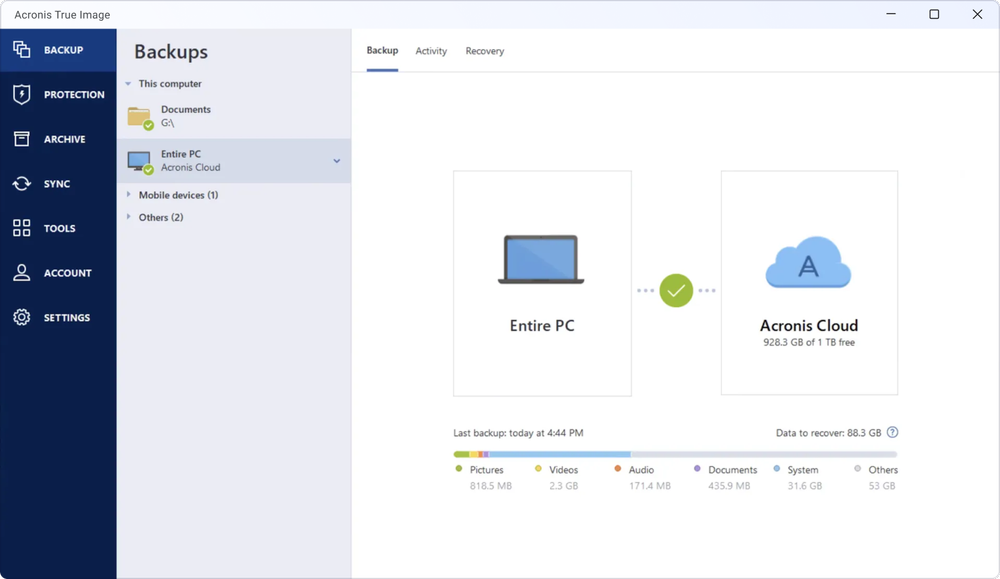
Acronis gives you flexible, user-friendly ways to back up your data on a regular basis. So if disaster strikes, you get it back quickly. It not only recovers all your data but, thanks to full-image backups, it can put everything back exactly where it was. That means all the same files in the same folders. The same applications and Operating System. The same icons and shortcuts. All your precious photos and videos. All your important work. Everything back to normal like it never happened!

Much more than a backup utility…

Acronis offers you handy features and capabilities to significantly enhance your experience, such as file synchronization across multiple computers, an optional online-backup service for an extra level of safety, and complete flexibility enabling you to restore to different hardware


  • The Perfect Image

    Recovering data is just half the battle. Returning your system to the way it was is another story. All those software downloads and program shortcuts you've added over the years. All the emails and contact folders. With Acronis' patented disk imaging and PC-cloning technology, every bit of information can be restored to its original shape in minutes—without having to reinstall any software application. You can also use the Secure Zone function to create a secure disk partition on your internal drive. That way you can recover your system easily at any moment, even if your Operating System has failed.

    The Perfect Image
  • Stay in Sync! New

    If you have two or more PCs and want them to mirror a selection of files or folders, it's now possible. This latest version of Acronis True Image Home includes File Synchronization, which lets you replicate important data between multiple computers, files or devices. Sync files with friends, family or colleagues over the Web. Or sync with local folders, including USB sticks or external hard drives.

    Stay in Sync!
  • Always on Schedule

    Setting up and running your backups is convenient with Acronis True Image Home. Smart Scheduling offers you practical options to decide when your backups should run, like during idle times or just before startup or shutdown. Set&Forget lets you configure your backups just once and then the software does the remembering for you.

    Always on Schedule
  • Flirt with Danger Exclusive

    Now it's easier to avoid disasters before they happen. For instance, if you want to try out new software but are not sure if it's virus-prone, Try&Decide® lets you take a test drive first to see if you want to keep or discard the changes to your system. This is also very practical for browsing potentially dangerous websites.

    Flirt with Danger
  • Greater Upgrade Possibilities

    Take your Acronis experience to the next level with our special Plus Pack add-on. This gives you advanced features, such as dynamic-disk support and Universal Restore, which lets you recover your entire system on a computer with a completely different architecture.

    Greater Upgrade Possibilities
 Show all features
  • Round-the-Clock Reassurance

    Because you’ve got enough on your mind, Acronis True Image Home stays on top of the action to ensure you continuous data protection. Acronis Nonstop Backup performs ongoing incremental changes as you go, so, if needed, you can roll back your system, file or folder to a specific point in time. And thanks to Live Backups, you can keep on working with no interruption during backups.

  • A Boot in the Right Direction New

    If ever your Operating System fails to boot and you don’t want to fuss around with bootable CDs or flash drives to get back up and running, Acronis gives you a hand. With a simple touch of your F11 key, the Acronis Startup Recovery Manager hops into gear and gets you into a fully functional recovery environment through which you can recover your entire system with ease.

  • For Big Appetites! New

    If you have a 2TB external hard drive or bigger that’s not compatible with your Windows Operating System, it’s ok! With Acronis Extended Capacity Manager, you can still use it to store all your backups on. And you can restore from it just as easily—like any other hard drive. This feature is extremely useful if you want to use an extra-large-capacity hard drive while running Windows XP.

  • Flexible Backup Choices

    You don’t have to run a long full-system backup every time. Acronis True Image Home gives you fast and efficient alternatives to performing full backups by offering your incremental and differential backups. Both approaches capture changes since the last backup and save disk space with Acronis data compression.

  • Full Speed Ahead!

    Your life is too busy to wait around for software to do its job. Acronis helps you keep backup and restoration time to a minimum. Acronis True Image Home saves you precious time thanks to its extremely simple design and convenient features. It also supports the latest USB 3.0 standard, which gives you high-speed data transfer for all your critical safeguards, whether file backup or full PC backup.

  • Travel Through Time

    Everyone makes mistakes. But with Acronis, you can always go back and do things differently. When running incremental backups, use Acronis’ Time Explorer feature to travel back to a specific point in time and, via intuitive screen shots, view or recover your system and data exactly how it was at that moment.

  • Extra Protection from Above

    Cloud-based backup is a rapidly growing trend thanks to its vast range of protection and simplicity benefits. Instead of only backing up to physical devices in your home, which can get stolen or damaged in a fire, optional Acronis True Image Online lets you store a copy of your backups to our fully secure online data center. Should a serious disaster occur, you recover everything!

  • Who’s Backing You Up?

    When you use Acronis products, we make sure you’re fully equipped with everything you need to purchase, install, set up, back up and restore with ease. We provide you with an excellent range of documentation and support tools, including an intuitive online Knowledge Base, handy user guides, how-to videos, live chat sessions, email follow-ups and optional phone support.

  • Enter Your Image

    A full-system backup image isn’t just a huge pile of ones and zeros. With Acronis’ Mount Image feature, you can temporarily transform this image into a virtual drive, which lets you access and browse all your folders just like a real, physical drive. Drag and drop your files wherever you want without having to reboot or restore the image. It’s like having direct access to your old system.

  • Network Backup Made Simple New

    If you’ve got a small home or office network and want to back up to Network Attached Storage (NAS), it’s now faster and easier than ever before. That’s because Acronis True Image Home includes enhanced NAS support. Instead of having to dig through network shares to manually locate your NAS device, Acronis detects it automatically and lists it for you. So you can easily back up multiple network-based PCs to a safe and reliable storage site.

  • View Before You Restore Exclusive

    This is a precious time saver. Say you need to restore your computer to a previous backup stage, but you’re not sure which one you want. Acronis True Image Home lets you boot without recovering, which means you get a clear preview of what your system looked like during that backup. So you don’t have to waste precious time recovering a backup you don’t want.
    This feature is applicable only to Enterprise and Ultimate editions of Windows 7 – more details are available here.

  • Extreme Media Versatility

    Keep using the storage devices you have. With Acronis True Image Home, you can back up your files or system to almost any type of media imaginable, including DVDs, USB keys, external hard drives, GPT drives and others. For an extra level of protection, you can also keep a copy of your backups at a secure online storage site.

  • Windows Ready

    Software is ideal when it gets along with your Operating System. Acronis True Image Home offers seamless compatibility with Windows platforms, including full Windows 7 integration. Launch backups directly from the Windows 7 taskbar, pull up previous files or volume versions from the Context menu, and backup Windows libraries with little effort. Additionally, Virtual Hard Disk support allows you to covert your backup image back and forth between regular format (.tib) and virtual hard disk format (.vhd).

  • As Easy as It Gets

    Even if you’ve never used backup software in your life and you’re installing Acronis True Image Home for the first time, you can count on a truly user-friendly experience at every level. The newly enhanced graphical interface offers you an intuitive Windows-like design including drag-and-drop simplicity. So every action is a breeze, from installation and set-up to ongoing tasks.

  • Your Data, Your Privacy!

    We keep prying eyes away from your confidential data. When sending your backup across your network or to an online storage center, you expect the highest level of security for your sensitive data. Acronis True Image Home is armed with robust government-grade encryption to keep your data safe and sound. Benefit from Advanced Encryption Standard (AES), including 128-, 192- and 256-bit encryption.

Acronis® True Image Home 2012 Plus Pack

Take Your Experience to the Next Level!

On top of all the great benefits you get with our flagship software, this optional Plus Pack offers you an additional range of special features, like the flexibility to restore files, applications and an operating system to dissimilar hardware, as well as support for Dynamic Disks and Microsoft® WindowsPreinstallation Environments (WinPE).

Acronis® True Image Home 2012 Plus Pack requires Acronis® True Image Home 2012 to be installed.

Acronis® True Image Online

Extra Protection from Above

Increase your data protection by backing up to the cloud. With this valuable add-on, you can save your important files to a secure remote location and, via simple Web browser, recover your data on any computer wherever you are, without even needing to install Acronis True Image Online or Acronis True Image Home 2012.

Acronis® True Image Online doesn't require Acronis® True Image Home 2012 to be installed.

Achieve Greater Possibilities with an Easy Add-On

Acronis® True Image Home 2012 Plus Pack

Upgrade your experience! This special add-on offers advanced users higher-level features that used to be available only on Acronis corporate products. For example, it gives you the flexibility to restore files and applications – or an entire system – to dissimilar hardware. And it supports dynamic disks as well as Microsoft Windows Preinstallation Environments (WinPE).

Best of all, the Plus Pack add-on integrates seamlessly within the Acronis True Image Home 2012 standalone version, so you benefit from the same intuitive interface and all the other great features!.

Advanced features Plus Pack features include:

  • Ability to Restore to Dissimilar Hardware - Whatever the make, model or installed components of your new computer, Plus Pack restores everything back to its proper form.
  • Dynamic Disk Support - Back up and restore dynamic volumes with ease, taking full advantage of dynamic-disk capabilities.
  • Microsoft Windows Preinstallation Environment (WinPE) Support - Speed up your recovery process with fast and easy integration of the latest Microsoft drivers, customized scripts, applications and plug-ins to your rescue or boot media.

Please note: Acronis True Image Home Plus Pack works with the Acronis True Image Home 2012 standard version but not with the Network Edition or other previous editions.

Make sure that the build number of your Plus Pack add-on is the same as your Acronis True Image Home 2012 software. See Viewing Build Number in Acronis True Image Home, and login to your account to get access to the latest builds on both products.

Plus Pack supports most common media and system types:

Storage Media

  • Hard Disk Drives
  • Networked Storage Devices
  • FTP servers
  • CD-R/RW, DVD-R/RW, DVD+R/RW, BD-R (NEW! Blu-ray)
  • ZIP®, REV® and other removable media
  • PATA (IDE), SATA, SCSI, SAS (NEW), IEEE1394 (FireWire), USB 1/2.0 drives

For information on RAID support, click here

Supported Operating Systems

  • Windows 7 all Editions (x32/x64)
  • Windows Vista all Editions(x32/x64 SP2)
  • Windows XP (x32 SP3/x64 SP2)
  • Windows XP Professional(x32 SP3/x64 SP2)

Supported File Systems

  • FAT16/32, NTFS
  • Raw Images support

Supported operating systems

  • Windows 7 all Editions
  • Windows Vista all Editions SP2
  • Windows XP Home Edition (X32, SP3)
  • Windows XP Professional (X32, SP3)
  • Windows XP Professional (X64, SP2)

Minimum system requirements

  • Pentium Processor 1 GHz or faster
  • 512 MB RAM
  • CD-RW/DVD-RW drive for bootable media creation
  • Using Acronis Nonstop Backup requires at least 1 GB RAM
  • Mouse or other pointing device (recommended)
  • High speed internet connection (for use with Acronis True Image Online)

For information on RAID support, click here

Supported file systems

  • FAT16/32
  • NTFS
  • Ext2/Ext3/Ext4
  • ReiserFS
  • Linux SWAP

Supported storage media

  • Hard Disk Drives
  • Networked Storage Devices
  • FTP servers
  • CD-R/RW, DVD-R/RW, DVD+R/RW, BD-R
  • ZIP®, Jaz® and other removable media
  • PATA (IDE), SATA, SCSI, SAS, IEEE1394 (Firewire), USB1/2.0/3.0 drives
  • Windows Dynamic Disks and GPT volumes support available with Plus Pack add-on. Check this Knowledge Base article for more details

Frequently Asked Questions (FAQ)

What is Acronis® True Image Home 2012?

Acronis True Image Home 2012 provides home users with reliable backup and recovery of systems, applications, settings and personal files.

Top ^

Who needs Acronis True Image Home 2012?

Designed for the needs of novices and advanced users alike, Acronis True Image Home 2012 meets home PC protection and file synchronization needs with an easy-to-use, yet comprehensive, backup and recovery solution.

Top ^

What are the main benefits of Acronis True Image Home 2012?

Usability: Acronis True Image Home 2012 user interface simplifies backup and recovery operations. You can start, edit, explore and recover backups by right-clicking on a file, folder or volume to see all versions available for recovery. For Windows 7, backup and recovery operations are directly integrated into the Windows control panel.

Freedom: Safely try new software and browse the web in a confined environment with Try&Decide®. After testing, you can decide whether to keep or discard changes to your system. Set&Forget by configuring once and having backups start automatically thereafter.

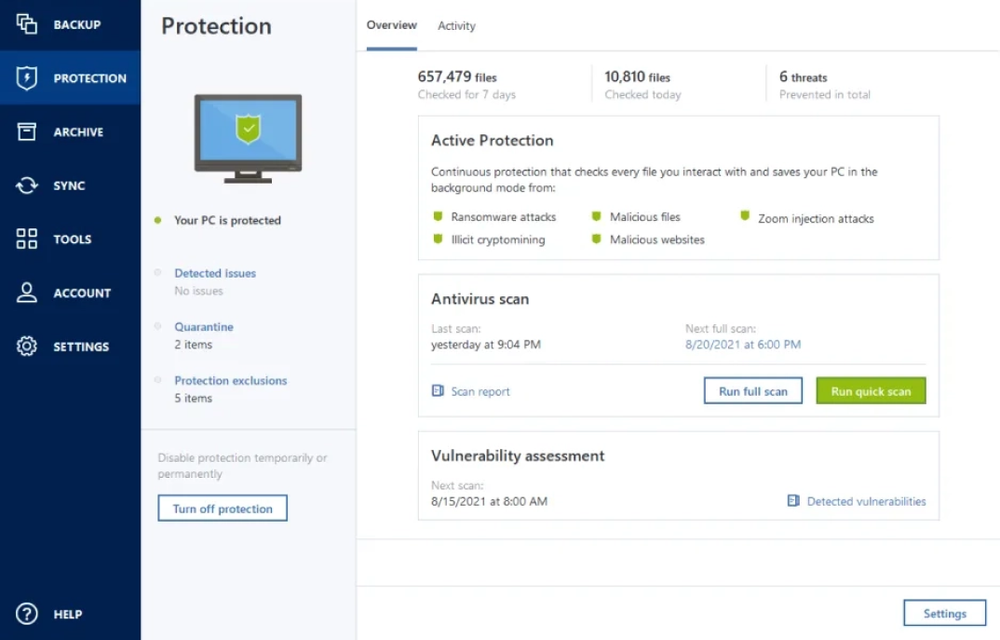
Protection: Acronis Nonstop Backup provides continuous data protection (CDP), enabling recovery of your PC to any point in time. Backup to a secure partition on your hard drive with Acronis Secure Zone® and recover wherever you are, even if your operating system has failed.

Coordination: File synchronization lets you easily keep multiple copies of your files up to date, no matter where they're located. Files can be synchronized between several PCs, within local and network folders and with Online Storage. Files can also be shared and synchronized with friends and family using Acronis' SocialSyncTM technology.

Top ^

What's new in Acronis True Image Home 2012?

File Synchronization: Synchronizing your files between all your computers has never been easier. Acronis® True Image Home 2012 supports file synchronization between several PCs, quick recovery of synchronized files, synchronizing within local and network folders and access to synchronized files stored on Online Storage. It also supports File sharing and synchronizing files with friends family with Acronis' SocialSyncTM technology.

Enhanced NAS Support: Acronis® True Image Home 2012 now supports Acronis' award winning Nonstop Backup technology to a network share to provide maximum protection for one PCs connected to your home network. A Network Attached Storage (NAS) device is also suggested as a backup place when attached to the network.

Ease of Use: Acronis True Image Home 2012 allows you to delay the start of a backup at computer startup so that it doesn't impact your system. It also restarts the backup If any task fails.

Top ^

What are the main features?

Disk Imaging
Backup the entire system on the fly with our patented disk imaging technology. It ensures the recovery of your operating system and applications without reinstalling any software.
File Synchronization
Synchronize files between folders, multiple PCs, online storage and with friends and family over the internet with Acronis SocialSyncTM technology.
NAS Support
Enables backup, recovery and file synchronization and is a suggested backup location for one PCs connected to your home network.
Acronis Extended Capacity Manager
Work with 2+ TB drives even if your operating system doesn't support them
Clone Disk
Copy your entire Hard Drive and replace it with a new one without reinstalling operating systems and applications, saving hours of effort.
Incremental and differential backups
Acronis True Image Home 2012 gives you alternatives to performing full backups every time by offering incremental and differential backups. Both capture changes only and save disk space with Acronis data compression.
File Backup
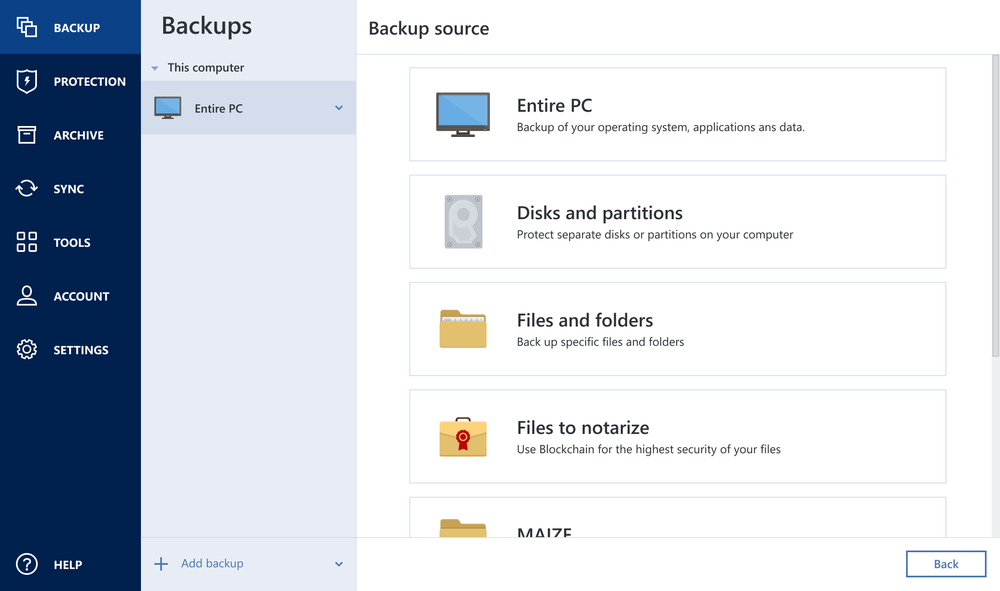
Back up individual files, folders or file categories.
Acronis® Startup Recovery Manager
Boot and restore a system after a failure. Start the recovery process simply by selecting the F11 key, even if your operating system has failed.
Try&Decide®
Safe environment for risk-free testing of new software or visiting websites with potentially dangerous content
Acronis Nonstop Backup
Automatically creates incremental backups allowing users to roll back their system, files and folders to any point in time.
Acronis Secure Zone®
Secure partition that allows you to store a disk backup on your system drive. Recover on the fly, wherever you are, even if your operating system has failed.
Set&Forget™
Configure just once and Acronis software perform backups automatically from that point on.
Image Encryption with Advanced Encryption Standard (AES)
128, 192 and 256-bit encryption
Smart Scheduling
Run backups automatically at preset or elapsed time, when the user is idle, on user logon/logout, on system startup/shutdown, or in coordination with other events.
Privacy tools
Thorough system cleaning and reliable data destruction of files, partitions, or volumes.
Reserve Backup Copy
Store multiple copies of the backup in another pre-defined location in a pre-selected format.
Exclude files and folders
Back up only the data you want in order to save disk space
Live Backups
Keep working right through your backup for maximum convenience
Windows-style Interface
The new, sleek interface of this product works on the Windows XP, Windows Vista and Windows 7 operating systems.
Virtual Hard Disk Support
Convert Acronis' backup images (.tib) into virtual hard disk files (.vhd) and vice versa, allowing users to mount an image as a virtual disk and explore it.
Boot from Windows 7 image
Windows 7 Ultimate users can boot from a backup image (.tib file) containing a backup of their system partition. This will allow the ability to test a backed up system without actual restoration. If the operating system boots from the .tib file, then it will boot when the need arises for a system recovery.

Top ^

What languages is Acronis True Image Home 2012 available in?

  • English
  • French
  • German
  • Chinese simplified
  • Chinese traditional
  • Czech
  • Dutch
  • Italian
  • Korean
  • Polish
  • Russian
  • Spanish

Top ^

What operating systems does Acronis True Image Home 2012 support?

  • Windows 7 (all editions) SP1
  • Windows Vista (all editions) SP2
  • Windows XP Professional x64 Edition SP2
  • Windows XP Professional/Home SP3

Top ^

What are the minimum system requirements?

  • Pentium Processor 1 GHz or faster
  • 512 MB RAM
  • CD-RW/DVD-RW drive for bootable media creation
  • Using Acronis Nonstop Backup requires at least 1 GB RAM.
  • Mouse or other pointing device (recommended).
  • High speed internet connection (for use with Acronis True Image Online)

Top ^

What are the supported storage media?

  • Local hard disk drives
  • Networked-attached storage devices
  • FTP server
  • CD-R/RW, DVD-R/RW, DVD+R (including double-layer DVD+R), DVD+RW, DVD-RAM*, BD-R, BD-RE
  • PATA (IDE), SATA, SCSI, SAS, USB 1.1 / 2.0 / 3.0, FireWire (IEEE-1394) and PC card storage devices
  • ZIP®, REV® (from rescue media only) and other removable media

Top ^

Why should I register my new Acronis True Image Home 2012 license?

Once your copy is registered you can take advantage of the following benefits:

  • Free post-sales technical support - Included for the first 30 days. Help is available via email and chat 24x7
  • A secure place to archive your serial number
  • Legal certainty about the software you have bought and are entitled to use
  • Free product updates
  • Information about the latest product updates and special offers

Top ^

Online Store Benefits

Online shopping is becoming more and more popular day by day. In spite of the fact historically people are more used to buying products in large stores, in the era of computerization shopping online has become extremely simple. Noted below are just several of the numerous benefits of shopping online.

What are the major benefits of online shopping?

It's convenient!
Purchases are made from the location which is convenient for you. You may buy from office, from home, it is up to you. You choose not only the location, but also the time. Online shops are open 24/7. There is no shipping, so you save time and can start using our product straight away.
It's secure!
A CD can be lost or broken, but buying online keeps you safe. When buying online you receive an activation key which can be restored, if forgotten or lost.
It's tuned!
Buying in our online store you are sure to get the latest version (note, unavailable in box versions some time after the release) and have a straight access to the updates of your product.
It's your choice!
In online shops there are no salespersons, who can have any influence whatsoever on the product you purchase. It is entirely your choice. And you can make it after consulting Customer stories and testing the software you are interested in.
It's up-to-date!
Once registered, you will be the first to receive information on our new products. If you forget your password, we will help you restore it.
It's flexible!
If you realize that the chosen product is not exactly right, you can always get your money back during 30 days. Not all offline stores provide a 30-day money back guarantee. But we are sure you will not regret purchasing our products!

Summary

Total:

    Our happy
    Customers say:

    • "Flirt with Danger because it's so good to know that things are reversible when everything goes wrong, and very much the opposite when they can't be reversed. Loss of tiny settings can be annoying, loss of important data can be a real disaster." Tim Bain
    • "View Before You Restore really does sound like a precious time saver. Never heard of this feature before but it does seem invaluable." Rach A James
    • "Being as organised as I am I like 'Always on Schedule' advising me when backups should be done, as I don't want it interrupting or slowing down my surfing time." Julie Brett
    • "Flirt with Danger i use a lot of different music software and not always confident in its abilities or sometimes causes conflicts so this great to know i can try risk free :)" Gaz Hughes
     1 of  

    Purchase online now

    This product is available as an instant electronic delivery: you will receive your product serial key(s) and a special link to download the latest product version!

    1 Choose your license type:
    $49.99 per license
       
    from $29.99
    $149.97 $79.99 per 3 licenses
    2 My support
       
    free of charge
       
    $9.95
    3 Gear up with our powerful add-ons
    $29.99 per copy

    Includes: ability to restore files, applications and an operating system to different hardware (for example, to a brand new PC).Also included support for Dynamic Disks and Microsoft® Windows Preinstallation Environments (WinPE)

    *Acronis True Image Home 2012 Plus Pack requires Acronis True Image Home 2012 to be installed.

    $49.99 12-month subscription

    Increase your data protection by backing up to the cloud. You can save up to 250 GB of your important files to a secure remote location and recover your data on any computer that has a Web interface.

    *Acronis® True Image Online doesn't require Acronis® True Image Home 2012 to be installed.

    3 Upgrade options
    $29.99 per single license

    You will receive an upgrade serial number key, which you can use to upgrade one copy of a previous product version.

    $79.98 $39.99* per 2 licenses

    You will receive a serial number key, which you can use to upgrade one previous product version and install the product on one new machine.

    $89.97 $39.99* per 3 licenses

    You will receive a serial number key, which you can use to upgrade three copies of a previous product version(s) or Acronis True Image Home 2011 Family Pack.

    $129.99 $49.99* per 3 licenses

    You will receive a serial number key which you can use to upgrade one previous product version and install the product on two new machines.

    Total
    $49.99 per license

    Summary

    Total:

      Our happy
      Customers say:

      • "Flirt with Danger because it's so good to know that things are reversible when everything goes wrong, and very much the opposite when they can't be reversed. Loss of tiny settings can be annoying, loss of important data can be a real disaster." Tim Bain
      • "View Before You Restore really does sound like a precious time saver. Never heard of this feature before but it does seem invaluable." Rach A James
      • "Being as organised as I am I like 'Always on Schedule' advising me when backups should be done, as I don't want it interrupting or slowing down my surfing time." Julie Brett
      • "Flirt with Danger i use a lot of different music software and not always confident in its abilities or sometimes causes conflicts so this great to know i can try risk free :)" Gaz Hughes
       1 of  

      Purchase upgrade online

      This product is available as an instant electronic delivery: you will receive your product serial key(s) and a special link to download the latest product version!

      1 Choose your upgrade option:
      $29.99 per single license

      You will receive an upgrade serial number key, which you can use to upgrade one copy of a previous product version.

      $79.98 $39.99* per 2 licenses

      You will receive a serial number key, which you can use to upgrade one previous product version and install the product on one new machine.

      $89.97 $39.99* per 3 licenses

      You will receive a serial number key, which you can use to upgrade three copies of a previous product version(s) or Acronis True Image Home 2011 Family Pack.

      $129.99 $49.99* per 3 licenses

      You will receive a serial number key which you can use to upgrade one previous product version and install the product on two new machines.

      2 My support
         
      free of charge
         
      $9.95
      Total
      $49.99 per license

      Choose your region