For every VM that you created, both Windows and Linux, you need to open five TCP ports. This will enable Acronis Backup clients to communicate with the main Acronis Backup Management Server.
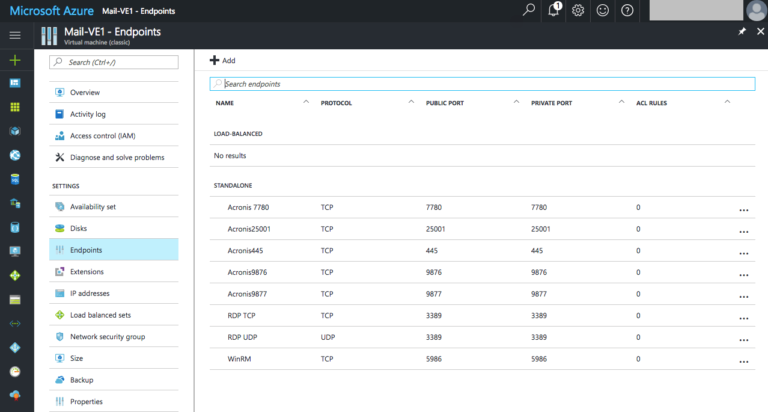
The five TCP ports are 25001, 7780, 9876, 9877, 445.
In Microsoft Azure, you just need to create “Endpoints.”
Go to the Azure dashboard and select your VM. You’ll see a settings overview page. Click “Endpoints” and then click “+ Add.”
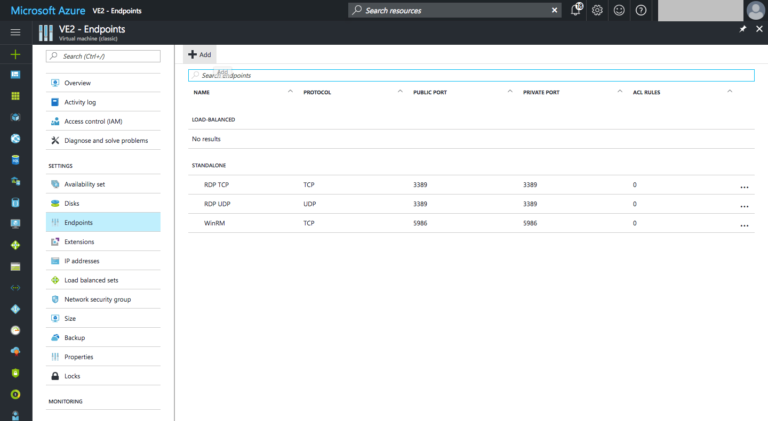
Remember the five endpoints we need to add: 25001, 7780, 9876, 9877, 445, all TCP protocol.
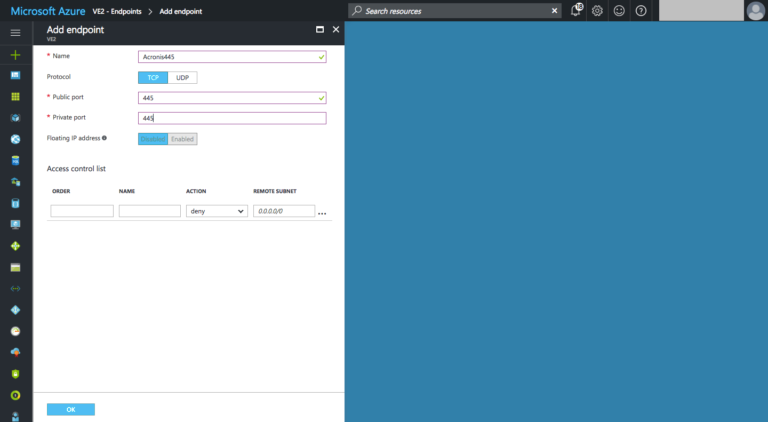
Enter them one at a time:
Name: a descriptive name you wish to use. Protocol: TCP Public port: 445 Private port: 445
Leave the rest as is. Click “OK.”
It takes about a minute for each Endpoint to be created. Be patient. When done, you’ll have your Endpoints looking similar to this:
About Acronis
Acronis is a global cyber protection company delivering the only natively integrated cybersecurity, data protection, and infrastructure management platform for managed service providers and IT departments. Acronis solutions are designed to identify, protect, detect, respond, recover and govern IT deployments, ensuring data integrity and business continuity. <br/><br/>A Swiss company founded in Singapore in 2003, Acronis has 15 offices worldwide and employees in 60+ countries. Acronis Cyber Platform is available in 26 languages in 150 countries and is used by over 21,000 service providers to protect over 750,000 businesses.