



Back to homepage
  • For MSPs
  • AI-Native
Search in acronis websites
Login for
  • Service ProvidersAcronis Cyber Protect Cloud
  • Business CustomersAccess business security, backup, and deployment products
  • Home UsersAcronis True Image
  • Acronis Partner PortalPartner resources, training, certifications, and business tools.
  • ConnectAcronis Cyber Protect Connect
  • For MSPs
  • AI-Native

Contact us

  • Contact Sales
  • Contact Support
  • Contact Renewals
  • All Contacts
Search
Try Now
Choose region and language
Americas
  • BrasilPortuguês
  • CanadaEnglish
  • CanadaFrançais
  • LATAMEspañol
  • United StatesEnglish
Asia-Pacific
  • AustraliaEnglish
  • Chinese Simplified简体中文
  • Chinese Traditional繁體中文
  • IndiaEnglish
  • Japan日本語
  • Korea한국어
  • SingaporeEnglish
Europe, Middle East and Africa
  • BulgariaБългарски
  • CzechČeština
  • EuropeEnglish
  • FranceFrançais
  • GermanyDeutsch
  • HungaryMagyar
  • Israelעברית
  • ItalyItaliano
  • NetherlandsDutch
  • PolandPolski
  • RomaniaRomână
  • SpainEspañol
  • SwedenSvenska
  • SwitzerlandDeutsch
  • TürkiyeTürkçe
  • United KingdomEnglish
Worldwide
  • GlobalEnglish
  • Americas
    • BrasilPortuguês
    • CanadaEnglish
    • CanadaFrançais
    • LATAMEspañol
    • United StatesEnglish
  • Asia-Pacific
    • AustraliaEnglish
    • Chinese Simplified简体中文
    • Chinese Traditional繁體中文
    • IndiaEnglish
    • Japan日本語
    • Korea한국어
    • SingaporeEnglish
  • Europe, Middle East and Africa
    • BulgariaБългарски
    • CzechČeština
    • EuropeEnglish
    • FranceFrançais
    • GermanyDeutsch
    • HungaryMagyar
    • Israelעברית
    • ItalyItaliano
    • NetherlandsDutch
    • PolandPolski
    • RomaniaRomână
    • SpainEspañol
    • SwedenSvenska
    • SwitzerlandDeutsch
    • TürkiyeTürkçe
    • United KingdomEnglish
  • Worldwide
    • GlobalEnglish
Acronis True Image
FOR HOME
MenuMenu
Acronis True Image
Overview
Backup
Cloning
Security
  • Backup features
    Easy BackupEmail BackupAutomatic BackupCloud BackupMobile BackupBackup ReplicationImaging SoftwareData MigrationData RecoverySurvival Kit
  • Security features
    Anti-Malware SoftwareIdentity ProtectionAntivirus SoftwareActive ProtectionReliable CybersecurityCryptojacking BlockerSecurity for MacData Protection
  • Solutions
    Gaming SecurityCloud Photo StorageElectronic SignatureMobile App
All features
Compare
Backup
Cloning
Security
Product features
Backup features
Easy Backup
Email Backup
Automatic Backup
Cloud Backup
Mobile Backup
Backup Replication
Imaging Software
Data Migration
Data Recovery
Survival Kit
Security features
Anti-Malware Software
Identity Protection
Antivirus Software
Active Protection
Reliable Cybersecurity
Cryptojacking Blocker
Security for Mac
Data Protection
Solutions
Gaming Security
Cloud Photo Storage
Electronic Signature
Mobile App
All features
Compare
Buy now
Try now
Acronis ASign — your personal electronic signature software

Acronis ASign — your personal electronic signature software

Buy nowTry now

Create your own electronic signature with Acronis ASign

In today’s fast-paced digital world, the ability to sign documents electronically has become essential for both personal and professional use. Acronis True Image introduces ASign, a powerful feature that enables you to securely sign your documents electronically, streamlining your workflow while ensuring the integrity and authenticity of your signatures placed on the Acronis cloud.
Create your own electronic signature with Acronis ASign
  • Legally binding signatures
    Legally binding signatures
    ASign allows you to create electronic signatures that are legally recognized, making it ideal for signing contracts, agreements and other official documents.
  • Secure signing process
    Secure signing process
    Your e-signed documents are protected by Acronis Notary that uses blockchain technology to ensure that they cannot be altered or forged. With ASign the authenticity of both the document and the signature can be validated along with a timestamp.
  • Easy document management
    Easy document management
    With ASign’s seamless integration into Acronis True Image, you can easily manage, sign and validate your backed-up documents on Acronis Cloud. Acronis True Image’s encrypted backups provide an added layer of security to your signed documents.
  • Multidevice support
    Multidevice support
    Sign documents on the go from your desktop, laptop or mobile device via the browser. ASign ensures that your electronic signatures are accessible and secure across all your devices.
  • Tamper proof
    Tamper proof
    Once a document is signed using ASign, it becomes tamper proof. A notarization certificate is issued for each signed document that can be used to verify its authenticity.

How to use Acronis ASign feature

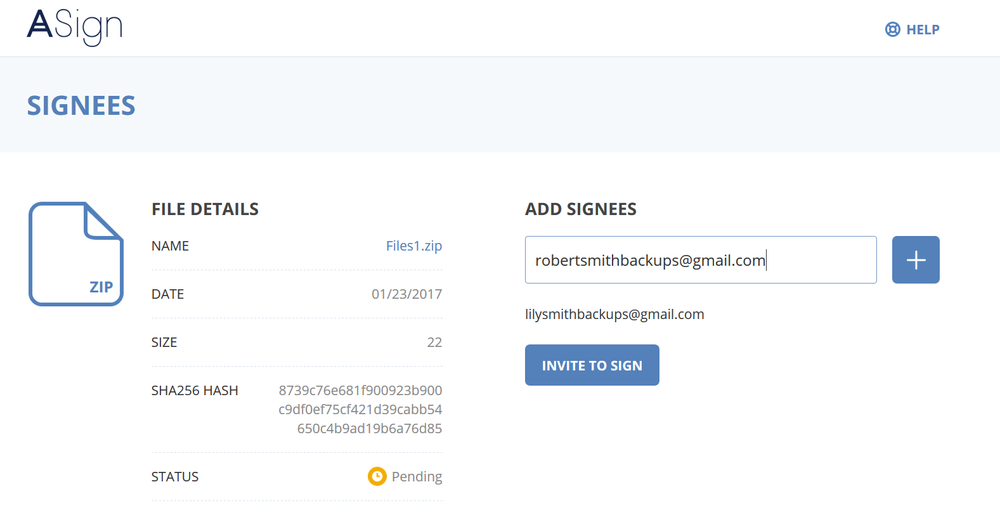
You can initiate the electronic signing process by inviting others to sign a document via the ASign web application. To do this, make sure the document is on a backup saved on the Acronis Cloud.
Each signee will receive an email with the signature request. Once all the requested signees have signed, this document is digitally notarized through the Acronis notary service, to ensure that it cannot be corrupted in the future.
How to use Acronis ASign feature
  • Step 1

    Open “Online Dashboard.”
  • Step 2

    Log in with your account credentials: those you use to log in to Acronis True Image.
  • Step 3

    Click on “Backups” and find the backup that contains the file(s) you want to sign.
  • Step 4

    Click the backup to view its content. Browse to the file you want to sign.
  • Step 5

    Click the gear button, and then click Send for signature.

Why you should choose Acronis electronic signature software

Whether you're signing contracts, agreements, or personal documents, ASign ensures that your electronic signatures are legally binding and protected against tampering. This feature is designed to simplify your document signing process while maintaining the highest standards of security.

  • Improved efficiency
    Improved efficiency
    There is no need for physical paperwork in the document signing process, which can improve the speed of documents to be signed, and signatories do not have to be at the same place or in the same time zone as everything is done electronically.
  • Enhanced security
    Enhanced security
    It is more secure as the documents are encrypted and authenticated.
  • Improved accessibility
    Improved accessibility
    When using eSignatures, you do not have to be physically present to sign the document. IT can easily be done from any place at any time, which improves the accessibility and flexibility of signing documents.
  • Reduced paper usage
    Reduced paper usage
    Using software will reduce the usage of paper, which will help the environment. Also, paper can easily be lost, destroyed, or damaged.
  • Cost savings
    Cost savings
    Electronic signatures help to reduce expenses and increases productivity since they can be done remotely. They also eliminate printing fees.

Choose the Acronis True Image plan that meets your needs

Please wait, this may take

a few seconds...

100% Detection Rate and 0 False Alarms in independent tests
Best Windows backup software, PCWorld
Cybersecurity Excellence Awards Winner
Editors' Choice, PCWorld
OPSWAT Anti-malware Platinum certification
TIME's Best Cloud Backup Services

What the experts say

  • Case study
    Case study

    Renowned composer William Goldstein relies on Acronis True Image to protect his valuable music files

    “The backups I make with Acronis True Image are part of my life. They make it possible for me to access my work and be able to get back to it.”

    William Goldstein
    Grammy-nominated composer, pianist and recording artist

    Read case study
  • Case study
    Case study

    Acronis True Image has saved my career on numerous occasions

    “I was hit by a ransomware attack and a gentleman told me on the phone that I should pay a certain amount of money to get my data back. But in the back of my head, I knew that I had the ace card as I had Acronis True Image.”

    Eli Yablonovitch
    Professor of Electrical Engineering and Computer Sciences at UC Berkeley

    Read case study

What our users say

  • …

    John A.
    Verified user
  • …

    Sarah M.
    Verified user
  • …

    George G.
    Verified user

Supported platforms

Microsoft Windows

  • Windows 11 (64-bit)
  • Windows 10 (64-bit)

File systems on Windows

  • NTFS
  • Ext2/Ext3/Ext4
  • ReiserFS(3)
  • Linux SWAP
  • HFS+/HFSX
  • FAT16/32/exFAT

Apple macOS

  • macOS Tahoe 26
  • macOS Sequoia 15
  • macOS Sonoma 14
  • macOS Ventura 13
  • macOS Monterey 12

File systems on macOS

  • APFS
  • HFS+
  • FAT32
  • NTFS (including Boot Camp)

Mobile operating systems

  • iOS 15 or later
  • Android 10 or later

Acronis Mobile: Easy, secure and portable

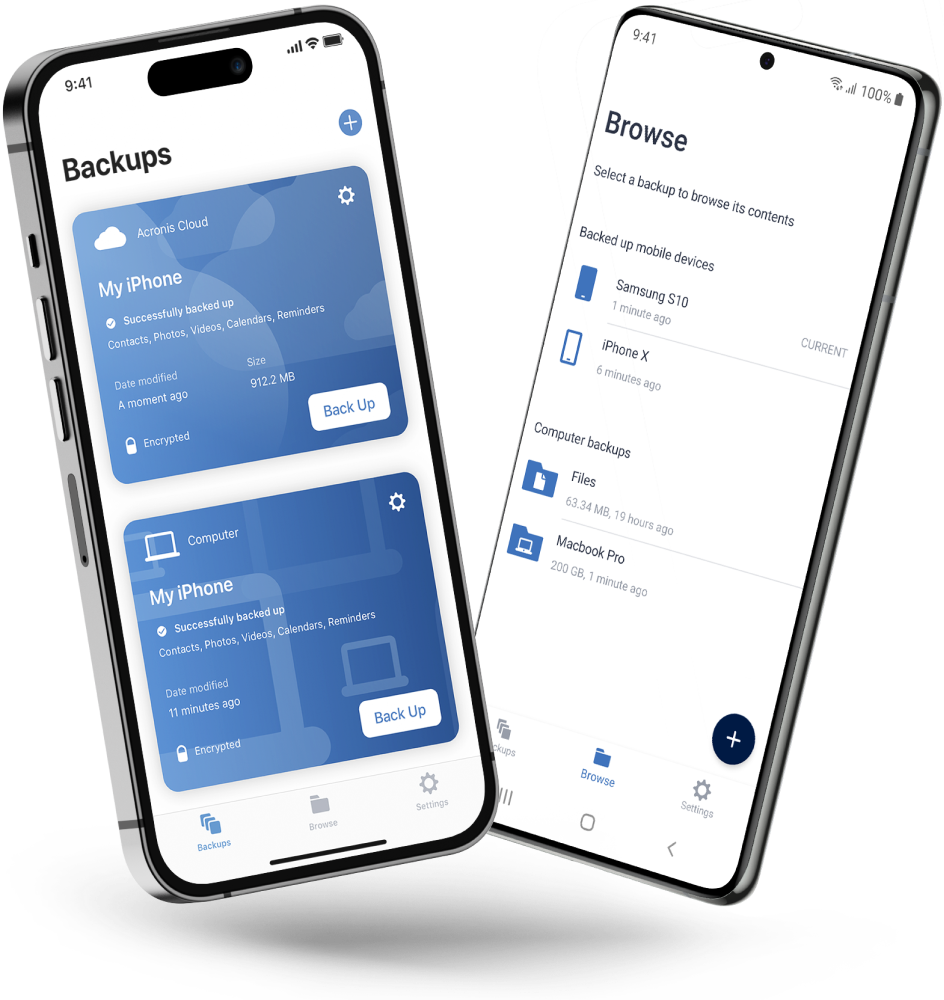
Never worry about losing your photos, videos, contacts or important files again. With the Acronis Mobile app, you can easily back up everything that matters on your phone and keep it safe in the cloud. Access your files anytime, anywhere from the Acronis Cloud, whether you're switching devices or just want peace of mind. It’s fast and always ready to protect your digital life.

  • How to back up your mobile device via Wi-Fi to a PC or Mac
Acronis Mobile: Easy, secure and portable

Looking for help?

Frequently Asked Questions

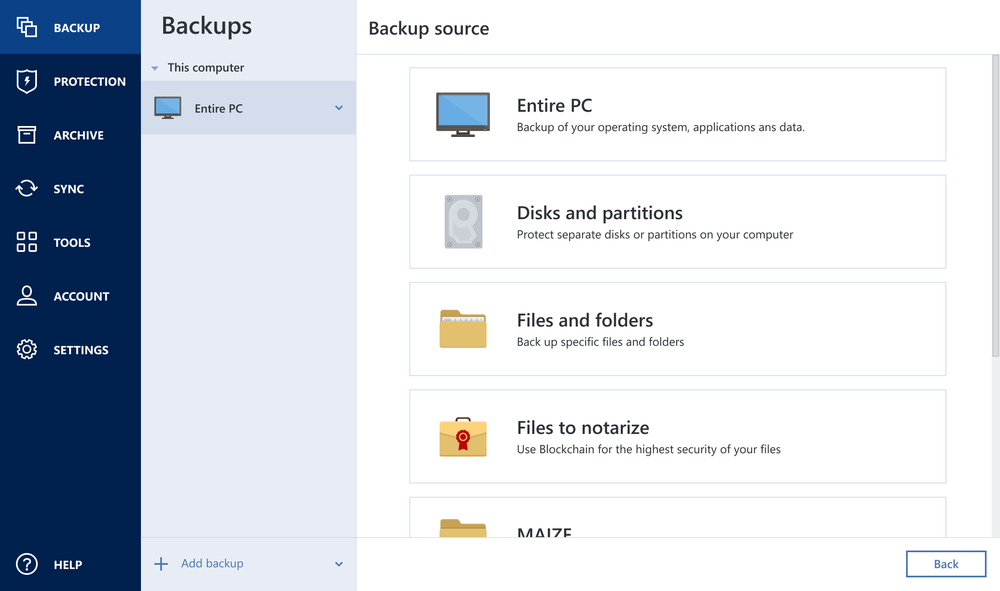
  • To sign a document electronically with ASign, create a backup to Acronis Cloud. It could be a backup of this file, of the whole partition or the entire machine. The file that needs to be signed needs to be backed up to the Acronis Cloud.

    • Open “Online Dashboard.”
    • Log in with your account credentials: those you use to log in to Acronis True Image.
    • Click on “Backups” and find the backup that contains the files you want to sign.
    • Click the backup to view its content. Browse to the file you want to sign.
    • Click the gear button, and then click Send for signature.

    Provide the email from the person who will need to sign and send it. The Acronis ASign service sends an email message to the addresses you entered. The signee receives an email with a unique URL for the page that is collecting signatures. Once a signee has signed the document, you receive an email notification on the event. Notifications are created for each signee. When all the requested signees have signed your file, you will receive a letter indicating that the process is complete.

  • When choosing electronic signature software, consider the following factors:

    • Security: Ensure the software uses encryption and tamper-proof technology to protect your documents and signatures.
    • Compliance: Check that the software complies with electronic signature laws (such as eIDAS in Europe or ESIGN in the U.S.) to ensure your signatures are legally binding.
    • Ease of use: The software should be user friendly, with a simple interface for creating and applying signatures.
    • Multidevice support: Choose software that works across various devices, allowing you to sign documents from anywhere.
    • Integration with other tools: Ensure the software integrates well with your existing tools and workflows, such as cloud storage and your backups.

  • Acronis Online eSignature, powered by the ASign feature in Acronis True Image, is a secure solution for electronically signing documents. It allows you to create legally binding electronic signatures, ensuring your documents remain tamper-proof and authentic. With Acronis Online eSignature, you can sign and manage your documents online while maintaining the highest level of security.

  • Acronis electronic signature works by letting you create a secure digital signature that is encrypted, and you can attach that to your document. When you sign a document using ASign in Acronis True Image, the signature is protected with tamper-proof technology, ensuring that the document cannot be altered after signing. This process guarantees the authenticity and integrity of your signed documents, making them legally binding and secure.

  • ESignatures are widely accepted in many countries around the world, including the United States (U.S.), European Union (EU) and other regions. Most electronic signature laws, such as the ESIGN Act in the U.S. and eIDAS Regulation in the EU, recognize eSignatures as legally binding. However, specific use cases may have exceptions, so it's essential to verify the acceptance of eSignatures based on your location and the type of document you are signing.

  • Yes, it is safe to sign documents online with Acronis ASign. The feature uses advanced encryption and tamper-proof technology to ensure that the document remains secure. This means that once a document is signed, it cannot be altered without detection. Acronis provides a secure storage option in the cloud, to keep your signed documents protected.

Product help
If you need product assistance, you can find helpful materials in the Knowledge Base. Or, post questions on our discussion boards.
Technical support
For subscription owners, there is free, 24-hour technical support. Refer to the Technical Support Site to find the appropriate support contact.
  • Acronis certification 1
  • Acronis certification 2
  • Acronis certification 3
  • Acronis certification 4
Engage with Acronis
  • twitter
  • blog
  • cpoc
  • yt
  • linkedin
  • reddit
  • facebook
  • Legal information
  • Privacy policy
  • Cookie Notice
  • Notice of collection
  • Sustainability & governance
© 2003–2026 Acronis International GmbH.
AcronisBack to homepage

Sorry, your browser is not supported.

It seems that our website is incompatible with your current browser's version. Don't worry, this is easily fixed!
To view our complete website, simply update your browser now or continue anyway.

Contact Sales for Product purchases:

United States: Workdays, 9:00 AM - 5:30 PM. Tel: +1 202-601-3104

Contact PR team:[email protected]

Press ReleasesProduct documentationSupport portalCustomer portalContactsRenewals

© 2003–2026 Acronis International GmbH. Legal information