You are on United States website. Change region to view location-specific content:
Global
English
Select another region
Choose region and language
- Americas
- Asia-Pacific
- Europe, Middle East and Africa
- Worldwide
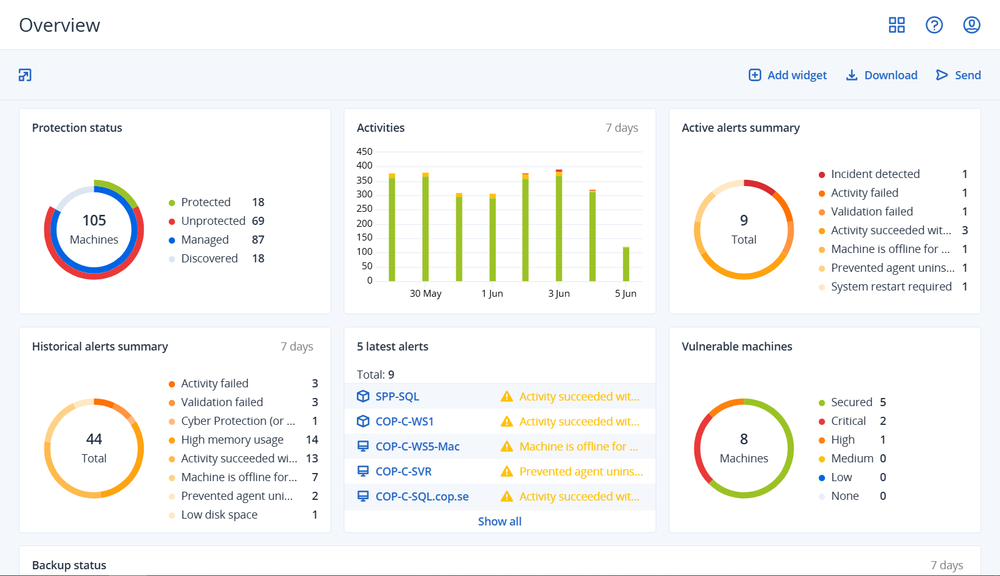
Discover the advantages of Acronis RMM — the natively-integrated, security-first remote monitoring and management service inside Acronis Cyber Protect Cloud, trusted by over 21,000 MSPs worldwide.

| Key advantages | Acronis RMM | Datto RMM / Kaseya VSA |
|---|---|---|
| Built-in next-gen anti-malware & EDR / XDR | ||
| AI-assisted scripting & ML anomaly detection | ||
| Fail-safe patching with automatic rollback | ||
| Unified agent for backup, DR and RMM | ||
| Microsoft 365 security-posture management | Native | Limited to visibility |
| Multitenant, white-label console | Full | Partial |
| Capabilities | Acronis RMM | Datto RMM / Kaseya VSA |
|---|---|---|
| Cloud-based | ||
| Real-time device monitoring & alerts | ||
| Automated OS patch management | ||
| Third-party application patching | 300+ Windows apps supported | Limited |
| Device discovery & asset inventory | ||
| Remote desktop / remote support | ||
| Automation & scripting engine | AI-assisted scripting automation | Not AI-driven |
| Auto-response / remediation | ||
| Software deployment at scale | ||
| Microsoft 365 tenant management | Security-posture & user management for M365 | Limited |
| Dashboards & scheduled reporting | ||
| REST / open API access | Acronis platform | REST API |
| PSA / ticketing integration | Native Acronis PSA integration | Autotask PSA integration |
| Two-factor authentication (2FA) | ||
| Windows, macOS & Linux agent coverage | ||
| Native backup integration |

“The granular and client controls with Acronis are next level. It is beneficial from our standpoint because not all our clients have the same needs. We like to package offerings so that they are simple, but we also need flexibility where we can expand and scale as needed.”

“It automates many routine tasks such as patch management, system updates, monitoring and backup, which saves significant time for our engineers. The main thing I found is that compared to any other tools that we used before, Acronis saved us a lot of time.”
“The platform frees us from constant firefighting and lets us concentrate on proactive support and strategic initiatives. Acronis gives us back time, it allows us to run cybersecurity workshops, train users, and create new solutions. That breathing room lets us step back, see the big picture, and streamline workflows for lasting efficiency instead of endless quick fixes. That is real value our clients feel every day.”

“We were able to double the number of customers that were using that kind of service (patching) with us, but we haven’t doubled the number of our technicians. It’s fair to assume that we made a 200% increase in that particular aspect (client to technician ratio).”
Frequently asked questions
Sorry, your browser is not supported.
It seems that our new website is incompatible with your current browser's version. Don’t worry, this is easily fixed! To view our complete website, simply update your browser now or continue anyway.