







Microsoft 365 Backup for MSPs and IT teams
Acronis Backup for Microsoft 365

Microsoft 365 Backup for MSPs and IT teams

Agentless, multi-tenant, cloud-to-cloud backup, with unlimited cloud storage, designed to protect all data within Teams, SharePoint, OneDrive and Exchange. Protect M365 alongside 30+ other workloads with integrated cybersecurity.
Microsoft 365 Backup for MSPs and IT teams
Badge

Why Microsoft 365 needs separate backup

Under Microsoft’s shared responsibility model, Microsoft maintains service resilience, while you remain responsible for protecting your data, accounts and configurations. Acronis Backup for Microsoft 365 enables you to restore business data after deletion, corruption or an attack. Protect data before incidents occur, set retention to meet your needs and quickly restore the items you need to keep work moving.

  • Keep users productive

    Recover individual emails, files and supported collaboration data fast.
  • Reduce management

    Protect users and workloads from one console, with no local agents.
  • Centralize Protection

    Manage Microsoft 365 data alongside 30+ other workloads.

Deploy in minutes. No hardware. No agent.

  • Unlimited storage
    Included with eligible per-seat Acronis Cloud plans.
  • 50+ data centers
    A global network to support data residency needs.
  • Zero agents
    Cloud-to-cloud backup managed through Acronis.

The most complete Microsoft 365 protection

Backup is one part of Acronis Protected 365. Bring recovery together with email and collaboration security, security posture management, security awareness training, email archiving and XDR integration. MSPs can deliver these integrated services through Acronis Cyber Platform. Organizations can select available services directly or through a provider. Availability and licensing vary by offering.

The most complete Microsoft 365 protection

Platform capabilities

Protect everyday work and the identities behind it. Explore all backup and recovery capabilities.

Exchange Online backup

Protect user, shared and group mailboxes, including email, calendars and contacts. Recover a mailbox or selected items to the original or another mailbox. Include in-place archive mailboxes when configuring the backup plan.

Exchange Online backup
1:35

OneDrive backup

Back up OneDrive for Business files and folders, then recover selected content from a chosen recovery point. Enable OneNote notebook protection when needed. Files shared with a user are not backed up through that user’s OneDrive.

OneDrive backup
4:27

Microsoft Teams backup

Back up teams, channels, channel files, team mailboxes, meetings and sites. Recover supported team content and download channel conversations as HTML. Private one-to-one and group chats are excluded; channel conversations cannot be restored into Teams.

Microsoft Teams backup
3:37

Entra ID backup

Protect identity data alongside Microsoft 365 content. Back up supported users, groups, conditional access policies and configurations. Compare backed-up attributes with live data and restore deleted users or overwritten attributes to help recover from mistakes or attacks.

Entra ID backup
8:55

Find the right recovery point faster

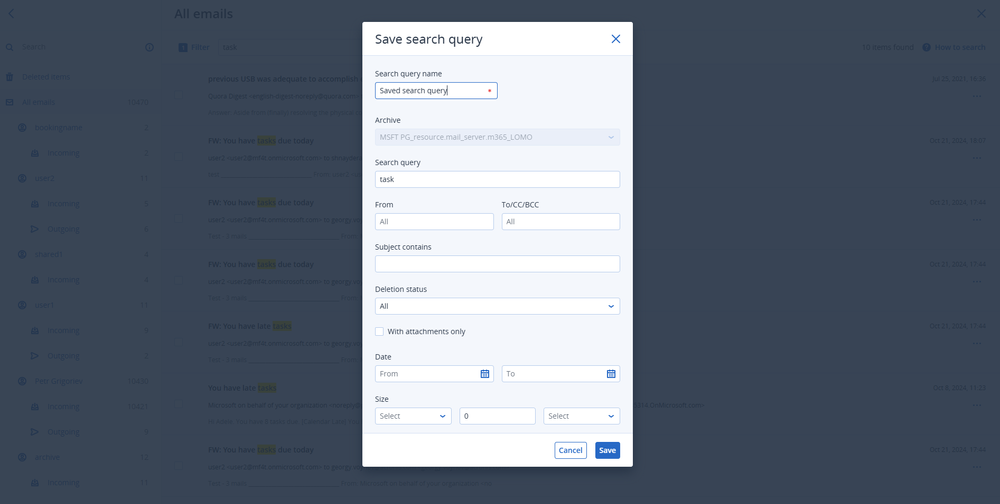
Search mailbox backups by sender, recipient, subject or date. Find files by name and preview supported content before recovery. Restore to the original location or use supported cross-user and cross-organization recovery to keep data accessible during changes to your environment.

Find the right recovery point faster

Complete Protection, simple management

Automate protection

Automate protection

Include new users, groups, sites and teams through group protection plans.
Schedule backups

Schedule backups

Run supported Microsoft 365 data backups up to six times daily.
Manage centrally

Manage centrally

Monitor status and investigate alerts from one console.
Encrypt backups

Encrypt backups

Use AES-256 encryption to safeguard sensitive backup data.
Keep recovery points

Keep recovery points

Set backup retention to match operational recovery needs.
Add immutability

Add immutability

Protect deleted backups for the configured immutability period.
Recover individual items

Recover individual items

Restore specific emails, files and folders without recovering an entire mailbox or site.
Choose a location

Choose a location

Select an available service region that fits data residency needs.
Extend protection

Extend protection

Manage Microsoft 365 alongside other supported business workloads.

Acronis Cloud vs Microsoft 365 Backup Storage

Acronis gives MSPs and IT teams two storage options. Acronis Cloud offers independent copies, broader coverage, granular recovery and unlimited storage on eligible plans. Microsoft 365 Backup Storage provides frequent backups and fast recovery within Microsoft’s infrastructure. Manage both through Acronis.

Compare

Acronis Backup to Microsoft 365 Backup Storage

Acronis Microsoft 365 Backup using Acronis Cloud

Coverage

Exchange Online user mailboxes, OneDrive accounts and SharePoint sites.

Exchange Online, OneDrive, SharePoint and Teams; Entra ID backup also available.

Backup location

Microsoft-hosted storage within the Microsoft 365 data trust boundary.

Separate from Microsoft 365. Acronis’ global network of 50+ data centres supports data sovereignty.

Retention

Fixed one-year retention; recovery-point frequency varies by workload and backup age.

Flexible retention by age or backup count, including indefinite retention.

Recovery

Whole mailbox, account or site recovery; individual item recovery is not supported.

Granular recovery of supported emails, files and collaboration content.

Recovery destinations

Original workload; cross-user and cross-organization recovery are not supported.

Original location or supported cross-user and cross-organization recovery within the same Acronis customer tenant.

Storage pricing

Consumption-based pricing per GB.

Per-seat licensing with unlimited Acronis Cloud Storage included.

Identity and security

Complement this option with separate Acronis Entra ID backup and Protected 365 services.

Entra ID backup and additional Protected 365 services available through Acronis.

See how teams improve protection and recovery

How to buy Backup for Microsoft 365

Monthly usage

Service Providers

Manage multiple customer tenants, standardize protection plans and add users without configuring every seat individually.

  • License: Acronis Microsoft 365 Backup
  • Deployment: Cyber Platform cloud service
Annual subscription

IT Departments

Start with the workloads you need and choose available services to strengthen protection.

  • License: Acronis Cyber Protect Advanced
  • Deployment: Cyber Platform cloud service

Useful resources

  • Product demo

    See recovery in action

    Watch how to protect and recover Microsoft 365 data through the Acronis console.
  • Solution brief

    Microsoft 365 backup

    Regain control with Acronis Cyber Platform for Microsoft 365.
  • Data centers

    Keep data where you need it

    Explore Acronis’ global network of more than 50 data centers and available service locations.
Explore all resources

Looking for help?

Frequently asked questions

Product help

In case you have any difficulties, we have collected all the useful materials for this product in our FAQ, Video Tutorials and Documentation. Also you can always ask your question on our Discussion Boards.

Technical support

Customers with active product maintenance or subscription are entitled to 24/7 technical support. Follow the instructions at the Technical Support Site to get prompt support by phone, chat or e-mail.

Sorry, your browser is not supported.

It seems that our website is incompatible with your current browser's version. Don't worry, this is easily fixed!
To view our complete website, simply update your browser now or continue anyway.