




Back to homepage
  • For MSPs
  • AI-Native
Search in acronis websites
Login for
  • Service ProvidersAcronis Cyber Protect Cloud
  • Business CustomersAccess business security, backup, and deployment products
  • Home UsersAcronis True Image
  • Acronis Partner PortalPartner resources, training, certifications, and business tools.
  • ConnectAcronis Cyber Protect Connect
  • For MSPs
  • AI-Native

Contact us

  • Contact Sales
  • Contact Support
  • Contact Renewals
  • All Contacts
Search
Try Now
Choose region and language
Americas
  • BrasilPortuguês
  • CanadaEnglish
  • CanadaFrançais
  • LATAMEspañol
  • United StatesEnglish
Asia-Pacific
  • AustraliaEnglish
  • Chinese Simplified简体中文
  • Chinese Traditional繁體中文
  • IndiaEnglish
  • Japan日本語
  • Korea한국어
  • SingaporeEnglish
Europe, Middle East and Africa
  • BulgariaБългарски
  • CzechČeština
  • EuropeEnglish
  • FranceFrançais
  • GermanyDeutsch
  • HungaryMagyar
  • Israelעברית
  • ItalyItaliano
  • NetherlandsDutch
  • PolandPolski
  • RomaniaRomână
  • SpainEspañol
  • SwedenSvenska
  • SwitzerlandDeutsch
  • TürkiyeTürkçe
  • United KingdomEnglish
Worldwide
  • GlobalEnglish
  • Americas
    • BrasilPortuguês
    • CanadaEnglish
    • CanadaFrançais
    • LATAMEspañol
    • United StatesEnglish
  • Asia-Pacific
    • AustraliaEnglish
    • Chinese Simplified简体中文
    • Chinese Traditional繁體中文
    • IndiaEnglish
    • Japan日本語
    • Korea한국어
    • SingaporeEnglish
  • Europe, Middle East and Africa
    • BulgariaБългарски
    • CzechČeština
    • EuropeEnglish
    • FranceFrançais
    • GermanyDeutsch
    • HungaryMagyar
    • Israelעברית
    • ItalyItaliano
    • NetherlandsDutch
    • PolandPolski
    • RomaniaRomână
    • SpainEspañol
    • SwedenSvenska
    • SwitzerlandDeutsch
    • TürkiyeTürkçe
    • United KingdomEnglish
  • Worldwide
    • GlobalEnglish
Acronis True Image
FOR HOME
MenuMenu
Acronis True Image
Overview
Backup
Cloning
Security
  • Backup features
    Easy BackupEmail BackupAutomatic BackupCloud BackupMobile BackupBackup ReplicationImaging SoftwareData MigrationData RecoverySurvival Kit
  • Security features
    Anti-Malware SoftwareIdentity ProtectionAntivirus SoftwareActive ProtectionReliable CybersecurityCryptojacking BlockerSecurity for MacData Protection
  • Solutions
    Gaming SecurityCloud Photo StorageElectronic SignatureMobile App
All features
Compare
Backup
Cloning
Security
Product features
Backup features
Easy Backup
Email Backup
Automatic Backup
Cloud Backup
Mobile Backup
Backup Replication
Imaging Software
Data Migration
Data Recovery
Survival Kit
Security features
Anti-Malware Software
Identity Protection
Antivirus Software
Active Protection
Reliable Cybersecurity
Cryptojacking Blocker
Security for Mac
Data Protection
Solutions
Gaming Security
Cloud Photo Storage
Electronic Signature
Mobile App
All features
Compare
Buy now
Try now
Easy backup solution to protect your personal data

Easy backup solution to protect your personal data

Buy nowTry now

Simplify your personal data protection with an easy-to-use backup solution

Safeguarding your precious family photos, sensitive documents, expensive applications and system settings is now easier than ever. That’s why Acronis True Image is as easy to use as it is powerful.

Enjoy the simplicity of the most feature-rich cyber protection solution, which integrates reliable secure backup and advanced anti-malware technologies in one. From two-click, full-image backups to real-time protection against malware, you get all the tools needed to protect your digital life against today’s threats — all managed through an intuitive, user-friendly dashboard.

Acronis
1:52

Secure, easy backup

  • Secure file backup made easy
    Secure file backup made easy
    Straightforward and really easy to use, in just two clicks, you can create a full-image backup. It’s also easy to schedule your daily, weekly or monthly backups. Get notified in your desktop tray so you can track the status of backups, antivirus scans and more.
  • One tool with secure backup for all
    One tool with secure backup for all
    Create a secure and super-easy backup of your personal files, folders, pictures and documents in just a few clicks. Have it all automated by performing daily, weekly or monthly backups to make sure you have always a copy of your important data.
  • Cloud backup that is easy to use
    Cloud backup that is easy to use
    In just a few clicks, you can create a secure and simple cloud backup that is encrypted. When in need, you can access this simple backup though the account portal — anywhere and at any time. You can even access your cloud backup with your mobile phone.
  • Your secure backup tool for different operating systems
    Your secure backup tool for different operating systems
    Are you using different operating systems at home or at work? We’ve got you covered. Acronis True Image (formerly Acronis Cyber Protect Home Office) works on Windows, MacOS, Android and iOS to make sure you can always create a secure backup, no matter which operating system you are using.
  • Easy backup and restore
    Easy backup and restore
    Did something happen and is there need to restore to a previously created backup? No worries; we’ve you covered — it’s hassle-free, quick and easy to do. So you can rapidly recover your data when needed.

User-friendly interface

Unmatched business continuity with a single-click response
  • Intuitive interface for ease of use
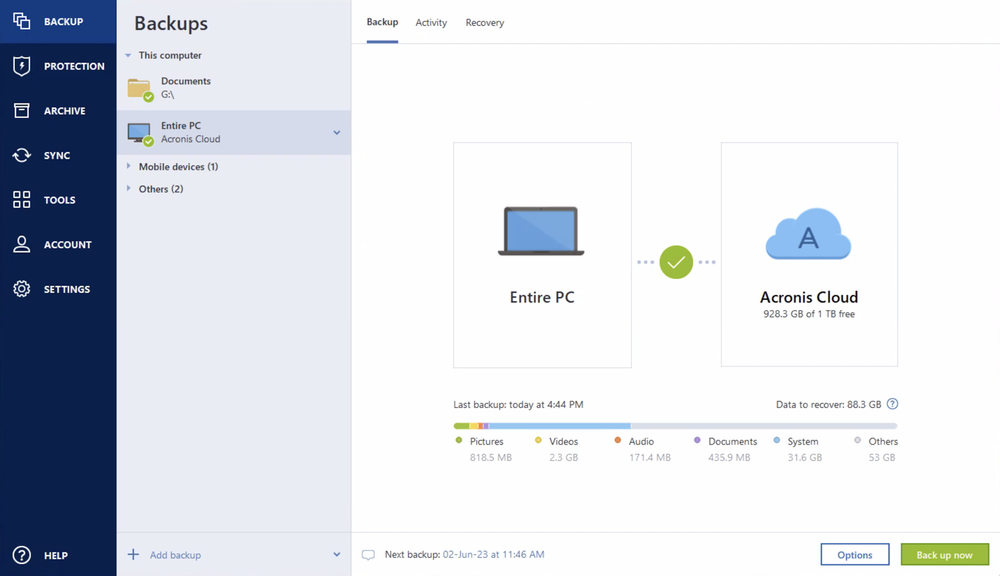
    Your personal data is valuable and so is your time. Our visual dashboard ensures you can check your protection status at a glance, with graphic displays of backup and anti-malware stats that is straightforward and really easy to use.
  • Simplified backup process
    Creating a simple backup of your personal data should not be difficult or require much effort. In just a few clicks, you can create a backup of the data you want to have a secure copy of.
  • Automated backup options
    Set your own schedule for daily, weekly or monthly backups; it’s all possible with our easy-to-use backup solution that requires no more manual intervention. You can even automatically back up your data when you plug into an external USB; it’s one of the several events triggers that are built in.
  • All-in-one backup tool
    Save time and backup the things that are important to you, whether it’s a full mirror or image, or only certain files, applications, OS and settings — and store them on local drives, external drives, NAS, network shares or the Acronis cloud.

Unified management

Save yourself the complexity and cost of managing multiple solutions. With Acronis True Image (formerly Acronis Cyber Protect Home Office), you’ll enjoy a seamless cyber protection experience, managing your backup and anti-malware through one console. Account information, licensing and pricing, alerts and important notifications are now displayed and controlled from one place.
Unified management
Unified management

Integrated anti-malware protection

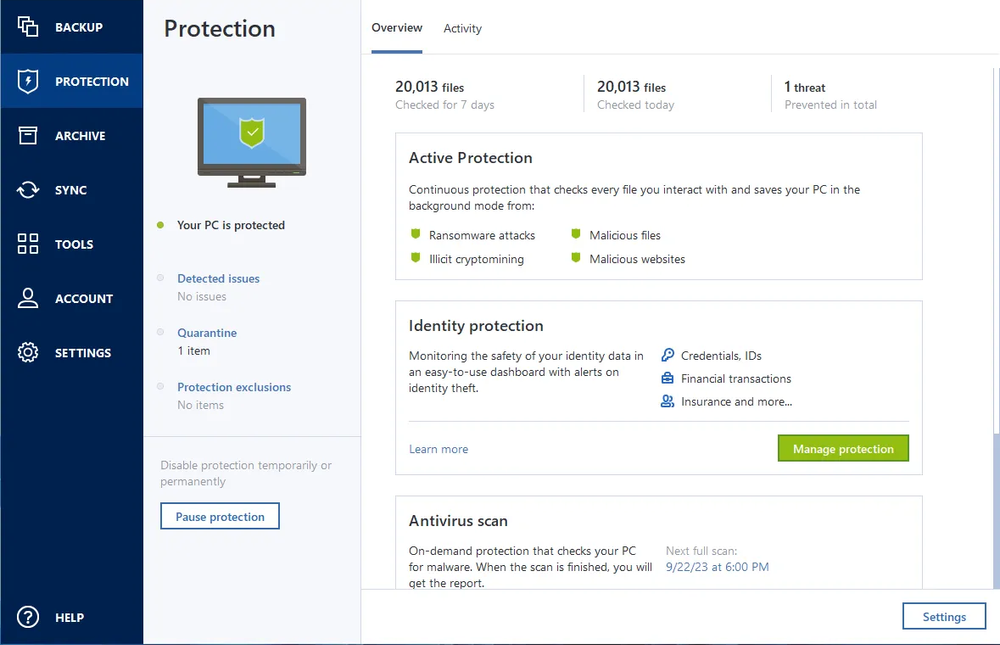
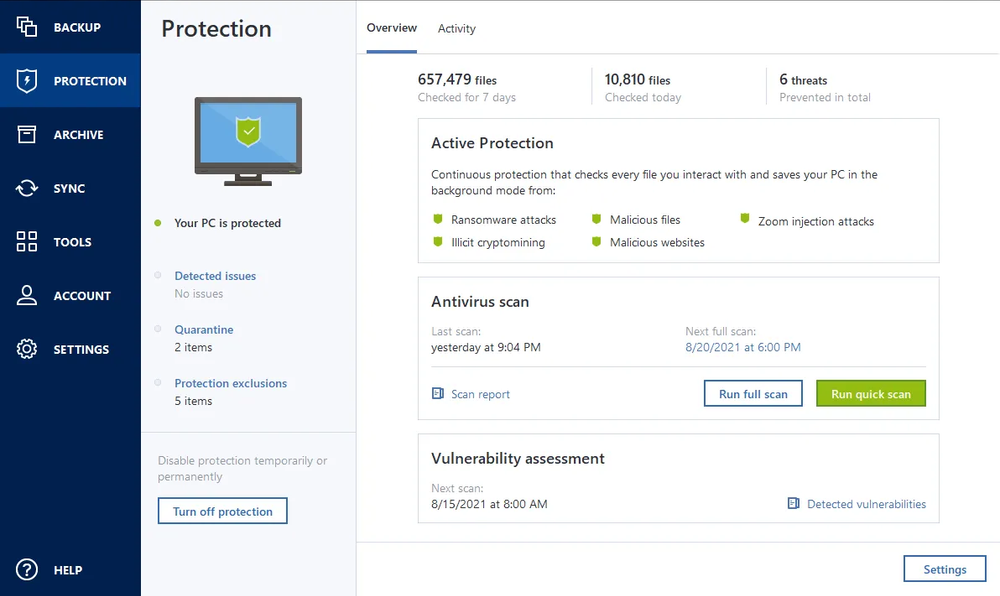
Stop the latest cyberthreats without really trying. Our machine-intelligence-powered anti-malware detects and defeats any malicious attacks — including never-before-seen threats — in real time, and automatically restores any affected files. A dashboard lists potential threats and blocked activity, shows why processes were flagged and lets you add trusted applications to an exclusion list.
Integrated anti-malware protection

So much protection. So easy to use

  • Mirror imaging

    Mirror imaging

    Back up everything in just two clicks — boot information, files, applications, OS and settings — and store it on local drives, external drives, NAS, network shares or the cloud.
  • Event-based backups

    Event-based backups

    Plug in an external USB to automatically back up your data — it’s one of several events triggers that can make protecting your data easier. Mac users can back up in Power Nap mode.
  • All-in-one recoveries

    All-in-one recoveries

    Create an Acronis Survival Kit using an external hard drive. It’s all your backups and boot media in one place. If your system crashes, just plug in and go.
  • Quick backup replication

    Quick backup replication

    Ensure you have a reliable, safe copy of your data — no matter what happens — by automatically replicating local backups in the cloud. Following the 3-2-1 backup rule has never been easier.
  • Automatic mobile backups

    Automatic mobile backups

    Safeguard your mobile data simply by coming home. Backups to your PC, Mac and NAS device start automatically as soon as your smartphone or tablet connects to your Wi-Fi network.
  • Anywhere access

    Anywhere access

    Our easy backup software lets you keep your data at your fingertips, wherever you are. Retrieve any file from your cloud backup and manage your protection from any computer or mobile device via our web-based console.
All Features

Choose the Acronis True Image plan that meets your needs

Please wait, this may take

a few seconds...

100% Detection Rate and 0 False Alarms in independent tests
Best Windows backup software, PCWorld
Cybersecurity Excellence Awards Winner
Editors' Choice, PCWorld
OPSWAT Anti-malware Platinum certification
TIME's Best Cloud Backup Services

Works On Multiple Platforms

Microsoft Windows

  • Windows 11 (64-bit)
  • Windows 10 (64-bit)

Mobile operating systems

  • iOS 15 or later
  • Android 10 or later

File systems on Windows

  • NTFS
  • Ext2/Ext3/Ext4
  • ReiserFS(3)
  • Linux SWAP
  • HFS+/HFSX
  • FAT16/32/exFAT

Apple macOS

  • macOS Tahoe 26
  • macOS Sequoia 15
  • macOS Sonoma 14
  • macOS Ventura 13
  • macOS Monterey 12

File systems on macOS

  • APFS
  • HFS+
  • FAT32
  • NTFS (including Boot Camp)

Acronis Mobile: Easy, secure and portable

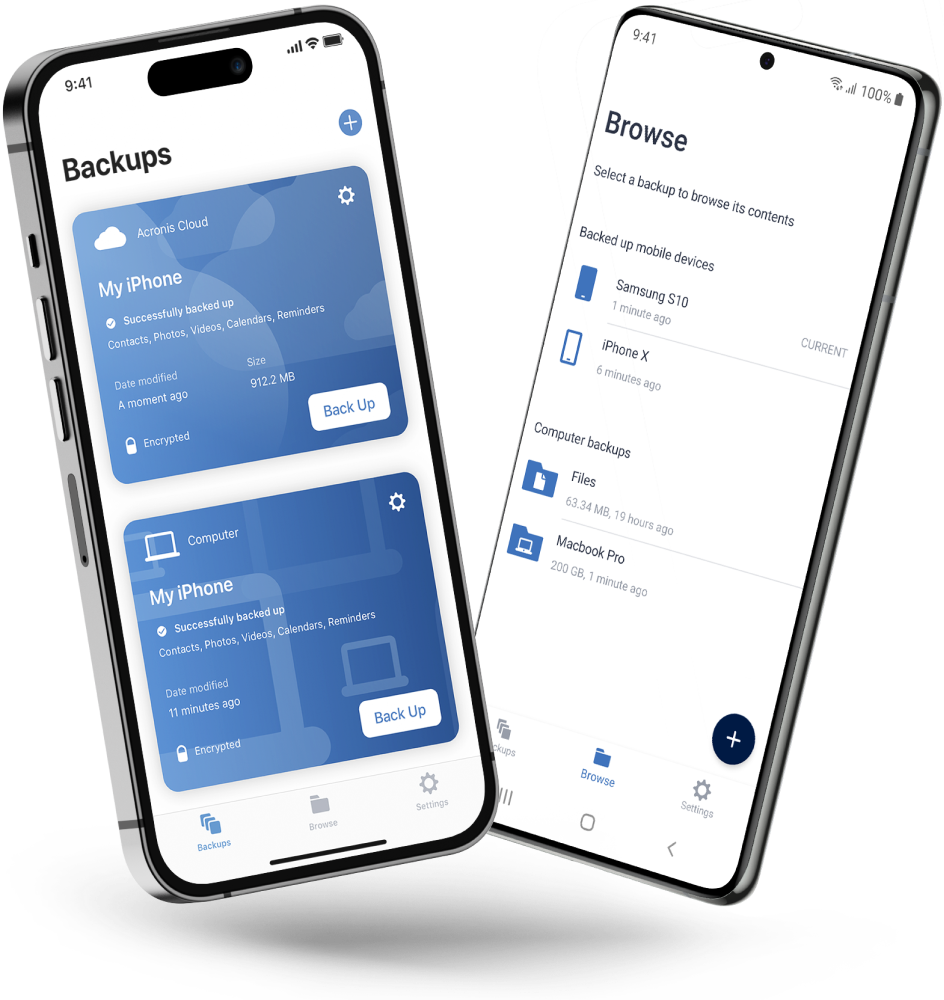
Never worry about losing your photos, videos, contacts or important files again. With the Acronis Mobile app, you can easily back up everything that matters on your phone and keep it safe in the cloud. Access your files anytime, anywhere from the Acronis Cloud, whether you're switching devices or just want peace of mind. It’s fast and always ready to protect your digital life.

  • How to back up your mobile device via Wi-Fi to a PC or Mac
Acronis Mobile: Easy, secure and portable

Looking for help?

Frequently Asked Questions

  • A computer backup is a second copy of your data that you store separately from the original. That includes family photos and videos, documents, emails, contacts, apps and even the operating system that powers your computer. If the originals are located on your laptop or a mobile device, you keep the backup somewhere else that’s safe — that way, you can use the second copy to restore your files or system if something happens to the original.

    To ensure all of this data is accurately copied so you can use it to recover your computer, backup software is a must. A solution like Acronis True Image automatically captures changes to everything, including hidden files that can be missed by manually copying files, and makes the process of recovery easy and efficient.

  • With Acronis True Image, creating a full image backup on an external hard drive is as easy as two clicks. Once the drive is connected and Acronis True Image is running, click Add backup. The entire computer is the default backup source, so you simply need to assign the external drive as the backup destination and then click Back up now.

  • Computer backups need to be stored someplace safe. Acronis recommends the 3-2-1 backup rule, which includes storing three copies of your data on at least two different types of media (such as external hard drives, network drives, and NAS devices) and keeping one copy off-site. That way, if a fire or flood damages both your original files and the local backup, the off-site copy is available to use for recovery.

    "The cloud" is a term that describes a remote network of computers and servers that you access via the internet. The cloud is a convenient way to store your files off-site, where they are safe from local damage. Subscriptions to the Advanced and Premium editions of Acronis True Image include cloud storage, as well as cloud-based features and "anywhere access" to your data.

    With Acronis True Image, you also have the ability to automatically replicate local backups in the Acronis Cloud, so you always have an off-site copy of your data available without having to manage a separate backup plan. By choosing this option, after the first successful backup, your backup and replication will be done simultaneously.

  • Acronis' advanced anti-malware gives you peace of mind by delivering outstanding multilayered threat protection. It uses a set of integrated technologies that address specific attack vectors:

    • Superb protection against known and unknown malware, including ransomware, cryptojackers, and fileless attacks.
    • Behavioral analysis and dynamic detection rules that combat any emerging threats.
    • On-demand antivirus scan that checks all files on your computer for any kind of malware: Trojans, viruses, backdoors, worms, keyloggers, spyware and others.

    Acronis continuously safeguards your device and backups from the latest cyberthreats.

  • Yes. Acronis anti-malware uses a set of integrated technologies that deliver data protection capabilities many third-party antiviruses don't.

    • It keeps your backup safe. A dedicated module of Acronis anti-malware protection guards your backup files and the backup agent, preventing deletion or alteration by malware.
    • It restores ransomware-affected files automatically. The majority of other security software only prevents the attack, without automatically recovering the ciphered data.

  • We are aware that you may have specialized antivirus, web filtering, or other security software installed on your device. Although we recommend uninstalling the third-party software and fully relying on Acronis' anti-malware solution, you can still keep it active.

    Acronis' anti-malware protection is compatible with most common anti-malware solutions. They do not conflict with each other for resources and do not create extra overhead on the system.

    However, our real-time protection switches on only if there is no third-party real-time protection solution running on your device. If third-party software is detected, you'll receive a message on your protection dashboard notifying you that another piece of software is protecting you from malicious files.

    Note: If you continue using an existing third-party solution for device protection rather than Acronis' anti-malware, we cannot guarantee the reliability of that third-party protection.

Product help
If you need product assistance, you can find helpful materials in the Knowledge Base. Or, post questions on our discussion boards.
Technical support
For subscription owners, there is free, 24-hour technical support. Refer to the Technical Support Site to find the appropriate support contact.
  • Company
    Press Releases
    Careers
    Contacts
    Cloud Data Centers
    Forum
  • Service Providers
    Resellers
    Developers and ISVs
    Affiliates
    OEMs
  • Active Protection
    AnyData Engine
    Universal Restore
    Anti-malware
    View all
  • Management
    Automation
    Security
    Data Protection
    View all
  • Acronis #CyberFit Sports
    Acronis Cyber Foundation
    TRU security
    Professional Services
  • ConnectWise
    Microsoft CSPs
  • Veeam
    Sophos
    Trend Micro
    ESET
    SentinelOne
    View all
  • Physical
    Virtual
    Cloud
    Endpoints
    Applications
    Mobile
  • About Acronis
  • Company
  • Press Releases
  • Careers
  • Contacts
  • Cloud Data Centers
  • Forum
  • For partners
  • Service Providers
  • Resellers
  • Developers and ISVs
  • Affiliates
  • OEMs
  • Technologies
  • Active Protection
  • AnyData Engine
  • Universal Restore
  • Anti-malware
  • View all
  • Integrations
  • Management
  • Automation
  • Security
  • Data Protection
  • View all
  • Programs & Services
  • Acronis #CyberFit Sports
  • Acronis Cyber Foundation
  • TRU security
  • Professional Services
  • Vendor Alliance
  • ConnectWise
  • Microsoft CSPs
  • Compare to
  • Veeam
  • Sophos
  • Trend Micro
  • ESET
  • SentinelOne
  • View all
  • Environments
  • Physical
  • Virtual
  • Cloud
  • Endpoints
  • Applications
  • Mobile
  • Acronis certification 1
  • Acronis certification 2
  • Acronis certification 3
  • Acronis certification 4
Engage with Acronis
  • twitter
  • blog
  • cpoc
  • yt
  • linkedin
  • reddit
  • facebook
  • Legal information
  • Privacy policy
  • Cookie Notice
  • Notice of collection
  • Sustainability & governance
© 2003–2026 Acronis International GmbH.
AcronisBack to homepage

Sorry, your browser is not supported.

It seems that our website is incompatible with your current browser's version. Don't worry, this is easily fixed!
To view our complete website, simply update your browser now or continue anyway.

Contact Sales for Product purchases:

United States: Workdays, 9:00 AM - 5:30 PM. Tel: +1 202-601-3104

Contact PR team:[email protected]

Press ReleasesProduct documentationSupport portalCustomer portalContactsRenewals

© 2003–2026 Acronis International GmbH. Legal information