You are on United States website. Change region to view location-specific content:
Global
English
Select another region
Choose region and language
Americas
  • BrasilPortuguês
  • CanadaEnglish
  • CanadaFrançais
  • LATAMEspañol
  • United StatesEnglish
Asia-Pacific
  • AustraliaEnglish
  • Chinese Simplified简体中文
  • Chinese Traditional繁體中文
  • IndiaEnglish
  • Japan日本語
  • Korea한국어
  • SingaporeEnglish
Europe, Middle East and Africa
  • BulgariaБългарски
  • CzechČeština
  • EuropeEnglish
  • FranceFrançais
  • GermanyDeutsch
  • HungaryMagyar
  • Israelעברית
  • ItalyItaliano
  • NetherlandsDutch
  • PolandPolski
  • RomaniaRomână
  • SpainEspañol
  • SwedenSvenska
  • SwitzerlandDeutsch
  • TürkiyeTürkçe
  • United KingdomEnglish
Worldwide
  • GlobalEnglish
  • Americas
    • BrasilPortuguês
    • CanadaEnglish
    • CanadaFrançais
    • LATAMEspañol
    • United StatesEnglish
  • Asia-Pacific
    • AustraliaEnglish
    • Chinese Simplified简体中文
    • Chinese Traditional繁體中文
    • IndiaEnglish
    • Japan日本語
    • Korea한국어
    • SingaporeEnglish
  • Europe, Middle East and Africa
    • BulgariaБългарски
    • CzechČeština
    • EuropeEnglish
    • FranceFrançais
    • GermanyDeutsch
    • HungaryMagyar
    • Israelעברית
    • ItalyItaliano
    • NetherlandsDutch
    • PolandPolski
    • RomaniaRomână
    • SpainEspañol
    • SwedenSvenska
    • SwitzerlandDeutsch
    • TürkiyeTürkçe
    • United KingdomEnglish
  • Worldwide
    • GlobalEnglish
Back to homepage
Search in acronis websites
  • Login for service providersAcronis Cyber Protect Cloud
  • Login for business customersAcronis Cyber Protect, Acronis Snap Deploy
  • Login for home usersAcronis True Image
  • Login to Partner PortalAcronis Partner Portal
  • Login to ConnectAcronis Cyber Protect Connect
  • Products
    For service providers
    For business
    For home
    Acronis Cyber Protect CloudEmpowering service providers with backup, disaster recovery, cybersecurity, and endpoint management in one integrated solution.
    • Try it free
    Cybersecurity
    Extended Detection & Response (XDR)
    Endpoint Detection & Response (EDR)
    Managed Detection & Response (MDR)
    Data Loss Prevention (DLP)
    Security Posture Management
    Email Security
    Email Archiving for Microsoft 365
    Collaboration Security
    Security Awareness Training (SAT)
    Data protection
    Backup
    Backup for Microsoft 365
    Disaster Recovery
    Direct Backup to Public Cloud
    Archival Storage
    Cloud Storage
    MSP operations
    RMM
    PSA
    Workflow Automation
    More products
    Acronis Cyber Protect Home & BusinessSecure backup and AI-powered anti-malware solution that service providers, telecoms or ISPs can easily integrate to their service suite.
    • All products
    Looking to update or renew your product or contact us for help?
  • Solutions
    Solutions
    For service providers
    For business
    • Microsoft 365 protection
    • Cyber resilience
    • Protected workspace
    • Endpoint protection
    • Hybrid disaster recovery
    • Disaster recovery to Azure
    • Prevention
    • Solutions for service providers
    • Compliance Navigator
    • Managed server backup
    • Ransomware protection
    • Managed anti-malware protection
    • Hosting service providers
    • MSP patch management
    • Recovery
    • Management
    • Automation
    • Security
    • Data Protection
    • All integrations
  • Pricing
    • For Service Providers
    • For Businesses & Enterprise
    • For Home
  • Partners
    Partner with Acronis
    • Acronis Partner ProgramMeet customer demand with one partner program for MSPs, VARs, OEMs and Hybrid Partners
    • Join the partner program
    • Acronis Technology Alliances Program (TAP)Integrate with Acronis to build powerful solutions for the MSP ecosystem
    Partner success kit
    • MSP AcademyTraining and resources to grow your MSP business
    • Active promotionsExplore current deals and limited-time offers
    • Partner CertificationPartners now have access to all sales and technical training — a $999 annual value per partner
    Locators
    • Find an IT providerBrowse verified Acronis IT service providers worldwide by region and specialization
    • Find a distributorBrowse verified Acronis distributors worldwide by type and location
  • Support & Resources
    Support
    • Customer service and supportGet help, find answers, and contact our support team
    • Product documentationEverything you need to understand and use the product
    • Support knowledge baseSelf-service support with guides and solutions
    Resources
    • Resource centerAll-in-one hub for expert insights and resources
    • Acronis blogExplore articles on security, backup, and innovation
    • Acronis Threat Research UnitInsights on cyber protection, tech trends, and news
    Webinars
    • Upcoming events and webinarsRegister for live demos and webinars led by Acronis experts
    • On-Demand webinarsWatch on-demand webinars at your convenience and learn from Acronis' top experts
  • Why Acronis
    • About AcronisLearn about our mission, vision, and team
    • Industry recognitionsRecognized by industry leaders for innovation and excellence
    • Compliance and certificationSee how we meet global compliance and regulatory requirements
    • Customer storiesReal-world success stories from our global clients
    • Acronis vs competitionWhy businesses choose Acronis over the competition
  • Trials
    • For Service Providers
    • For business and enterprise
    • For Home
  • Buy online
    • For business and enterprise
    • For Home
  • Contact us
    • Contact sales
    • Contact renewals
    • Contact support
    • Professional services
    • All contacts
Choose region and language
Americas
  • BrasilPortuguês
  • CanadaEnglish
  • CanadaFrançais
  • LATAMEspañol
  • United StatesEnglish
Asia-Pacific
  • AustraliaEnglish
  • Chinese Simplified简体中文
  • Chinese Traditional繁體中文
  • IndiaEnglish
  • Japan日本語
  • Korea한국어
  • SingaporeEnglish
Europe, Middle East and Africa
  • BulgariaБългарски
  • CzechČeština
  • EuropeEnglish
  • FranceFrançais
  • GermanyDeutsch
  • HungaryMagyar
  • Israelעברית
  • ItalyItaliano
  • NetherlandsDutch
  • PolandPolski
  • RomaniaRomână
  • SpainEspañol
  • SwedenSvenska
  • SwitzerlandDeutsch
  • TürkiyeTürkçe
  • United KingdomEnglish
Worldwide
  • GlobalEnglish
  • Americas
    • BrasilPortuguês
    • CanadaEnglish
    • CanadaFrançais
    • LATAMEspañol
    • United StatesEnglish
  • Asia-Pacific
    • AustraliaEnglish
    • Chinese Simplified简体中文
    • Chinese Traditional繁體中文
    • IndiaEnglish
    • Japan日本語
    • Korea한국어
    • SingaporeEnglish
  • Europe, Middle East and Africa
    • BulgariaБългарски
    • CzechČeština
    • EuropeEnglish
    • FranceFrançais
    • GermanyDeutsch
    • HungaryMagyar
    • Israelעברית
    • ItalyItaliano
    • NetherlandsDutch
    • PolandPolski
    • RomaniaRomână
    • SpainEspañol
    • SwedenSvenska
    • SwitzerlandDeutsch
    • TürkiyeTürkçe
    • United KingdomEnglish
  • Worldwide
    • GlobalEnglish
Acronis True Image
FOR HOME
MenuMenu
Acronis True Image
Overview
Backup
Cloning
Security
  • Backup features
    Easy BackupEmail BackupAutomatic BackupCloud BackupMobile BackupBackup ReplicationImaging SoftwareData MigrationData RecoverySurvival Kit
  • Security features
    Anti-Malware SoftwareIdentity ProtectionAntivirus SoftwareActive ProtectionReliable CybersecurityCryptojacking BlockerSecurity for MacData Protection
  • Solutions
    Gaming SecurityCloud Photo StorageElectronic SignatureMobile App
All features
Compare
Backup
Cloning
Security
Product features
Backup features
Easy BackupEmail BackupAutomatic BackupCloud BackupMobile BackupBackup ReplicationImaging SoftwareData MigrationData RecoverySurvival Kit
Security features
Anti-Malware SoftwareIdentity ProtectionAntivirus SoftwareActive ProtectionReliable CybersecurityCryptojacking BlockerSecurity for MacData Protection
Solutions
Gaming SecurityCloud Photo StorageElectronic SignatureMobile App
All features
Compare
Acronis

Acronis Survival Kit: The ultimate disk recovery tool

A recovery drive you can trust

Imagine you lose an important file — how would you recover it?

Stay one step ahead of any data loss, accidental deletion or disk damage and never lose a file again. The Acronis Survival Kit is your ultimate recovery tool. It’s an all-in-one recovery software that includes everything you need to restore your system, including boot media and all your backups.

With the Acronis Survival Kit, you can have peace of mind knowing that your important files are always protected and easily recoverable. Don't wait for disaster to strike — be prepared with Acronis.

Acronis Survival Kit

Core features of Acronis Survival kit

  • Easy to prepare
    Easy to prepare
    Build a recovery drive in just a few clicks — you just need an external hard drive. You can copy your system partition or the entire system, and the Acronis Survival Kit will identify the boot media that’s needed and add it for you. It’s that simple.
  • Flexible data safety
    Flexible data safety
    Recover lost files on your hard drive. Whether you have a Windows or Mac operating system, you deserve surefire recovery. Acronis True Image ensures that all users can create a customized survival kit.
  • Comprehensive protection
    Comprehensive protection
    The Acronis Survival Kit is not limited to the backup and recovery basics — it goes beyond. With built-in all around cybersecurity like antivirus, anti-malware and anti-ransomware defenses, your data is safe and secure from all kinds of threats.

How to create your recovery drive with Acronis Survival Kit

Creating your recovery drive with Acronis could not be easier.
Simply follow these easy steps.
1
1
2
2
3
3
4
4
Acronis True Image
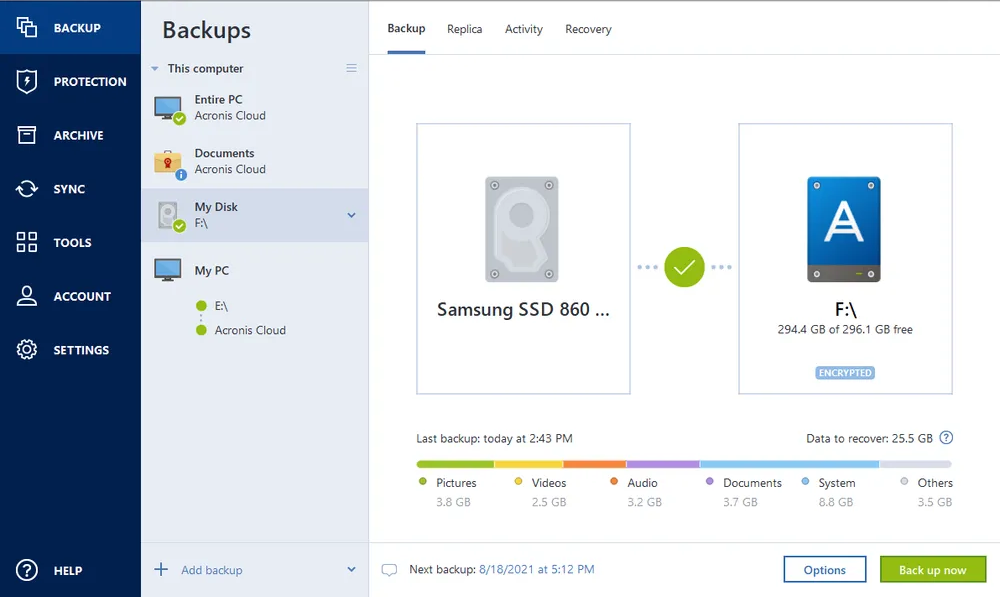
  1. Open Acronis True Image (formerly Acronis Cyber Protect Home Office) and select Add backup.
  2. Specify source (entire PC, system HDD) and destination (external HDD).
  3. Select the Make bootable option that appears under the destination panel.
  4. Follow the wizard instructions to create your boot media and backup.

Choose the Acronis True Image plan that meets your needs

Please wait, this may take

a few seconds...

Award-winning cyber protection solution

Over 5.5 million users rely on Acronis True Image every day

Best Windows backup software, PCWorld
Cybersecurity Excellence Awards Winner
Editors' Choice, PCWorld
OPSWAT Anti-malware Platinum certification
100% Detection Rate and 0 False Alarms in independent tests
All Awards

Product Reviews

  • Acronis is the real deal

    …

    John A.
    Verified Acronis user
  • Fast and secure backup and recovery

    …

    Jessica C.
    Verified Acronis user
  • Straightforward recovery tool

    …

    Jeff C.
    Verified Acronis user

Works On Multiple Platforms

Microsoft Windows

  • Windows 11 (all editions)
  • Windows 10 (all editions)

File systems on Windows

  • NTFS
  • Ext2/Ext3/Ext4
  • ReiserFS(3)
  • Linux SWAP
  • HFS+/HFSX
  • FAT16/32/exFAT

Apple macOS

  • macOS Tahoe 26
  • macOS Sequoia 15
  • macOS Sonoma 14
  • macOS Ventura 13
  • macOS Monterey 12

File systems on macOS

  • APFS
  • HFS+
  • FAT32
  • NTFS (including Boot Camp)

Mobile operating systems

  • iOS 15 or later
  • Android 10 or later

Acronis Mobile: Easy, secure and portable

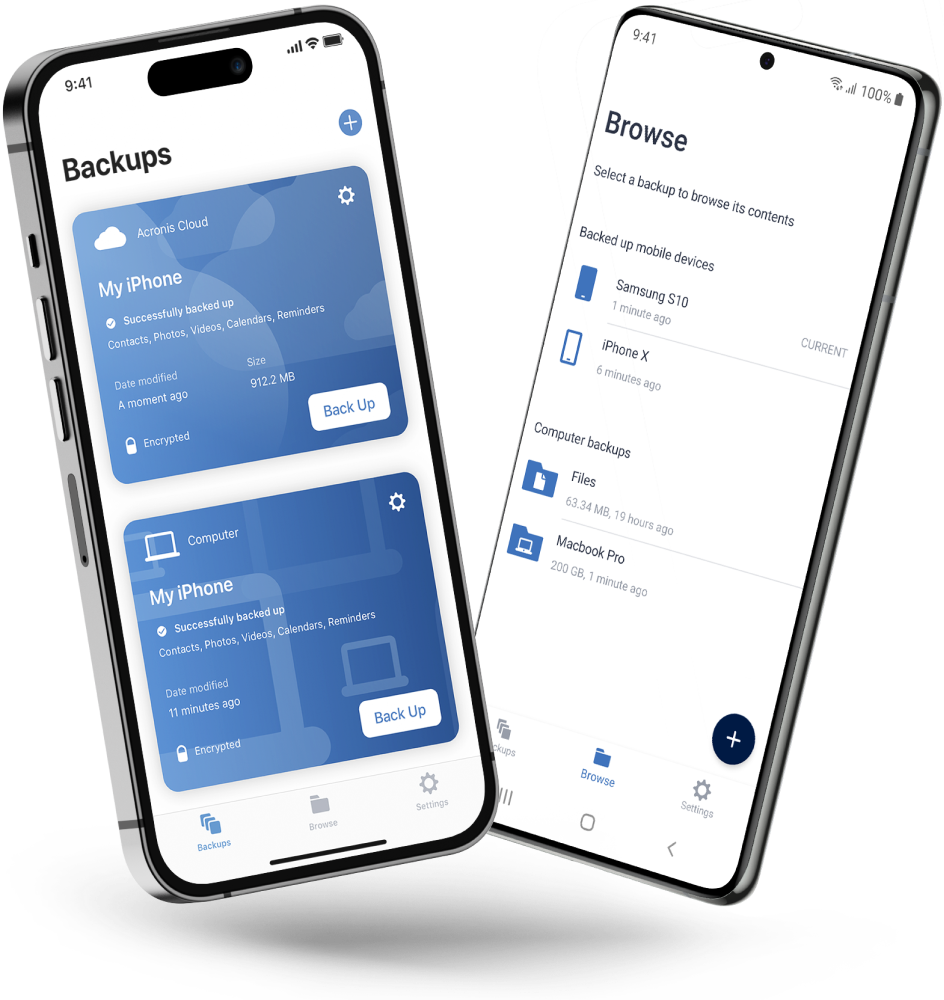
Never worry about losing your photos, videos, contacts or important files again. With the Acronis Mobile app, you can easily back up everything that matters on your phone and keep it safe in the cloud. Access your files anytime, anywhere from the Acronis Cloud, whether you're switching devices or just want peace of mind. It’s fast and always ready to protect your digital life.
  • How to back up your mobile device via Wi-Fi to a PC or Mac
Acronis

Looking for help?

Frequently Asked Questions

  • What is a recovery drive?

    A recovery drive is a CD, DVD or USB drive that lets you boot your computer without launching the operating system from the hard drive, so you can safely analyze and troubleshoot any issues that might be affecting your system. A “factory settings” version is sometimes included on the hard drive of new computers so you can create a rescue disk, but a better option is to occasionally create a rescue disk that is designed for your current system, which captures any changes.
    The Acronis Survival Kit in Acronis True Image is an all-in-one recovery drive, so you have the boot media, system partition and even backups needed to rescue your computer and recover any files needed.

  • Can a recovery drive help when your computer doesn't boot from the hard drive?

    Absolutely, as long as you’ve adjusted the boot order in your computer's BIOS or UEFI to ensure your recovery drive is the first option the machine will check. For example, when you create an Acronis Survival Kit, it will be created as an external hard drive. If that drive connects via USB, your BIOS’ boot order needs to be set to read USB drives first.
    Then, if your computer won’t boot from the hard drive, you simply connect the Acronis Survival Kit to the USB drive. As long as the boot order is set to check the USB first, the machine will launch from the recovery drive. Then you can safely troubleshoot the issue.

  • How do you use a recovery disk?

    Connect your recovery disk and restart the computer. With an Acronis Survival Kit, you can analyze and troubleshoot system issues, restore the system partition or individual files from backups, or recover your system using a recent full image backup. Once you make the necessary system changes or reset the system, you can try booting from the hard drive to confirm that the machine is running properly.

  • Can I recover data from different storage devices using the Acronis Survival Kit?

    Yes, you can recover data from different storage devices using the Acronis Survival Kit. Recovery works in the same way as to regular bootable media. When you boot a machine from the survival kit, on the Home screen under Recover you can choose the storage device you would like to recover from. The advantage of creating a survival kit is that it prepares your external hard disk drive to contain both the Acronis bootable media files and your configured backup both in one place, in case other storage media is not accessible for some reason.

  • Does the Acronis Survival Kit support encryption for secure data recovery?

    Yes, the Acronis Survival Kit supports encryption to ensure secure data recovery. When you use Acronis True Image to create a survival kit, you have the option to encrypt the backup data that is stored on your external USB drive. This encryption protects your data by making it inaccessible to unauthorized users, ensuring that your personal sensitive information remains confidential, even if the external drive is lost or stolen.

  • Can I create a bootable USB drive with the Acronis Survival Kit?

    Yes, with the Acronis Survival Kit, you can create a bootable USB Drive. The Survival Kit is specifically designed to be a comprehensive recovery tool that includes a bootable component along with your backed-up data. This allows you to recover your system even if your computer fails to boot up normally due to system errors or hardware failures.

  • Can I use the Acronis Survival Kit to recover data from damaged or corrupted hard drives?

    Yes, you can use the Acronis Survival Kit to recover data from damaged or corrupted hard drives, provided the damage is not severe, physical damage that makes the drive completely unreadable. The Acronis Survival Kit is designed to help you recover systems and data from various scenarios including software failures, system crashes and some types of hardware issues.

Product help
If you need product assistance, you can find helpful materials in the Knowledge Base. Or, post questions on our discussion boards.
Technical support
For subscription owners, there is free, 24-hour technical support. Refer to the Technical Support Site to find the appropriate support contact.
  • Company
    Press Releases
    Careers
    Contacts
    Cloud Data Centers
    Forum
  • Service Providers
    Resellers
    Developers and ISVs
    Affiliates
    OEMs
  • Active Protection
    AnyData Engine
    Acronis Notary
    Universal Restore
    Anti-malware
    View all
  • Management
    Automation
    Security
    Data Protection
    View all
  • Acronis #CyberFit Sports
    Acronis Cyber Foundation
    TRU security
    Professional Services
  • ConnectWise
    Microsoft CSPs
  • Veeam
    Sophos
    Trend Micro
    ESET
    SentinelOne
    View all
  • Physical
    Virtual
    Cloud
    Endpoints
    Applications
    Mobile
  • About Acronis
  • Company
  • Press Releases
  • Careers
  • Contacts
  • Cloud Data Centers
  • Forum
  • For partners
  • Service Providers
  • Resellers
  • Developers and ISVs
  • Affiliates
  • OEMs
  • Technologies
  • Active Protection
  • AnyData Engine
  • Acronis Notary
  • Universal Restore
  • Anti-malware
  • View all
  • Integrations
  • Management
  • Automation
  • Security
  • Data Protection
  • View all
  • Programs & Services
  • Acronis #CyberFit Sports
  • Acronis Cyber Foundation
  • TRU security
  • Professional Services
  • Vendor Alliance
  • ConnectWise
  • Microsoft CSPs
  • Compare to
  • Veeam
  • Sophos
  • Trend Micro
  • ESET
  • SentinelOne
  • View all
  • Environments
  • Physical
  • Virtual
  • Cloud
  • Endpoints
  • Applications
  • Mobile
Engage with Acronis
  • twitter
  • blog
  • cpoc
  • yt
  • linkedin
  • reddit
  • facebook

Tips, news and promo offers

  • Legal information
  • Privacy policy
  • Cookie Notice
  • Notice of collection
  • Sustainability & governance
© 2003–2026 Acronis International GmbH.
Back to homepage

Sorry, your browser is not supported.

It seems that our new website is incompatible with your current browser's version. Don’t worry, this is easily fixed! To view our complete website, simply update your browser now or continue anyway.

© 2003–2026 Acronis International GmbH. All rights reserved.
Legal information