





Back to homepage
  • For MSPs
  • AI-Native
Search in acronis websites
Login for
  • Service ProvidersAcronis Cyber Protect Cloud
  • Business CustomersAccess business security, backup, and deployment products
  • Home UsersAcronis True Image
  • Acronis Partner PortalPartner resources, training, certifications, and business tools.
  • ConnectAcronis Cyber Protect Connect
  • For MSPs
  • AI-Native

Contact us

  • Contact Sales
  • Contact Support
  • Contact Renewals
  • All Contacts
Search
Try Now
Choose region and language
Americas
  • BrasilPortuguês
  • CanadaEnglish
  • CanadaFrançais
  • LATAMEspañol
  • United StatesEnglish
Asia-Pacific
  • AustraliaEnglish
  • Chinese Simplified简体中文
  • Chinese Traditional繁體中文
  • IndiaEnglish
  • Japan日本語
  • Korea한국어
  • SingaporeEnglish
Europe, Middle East and Africa
  • BulgariaБългарски
  • CzechČeština
  • EuropeEnglish
  • FranceFrançais
  • GermanyDeutsch
  • HungaryMagyar
  • Israelעברית
  • ItalyItaliano
  • NetherlandsDutch
  • PolandPolski
  • RomaniaRomână
  • SpainEspañol
  • SwedenSvenska
  • SwitzerlandDeutsch
  • TürkiyeTürkçe
  • United KingdomEnglish
Worldwide
  • GlobalEnglish
  • Americas
    • BrasilPortuguês
    • CanadaEnglish
    • CanadaFrançais
    • LATAMEspañol
    • United StatesEnglish
  • Asia-Pacific
    • AustraliaEnglish
    • Chinese Simplified简体中文
    • Chinese Traditional繁體中文
    • IndiaEnglish
    • Japan日本語
    • Korea한국어
    • SingaporeEnglish
  • Europe, Middle East and Africa
    • BulgariaБългарски
    • CzechČeština
    • EuropeEnglish
    • FranceFrançais
    • GermanyDeutsch
    • HungaryMagyar
    • Israelעברית
    • ItalyItaliano
    • NetherlandsDutch
    • PolandPolski
    • RomaniaRomână
    • SpainEspañol
    • SwedenSvenska
    • SwitzerlandDeutsch
    • TürkiyeTürkçe
    • United KingdomEnglish
  • Worldwide
    • GlobalEnglish
Acronis True Image
FOR HOME
MenuMenu
Acronis True Image
Overview
Backup
Cloning
Security
  • Backup features
    Easy BackupEmail BackupAutomatic BackupCloud BackupMobile BackupBackup ReplicationImaging SoftwareData MigrationData RecoverySurvival Kit
  • Security features
    Anti-Malware SoftwareIdentity ProtectionAntivirus SoftwareActive ProtectionReliable CybersecurityCryptojacking BlockerSecurity for MacData Protection
  • Solutions
    Gaming SecurityCloud Photo StorageElectronic SignatureMobile App
All features
Compare
Backup
Cloning
Security
Product features
Backup features
Easy Backup
Email Backup
Automatic Backup
Cloud Backup
Mobile Backup
Backup Replication
Imaging Software
Data Migration
Data Recovery
Survival Kit
Security features
Anti-Malware Software
Identity Protection
Antivirus Software
Active Protection
Reliable Cybersecurity
Cryptojacking Blocker
Security for Mac
Data Protection
Solutions
Gaming Security
Cloud Photo Storage
Electronic Signature
Mobile App
All features
Compare
Buy now
Try now
Secure your mobile devices with Acronis Mobile and Acronis True Image

Secure your mobile devices with Acronis Mobile and Acronis True Image

Buy nowTry now
  • 10%
    device owners have had one stolen
  • 2,000+
    devices are lost or stolen around the world every hour
  • 70 million
    smartphones are lost each year

Acronis Mobile for Android and iOS is a versatile, user-friendly and highly secure mobile app

In today’s digital age, your mobile device is not just a phone; it's a central hub for your personal and professional life – securing it against cyberthreats and ensuring your data is backed up should be a top priority.

The Acronis cybersecurity app is your all-in-one solution for mobile cybersecurity and data backup. It combines robust cyber protection with efficient backup features to keep your mobile safe and your data accessible anytime, anywhere.

With our intuitive and reliable mobile backup app for Android and iOS, you can make sure that your treasured memories and important information stay safe and accessible all the time.

Download via Google Play
Download via App Store
Acronis Mobile for Android and iOS is a versatile, user-friendly and highly secure mobile app

The best backup app for your mobile data protection

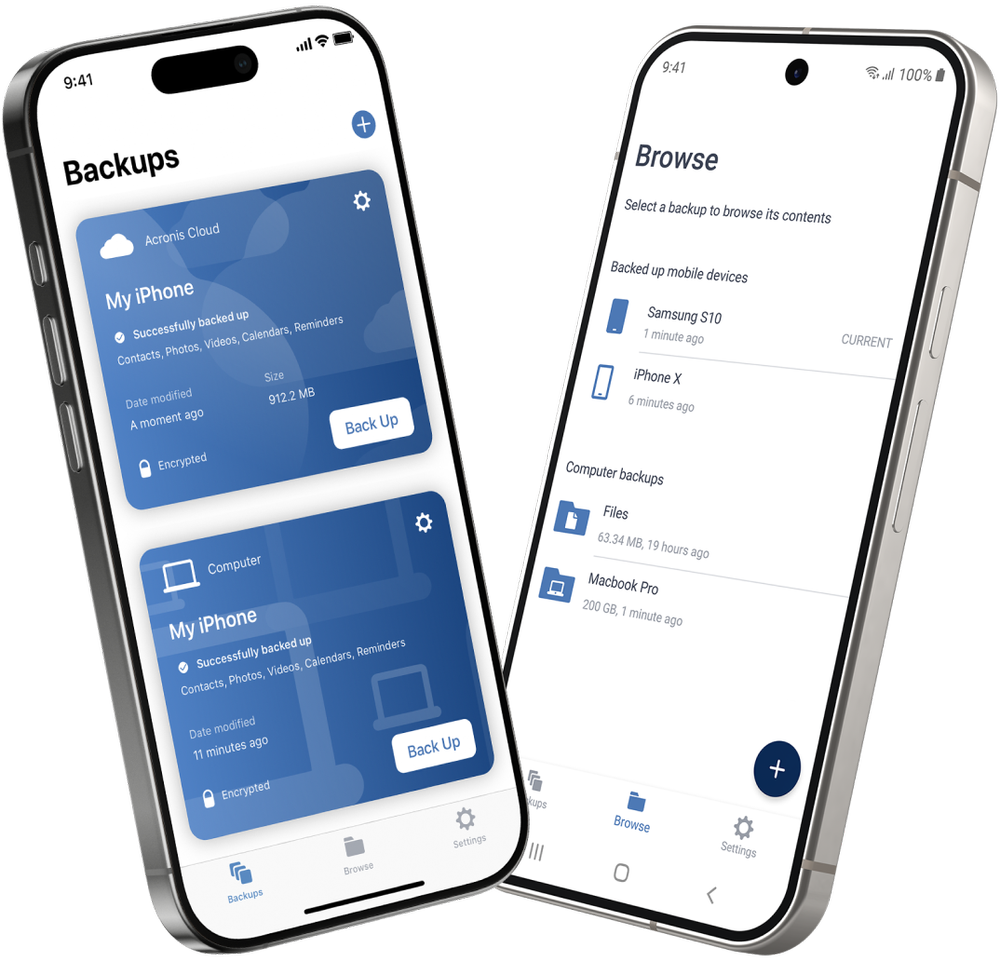
With our mobile phone backup app, you can effortlessly back up an unlimited number of both Android and iPhone devices, depending on the license you acquire.

Whether you need dependable Android mobile backup app or a seamless iPhone backup solution, Acronis has you covered.

No need to manage multiple mobile backup applications or systems. Enjoy peace of mind knowing your mobile data from your Android and your iPhone is protected and easily accessible whenever you need it.

The best backup app for your mobile data protection
  • Comprehensive backup app
    Comprehensive backup app
    Securely back up your contacts, photos, videos and calendars with the best backup app available for both Android and iPhone devices.
  • Scheduled mobile backups
    Scheduled mobile backups
    Set it and forget it with scheduled backups that run in the background, ensuring your data is always up to date. Ideal for users looking for a reliable app for backing up Android phone or iOS devices.
  • Cloud and local storage
    Cloud and local storage
    Choose where to backup your mobile app data — either in the secure Acronis Cloud or locally on your computer or NAS device.
  • Cross-platform access
    Cross-platform access
    Easily migrate your data between devices, whether you’re switching from iOS to Android or vice versa. It’s the perfect app for phone backup across different platforms.
  • Easy data recovery
    Easy data recovery
    Recover your data to the same Android or iPhone or transfer it easily to a new device. With the seamless and quick mobile data recovery process, you can restore your mobile data in case of accidental deletion, device loss or device upgrade.
  • Integration with Acronis True Image
    Integration with Acronis True Image
    Create a backup on your Android phone or iPhone and share it with your desktop when you use Acronis True Image. This works on all different subscriptions plans.

Tougher security with flexible and secure backup for Android and iPhone

Keep your data safe, wherever you are.

  • Advanced encryption

    Advanced encryption

    Files sent to backup are protected by enterprise-grade encryption.
  • Secure storage

    Secure storage

    Our data centers boast superior security and are SSAE-18 certified.
  • Dual protection

    Dual protection

    Local and cloud backups mean you always have a safe, clean copy.
Mobile security features
Acronis Mobile
iCloud
Google Drive
Remote backup management
End-to-end encryption
Data migration to or from another backup
iOS to Android and Android to iOS
iOS to Android only
Automatic and continuous backup
Automatic, wireless backup to local computer
Anywhere access to backup data
Version control

Get started with the Acronis backup app today

Protect your digital life with the ultimate backup and cybersecurity mobile apps for both your mobile devices and computers. With Acronis Mobile and Acronis True Image, you can enjoy peace of mind knowing your data is always secure and accessible.
Download via Google Play
Download via App Store
Get started with the Acronis backup app today
100% Detection Rate and 0 False Alarms in independent tests
Best Windows backup software, PCWorld
Cybersecurity Excellence Awards Winner
Editors' Choice, PCWorld
OPSWAT Anti-malware Platinum certification
TIME's Best Cloud Backup Services

Product Reviews

  • Acronis is the real deal

    …

    John A.
    Verified Acronis user
  • Fast and secure backup and recovery

    …

    Jessica C.
    Verified Acronis user
  • Straightforward recovery tool

    …

    Jeff C.
    Verified Acronis user

Frequently Asked Questions

  • When choosing a backup mobile app, you should consider the following key features:

    • Comprehensive data coverage: Ensure the app can back up not just photos and videos, but also contacts, calendars, messages and other important files.
    • Cross-platform compatibility: Look for an app that works across different operating systems (iOS, Android) and allows easy data migration between devices.
    • Storage flexibility: The best apps offer options to store backups locally (on your computer or external drive) and in the cloud for added security and convenience.
    • Automatic backup: Choose an app that offers scheduled or continuous automatic backups to ensure your data is always up to date without requiring manual intervention.
    • Security features: Consider apps that provide encryption and other security measures to protect your data from unauthorized access and cyberthreats.
    • Ease of use: A user-friendly interface is essential, especially if you're not very tech savvy. The app should be easy to navigate and configure.

  • Installing the Acronis Mobile app is simple:

    • Download the app: Visit the Apple App Store (for iOS devices) or Google Play Store (for Android devices). Search for “Acronis Mobile” and tap “Download” or “Install”.
    • Launch the app: Once installed, open the Acronis Mobile app from your home screen.
    • Sign in or create an account: If you already have an Acronis account, sign in with your credentials. If not, you can easily create a new account directly within the app.
    • Configure backup settings: Follow the on-screen prompts to set up your backup preferences, including what data you want to back up and where you want to store it (locally or in the cloud).
    • Start your first backup: Once configured, initiate your first backup by tapping the “Back Up Now” button.

  • Acronis stands out as one of the best cybersecurity solutions due to its comprehensive approach to data protection:

    • Advanced encryption: Acronis uses industry-standard AES-256 encryption to secure your data, ensuring it is protected from unauthorized access both in transit and at rest.
    • Integrated backup and security: Acronis combines backup and cybersecurity in one solution, offering dual protection for your data. This integration ensures that your data is not only backed up but also safeguarded against threats.
    • Regular updates and threat intelligence: Acronis continuously updates its security algorithms and threat detection capabilities, providing real-time protection against the latest cyberthreats.

  • Acronis’s app for phone backup offers flexible storage options:

    • Acronis Cloud: You can securely store your backups in the Acronis Cloud, which offers access to your data from anywhere with an internet connection. This option also provides additional security and redundancy.
    • Local storage: If you prefer to keep your data offline, Acronis allows you to store backups locally on your computer, an external hard drive, or a NAS (network attached storage) device. This option is ideal for users who want full control over their backup location.

  • Acronis True Image and Acronis Mobile are compatible with the following operating systems:

    Acronis True Image:
    Windows: Compatible with Windows 7, 8, 8.1, 10 and 11.
    macOS: Compatible with macOS 11.0 Big Sur and later versions.

    Acronis Mobile:
    iOS: Compatible with iOS 15.0 and later versions, making it suitable for iPhones and iPads.
    Android: Compatible with Android 10.0 and later versions.

Product help
If you need product assistance, you can find helpful materials in the Knowledge Base. Or, post questions on our discussion boards.
Technical support
For subscription owners, there is free, 24-hour technical support. Refer to the Technical Support Site to find the appropriate support contact.
  • Company
    Press Releases
    Careers
    Contacts
    Cloud Data Centers
    Forum
  • Service Providers
    Resellers
    Developers and ISVs
    Affiliates
    OEMs
  • Active Protection
    AnyData Engine
    Universal Restore
    Anti-malware
    View all
  • Management
    Automation
    Security
    Data Protection
    View all
  • Acronis #CyberFit Sports
    Acronis Cyber Foundation
    TRU security
    Professional Services
  • ConnectWise
    Microsoft CSPs
  • Veeam
    Sophos
    Trend Micro
    ESET
    SentinelOne
    View all
  • Physical
    Virtual
    Cloud
    Endpoints
    Applications
    Mobile
  • About Acronis
  • Company
  • Press Releases
  • Careers
  • Contacts
  • Cloud Data Centers
  • Forum
  • For partners
  • Service Providers
  • Resellers
  • Developers and ISVs
  • Affiliates
  • OEMs
  • Technologies
  • Active Protection
  • AnyData Engine
  • Universal Restore
  • Anti-malware
  • View all
  • Integrations
  • Management
  • Automation
  • Security
  • Data Protection
  • View all
  • Programs & Services
  • Acronis #CyberFit Sports
  • Acronis Cyber Foundation
  • TRU security
  • Professional Services
  • Vendor Alliance
  • ConnectWise
  • Microsoft CSPs
  • Compare to
  • Veeam
  • Sophos
  • Trend Micro
  • ESET
  • SentinelOne
  • View all
  • Environments
  • Physical
  • Virtual
  • Cloud
  • Endpoints
  • Applications
  • Mobile
  • Acronis certification 1
  • Acronis certification 2
  • Acronis certification 3
  • Acronis certification 4
Engage with Acronis
  • twitter
  • blog
  • cpoc
  • yt
  • linkedin
  • reddit
  • facebook
  • Legal information
  • Privacy policy
  • Cookie Notice
  • Notice of collection
  • Sustainability & governance
© 2003–2026 Acronis International GmbH.
AcronisBack to homepage

Sorry, your browser is not supported.

It seems that our website is incompatible with your current browser's version. Don't worry, this is easily fixed!
To view our complete website, simply update your browser now or continue anyway.

Contact Sales for Product purchases:

United States: Workdays, 9:00 AM - 5:30 PM. Tel: +1 202-601-3104

Contact PR team:[email protected]

Press ReleasesProduct documentationSupport portalCustomer portalContactsRenewals

© 2003–2026 Acronis International GmbH. Legal information