

Security vulnerabilities are a constant source of headaches for managed service providers (MSPs). But failing to patch vulnerabilities on time can open clients up to a range of cybersecurity issues, including ransomware attacks. Even with a solid patching strategy, issues can still arise, such as patching at inopportune times and causing software downtime and productivity issues.
One of the main reasons for the delay in patching is the diversity of software and configurations, the volume of updates for operating systems and third-party software, and the labor-intensive nature of patching. According to the Ponemon Institute, 62% of organizations were unaware of their vulnerabilities before experiencing a data breach, while 60% of breach victims suffered due to known vulnerabilities for which patches were available but not applied. And nearly 52% of business leaders say their organizations grapple with responding to vulnerabilities because of manual processes.
To address these challenges, MSPs need a streamlined and efficient patch management solution. Acronis RMM offers a simple, automated patching solution that can help MSPs resolve their patch management challenges.
Boosting efficiency and safeguarding continuity: An overview of Acronis Vulnerability Assessment and Patch Management
For modern MSPs, it is not only about patching faster, but patching smarter to boost efficiency and reinforce security for clients. Acronis RMM simplifies the patch management process by automating vulnerability assessment and patch deployment. With over 300 applications supported, Acronis’ vulnerability assessment and automated patch management can identify vulnerabilities and close security gaps automatically, reducing the burden on technicians and enhancing productivity.
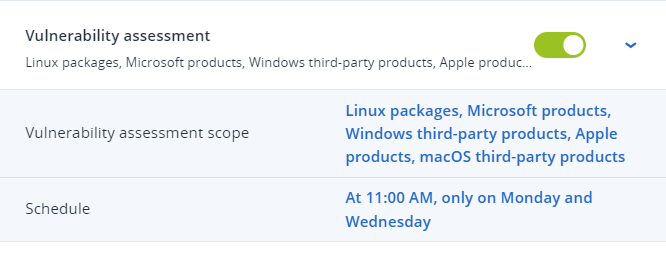
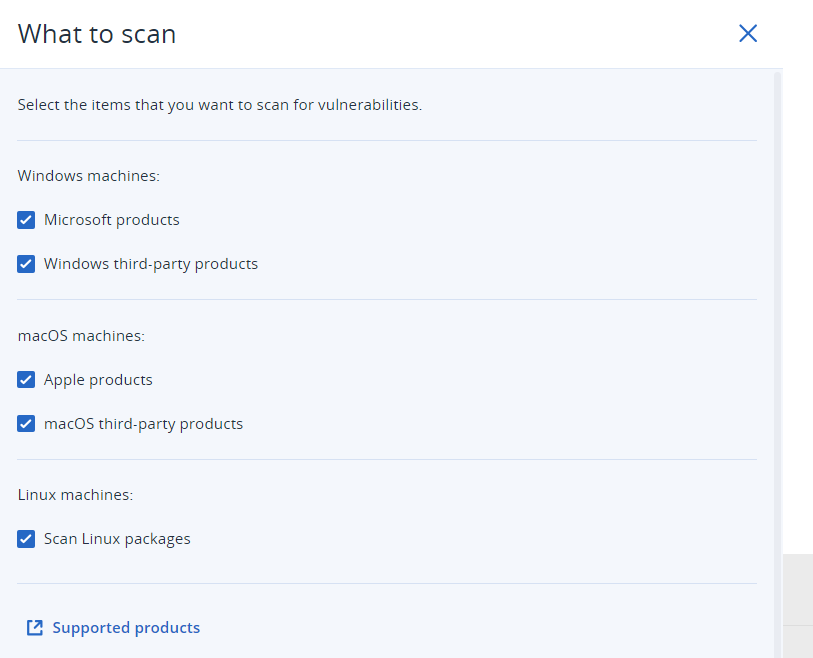
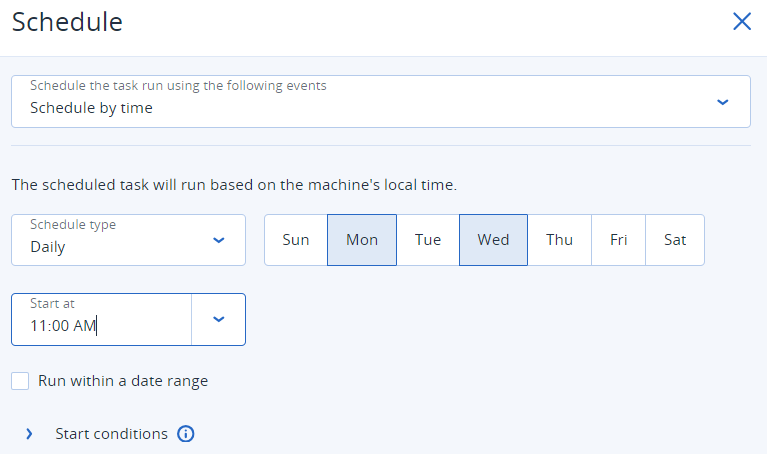
The solution starts with a vulnerability assessment, in which MSPs can select the devices to be targeted for scanning and patching. The assessment scope includes Linux packages, Microsoft products, Windows third-party products, Apple products and macOS third-party applications. The scan schedule can be customized to run at specific times, such as every Monday and Wednesday at 11:00 a.m.
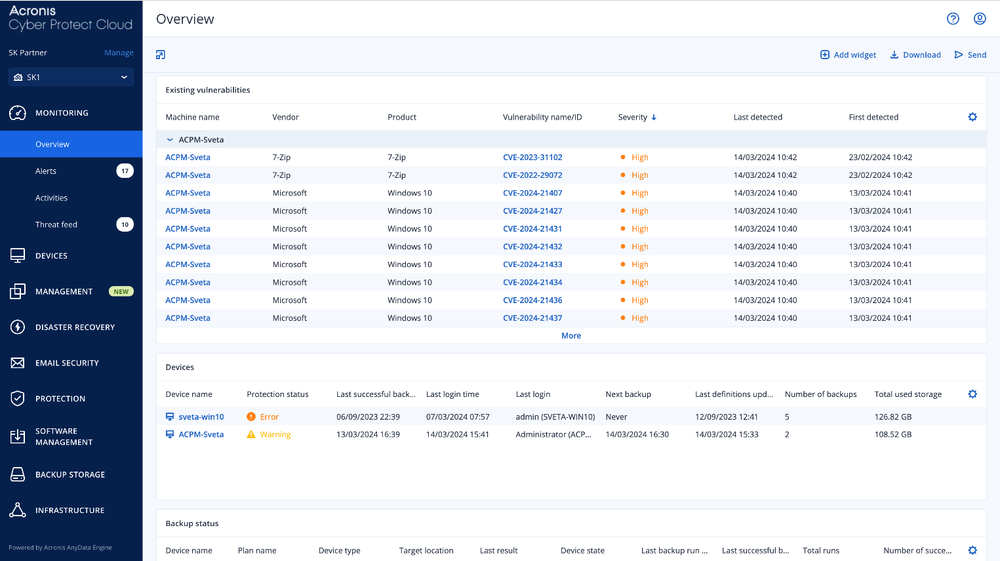
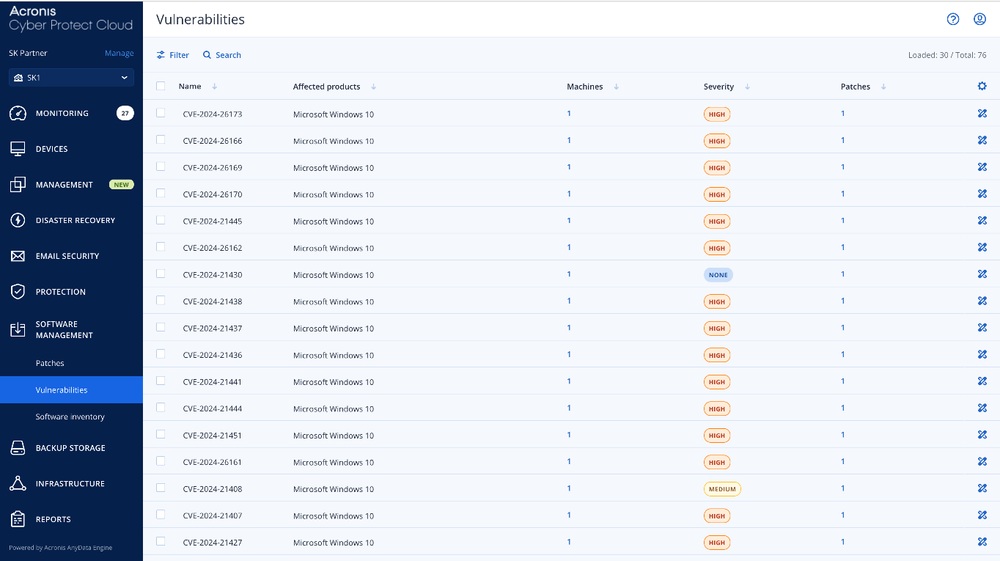
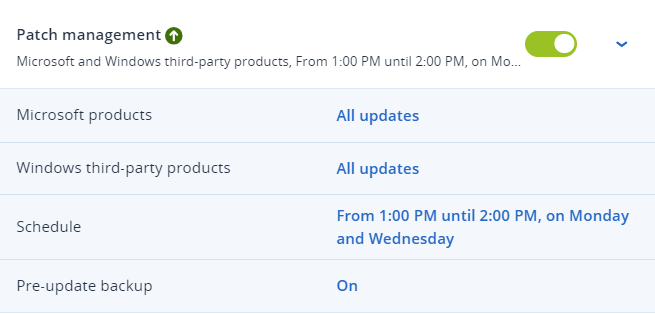
Note that severity ratings, for example “Critical” and “High,” are based on the Common Vulnerability Scoring System (CVSS). Once the vulnerabilities are identified, Acronis RMM enables MSPs to apply patches to both Microsoft products and Windows third-party applications. The default deployment schedule is set for every Monday and Wednesday, but MSPs can also configure a maintenance window for patches to avoid disrupting productivity. Additionally, the solution offers a pre-update backup feature that automatically creates an image backup before a patch is applied, eliminating the risk of faulty patches rendering systems unusable.
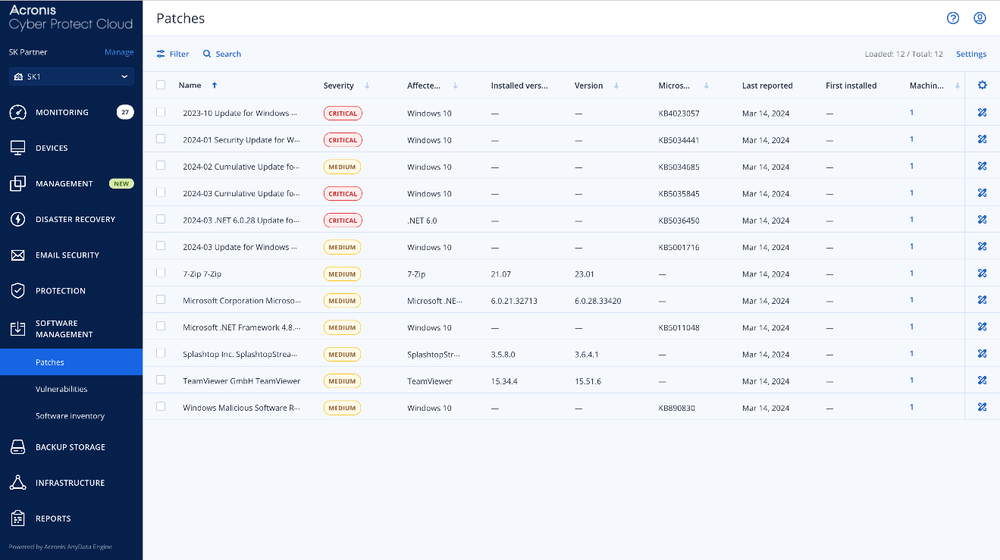
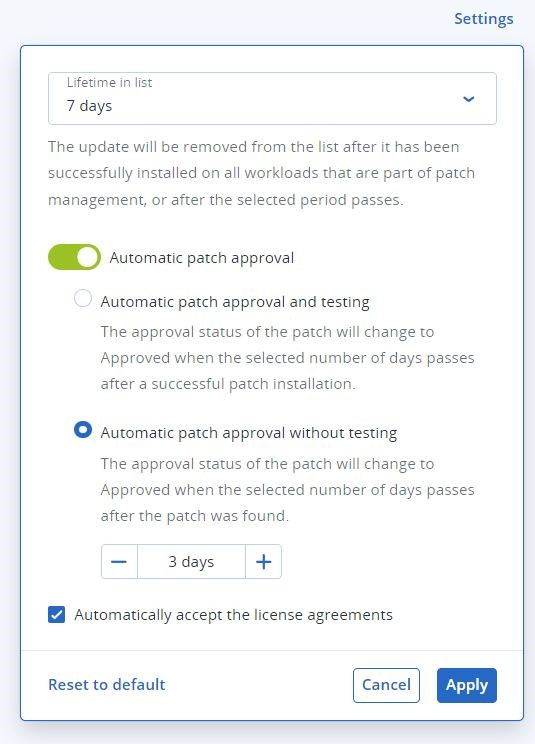
The patch management functionality within Acronis RMM provides a comprehensive view of vulnerabilities and patches. MSPs can browse the vulnerabilities list and remediate them by applying patches. The solution offers two options for patch approval: automatic patch approval and testing, or automatic patch approval without testing. These options streamline the patch approval process, saving time and enabling zero-day patching.
MSPs can also automate the way they handle patch management, reducing the risk of data breaches and improving client security. By streamlining vulnerability assessment and patch deployment, MSPs can enhance their productivity and focus on other mission-critical activities without the labor-intensive burden of manual patching.
How to create a protection plan with Acronis RMM: Customize scanning and patching
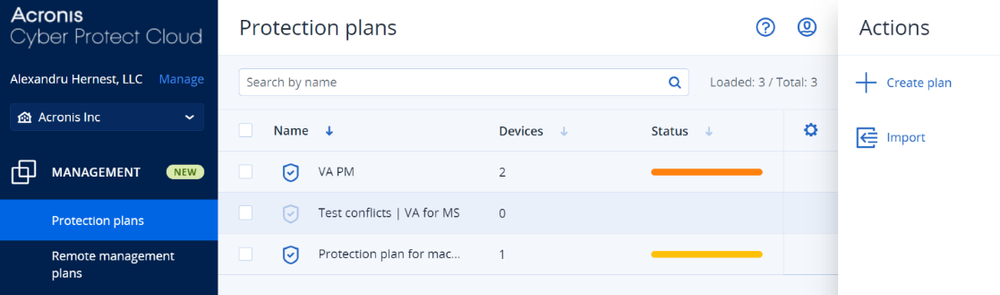
Under the “Protection plan” sub-menu, Acronis MSP partners can click “Create plan” to build a protection plan tailored to their clients’ needs. It can include stringent specifications for applying patches. For instance, administrators can set a policy that only Windows 2016 servers of high and critical severity are only to be applied patches if in an approved status.

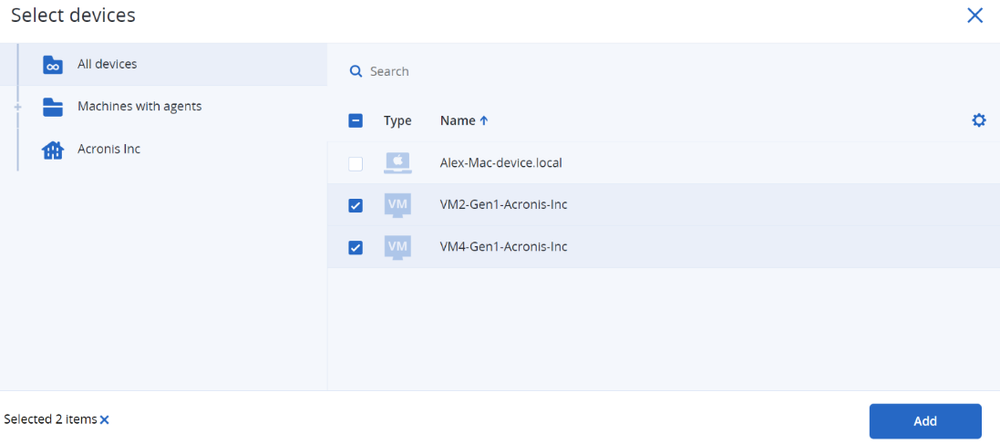
Perhaps it is not the best time to scan and patch all devices during operating hours, but your MSP business cannot afford to wait until the end of the workday. Rest assured, Acronis empowers our MSP partners with the flexibility to scan and apply patches to specific devices. Partners can select the devices they want to target for vulnerability scanning and patch application by indicating the designated devices and clicking “Add.” This ensures the identified devices are added to the protection plan.
Once an Acronis partner creates a new protection plan, they can rename the plan based on the set criteria and specifications. By clicking the pencil icon to edit, administrators can rename the protection plan accordingly. Using our example, an administrator might consider naming the protection plan,” Windows Server 16 high and critical production” or something similar.

With flexible scheduling options, Acronis RMM makes it easy for MSPs to plan ahead by scanning and patching at the most optimal times — eliminating the risk of disruption and unexpected downtime to client operations. In the first example, we set vulnerability assessments to be scheduled every Monday and Wednesday at 11:00 a.m. For Acronis partners, it would look like the console images below:
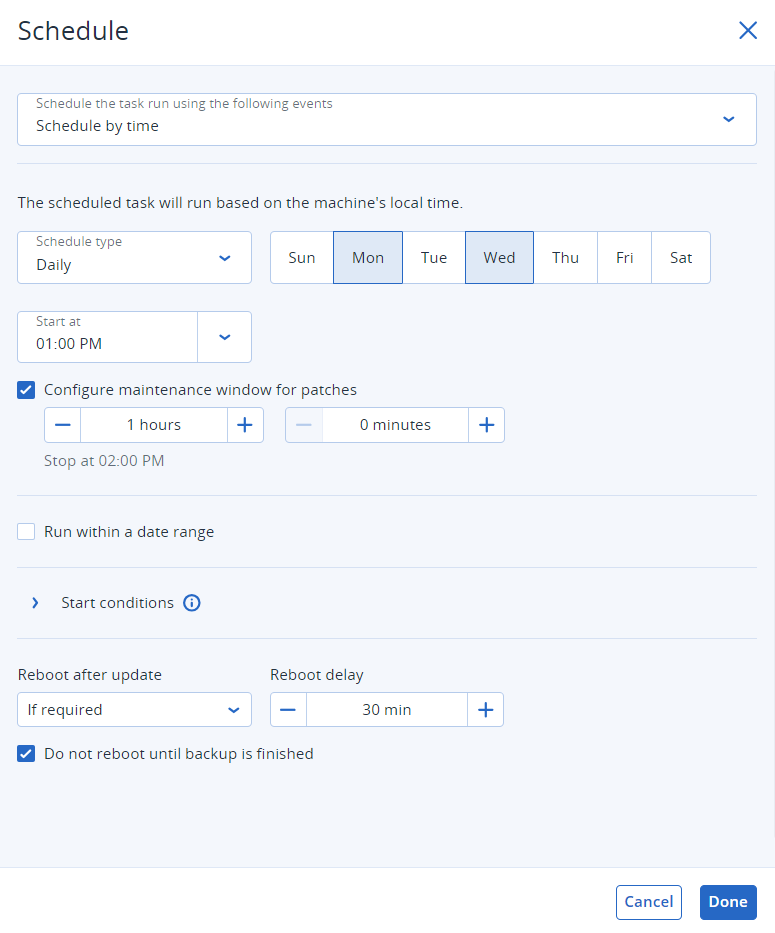
Additionally, scheduling patch deployment can be done in a similar fashion. Because the default deployment schedule will apply patches every Monday and Wednesday, we recommend configuring an adequate maintenance window for patches. In our example, with patch management enabled, let’s start at 1:00 p.m. and select the duration for this activity to be one hour. The administrator would proceed to fill out the fields and like the below:
Say goodbye to bad patches: Acronis’ pre-update backup ensures fail-safe patching
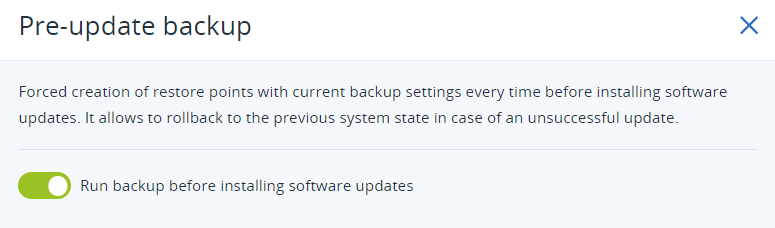
Acronis Cyber Platform (formerly Acronis Cyber Protect Cloud) delivers pre-update backup that automatically creates an image backup before a patch is applied. Far too often bad patches are applied leading to technician headaches and downtime. With pre-update backup, this allows MSPs to roll back to a previous system state in case of an unsuccessful patching update.
Streamlining patch management is a must for modern MSPs
Automated patching is a simple solution to the complex problem of patch management. Acronis Advanced Management offers a comprehensive patch management solution that can help MSPs overcome the challenges they face, including downtime, failed patches, labor-intensive processes and open security gaps. By automating vulnerability assessments and patch deployment, MSPs can improve their patching strategy, reduce the risk of data breaches and enhance client security.
Explore a personalized demo of Acronis RMM and ask our experts about our 2024 product roadmap. Schedule a demo!
Written by
About Acronis
Acronis is a leader in AI-native cyber protection, unifying data protection, cybersecurity, IT operations and hybrid infrastructure to deliver business continuity, security and compliance with less cost and complexity. More than 21,000 service providers trust Acronis to protect over 750,000 businesses in 150 countries. Acronis is headquartered in Schaffhausen, Switzerland.