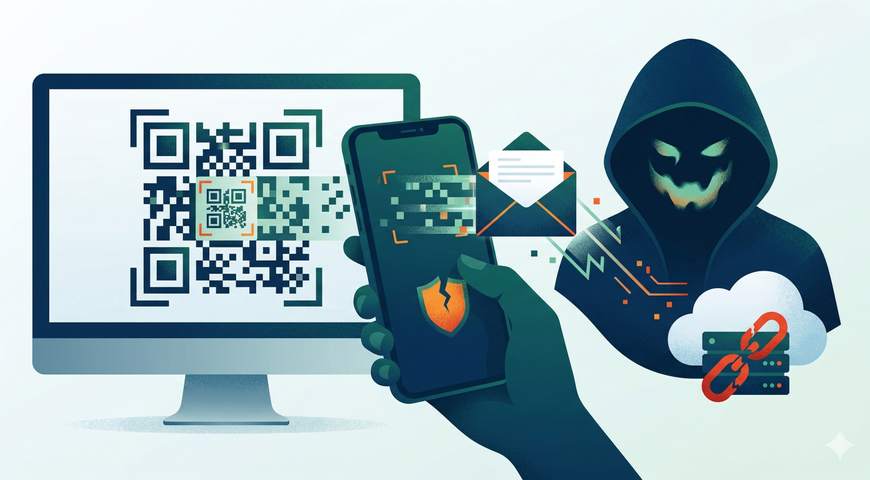
QR code phishing is a social engineering attack that embeds malicious URLs inside QR code images delivered through email. Because the payload lives inside an image — not in a clickable link or plain text — legacy secure email gateways (SEGs) never see it. The email passes inspection. The user scans the code with their phone. And the attack moves from a protected corporate desktop to an unmanaged mobile device outside your security perimeter.
This isn't a theoretical edge case. The Anti-Phishing Working Group tracked a 400% increase in image-based phishing attacks heading into 2025, and the technique has only accelerated since. Microsoft's Digital Defense Report flagged more than 15,000 daily QR-code-bearing phishing emails targeting the education sector alone. For IT administrators and MSPs running traditional email filters, the math is stark: your gateway was built to parse text, and the threat has moved to images.
The industry shorthand for this attack is "quishing" — a portmanteau of QR and phishing. Whatever you call it, the underlying problem is architectural. And it demands a different kind of detection.
Key Takeaways
· QR code phishing (quishing) hides malicious URLs inside image files that legacy text-based email filters cannot parse, creating a structural detection gap.
· Image-based attacks surged 400% heading into 2025 (APWG), with 12% to 12.4% of all phishing incidents now using image-encoded payloads.
· The attack shifts the user from a managed desktop to an unmanaged mobile device, bypassing endpoint protection, web proxies, and corporate DNS filtering.
· Attackers are evolving fast — using logo-embedded QR codes, Blob URIs, ASCII-art codes, split-image delivery, and multipart MIME abuse to defeat even basic image scanning.
· 73% of users scan QR codes without verifying the destination, making technological interception — not training alone — the only scalable defense.
· Detection requires image recognition and runtime analysis, not just URL blocklists. Acronis Advanced Email Security uses both to catch image-based payloads before they reach the inbox.
What Is QR Code Phishing? Why "Quishing" Is More Than a Buzzword
QR code phishing is a phishing technique where the malicious link — typically a credential-harvesting page, a malware download, or a session-hijacking redirect — is encoded into a QR code image and delivered via email or embedded inside a PDF or document attachment.
The attacker's lure follows the same playbook as traditional phishing: fake HR notices, mandatory MFA resets, payroll updates, or IT compliance deadlines. The difference is the delivery mechanism. Instead of a clickable hyperlink, the email contains a QR code image and instructs the user to scan it with their phone.
That single change in format breaks the detection model that most email security tools rely on. A secure email gateway inspects headers, parses body text, extracts URLs, and checks them against known blocklists and reputation databases. When the malicious URL is encoded inside the pixel matrix of an image, none of those inspections apply. The gateway sees an image file. It passes it through.
The term "quishing" has drawn criticism in some professional circles — it's just phishing with QR codes, after all. But the distinction matters operationally. Quishing isn't just a rebranding of a familiar attack. It exposes a fundamentally different failure mode in email security infrastructure: the inability to read image-encoded data. That's why it warrants its own category in threat intelligence and its own detection strategy in your security stack.
Why QR Code Phishing Is Rising in 2026
The surge in quishing tracks directly to attacker economics. Image-based payloads work because they exploit a gap that most organizations haven't closed.
The APWG documented a 400% increase in these attacks heading into 2025. Keepnet Labs and Supercode report that 12% to 12.4% of all phishing incidents now rely on image-based payloads — up sharply from negligible levels just a few years ago. ZenSec identified 1.7 million unique malicious QR codes detected in attachments alone across 2025.
Several converging forces are accelerating adoption by threat actors:
Legacy filters remain blind. Most SEGs still operate on text-parsing architectures designed over a decade ago. As long as that gap exists, QR-code-based delivery offers a reliable way to bypass automated defenses.
Users trust QR codes. Research from KnowBe4 and NordVPN found that 73% of users scan QR codes without verifying where the link goes. People are conditioned to scan codes for restaurant menus, parking payments, and conference check-ins. That learned trust transfers directly to malicious codes in emails.
The economics favor speed. Kymatio's 2026 phishing benchmarks show the average time-to-click on a phishing payload is just 21 seconds. Huntress reports the median time-to-ransom — from initial compromise to encryption and extortion — has dropped to 17 to 20 hours. Attackers don't need sophisticated persistence when the initial foothold comes this fast.
Financial motivation dominates. Microsoft's Digital Defense Report attributes 52% of cyber incidents to financially motivated actors. These aren't nation-state operators running long-burn espionage campaigns. They're running industrial-scale credential harvesting and extortion operations — and image-based phishing gives them a scalable delivery channel.
Why Traditional Secure Email Gateways Miss Image-Based Threats
The architectural failure is straightforward. Legacy SEGs were built to do three things well: parse email headers, analyze body text and HTML, and check extracted URLs against blocklists and reputation databases. That pipeline works when the malicious payload is a plaintext URL or an embedded hyperlink.
When the payload is encoded inside a QR code image, the SEG's extraction pipeline has nothing to extract. The image is a JPEG, PNG, or GIF attachment. The gateway sees a file with an image MIME type, finds no suspicious URLs in the email body, and delivers the message.
This isn't a tuning problem or a signature gap. It's a design limitation. The gateway was never built to decode the data matrix inside an image file, resolve the encoded URL, and evaluate it for malicious intent. Adding that capability requires a fundamentally different detection layer — one that includes image recognition, optical decoding, and dynamic analysis of the resolved destination.
Some organizations attempt to close this gap with endpoint detection or user-reported phishing workflows. But endpoint tools only engage after the user has already scanned the code and opened the link — on a device that may sit entirely outside the corporate security perimeter. And user-reported workflows depend on people recognizing the threat, which the 73% scan-without-verifying statistic directly undercuts.
The Verizon 2025 Data Breach Investigations Report underscores the broader context: phishing remains the initial access vector in 16% of all confirmed breaches, and vulnerability exploitation has risen to 20% of breaches (up 34% year over year). Email security is not a solved problem — it's an evolving one. And image-based payloads represent the next evolution that most gateways aren't equipped to handle.
For a deeper look at how modern email defense architectures address these gaps, see Acronis's guide to advanced techniques for email security.
The Mobile Device Risk: How the Attack Escapes the Corporate Perimeter
The QR code doesn't just evade the email filter. It shifts the entire attack chain to a different device — one your security stack probably doesn't control.
Here's the sequence: an employee receives a phishing email on their corporate workstation. The email contains a QR code and a pretext — scan this to verify your identity, update your payroll, complete a compliance form. The user opens their personal phone, scans the code, and follows the link.
At that moment, the attack has moved from a managed corporate endpoint — protected by endpoint detection, web proxies, DNS filtering, and DLP policies — to a personal mobile device with none of those controls. The phishing page loads in a mobile browser. Credentials are entered. The attacker now has valid credentials to an enterprise account, harvested entirely outside the organization's security perimeter.
This is the structural advantage of quishing over traditional link-based phishing. A malicious URL in an email body can be rewritten, sandboxed, or blocked by a web proxy. A QR code scanned by a personal phone bypasses all of those layers.
For MSPs managing client environments, this creates a particularly difficult operational problem. You can't enforce mobile device management on every employee's personal phone. You can't guarantee that personal devices run current OS versions or security patches. The only reliable interception point is before the email reaches the inbox — which brings the problem back to your email security layer and whether it can actually detect what's inside the image.
Understanding how to respond when these attacks succeed is critical. Acronis's incident response guide covers the operational playbook for recovering from credential compromise and account takeover scenarios.
Beyond Basic QR Codes: The Rise of Evasive and Obfuscated Threats
Early quishing attacks used standard black-and-white QR codes — easily recognizable and, in theory, detectable by basic optical scanning tools. That era is ending.
Attackers are now deploying a range of evasive phishing techniques designed to defeat both human visual inspection and automated image analysis:
"Fancy" QR codes with embedded logos and custom styling. KnowBe4 has documented the rise of QR codes that incorporate brand logos, altered module shapes, and blended color patterns. These modifications don't break the code's scannability but do disrupt the pixel-pattern assumptions that basic detection tools rely on.
ASCII-art and Unicode-rendered QR codes. Barracuda's research documented phishing campaigns that construct QR codes from ASCII or Unicode text characters rather than embedded images. Because the "image" is technically rendered from text, it evades filters that only scan image attachments.
Blob URIs and in-app deep links. Palo Alto Networks' Unit 42 has tracked campaigns that use Blob URIs — data objects created in the browser rather than fetched from a server — to render phishing pages. Others use deep links that open directly inside apps like Telegram, bypassing the mobile browser entirely and avoiding URL-reputation checks.
Split-image and multipart MIME delivery. Some campaigns split the QR code across multiple image fragments or abuse multipart MIME structures to assemble the code in the email client's rendering engine, rather than delivering a single scannable image file.
Legitimate redirect infrastructure. Attackers increasingly route QR code URLs through trusted domains — URL shorteners, cloud storage platforms, or legitimate SaaS redirect chains — so the initial destination passes reputation checks even if the final landing page is malicious.
Each of these techniques targets a different assumption in the detection pipeline. Collectively, they make it clear that stopping quishing requires more than adding a QR code scanner to an existing gateway. It requires image recognition that can handle visual obfuscation, and runtime analysis that can follow redirect chains and evaluate final destinations dynamically.
What This Means for IT Admins and MSPs
If you're managing email security for an organization or a portfolio of MSP clients, the operational impact of quishing is concrete:
Rising help desk volume. Users report suspicious QR code emails. Analysts investigate. Many are real threats that the filter missed. Ticket volume grows, and triage time scales with it.
Credential compromise from outside your perimeter. When credentials are harvested on personal mobile devices, your first indicator may be an anomalous login — not a blocked phishing email. Detection shifts from prevention to response, which is slower and more expensive.
False sense of security from existing tools. If your SEG reports a low phishing detection rate while image-based threats are passing through unscanned, your metrics are misleading. You're not catching more — you're seeing less.
Compliance and audit exposure. Regulations increasingly expect organizations to demonstrate effective email threat prevention. A known architectural gap in image-based detection is difficult to defend in an audit.
For MSPs specifically, this creates a trust problem. Clients expect their managed security provider to catch the threats they can't catch themselves. When image-based phishing bypasses the email filter you deployed, that trust erodes fast — along with the operational efficiency your team depends on.
The practical question isn't whether to add image-based detection. It's how quickly you can deploy it without disrupting mail flow or adding another tool that generates more noise than signal. Understanding the capabilities of advanced threat detection and response platforms is a useful starting point for evaluating your options.
Case Study: How Lithium Systems Replaced Microsoft Defender to Stop Evasive Threats
Lithium Systems is a UK-based MSP protecting more than 1,200 endpoints across its client base. Their security team was facing a specific, measurable problem: image-based phishing emails were bypassing Microsoft Defender for Office 365 and reaching client inboxes. The result was a spike in help desk tickets, credential compromise incidents, and escalations that consumed senior engineering time.
After evaluating alternatives, Lithium Systems replaced Microsoft Defender with Acronis Advanced Email Security. The operational results were immediate and specific:
The image-based phishing emails that had been passing through Defender were caught before reaching inboxes. Help desk ticket volume from suspicious email reports dropped. Client onboarding time for the new email security layer was reduced to under an hour. And junior technicians were able to resolve security-related tickets without escalating to senior staff — directly reducing operational cost.
This case matters for two reasons. First, it demonstrates that the detection gap in legacy tools isn't hypothetical — a real MSP, running a major vendor's email security product, experienced exactly the failure mode this article describes. Second, it shows that closing the gap doesn't require months of deployment or retraining. The switch was operationally lightweight and produced measurable results immediately.
How Acronis Advanced Email Security Detects What Legacy Filters Miss
The detection gap described throughout this article — image-based payloads that evade text-parsing gateways — requires specific technical capabilities to close. Acronis Advanced Email Security addresses this gap through a combination of image recognition, CPU-level analysis, and high-speed dynamic scanning.
Image recognition engine. The platform includes a specialized image recognition engine designed to identify, decode, and evaluate URLs embedded within QR code images, logos, and other visual elements. This is the capability that directly addresses the SEG blind spot: instead of skipping image attachments, the system unpacks them and analyzes the encoded data.
CPU-level analysis. For payloads that involve evasive malware — including zero-day threats designed to bypass signature-based detection — Acronis analyzes execution flows at the CPU instruction level. By inspecting assembly code and detecting deviations at the earliest exploit stage, this approach catches threats before they release their payload. This goes deeper than traditional sandboxing, which often relies on behavioral observation after the malware has begun executing.
Speed without delivery delays. Legacy sandbox approaches can take 20 minutes or more to return a verdict, causing unacceptable delays in email delivery. Acronis's dynamic scanning delivers verdicts in seconds to milliseconds, maintaining normal mail flow with near-zero false positives. For MSPs managing hundreds of mailboxes, this eliminates the tradeoff between security coverage and business continuity.
These capabilities are not generic claims. They are the specific technical differentiators that enabled the Lithium Systems results described above — and they represent the architectural shift required to detect evasive phishing techniques that legacy gateways were never designed to handle.
Legacy SEG vs. Modern Detection: A Quick Comparison
FAQ
What is quishing in cybersecurity?
Quishing is a phishing attack that delivers malicious URLs encoded inside QR code images rather than as clickable text links. The term combines "QR" and "phishing." Because the payload is embedded in an image, it bypasses traditional email filters that only parse text and extract hyperlinks. The attack typically redirects the victim to a credential-harvesting page or a malware download.
Why do QR code phishing attacks bypass traditional email filters?
Legacy secure email gateways analyze email headers, body text, and extracted URLs. When a malicious URL is encoded inside the pixel matrix of a QR code image, the gateway sees only an image file — not a URL. Without image recognition and optical decoding capabilities, the filter has no payload to evaluate, and the email is delivered as benign.
How can IT admins detect malicious QR codes in email?
Detection requires an email security platform with an integrated image recognition engine that can identify QR codes within attachments and inline images, decode them, and evaluate the destination URL in real time. CPU-level or dynamic runtime analysis adds a second layer by catching evasive payloads that use obfuscation, redirect chains, or zero-day exploits. Basic URL blocklists and signature-based tools are not sufficient.
What is the difference between phishing, spear phishing, and quishing?
Phishing is a broad category of social engineering attacks delivered at scale. Spear phishing targets specific individuals using personalized lures. Quishing refers specifically to the delivery mechanism — using QR code images to encode the malicious payload. A quishing attack can be broad or targeted; the distinction is the image-based delivery format, not the targeting strategy. All three can result in credential theft, malware installation, or account compromise.
Is security awareness training enough to stop QR code phishing?
Training is a necessary part of any defense-in-depth strategy, but it is not sufficient on its own. Data shows that 73% of users scan QR codes without verifying the destination, and the average time-to-click on a phishing payload is 21 seconds. Automated, pre-inbox detection is the only scalable defense against industrial-volume quishing campaigns.
Closing the Gap
QR code phishing isn't a novelty attack. It's a structural challenge for any organization still relying on text-based email filtering. The payload hides in images. The attack moves to unmanaged mobile devices. The evasion techniques are evolving faster than legacy gateways can adapt.
The path forward requires email security that can see inside images, analyze payloads at the CPU level, and return verdicts fast enough to avoid disrupting mail flow. For MSPs and IT administrators facing rising ticket volumes and credential compromise incidents, the question isn't whether to upgrade — it's how long you can afford to wait.
See It in Action
Read the full case study: Discover how Lithium Systems eliminated image-based phishing threats and reduced client onboarding to under an hour by replacing Microsoft Defender with Acronis Advanced Email Security.
Request a demo: See how the image recognition engine and CPU-level analysis in Acronis Advanced Email Security detect evasive threats that legacy filters miss.
About Acronis
A Swiss company founded in Singapore in 2003, Acronis has 15 offices worldwide and employees in 60+ countries. Acronis Cyber Platform is available in 26 languages in 150 countries and is used by over 21,000 service providers to protect over 750,000 businesses.