Nowadays, businesses of all sizes rely on MSPs and IT service providers for key functions such as cybersecurity, cloud management, and digital transformation, because it is often more cost-effective and efficient than handling these tasks in-house. However, that places enormous pressure on those providers because they are expected to solve a wide range of problems around the clock. To achieve this level of service, they need reliable ticketing tools that deliver real-time information and support automated end-to-end processes, which directly impact multiple critical areas for profitability, customer satisfaction and productivity.
In this article, we will explore why ticketing tools are important for MSPs and IT service providers, the core functions of these tools, the types of ticketing systems available, the benefits they deliver, and when to use them. In addition, we will compare the top options on the market to help you choose the right one for your business.
Understanding ticketing tools for MSPs
Every single support request your clients submit creates a record that needs tracking, prioritization, and resolution. That is what ticketing systems are used for: to transform chaotic email threads and phone calls into organized and manageable workflows.
What is a ticketing tool in the context of IT services?
What are the differences between standalone help desk tools and PSA ticketing systems?
Standalone help desk software focuses on ticket management and customer support. It routes support requests and tracks resolution but lacks the broader business management features that MSPs need.
PSA-based ticketing systems, on the other hand, integrate ticketing with billing, time tracking, contract management and project workflows. A significant benefit they offer is that once one of your technicians resolves a problem and closes a ticket, time automatically flows to invoicing, eliminating manual effort and capturing every billable hour. As you can imagine, for MSPs managing multiple clients with different service level agreements, this is extremely important.
Why MSPs need ticketing as part of a bigger automation strategy
One thing is for sure: manual ticket management does not scale. Spreadsheets work for ten clients maybe, but at fifty you are drowning. That is why MSPs need ticketing integrated into automation workflows to connect RMM alerts and backup monitoring into one unified platform.
The idea is to automate each step of the process, so your RMM detects a failing backup, creates a ticket, assigns it, and tracks time. That gives you accurate real-time information, which helps you keep your organization profitable, never miss billable hours, and improve client satisfaction.
Core functions of a ticketing tool for IT service providers
- Consolidate requests from email, alerts, portals, and monitoring tools: Support requests arrive through email, RMM tools, backup systems, and self-service portals. Managing these manually is nearly impossible, and if you try, the result is always the same: lost revenue and a melting client base. That's why modern ticketing software consolidates all communication channels into a single pipeline, with the goal of preventing these negative scenarios for your business and ensuring you or your team doesn't miss a single opportunity.
- Routing and prioritizing tickets to the right technician or team: Ticketing tools are highly efficient because they automatically assign tickets based on type, client priority, SLA requirements, and technician expertise. This ensures tickets are categorized and routed to technicians who have the knowledge to fix them.
- Ensuring SLA compliance with automated workflows and alerts: SLAs are critical because they define client relationships, so your ticketing system should monitor SLA compliance in real-time, and send automated alerts when tickets approach deadlines. This built-in SLA management tracks response times across client tiers and automatically escalates overdue tickets when necessary.
- Capturing technician time and effort directly from tickets: To keep your company profitable, you can't rely on guesswork. Integrated time tracking eliminates separate timesheets; your technicians start timers when they begin work and stop them when they complete it. And yes, that process is automated too. The system captures this data in real-time and links it to specific clients for accurate billing.
- Integrating resolution steps with project or recurring services: Many tickets reveal larger patterns requiring systematic fixes. The best ticketing tools connect service desk operations with project management, letting you escalate tickets into projects while maintaining visibility across both reactive support and proactive service delivery.
Types of ticketing systems relevant to MSPs
Different MSP business models require different ticketing systems, which is why we are going to take a quick look at each to help you understand how they work and what makes them unique.
PSA-based ticketing systems for complete service automation
PSA platforms like Acronis PSA, ConnectWise Manage, and Autotask PSA offer organizations of all sizes what they need most: comprehensive business management capabilities. Their ticketing systems integrate with billing, contracts, CRM, and reporting. Or simply put, when one of your technicians closes a ticket, time flows to invoices automatically. And that's why this deep integration makes PSA systems ideal for MSPs focused on recurring revenue.
Help desk ticketing systems for basic customer support
These systems focus on a particular area, and in our case, on support management without delivering business automation. Tools like Zendesk are quite effective at ticket tracking and customer communication but lack integrated billing. The truth is that many internal IT departments use them, but they are not quite practical for MSPs managing multiple clients.
IT service management platforms for enterprise-level environments
ITSM platforms follow ITIL frameworks, and they provide structured workflows for incident management, asset management, and change management. ServiceNow is such a platform, and it offers extensive customization for enterprises and MSPs serving highly regulated industries.
Cloud-based ticketing systems for distributed teams
Cloud-based ticketing systems enable support teams to work from anywhere, and that's crucial nowadays. In fact, most ticketing tools operate as cloud platforms, because only that way can they deliver automatic updates and mobile access while eliminating infrastructure overhead.
Must-have features for MSP ticketing success
To equip your MSP or service provider company with a ticketing system that delivers success instead of headaches, focus on capabilities that directly impact operational efficiency and profitability.
- Omnichannel intake - email, RMM alerts, client portals: A reliable ticketing system must capture requests from multiple channels or sources. Email-to-ticket conversion, API integrations with RMM platforms and backup systems, and self-service portals prevent missed requests while giving your clients the flexibility they need.
- Automated time tracking linked to tickets for accurate billing: Your MSP company cannot stay profitable if it relies on manual timesheets to track billable hours. You need a system that automatically logs time spent on each ticket, linking entries to client contracts and ensuring accurate billing without administrative burden.
- Built-in SLA monitoring with real-time compliance alerts: Your system should display SLA status prominently, use visual urgency indicators, and automatically escalate at-risk tickets. Real-time tracking lets managers intervene before violations occur.
- Integration with backup, cybersecurity, and monitoring tools: Integration with such tools is mandatory because they transform alerts into actionable tickets with full context, and they serve as a lifesaving option for businesses operating across many different industries.
- Ticket-to-invoice workflows for seamless billing: Each step from resolution to invoice should be automatic, like converting ticket time to invoice line items, applying contract rates, and handling different billing models.
- Analytics dashboards with utilization, margins, and NPS scores: Dashboards showing technician utilization, ticket trends, client satisfaction scores, and contract margins help you measure key performance indicators for strategic decisions.
- Customizable portals for branding and client transparency: Client-facing portals should reflect your brand. Customizable self-service options let clients submit tickets, track progress, and access knowledge bases within a branded experience.
Benefits of using automated ticketing tools
Using the right robust IT ticketing system in your organization will deliver the following benefits:
- Faster response and solution times for client issues: Automated ticketing puts an end to assignment delays. Tickets reach your technicians much faster, and they are distributed equally and based on their expertise, which is critical for improving productivity and avoiding overhead. This also enables instant troubleshooting and significantly reduced ticket resolution times.
- Increased profitability through accurate time capture and billing: Automated time capturing guarantees accurate billing and prevents guesswork. Moreover, invoices are generated much faster, and that increases not only your company's profitability but also your clients' satisfaction level.
- Proactive service improvement using KPI-driven insights: Having detailed valuable data regarding each ticket gives you a clear picture of what can be improved. For instance, analytics show which clients generate the most support tickets, what problems recur, and which services deliver the best margins. All these statistics show you exactly how to improve productivity and generate more profits with the same workforce.
Integrations that matter for MSPs
Integration with backup and cyber protection alerts: Backup failures demand immediate attention. Integration ensures backup alerts automatically create high-priority tickets with job details, assign them to specialists immediately, and track resolution against SLA requirements.
Syncing with CRM systems for unified client records: CRM integration gives technicians instant access to account history, contract details, and communication preferences when handling support requests—ensuring personalized service.
Linking ticketing with invoicing and accounting: Integrations with QuickBooks, Xero, and Sage enable automatic invoice generation, Stripe-based payment processing , and financial reporting that reflect actual service delivery.
Connecting project management with service desk workflows: Integration lets you escalate complex tickets into formal projects, track milestones, and maintain visibility across reactive support and proactive initiatives.
Common challenges MSPS face with ticketing systems
MSPs wrestle with the same obstacles again and again, and each one slows down service delivery more than most teams realize. Some issues feel small at first, almost invisible, yet they grow into patterns that shape the entire workday. Others hit harder, revealing where processes are fragile or where the team lacks the rhythm needed to keep support steady. Here are the challenges most MSPs encounter.
- Ticket backlogs and uneven workload distribution: Backlogs form quickly when ticket routing is unclear or when a few technicians absorb most of the pressure. The queue expands, response times stretch, and your help desk loses its balance before anyone even notices.
- Poor adoption of time tracking among technicians: Many employees avoid time tracking because it feels tedious or distracting, yet without accurate entries, managers cannot see true workloads or understand how much manual effort hides inside daily routines.
- Disconnected systems creating data silos: When ticketing tools, asset platforms, and billing systems fail to communicate, information splinters. Each island of data forces teams to guess, recheck, or repeat work that should have been visible from the start.
- Difficulty linking tickets to contracts or billing: If contract terms aren't tied directly to ticket creation, small tasks drift away from their financial context. Hours disappear, billing accuracy drops, and the MSP quietly loses margin with nothing obvious to blame.
- Underutilization of reporting and analytics: Most platforms offer rich dashboards, yet many teams barely touch them. Without engaging with these insights, MSPs miss patterns, overlook inefficiencies, and walk past opportunities that could reshape service quality.
Use cases: how MSPs and service providers apply ticketing tools
MSPs use ticketing tools to bring order to an environment where tasks rarely arrive in tidy lines. Some appear as alerts in the middle of the night, others emerge from long projects, while many come from clients who simply need clarity. Each scenario calls for precision, discipline, and a system that reacts as quickly as the people who depend on it.
- Managing backup and cyber protection alerts with automated tickets: A modern platform transforms backup failures or cyber protection alarms into tickets instantly. This automatic lift keeps issues visible, moving, and properly assigned, long before anyone has time to miss a critical warning.
- Handling IT project-based services with ticket-linked tasks: Projects run smoother when tasks live inside structured tickets. Every dependency is clear. Every step is traceable. A project manager can follow progress without chasing updates through scattered conversations.
- Resolving recurring support incidents efficiently with automation: Recurring issues drain hours unless automation steps in. A refined workflow identifies repeat patterns, applies predefined actions, and accelerates resolution so technicians can stay focused on higher-value work.
- Improving transparency for clients through branded portals: A branded portal gives clients a clean window into your work. They can submit tickets, follow updates, and see progress without waiting for emails, which builds trust and reduces unnecessary back-and-forth.
- Tracking profitability of managed services contracts: When labor, time, and ticket categories align with contract terms, profitability becomes unmistakably clear. MSPs can see which agreements perform well and which quietly erode margins.
Security and compliance considerations
When you choose a ticketing system, you are not just buying workflows and pretty dashboards. You are choosing the place where client details, incident notes, and sometimes sensitive records will live for years. That makes security and compliance as important as automation or usability, especially if you handle regulated data or work with clients who expect formal audits, signed agreements, and evidence on demand.
Importance of encryption and secure data handling
Your ticketing platform should treat every record as something worth stealing. At a minimum, insist on strong encryption in transit and at rest, so attackers cannot read data even if they intercept traffic or reach storage systems. Equally important is secure handling in daily operations, including hardened infrastructure, least-privilege access, and proper segregation between tenants, teams, and environments.
Meeting compliance needs (GDPR, HIPAA, ISO standards)
GDPR focuses on lawful processing and protection of personal data, HIPAA guards health information, while ISO 27001 defines a complete framework for managing information security risks. A reliable and efficient ticketing system helps you align with all three, offering data-location clarity, data-subject controls, retention policies, and documented security controls that map cleanly to these frameworks and satisfy external auditors.
Role-based access controls for technicians and clients
Role-based access control lets you grant each technician and client only what they genuinely need, nothing more. In practice, that means granular roles, group-based permissions, and regular reviews of who can open, edit, export, or delete records. Done well, this reduces insider risk, limits blast radius, and keeps you aligned with modern access control guidelines.
Audit logs and reporting for regulatory checks
Regulators, auditors, and security teams all ask the same question in the end: who did what, when, and to which data. Your ticketing platform should maintain tamper-resistant audit logs that track logins, permission changes, ticket edits, and data exports, then surface those events through clear reports. These logs become the chronicle that proves due care, supports investigations, and helps you pass formal IT compliance audits with confidence.
Comparison of the best ticketing tools for MSPs and ITs in 2026
We will now compare the best leading MSP-focused ticketing tools: Acronis PSA, ConnectWise Manage, Autotask PSA, and Halo PSA, to help you make an informed decision without wasting countless hours of researching.
Acronis PSA ticketing system
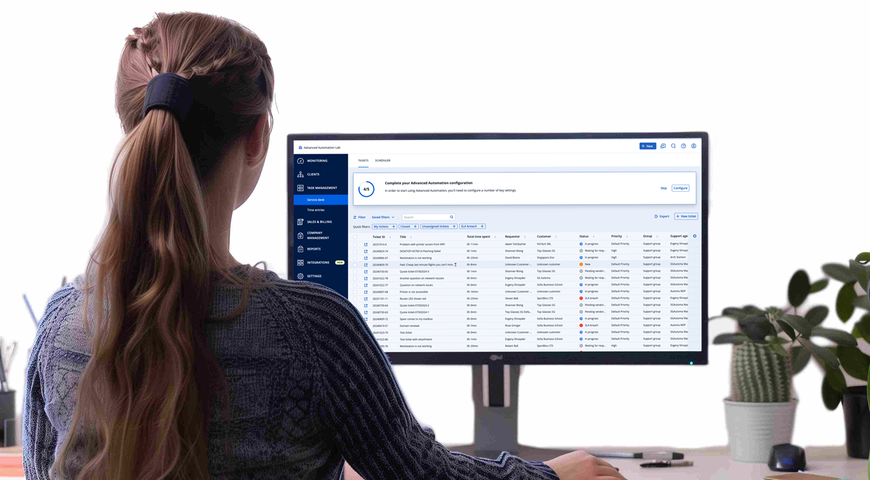
Acronis PSA brings every core MSP workflow into a single, easy-to-use platform, giving your team a clear way to manage support requests, projects, contracts, billing, and performance without jumping between five different tools to complete a simple task. It is built for cloud-first service providers that rely on recurring revenue, where efficiency, automation, fast response times, and accurate billing determine profitability. By connecting directly with Acronis cybersecurity, backup, and RMM, it helps MSPs resolve issues faster, automate financial operations, and gain visibility into exactly how the business performs day after day.
Key advantages for MSPs:
- A unified service desk that simplifies ticket handling and helps your technicians resolve issues quickly and consistently.
- Centralized ticket intake from email, the client portal, and automated alerts.
- Automatic time tracking inside every ticket to ensure accurate billing and reliable technician performance reporting.
- SLA tracking and real-time performance insights that help MSPs deliver predictable service quality.
- Native integrations with Acronis RMM, cybersecurity, and backup to convert alerts directly into tickets and connect to endpoints instantly.
- Automated, usage-based billing that removes manual work and dramatically reduces billing discrepancies.
- Consolidated invoices that combine software usage, cloud resources, and labor into a single, clear statement.
- Real-time dashboards showing margins, costs, and revenues, helping leaders make decisions based on actual data, not assumptions.
- Project planning tools that give teams a structured way to deliver complex work on time and within budget.
- Smart inventory management to control stock, track warranty status, and analyze profitability across hardware sales.
ConnectWise PSA
ConnectWise PSA is a professional services automation platform designed for MSPs that want to streamline their daily operations, improve service delivery, and scale faster. The software offers you ticketing, time tracking, projects, sales, billing, and reporting into a single system, helping your team stay productive, organized, and profitable. The platform is built around centralized IT management, powerful automation capabilities, and a growing set of integrations, so MSPs can reduce manual effort and focus their time on customer relationships and strategic initiatives.
Key advantages for MSPs:
- A responsive service desk that keeps support teams productive and helps resolve customer issues efficiently.
- Tailored time tracking that lets technicians log billable and non-billable time by client, project, or task.
- Expert-level project management tools to track milestones and ensure projects finish on time and on budget.
- Seamless automated billing designed to simplify recurring invoicing through automation and integrations.
- Strategic sales management tools to follow opportunities closely and close deals with greater confidence.
- A centralized management approach that brings PSA functionality and third-party tools together in one place.
- AI-driven hyper-automation capabilities that boost efficiency and free teams from repetitive tasks.
- Insightful reporting that delivers the metrics and visibility MSPs need to make informed business decisions.
Autotask PSA
Autotask PSA is a cloud-based professional services automation platform built specifically for IT service providers and MSPs. It brings people, processes, and technology together into a single pane of glass, helping teams scale, streamline operations, and improve profitability. With AI-driven automation, centralized operations, and customizable IT modules, Autotask gives MSPs the flexibility to adapt as they grow while maintaining full control over service delivery, financials, and performance.
Key advantages for MSPs:
- A powerful service desk that helps technicians resolve tickets faster and strengthen customer experience.
- Seamless endpoint integration to reduce context switching and accelerate troubleshooting workflows.
- Smart suggestions that surface IT documentation based on ticket context for faster resolutions.
- Customizable IT modules that automate repetitive tasks and improve efficiency from day one.
- Automatic invoicing tied to labor, contracts, expenses, and services to eliminate revenue leakage.
- Access anywhere through a secure, cloud-based PSA platform designed for high uptime.
- Actionable dashboards and widgets showing key alerts and insights in real time.
- Pre-built performance reports that highlight trends, resource utilization, and profitability.
- Built-in enterprise-grade security, including 256-bit encryption, 2FA, SSO, role-based access, backups, and verified audits.
- A unified PSA-RMM experience supported by a broader Datto product suite.
- LiveMobile app support to stay connected and manage operations on the go.
Halo PSA
Halo PSA is an all-in-one professional services automation platform built for service providers that want a simpler and more efficient way to run their managed IT business. Designed to unify service delivery, sales, projects, billing, and reporting into a single system, HaloPSA gives MSPs a faster and more controlled way to operate while staying aligned with clients. With value-focused pricing, 250+ integrations, and a long-term commitment to independence, the platform helps MSPs streamline operations without complexity or feature lock-ins.
Key advantages for MSPs:
- A powerful service desk designed specifically for MSPs, giving teams a faster, simpler way to run ticketing.
- Full visibility and pipeline management through built-in project tools that enhance productivity.
- Tailored customer experiences through integrated Sales & CRM capabilities.
- Deep time-tracking features that keep teams informed and support stronger decision-making.
- Reliable stock management for easier tracking, selling, and inventory oversight.
- Accurate contract management to maintain clarity on subscriptions and agreements.
- Automated billing processes that simplify invoicing and financial operations.
- Value-focused pricing with one product and every feature included by default.
- Easy onboarding with seamless import of tickets, projects, contracts, assets, and knowledge.
- 250+ free integrations to centralize work across existing tools.
- Recognition as a Representative Vendor in the Gartner 2025 Market Guide for ITSM Platforms.
- Cloud setup and deployment designed to be simple, fast, and accessible.
Choosing the right ticketing tool for your MSP
The ticketing tool you choose will affect how your business operates for years, so the decision matters. Look for a platform that your team can learn quickly and that holds up as you add clients. You need a user-friendly platform that feels stable on day one and remains dependable five years down the road.
Think about how your help desk team works, how they manage tickets, and how the entire process flows when pressure rises. A good option adapts to different ticketing systems, supports multi-channel support, and strengthens workflow automation so your support agents don't drown in manual tasks again.
Identifying your service delivery model (projects, recurring, break/fix)
Your delivery model defines everything, from ticket creation to ticket routing during busy weeks. A project manager sees patterns differently than a break/fix technician, and your desk team relies on support workflows that reflect real work, not theory.
When recurring services dominate, you need a desk system that reduces manual tasks without disrupting existing tools. Break/fix environments benefit from collaboration tools and fast ticketing process clarity, while project-driven MSPs depend on data migration stability and resource allocation that doesn't collapse under pressure.
Key evaluation criteria: scalability, usability, integrations, reporting
Start by asking how the platform behaves once growth accelerates, because key metrics matter long before audits arrive. Look closely at integration capabilities and whether the system introduces a unified platform or forces scattered steps.
Strong reporting should measure key performance indicators naturally, without burying insight behind noise. A refined tool avoids chaos in ticket assignment, uses web forms intelligently, and maintains support channels that feel intuitive. Above all, it must enhance collaboration so service desk teams can move as one even when the clock runs hot.
Comparing cloud vs on-premises ticketing solutions for MSPs
A cloud-based ticketing system offers flexibility, fast deployment, and freedom from hardware upkeep, making it easier to maintain support workflows as teams grow. On-premises options appeal when access controls or legacy constraints dominate, though they may strain resource allocation over time.
Consider how each handles ticketing process demands, especially when support agents face desk tickets arriving from multiple channels. Cloud solutions often provide automated workflows that route tickets cleanly, whereas on-prem setups require more manual tasks and tighter coordination within your help desk team.
Vendor reliability, roadmap, and support considerations
A reliable vendor helps the entire process stay predictable, especially when your help desk depends on stable communication channels. Examine the roadmap closely; vague promises create problems later, leaving service desk teams juggling support workflows manually. Strong vendors provide collaborative paths forward, listen to user feedback, and maintain a clear vision for automation features. They must also support data migration, offer steady integration capabilities with existing tools, and keep support agents equipped with what they need to manage tickets without friction.
Estimating total cost of ownership and potential ROI
Calculate not just licensing but everything that shadows it, including workflow automation needs, training, and long-term maintenance. True ROI appears when your help desk reduces manual tasks and gains a unified platform that supports multiple channels without slowing down. Look at how well the tool streamlines ticket creation and ticket routing, because wasted motion drains margins. The right choice should strengthen business operations, scale cleanly with your project manager's plans, and return valuable data you can use to measure key performance indicators with confidence.
FAQs
What makes a PSA-based ticketing system better for MSPs than a standard service desk?
A PSA-based ticketing system supports the entire MSP workflow, not just issue resolution. It connects tickets to contracts, service level agreements, time entries, project tasks, and billing, which allows every action to have financial and operational context. A standard service desk focuses mostly on resolving incidents and service requests, but it rarely shows whether the work was billable or whether the client agreement covered it. This difference is why MSPs lean toward PSA platforms once they begin managing multiple clients at scale.
How does a ticketing tool integrate with RMM tools and backup alerts?
Modern RMM tools monitor endpoints for performance issues, failures, and security events. When something triggers an alert, the RMM sends the information directly into the ticketing system through an integration or API. The result is a new ticket that already contains the device name, timestamp, severity, and alert content. Your technicians spend less time gathering details and more time solving the issue because the system captures the information automatically.
How does ticketing automation improve profitability for IT service providers?
Automation increases profitability by eliminating repetitive work and by enforcing consistent processes. Automatic ticket creation, routing rules, time tracking prompts, and clear service level timers reduce the number of delays or missed entries. Accurate time capture flows into billing, and your reporting reveals which services remain healthy and which consume more hours than expected. Better visibility leads to better pricing and better resource planning.
What is the difference between ticketing in a PSA and an ITSM tool?
PSA ticketing is built for MSPs that support many external clients. It connects tickets to revenue, contracts, inventory, and project management. ITSM platforms focus on internal IT operations. They follow ITIL structures such as incident, problem, and change management and are used mostly by in-house IT departments. Both categories manage tickets, yet each one serves a different operational reality.
How can MSPs migrate from spreadsheets or email to a ticketing system smoothly?
Start by identifying which clients and active issues need to move into the new system. Import clean data from spreadsheets, set up email-to-ticket rules, and define your categories and priorities. Run both systems briefly in parallel so no request is missed while your team learns the new workflow. Provide short training sessions and adjust the process week by week until everyone feels confident.
Are cloud-based ticketing systems secure enough for client data?
Yes, provided you choose a platform with strong encryption, strict access controls, multi-factor authentication, and independent certifications such as ISO 27001 or SOC 2. Cloud systems that follow these standards can protect sensitive records as effectively as on-premises solutions. Review the vendor's security documentation and follow your own best practices, and the environment becomes stable, predictable, and safe for long-term use.
Summary
Modern MSPs and IT service providers operate in an environment where speed, accuracy, and automation are no longer optional. Ticketing tools sit at the center of this reality. They transform scattered requests, alerts, and emails into structured workflows that protect SLAs, capture billable time, and keep clients satisfied. When ticketing is tightly integrated with automation, monitoring, billing, and reporting, it becomes a strategic engine for profitability, not just a support function.
Throughout this article, one thing is clear: MSPs that rely on disconnected tools, manual processes, or basic help desk systems struggle to scale. They lose visibility, miss revenue, and burn out their teams. In contrast, MSPs that adopt PSA-based ticketing systems gain real-time insight, predictable service delivery, and the ability to grow without adding chaos.
This is exactly where Acronis Ticketing System stands out.
Acronis PSA unifies ticketing, automation, billing, projects, and reporting into a single, cloud-based platform built specifically for MSPs. By natively integrating with Acronis RMM, cybersecurity, and backup solutions, it turns alerts into actionable tickets, tracks technician time automatically, enforces SLAs, and converts resolved work directly into accurate invoices. The result is faster resolution times, higher margins, and complete visibility into your business performance.
About Acronis
A Swiss company founded in Singapore in 2003, Acronis has 15 offices worldwide and employees in 60+ countries. Acronis Cyber Platform is available in 26 languages in 150 countries and is used by over 21,000 service providers to protect over 750,000 businesses.