Data replication keeps your home photos, work docs, and family videos safe by copying them across devices and cloud storage, so a laptop crash or lost phone doesn't mean lost memories. For home and office users, tools like Acronis True Image make it simple to stay protected without tech headaches.
Key takeaways
- Instant protection: Keep your most important files safe with Acronis True Image. Critical documents sync instantly across all your devices and the cloud.
- Smart efficiency: Asynchronous or snapshot methods handle photos and videos with minimal delay, saving bandwidth while keeping everything up to date on shared family or office devices.
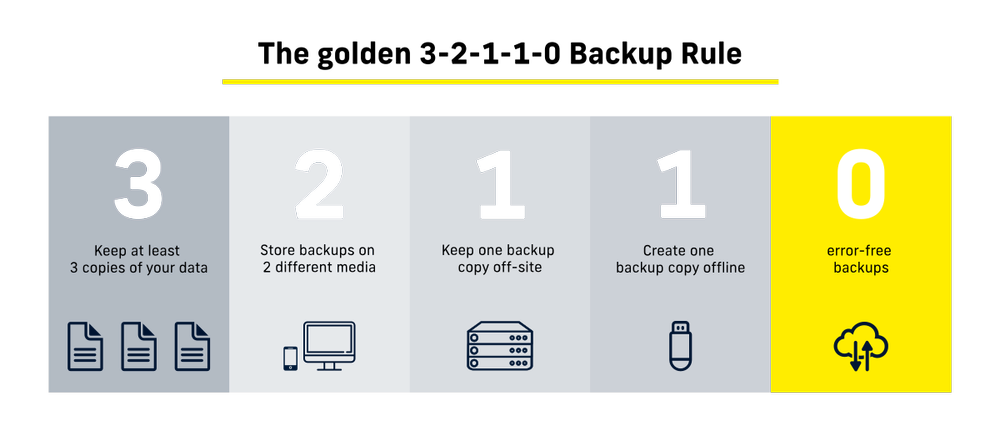
- Easy recovery: Follow the 3-2-1-1-0 rule (3 copies, 2 media types, 1 offsite, 1 immutable, 0 errors) and test monthly to restore files or full systems fast after ransomware, deletions, or hardware failures.
- Daily wins: Monitor via app alerts, encrypt for security, and combine with backups for seamless access from any device—perfect for remote work or household sharing.
What is data replication?
In practical terms, data replication involves copying data from a primary device, such as a laptop or desktop computer, to one or more secondary locations following the 3-2-1-1-0 backup rule. These locations may include external hard drives, network storage, or cloud storage, and storing data across these locations provides data redundancy, which enhances reliability and data recovery. Tools like Acronis True Image simplify this process by automating data replication, ensuring copies remain up to date, and helping ensure that data remains consistent across all copies.
By maintaining replicated copies, individuals can protect their data against hardware failures, accidental deletion, malware, and other unexpected events that could otherwise result in permanent data loss. This is why data replication is important for personal data protection, as it helps maintain continuous access and resilience against unforeseen issues.
Types of Data Replication
There are several types of data replication that home and office users commonly use, each suited to different protection needs. The main data replication schemes and replication strategies include synchronous, asynchronous, and snapshot replication, each offering distinct advantages.
Synchronous replication keeps copies updated in near real time, ensuring minimal data loss but requiring stable system performance and connectivity. Asynchronous replication, on the other hand, involves copying data to the target location with a slight delay, offering flexibility in environments where immediate consistency is not critical. Synchronous and asynchronous replication each has trade-offs in terms of timeliness, consistency and performance impact.
Asynchronous replication updates data at scheduled intervals, offering a balance between protection and system resource usage. Asynchronous replication requires substantially less bandwidth compared to synchronous methods, making it a cost-effective option for distributing data across distant locations. This approach is commonly used for personal backups and file synchronization.
Snapshot-based replication, also known as snapshot replication, captures data at a specific point in time and replicates it as a complete snapshot. This method is especially useful for system recovery and ransomware protection, allowing users to roll back to a clean version of their data. Snapshot replication involves creating a copy of the data at a specific point in time and replicating this snapshot to other locations, ensuring consistency and reliability.
Acronis True Image supports these approaches through continuous backup, scheduled backups, and full disk image snapshots, giving individuals flexibility based on how critical their data is and how often it changes.
In more advanced or database scenarios, additional replication strategies such as full table replication, partial replication, and key based incremental replication are used. Full table replication involves copying the entire database to every site within a distributed system for high redundancy, ensuring that all locations have access to the same complete dataset. Partial replication selectively copies specific data fragments, and key based incremental replication focuses on efficiently replicating only new or changed data.
Data replication techniques
Data replication can be implemented using different techniques depending on the size and type of data being protected. Individuals can perform data replication using these techniques to maintain consistent and available copies of their data across different environments.
Full replication involves copying all selected files or entire disks, which is ideal for system image backups and full recovery scenarios.
Incremental replication copies only the data that has changed since the last backup, significantly reducing storage usage and backup time. This method is particularly effective for daily personal backups.
Differential replication copies all changes from the last full backup, offering faster recovery than incremental methods while still reducing storage requirements.
Replication can be performed on different data sources, such as files, folders, or system images, depending on the user's needs.
Acronis True Image intelligently manages these techniques in the background, allowing individuals to benefit from efficient replication without manual configuration or technical complexity.
As an advanced technique, merge replication enables bidirectional synchronization of changes between multiple data sources, making it suitable for complex environments where updates can occur on both primary and secondary databases.
Database replication
Database replication is a foundational technique for ensuring data availability and resilience in modern organizations. Replication is the process of copying data from a primary database to one or more secondary databases, creating multiple copies that can be accessed from different locations. This approach safeguards against data loss and system failure by ensuring that, even if the primary database encounters an issue, the same data remains accessible elsewhere.
There are several main types of database replication, each suited to different needs. Master-slave replication involves a primary database (the master) that handles write operations, while one or more secondary databases (the slaves) receive copies of the data. This setup is ideal for distributing read workloads and protecting against data loss. Multi-master replication allows multiple databases to accept write operations, synchronizing changes across all nodes. This increases availability and supports distributed systems, but requires careful conflict resolution. Peer-to-peer replication distributes data changes among multiple databases, with each acting as both a source and a recipient, enhancing fault tolerance and load balancing.
By implementing database replication, home and office users can ensure that critical data is always available, even in the face of hardware failures or network outages. The replication process improves reliability and security by maintaining up-to-date copies of essential information across multiple locations. Data replication allows users to access their data and systems within minutes in the event of any trouble, and to restore and recover their devices without further complications.
Synchronous backup replication
When you save a file, you want to know it is safe right away. With synchronous backup replication, every time you change a document, photo, or spreadsheet, that change is saved in more than one place at the same time—such as your computer and a cloud service. The save is only “done” once all copies are updated, so every version stays perfectly in sync.
This is especially important for items you cannot afford to lose, like tax records, client files or important family photos. If your laptop suddenly fails or gets lost, you can pick up another device and continue working with the exact same, up-to-date files.
The downside is that this kind of real-time mirroring can feel slightly slower if your internet connection is weak, because your changes must reach all backup locations before they are confirmed. Many people use synchronous backup for their most important folders (like “Work” or “Documents”) and a simpler, less instant backup for everything else to keep things both safe and fast.
Automatic backup and replication with Acronis True Image
Acronis True Image smartly spots what’s new or changed in your files—like adds, edits, or deletes—without backing up everything every time. It uses efficient methods, such as monitoring your file activity logs or quick folder scans to capture only the updates, saving you time and data.
Choose real-time tracking for instant queuing of changes, or scheduled checks every few hours for lighter use. Acronis even taps into your system's history for super-fast detection.
This keeps your home backups lean and fast, reducing internet strain while ensuring your desktop, laptop, and shared office files stay perfectly synced and protected.
Benefits of data replication for individuals
Data replication provides peace of mind by ensuring important files and systems are always recoverable. It protects against hardware failures, ransomware attacks, accidental deletions, and operating system crashes. By maintaining multiple copies, data replication enhances system reliability for individuals, ensuring continuity and minimizing disruption during failures.
By maintaining multiple copies of personal data, users can quickly restore files or entire systems without relying on costly recovery services. Data recovery is a primary benefit of having replicated data, as it allows for fast restoration in case of data loss. Replication also enables seamless device migration, making it easier to move data to a new computer or recover after a system replacement.
With Acronis True Image, individuals gain not only replication but also built-in cybersecurity features, combining backup, replication, and malware protection in a single software.
Applications of data replication for home and office users
Data replication helps keep your important files safe, accessible, and organized. By creating copies of documents, photos, videos, and other personal or work-related files across multiple devices or cloud services, you can ensure that your information is always available, even if a computer crashes, a device is lost, or a file is accidentally deleted.
One of the biggest benefits of data replication is improved access to your files. Copies stored on different devices or cloud accounts allow you to open your documents, photos, and other files from anywhere, at any time. This is ideal for home offices, remote work, or families sharing devices and important files.
Data replication also serves as a reliable backup software. In the event of accidental deletion, hardware failure, or malware, replicated data can be restored quickly, preventing permanent loss. This ensures that everything from family photos and personal documents to work files remains safe.
Beyond protection, data replication supports better organization and collaboration. Keeping files updated across multiple devices makes it easy for household members or office colleagues to access the latest versions of documents. This reduces confusion caused by outdated files and allows smooth collaboration when sharing or editing content.
For users who work with home media servers, personal databases, or multiple devices, data replication ensures that information stays current and accessible without slowing down your main device. It allows files to be opened quickly and safely, whether you’re editing documents, managing household records, or enjoying personal media.
In short, data replication is a practical tool for home and office users. It protects your personal and work-related files, keeps them accessible across devices, and ensures your daily tasks and activities can continue without interruption, even when technical problems arise.
Building a personal data replication strategy
A personal data replication strategy starts with identifying which data matters most. This typically includes personal documents, photos, videos, work files, and system configurations. When planning, it's important to evaluate different replication strategies to determine which approach best fits your needs.
Next, users should decide how often data should be replicated and where it should be stored. A balanced strategy often includes both local replication for fast recovery and cloud replication for offsite protection.
Acronis True Image makes this process simple by offering flexible backup schedules, hybrid local and cloud storage options, and automatic replication that runs quietly in the background. This ensures protection without disrupting daily computer use.
Data security and recovery
Data security is crucial in data
replication, especially when personal information is involved. Replicated data
should be protected against unauthorized access, tampering and cyberthreats.
Acronis True Image enhances security by encrypting backup and replicated data, ensuring that personal files remain private whether stored locally or in the cloud. Access controls further protect data from unauthorized use.
In the event of data loss, recovery is fast and reliable. Users can restore individual files, folders, or entire systems from replicated copies, minimizing downtime and stress during unexpected incidents.
Data replication tools and technologies
Individuals can choose from a variety of data replication tools, ranging from basic file synchronization software to advanced backup and recovery tools.
Unlike simple sync tools, Acronis True Image provides full-disk imaging, incremental replication, cloud backup and ransomware protection in a single platform. Some advanced tools can also replicate data across multiple nodes, enhancing reliability and scalability by distributing to several devices or locations. This eliminates the need to manage multiple tools and reduces the risk of incomplete data protection.
Cloud-based replication technologies also play a growing role, enabling users to protect data offsite without managing physical storage devices.
Best practices for data replication
Set up replication in Acronis True Image by choosing your source folders—like Documents or Photos—and target destinations such as cloud storage or external drives, then select real-time sync for instant mirroring across devices. This keeps every change copied simultaneously to all locations, ensuring perfect consistency without data loss.
Monitor replication status regularly through the Acronis dashboard and mobile app alerts to catch any network hiccups or sync delays early. Combine it with Acronis' backup features for layered protection, so your home photos or office files stay available even if a device fails.
Test your replication setup monthly by editing a test file on one device and confirming it appears identically on others right away. This quick check verifies everything works, giving you confidence for family memories or work projects.
Common challenges in data replication
One common challenge in data replication is ensuring that all important data is included without consuming excessive storage or system resources. Poorly configured replication can also lead to outdated or incomplete backups. In remote work environments, inconsistent data access can result from data not being properly replicated across locations, disrupting business operations. Data replication helps resolve this issue by ensuring reliable and efficient data availability everywhere it is needed.
Network limitations, storage constraints, and user error can impact replication reliability. Malware and ransomware pose additional risks if backups are not properly isolated or protected.
Using a software like Acronis True Image helps overcome these challenges by automating replication, optimizing storage usage, and protecting backup data from cyber threats through built-in security features.
Emerging trends and innovations
Modern data replication continues to evolve with cloud-native technologies, smarter automation, and improved security integration.
Personal users increasingly rely on hybrid replication models that combine local backups with secure cloud storage. AI-assisted threat detection and ransomware recovery are also becoming essential features rather than optional add-ons. Modern replication tools are now designed to be compatible with a wide range of database system architectures, making integration and support more seamless across different environments.
Acronis True Image reflects these trends by integrating cybersecurity, backup, and replication into a single software designed for modern digital lifestyles.
Conclusion
Data replication is a fundamental component of personal data protection, enabling individuals to safeguard their files, systems, and digital memories against loss and disruption.
By creating and maintaining multiple copies of important data using efficient replication techniques, users can ensure availability, security, and rapid recovery when it matters most.
With software like Acronis True Image, individuals can implement a reliable, secure, and easy-to-manage data replication strategy to support everyday computing needs and provide long-term peace of mind.
About Acronis
A Swiss company founded in Singapore in 2003, Acronis has 15 offices worldwide and employees in 60+ countries. Acronis Cyber Platform is available in 26 languages in 150 countries and is used by over 21,000 service providers to protect over 750,000 businesses.