



Back to homepage
  • For MSPs
  • AI-Native
Search in acronis websites
Login for
  • Service ProvidersAcronis Cyber Protect Cloud
  • Business CustomersAccess business security, backup, and deployment products
  • Home UsersAcronis True Image
  • Acronis Partner PortalPartner resources, training, certifications, and business tools.
  • ConnectAcronis Cyber Protect Connect
  • For MSPs
  • AI-Native

Contact us

  • Contact Sales
  • Contact Support
  • Contact Renewals
  • All Contacts
Search
Try Now
Choose region and language
Americas
  • BrasilPortuguês
  • CanadaEnglish
  • CanadaFrançais
  • LATAMEspañol
  • United StatesEnglish
Asia-Pacific
  • AustraliaEnglish
  • Chinese Simplified简体中文
  • Chinese Traditional繁體中文
  • IndiaEnglish
  • Japan日本語
  • Korea한국어
  • SingaporeEnglish
Europe, Middle East and Africa
  • BulgariaБългарски
  • CzechČeština
  • EuropeEnglish
  • FranceFrançais
  • GermanyDeutsch
  • HungaryMagyar
  • Israelעברית
  • ItalyItaliano
  • NetherlandsDutch
  • PolandPolski
  • RomaniaRomână
  • SpainEspañol
  • SwedenSvenska
  • SwitzerlandDeutsch
  • TürkiyeTürkçe
  • United KingdomEnglish
Worldwide
  • GlobalEnglish
  • Americas
    • BrasilPortuguês
    • CanadaEnglish
    • CanadaFrançais
    • LATAMEspañol
    • United StatesEnglish
  • Asia-Pacific
    • AustraliaEnglish
    • Chinese Simplified简体中文
    • Chinese Traditional繁體中文
    • IndiaEnglish
    • Japan日本語
    • Korea한국어
    • SingaporeEnglish
  • Europe, Middle East and Africa
    • BulgariaБългарски
    • CzechČeština
    • EuropeEnglish
    • FranceFrançais
    • GermanyDeutsch
    • HungaryMagyar
    • Israelעברית
    • ItalyItaliano
    • NetherlandsDutch
    • PolandPolski
    • RomaniaRomână
    • SpainEspañol
    • SwedenSvenska
    • SwitzerlandDeutsch
    • TürkiyeTürkçe
    • United KingdomEnglish
  • Worldwide
    • GlobalEnglish
Acronis True Image
FOR HOME
MenuMenu
Acronis True Image
Overview
Backup
Cloning
Security
  • Backup features
    Easy BackupEmail BackupAutomatic BackupCloud BackupMobile BackupBackup ReplicationImaging SoftwareData MigrationData RecoverySurvival Kit
  • Security features
    Anti-Malware SoftwareIdentity ProtectionAntivirus SoftwareActive ProtectionReliable CybersecurityCryptojacking BlockerSecurity for MacData Protection
  • Solutions
    Gaming SecurityCloud Photo StorageElectronic SignatureMobile App
All features
Compare
Backup
Cloning
Security
Product features
Backup features
Easy Backup
Email Backup
Automatic Backup
Cloud Backup
Mobile Backup
Backup Replication
Imaging Software
Data Migration
Data Recovery
Survival Kit
Security features
Anti-Malware Software
Identity Protection
Antivirus Software
Active Protection
Reliable Cybersecurity
Cryptojacking Blocker
Security for Mac
Data Protection
Solutions
Gaming Security
Cloud Photo Storage
Electronic Signature
Mobile App
All features
Compare
Buy now
Try now
Personal cloud backup software

Personal cloud backup software

Buy nowTry now

Protect your data with a personal backup cloud

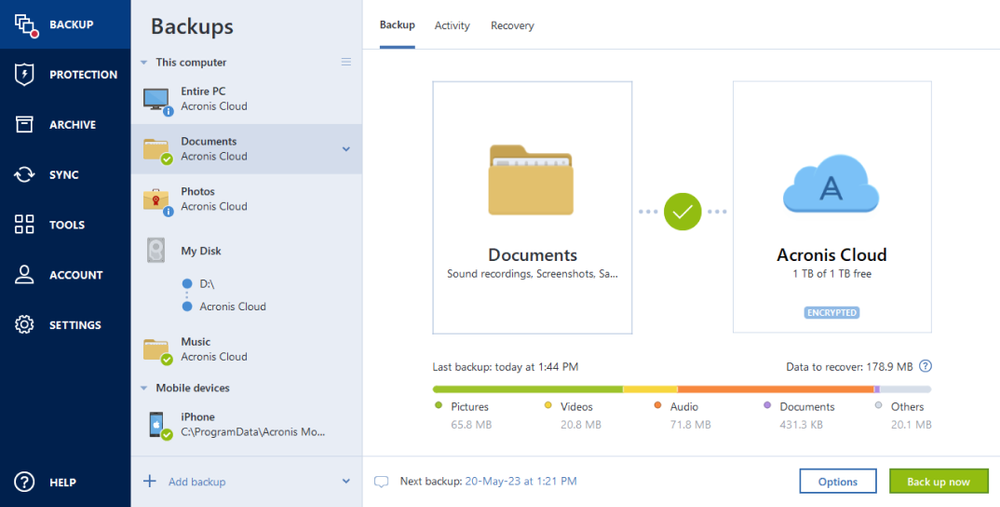
Local backup is great, but adding online backup greatly improves your protection strategy. Personal cloud backup is an easy, efficient way to add another layer of safety for your data, reliably storing it off-site in a secure location where your privacy is guaranteed. At the same time, the personal cloud enables you to access your files whenever and wherever you can connect online, giving you greater control and convenience.

With a subscription to Acronis True Image (formerly Acronis Cyber Protect Home Office), you can automatically replicate local backups in the Acronis Cloud thanks to our Dual Protection feature.

Protect your data with a personal backup cloud

Accessible and secure

  • Seamless and automatic backup of files and folders
    Seamless and automatic backup of files and folders
    Don’t waste time waiting for backups to complete. Independent lab tests prove that our personal cloud backups are up to 13 times faster than the closest competitor.
  • Encrypted and secure cloud storage for data protection
    Encrypted and secure cloud storage for data protection
    Enjoy the enhanced speed, reliability and stability of restoring from the cloud. Our technology delivers better performance and a superior online experience.
  • Back up on selected Wi-Fi
    Back up on selected Wi-Fi
    Back up to your personal cloud safely by selecting the Wi-Fi network. You’ll avoid the metered connections and unsecured public networks that can expose your data.
  • End-to-end encryption
    End-to-end encryption
    Secure your data with enterprise-grade AES-256 encryption. Ensures privacy on-site, in transit, or the cloud. Not even Acronis can read your encrypted files.
  • Automatic mobile backups
    Automatic mobile backups
    Backup your mobile to our data centers knowing that each location is designed to meet the industry’s highest standards of data security, privacy and availability.
  • Anywhere access
    Anywhere access
    Retrieve any file or folder you need from your cloud backup — wherever and whenever you want — from any internet-connected computer or mobile device.

Choose the Acronis True Image plan that meets your needs

Please wait, this may take

a few seconds...

100% Detection Rate and 0 False Alarms in independent tests
Best Windows backup software, PCWorld
Cybersecurity Excellence Awards Winner
Editors' Choice, PCWorld
OPSWAT Anti-malware Platinum certification
TIME's Best Cloud Backup Services

What our users say

  • Excellent personal cloud backup solution

    …

    Verified Acronis user
  • High-level security and great integration

    …

    Verified Acronis user
  • Reliable and efficient data recovery

    …

    Verified Acronis user

Works on multiple platforms

Microsoft Windows

  • Windows 11 (64-bit)
  • Windows 10 (64-bit)

File systems on Windows

  • NTFS
  • Ext2/Ext3/Ext4
  • ReiserFS(3)
  • Linux SWAP
  • HFS+/HFSX
  • FAT16/32/exFAT

Apple macOS

  • macOS Tahoe 26
  • macOS Sequoia 15
  • macOS Sonoma 14
  • macOS Ventura 13
  • macOS Monterey 12

File systems on macOS

  • APFS
  • HFS+
  • FAT32
  • NTFS (including Boot Camp)

Mobile operating systems

  • iOS 15 or later
  • Android 10 or later

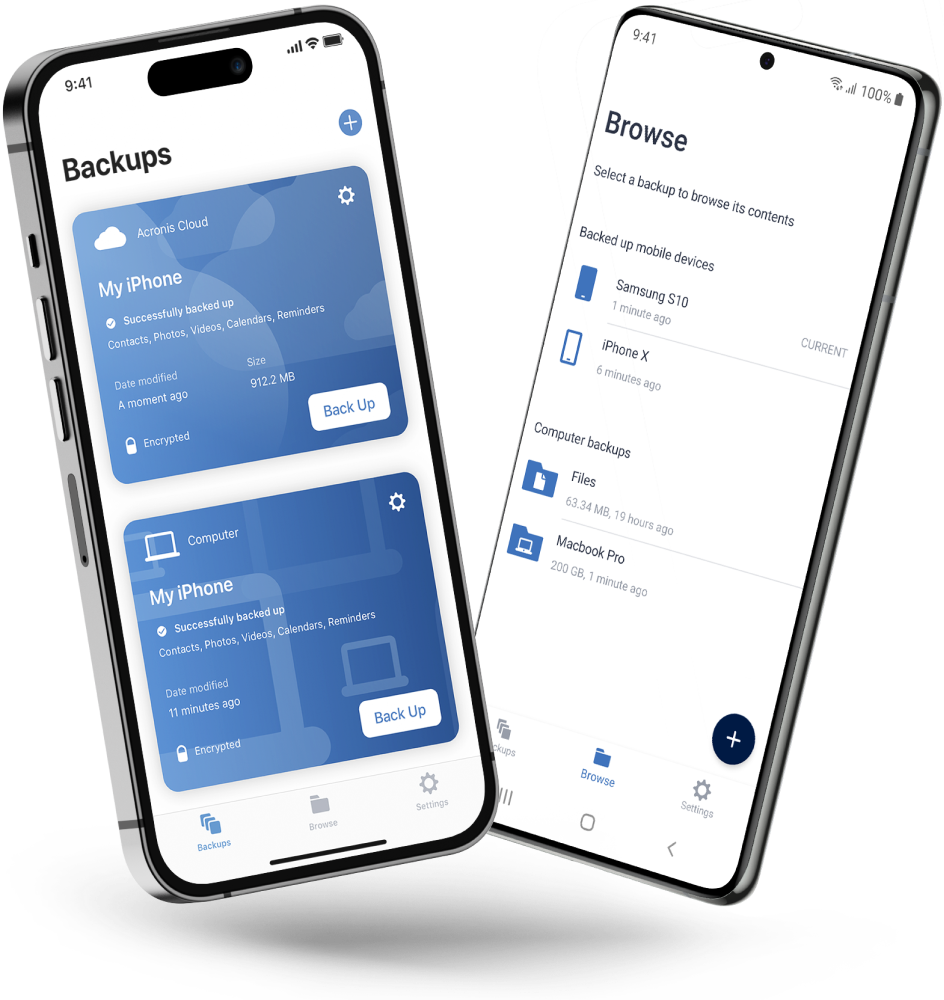
Acronis Mobile: Easy, secure and portable

Never worry about losing your photos, videos, contacts or important files again. With the Acronis Mobile app, you can easily back up everything that matters on your phone and keep it safe in the cloud. Access your files anytime, anywhere from the Acronis Cloud, whether you're switching devices or just want peace of mind. It’s fast and always ready to protect your digital life.

  • How to back up your mobile device via Wi-Fi to a PC or Mac
Acronis Mobile: Easy, secure and portable

Looking for assistance?

Frequently Asked Questions

  • Cloud backup is a service that allows users to store copies of their data on remote servers hosted by a service provider. It works by continuously or periodically uploading data from the user's device or network to these remote servers over the internet. The data is securely stored and can be accessed and restored from the cloud in the event of data loss, ensuring data protection and accessibility.

  • Cloud backup stores data on remote servers maintained by a service provider, while traditional backup methods typically involve on-site storage solutions like external hard drives or tape backups. Unlike traditional backups, cloud backups are often automatic, continuous, and accessible from anywhere with an internet connection, reducing the need for manual intervention and geographical limitations. Cloud backups offer scalability, cost-effectiveness, and data redundancy, while traditional methods may require upfront hardware investments and entail greater management complexity.

  • Cloud backup services offer data redundancy, automatic backups, and easy data recovery, enhancing reliability and reducing the risk of data loss. They provide cost savings by eliminating the need for on-premises hardware and offer scalability to accommodate changing storage needs. Security, accessibility, and collaboration features make cloud backups a convenient and versatile solution for individuals and businesses.

  • Yes, the data is fully secure and encrypted.

  • Yes, you have access to your online dashboard, where you can login with your Acronis account details and access your previously made backups.

  • If you have made a backup where this file was present, you can restore it at any time, from anywhere.

  • You can get up to 10TB cloud storage with a Premium subscription.

Product help
If you need product assistance, you can find helpful materials in the Knowledge Base. Or, post questions on our discussion boards.
Technical support
For subscription owners, there is free, 24-hour technical support. Refer to the Technical Support Site to find the appropriate support contact.
  • Company
    Press Releases
    Careers
    Contacts
    Cloud Data Centers
    Forum
  • Service Providers
    Resellers
    Developers and ISVs
    Affiliates
    OEMs
  • Active Protection
    AnyData Engine
    Universal Restore
    Anti-malware
    View all
  • Management
    Automation
    Security
    Data Protection
    View all
  • Acronis #CyberFit Sports
    Acronis Cyber Foundation
    TRU security
    Professional Services
  • ConnectWise
    Microsoft CSPs
  • Veeam
    Sophos
    Trend Micro
    ESET
    SentinelOne
    View all
  • Physical
    Virtual
    Cloud
    Endpoints
    Applications
    Mobile
  • About Acronis
  • Company
  • Press Releases
  • Careers
  • Contacts
  • Cloud Data Centers
  • Forum
  • For partners
  • Service Providers
  • Resellers
  • Developers and ISVs
  • Affiliates
  • OEMs
  • Technologies
  • Active Protection
  • AnyData Engine
  • Universal Restore
  • Anti-malware
  • View all
  • Integrations
  • Management
  • Automation
  • Security
  • Data Protection
  • View all
  • Programs & Services
  • Acronis #CyberFit Sports
  • Acronis Cyber Foundation
  • TRU security
  • Professional Services
  • Vendor Alliance
  • ConnectWise
  • Microsoft CSPs
  • Compare to
  • Veeam
  • Sophos
  • Trend Micro
  • ESET
  • SentinelOne
  • View all
  • Environments
  • Physical
  • Virtual
  • Cloud
  • Endpoints
  • Applications
  • Mobile
  • Acronis certification 1
  • Acronis certification 2
  • Acronis certification 3
  • Acronis certification 4
Engage with Acronis
  • twitter
  • blog
  • cpoc
  • yt
  • linkedin
  • reddit
  • facebook
  • Legal information
  • Privacy policy
  • Cookie Notice
  • Notice of collection
  • Sustainability & governance
© 2003–2026 Acronis International GmbH.
AcronisBack to homepage

Sorry, your browser is not supported.

It seems that our website is incompatible with your current browser's version. Don't worry, this is easily fixed!
To view our complete website, simply update your browser now or continue anyway.

Contact Sales for Product purchases:

United States: Workdays, 9:00 AM - 5:30 PM. Tel: +1 202-601-3104

Contact PR team:[email protected]

Press ReleasesProduct documentationSupport portalCustomer portalContactsRenewals

© 2003–2026 Acronis International GmbH. Legal information