
Security Posture Management for Microsoft 365
Acronis Cyber Platform

Security Posture Management for Microsoft 365

Security Posture Management for Microsoft 365
Badge

Enable efficient and best-practice delivery of Microsoft 365 security posture management services

Acronis Security Posture Management for Microsoft 365 (part of Acronis RMM) empowers MSPs of any cybersecurity expertise level to provide robust protection to multiple clients at the Microsoft 365 tenant level from a single console. It reduces human labor costs by making complex security and user management tasks manageable for nonsenior technicians and identifies more security risks compared to traditional audit methods.
Enable efficient and best-practice delivery of Microsoft 365 security posture management services
…
8:16

Why MSPs need a specialized solution for delivering Microsoft 365 security posture management

  • Microsoft’s built-in tools fall short for MSPs

    Delivering Microsoft 365 management services without specialized solutions is nearly impossible for MSPs. Microsoft’s built-in functionalities are not designed with MSPs in mind and lack critical features such as multitenancy, making the management and monitoring of multiple clients a significant operational challenge.
  • MSPs need purpose-built Microsoft 365 solutions

    Microsoft 365 security management requires purpose-built solutions to ensure efficient and effective service delivery. MSPs need best practices, multitenancy and other functionalities to avoid costly inefficiencies and improve productivity.

Included Microsoft 365 management features

  • Multitenant Microsoft 365 management

    Multitenant Microsoft 365 management

    Manage all Microsoft 365 tenants for all clients efficiently from a single web console.
  • Security posture best practice baselines

    Security posture best practice baselines

    Access a set of predefined security baselines for both Microsoft 365 tenants and Intune-managed endpoints aligned with best practices.
  • On-demand security posture audits

    On-demand security posture audits

    Instantly scan onboarded tenants against best practice baselines and perform Microsoft 365 security gap analysis whenever needed.
  • Alerts about baseline deviations

    Alerts about baseline deviations

    Receive instant alerts on newly discovered threats and user changes, helping you to quickly respond to hidden attacks and risky misconfigurations.
  • Microsoft 365 user onboarding

    Microsoft 365 user onboarding

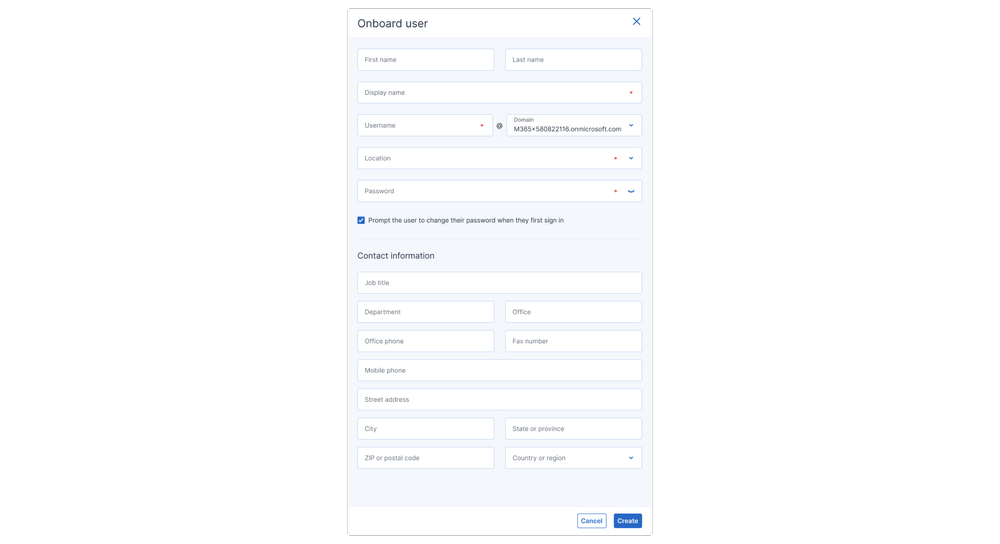
    Quickly set up new users with the required Microsoft licenses, admin roles, group memberships, mailbox settings and more.
  • Microsoft 365 user offboarding

    Microsoft 365 user offboarding

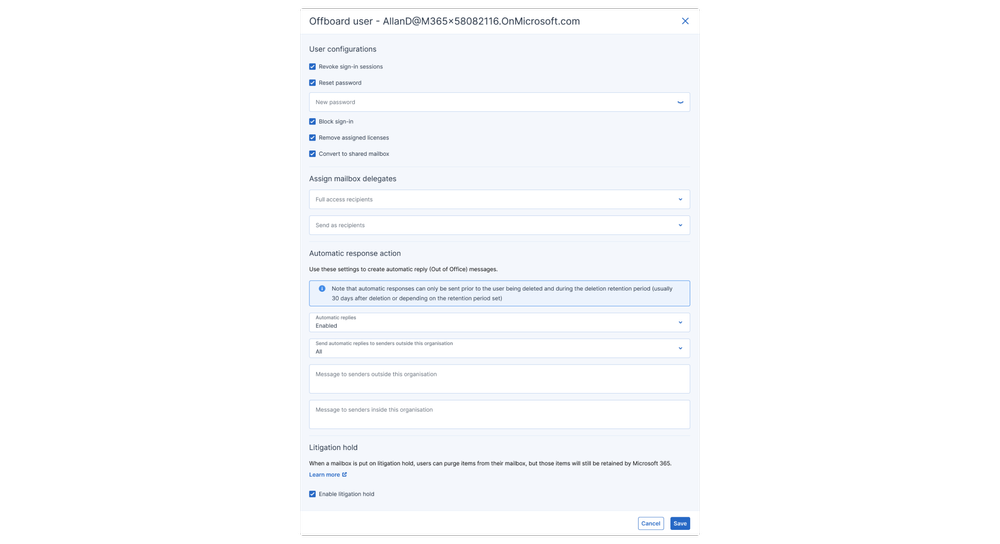
    Simplify the complex offboarding process, which includes revoking sign-in sessions, resetting passwords, removing licenses, converting to shared mailboxes and ensuring legal compliance with litigation holds.
  • Continuous monitoring of security posture vs. baselines

    Continuous monitoring of security posture vs. baselines

    Eliminate repetitive audits and ensure peace of mind with 24/7 automatic detection of new risks.
  • Automatic and manual remediation of security risks

    Automatic and manual remediation of security risks

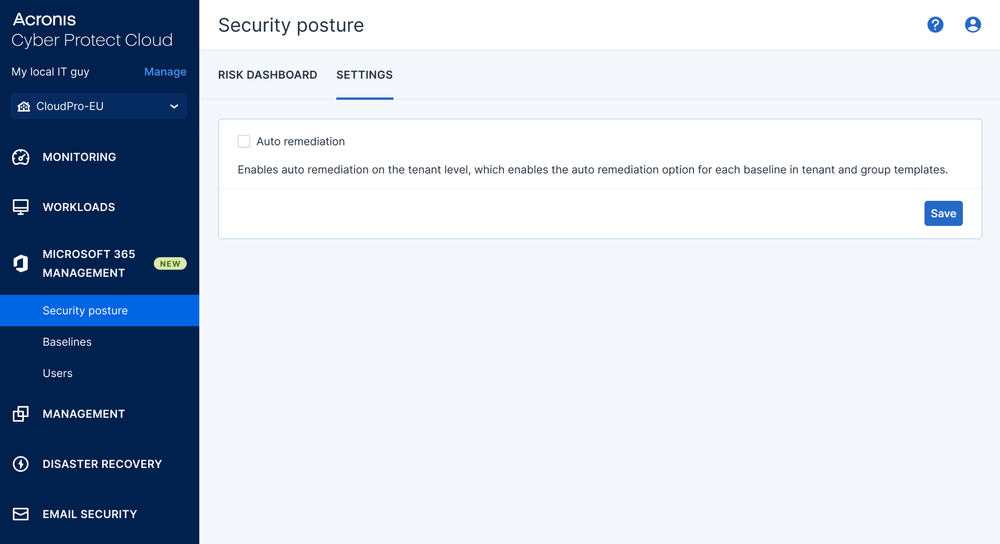
    Quickly address risks with simplified remediation actions directly from the Acronis console, with both manual intervention and automatic remediations upon detection.
  • Integration with Acronis and third-party PSAs

    Integration with Acronis and third-party PSAs

    Natively integrates with Acronis Automation and third-party PSAs. Visit the full list of PSA and RMM integrations in our application catalogue.
  • Security posture reports in PDF

    Security posture reports in PDF

    Generate detailed client reports outlining compliance summaries and trends, and showcase service proof.
  • Baseline templates

    Baseline templates

    Build, customize and manage reusable baseline templates to tailor and standardize security management across all customer tenants.

A closer look at Microsoft 365 management functionalities

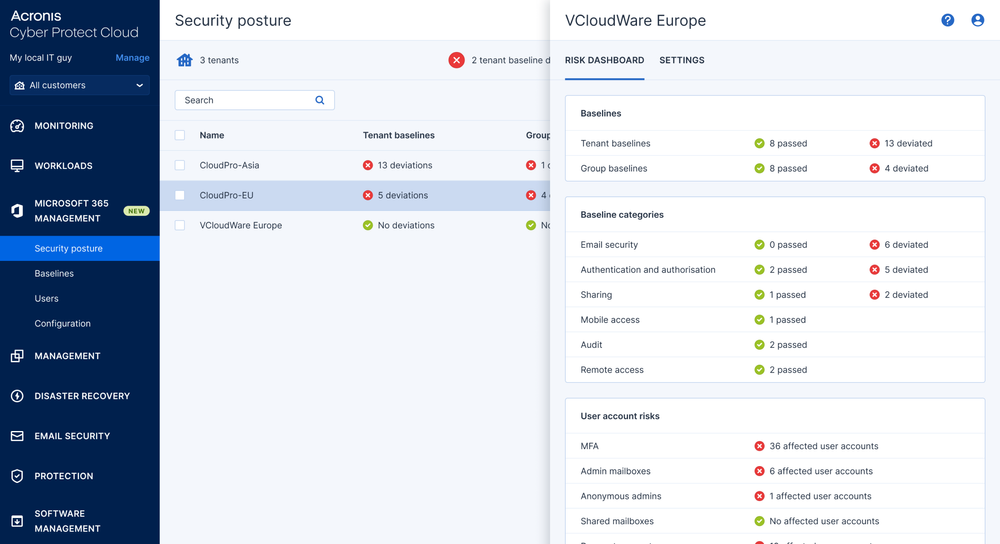
  • Per-tenant security posture dashboards in the Acronis Cyber Platform console
    Per-tenant security posture dashboards in the Acronis Cyber Platform (formerly Acronis Cyber Protect Cloud) console
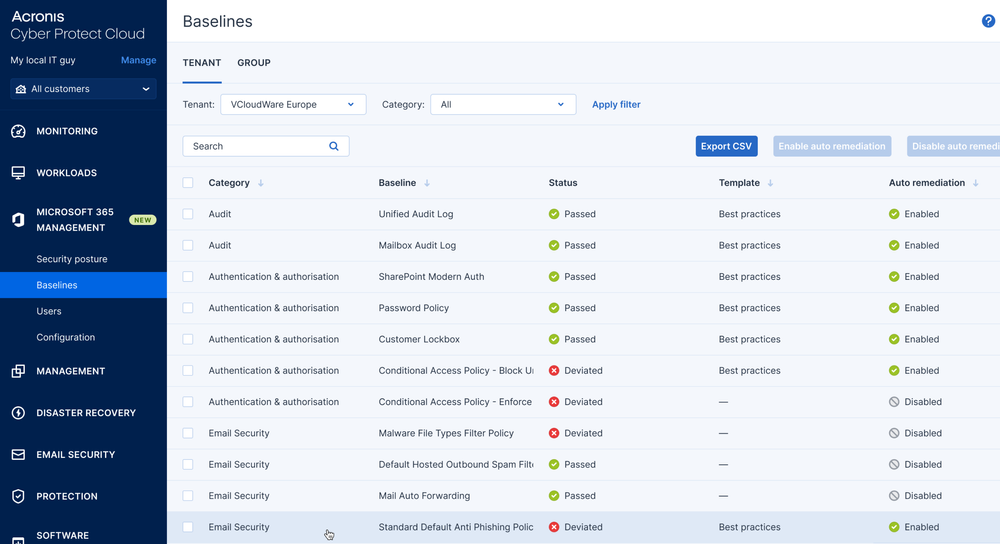
  • Baseline management on a client level
    Baseline management on a client level
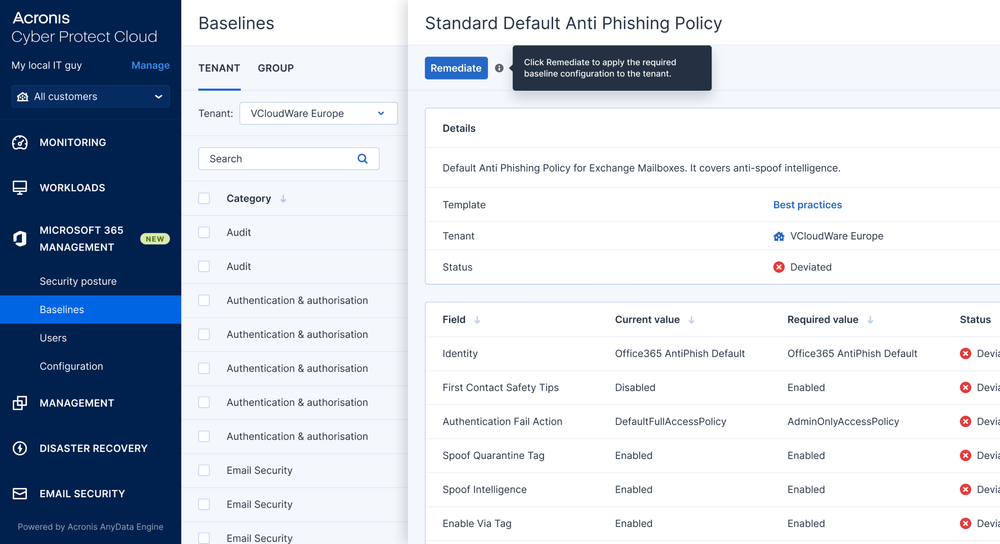
  • Baseline details and applying baseline configurations
    Baseline details and applying baseline configurations
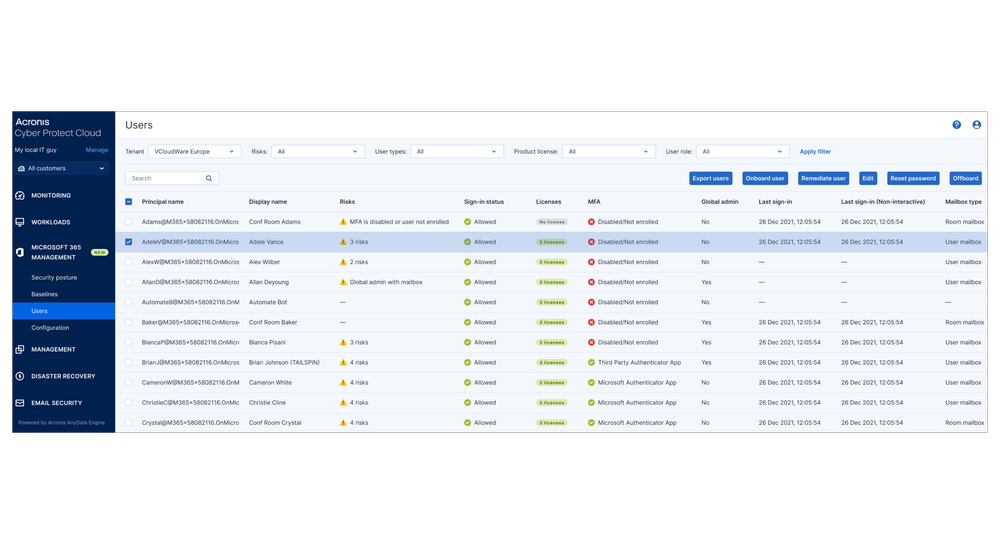
  • User management
    User management
  • User onboarding
    User onboarding
  • User offboarding
    User offboarding
  • Enabling auto-remediation
    Enabling auto-remediation

How to buy Acronis Security Posture Management

Monthly usage

Service Providers

  • License: Acronis Security Posture Management
  • Deployment: Cyber Platform cloud service
Through IT provider

IT Departments

  • License: Acronis Security Posture Management through a service provider
  • Deployment: Cyber Platform cloud service

Industry-focused solutions for MSP success

Manufacturing

Manufacturing

Protect manufacturing environments from cyberthreats, unplanned downtime and operational disruptions. Acronis helps MSPs secure production systems, safeguard critical data and keep operations running.
Health care

Health care

Help health care organizations protect sensitive patient data, maintain regulatory compliance and ensure continuous access to critical systems. Acronis delivers cyber protection designed to support secure, reliable patient care.

Protected 365: 7-in-1 Microsoft 365 protection

Acronis Email Archiving for Microsoft 365 is part of Acronis Protected 365, which includes Backup & Recovery, Email Security, Collaboration Security, Security Posture Management, Security Awareness Training, Email Archiving and XDR Integration.
0:42

Data centers in Dallas, Ashburn, Phoenix & St Louis
are part of Acronis’ global network of 50+ locations worldwide

Acronis operates a global network of cloud data centers designed to deliver a high level of safety, security, and accessibility.

Looking for help?

Frequently Asked Questions

Product help
In case you have any difficulties, we have collected all the useful materials for this product in our FAQ, Knowledge Base, video tutorials and documentation. Also you can always ask your question on our discussion boards.
Support
Customers with active product maintenance or subscription are entitled to 24/7 technical support. Follow the instructions at the Technical Support Site to get prompt support by phone, chat or e-mail.

Sorry, your browser is not supported.

It seems that our website is incompatible with your current browser's version. Don't worry, this is easily fixed!
To view our complete website, simply update your browser now or continue anyway.