Acronis


Patch management for
MSPs

Patch management is essential for MSPs to secure client systems by
deploying updates that fix vulnerabilities, bugs and performance issues. With
60% of breaches linked to unpatched known vulnerabilities, efficient
patching is critical. This page explains what MSPs need in a patching
solution and how Acronis RMM delivers it.

Key features of Acronis patch management software

  • Built-in vulnerability assessments

    Built-in vulnerability assessments

    Automatically scan Windows, macOS and Linux devices for missing patches and prioritize remediation based on severity.
  • Proprietary patching engine

    Proprietary patching engine

    Acronis uses its own patching engine and database for greater reliability and detection accuracy — unlike tools that depend on open-source components.
  • Support for 320+ Windows applications

    Support for 320+ Windows applications

    Patch Microsoft products and over 320 third-party apps like browsers and runtimes — no need for extra tools.
  • Fail-safe patching with rollback

    Fail-safe patching with rollback

    Due to native integration with Acronis Backup, you can automatically back up endpoints before patching so you can quickly roll back if an update causes issues.
  • Automatic patching after recovery

    Automatic patching after recovery

    Recovered systems can be automatically brought up to date, reducing post-recovery vulnerability windows.
  • AI-based patch stability scoring

    AI-based patch stability scoring

    Prevent disruptions and cut troubleshooting time with AI-powered patch scoring. The system delivers real-time patch stability insights based on open-source intelligence and flags risky updates before deployment.
  • Fully automated patch management with flexible policies

    Fully automated patch management with flexible policies

    Set auto-approvals, schedule deployments after hours and configure reboot options to minimize disruption.
  • Dashboards and alerts

    Dashboards and alerts

    Ensure tasks are running smoothly with real-time patching status dashboards and get notifications if critical patches fail to install.
  • Patching as part of EDR / XDR response

    Patching as part of EDR / XDR response

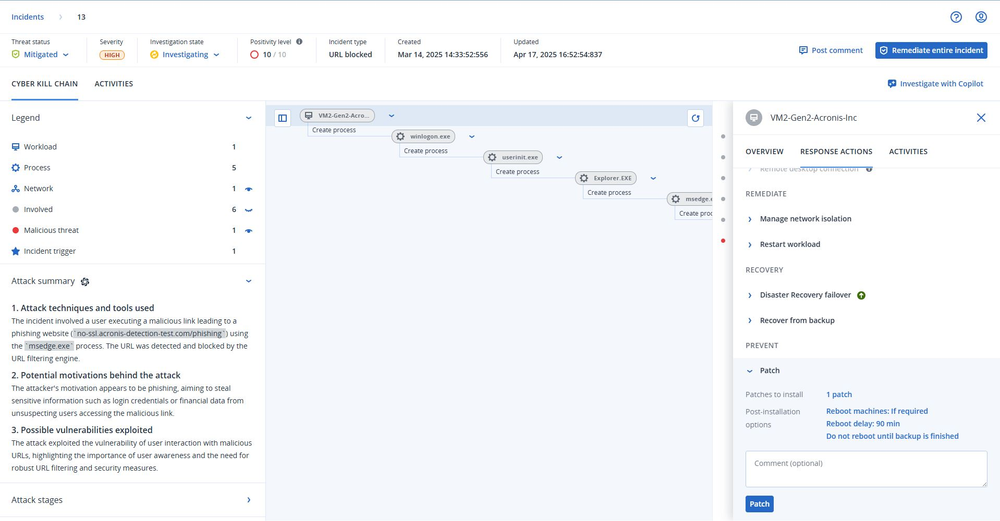
    Thanks to native integration with Acronis EDR / XDR, you can deploy patches to affected machines to reduce the risk of repeat attacks.
Acronis

Major benefits of Acronis patch management for MSPs

  • Save time and boost efficiency

    Save time and boost efficiency

    Acronis automates patch discovery and deployment, saving technicians hours each month. One use case showed that Acronis RMM cut patching time from four hours to just 10 minutes— saving $150+ per incident and up to $100,000 annually in labor costs.
  • Strengthen security and reduce risk

    Strengthen security and reduce risk

    Prompt patching closes vulnerabilities before they’re exploited. Acronis pairs patching with vulnerability assessments and offers fail-safe rollbacks, helping MSPs prevent breaches, stay compliant and patch with confidence.
  • Synergies due to native integrations

    Synergies due to native integrations

    As part of a unified platform, Acronis RMM enables you to manage patching, backup and security through one agent and interface. This reduces complexity, lowers costs and improves protection and reliability across all clients.

Partner testimonials

  • JVS Net eliminates on-site visits to manually patch client endpoints

    Vladimir Georieski
    Verified Acronis user

Get a closer look at Acronis patching software

  • Acronis
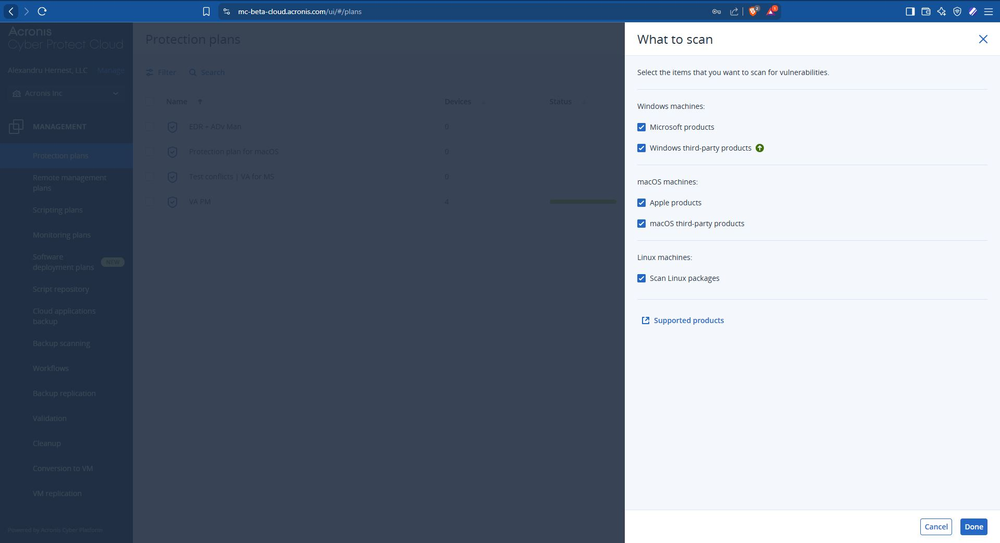
    Select which systems and apps to scan for missing patches.
  • Acronis
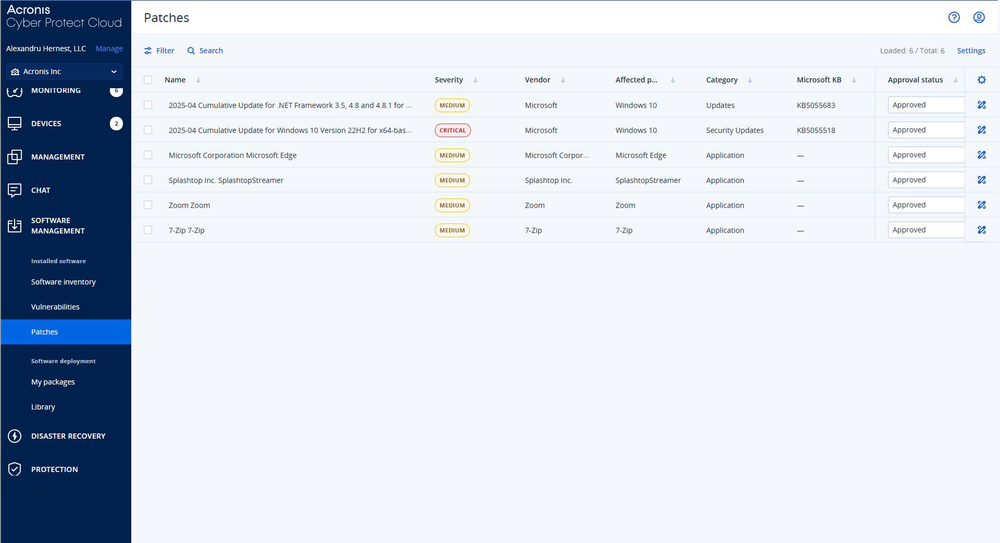
    View all patches for detected vulnerabilities.
  • Acronis
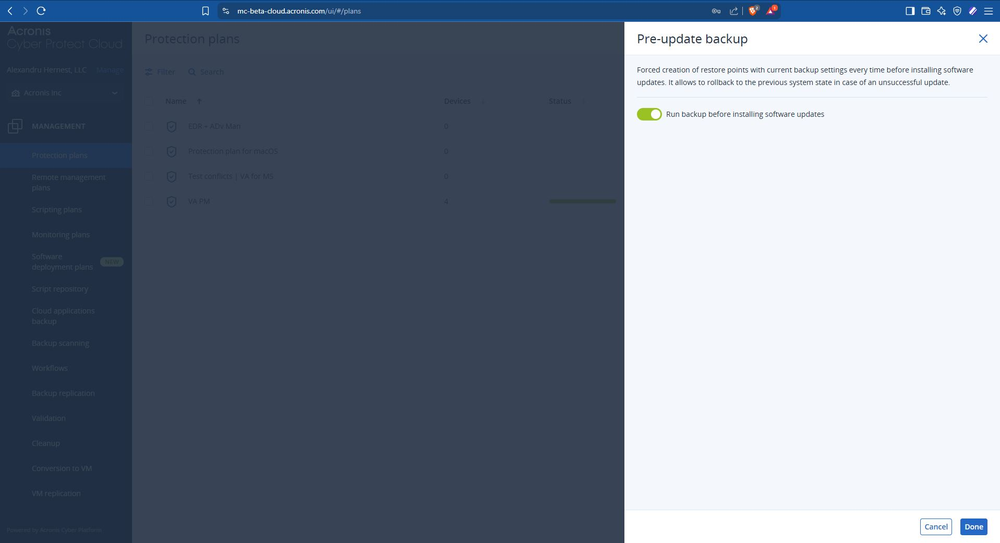
    Enable auto-backup before patching to allow rollback.
  • Acronis
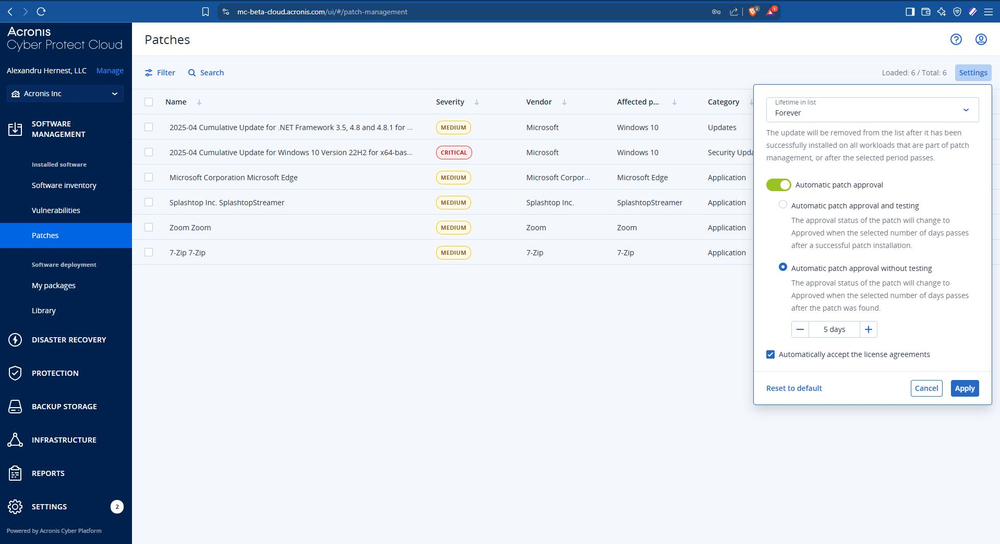
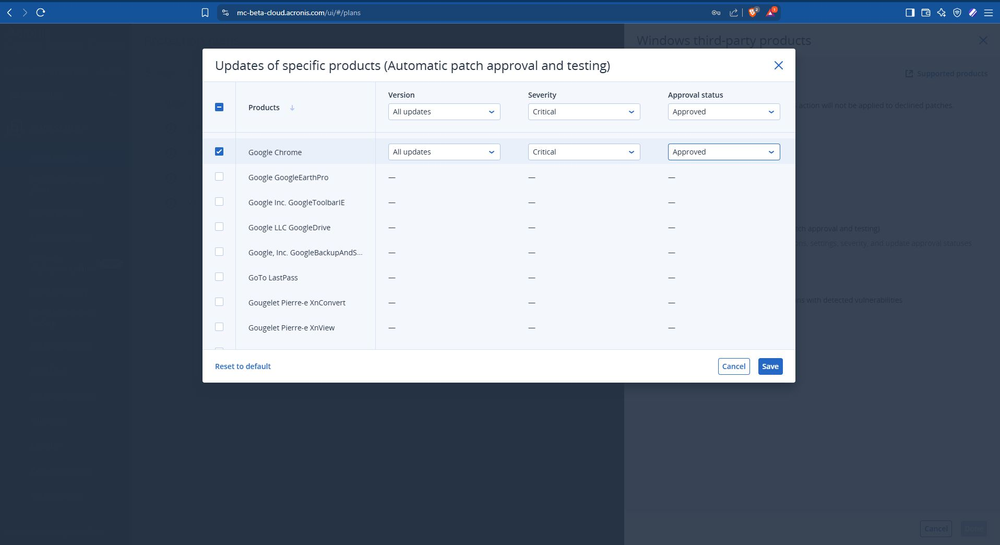
    Set automatic patch approvals to save time and reduce delays.
  • Acronis
    Customize patching rules per product and severity.
  • Acronis
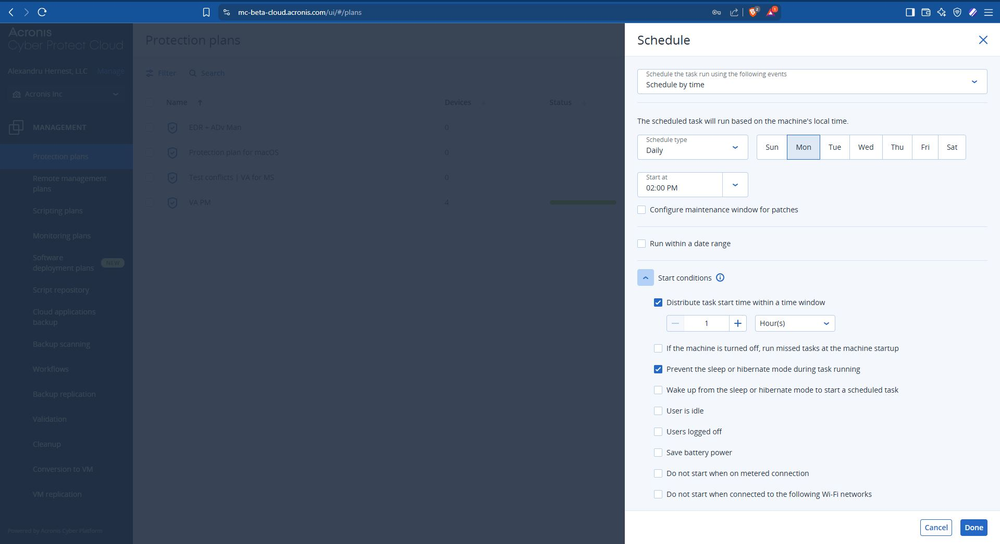
    Schedule patching by day and time, with flexible options.
  • Acronis
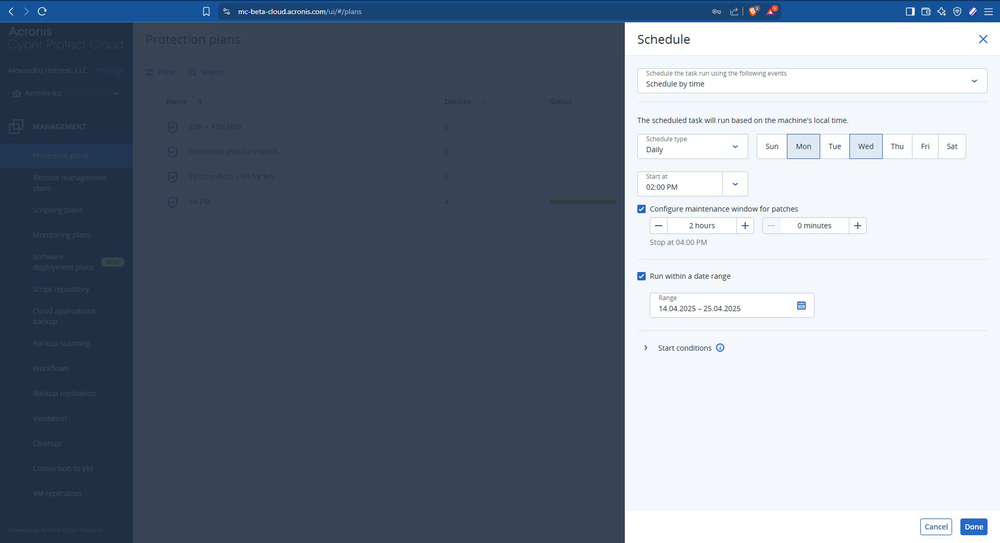
    Define patching windows to avoid service disruption.
  • Acronis
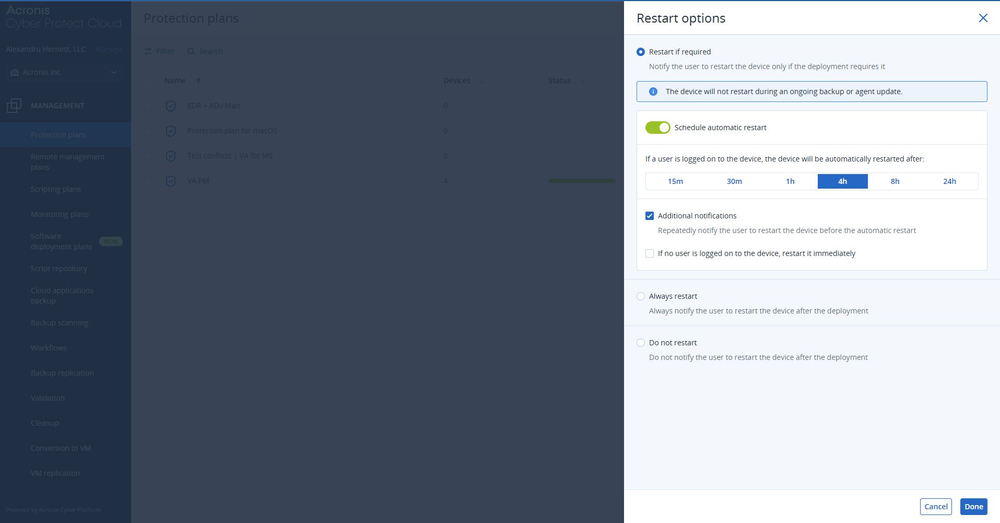
    Control restart behavior after patch installation.
  • Acronis
    Patch affected systems directly from the incident response window.
  • Acronis
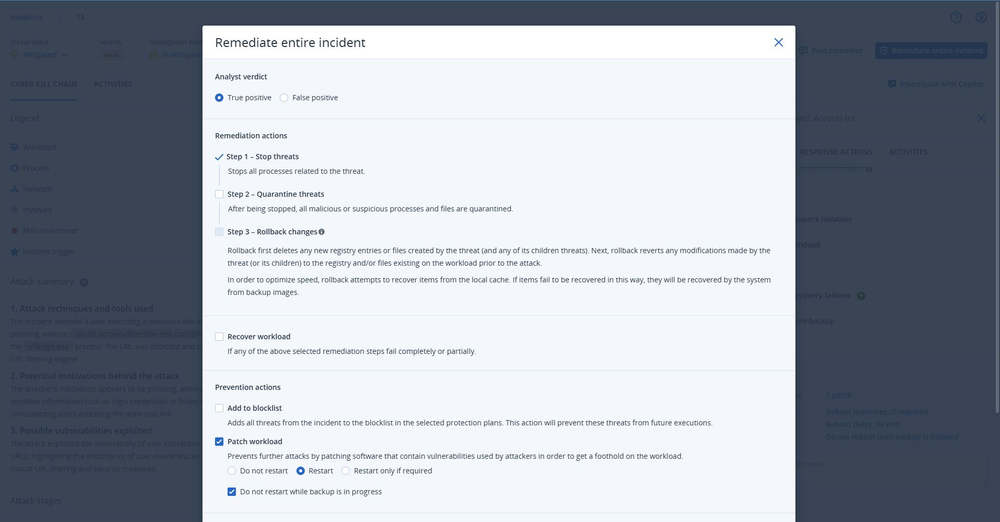
    Trigger patching from within XDR for faster remediation.
Acronis

Part of Acronis RMM

Achieve peak MSP performance with natively integrated, secure, AI-powered RMM

Frequently Asked Questions

Product help
In case you have any difficulties, product materials can be found in our Knowledge Base. You can also post questions on our discussion boards.
Technical support
For subscription owners, there is free, 24-hour technical support. Refer to the Technical Support Site to find the appropriate support contact.

Sorry, your browser is not supported.

It seems that our new website is incompatible with your current browser's version. Don’t worry, this is easily fixed! To view our complete website, simply update your browser now or continue anyway.