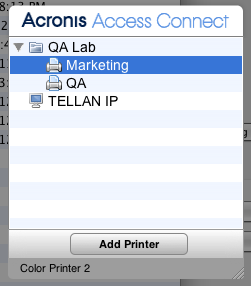
The Access Connect Zidget is a new way of connecting to Access Connect file and print servers. Zidget is a Dashboard Widget that the Macintosh user can use to discover and connect to a file server whether or not the server is in the user’s local subnet. Zidget also allows the Macintosh user to browse DFS namespaces that are shared through the Access Connect server. Using Zidget, the Macintosh user can also browse for and add Access Connect printers. Zidget will automatically download the PPD for the printer, and set up the print queue without the user having to use the Print Center.
The Zidget can also be used to add queues on the print server that receive jobs directly, or direct print printers that are advertised by the Access Connect server but do not route jobs through the print server. Zidget contacts a server called the Access Connect master server to retrieve a list of all the Access Connect servers in your organization. It then contacts each of those servers to find out whether they are just file servers or if they also are print servers. If the server is a print server it then retrieves a list of all the print queues on that server. The servers as well as individual print queues can be assigned to locations or zones. Once the Zidget has retrieved information from all the servers it merges them into a list of locations for the user to choose from.
Although many customers may choose to mimic their existing AppleTalk zone structure, they can also use a more complex location-based method for organizing their print queues. For that matter, they can use any other hierarchical arrangement they would like, such as Color and Black and White. The location-based method can be hierarchical such as building, floor, and room.