Dashboard widgets have limited ability to interact with the operating system and cannot natively add printers to the Macintosh. Therefore the Zidget includes an application—Dashboard widgets are implemented as Macintosh packages—that the Zidget invokes to download the PPD and create the printer on the Macintosh.
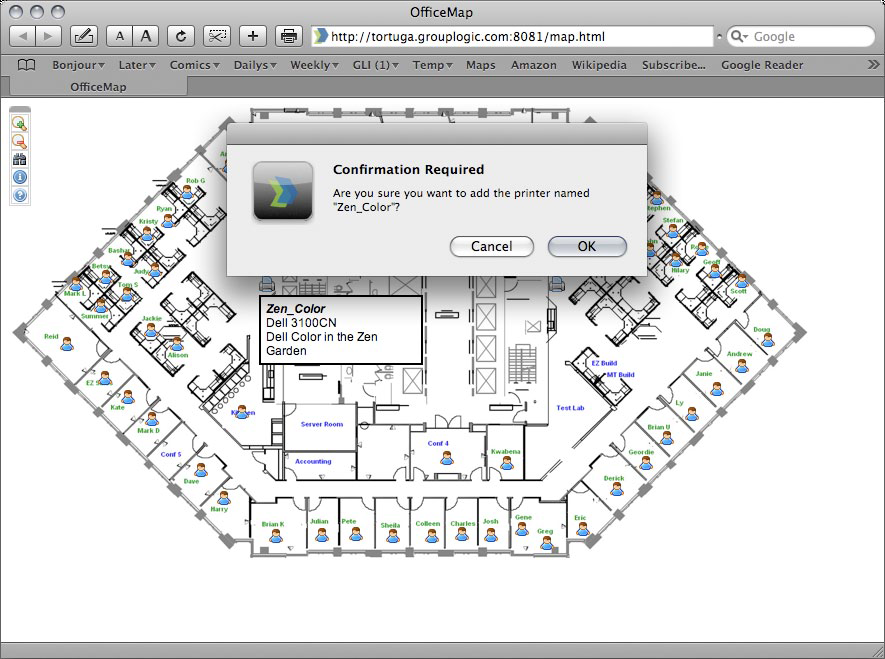
The helper application can also be used as an Internet protocol helper for ezip:// URLs. This enables Safari or another web browser to create a printer when you click on a specially formatted link from a standard web page such as an office map with links for different areas. If you click on a URL to invoke the helper application, it asks if you want to add the printer. Whereas when Zidget invokes the helper application, the helper application operates silently.
Creating a web-based Printer Location Map is a very effective way to let users easily find and add printers. Taking a scan of the map and making a PDF in Adobe Acrobat is one simple way to create a web page with a map of the user’s floor. Acrobat will let you add links for areas of the picture without having to know any HTML.
To add a printer from a Web page, do the following:
In some cases you might need to add the ZidgetHelper.app to the Applications folder in order for it to be registered as an internet helper.
Do the following: