
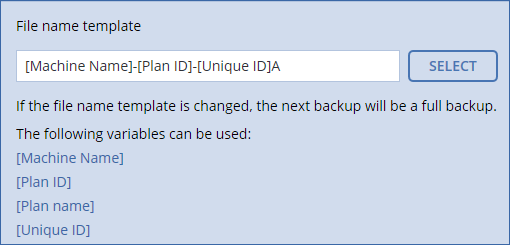
This option defines the names of the backup files created by the backup plan.
These names can be seen in a file manager when browsing the backup location.
What is a backup file?
Each backup plan creates one or more files in the backup location, depending on which backup scheme and which backup format are used. The following table lists the files that can be created per machine or mailbox.
|
Always incremental (single-file) |
Other backup schemes |
Version 11 backup format |
One .tib file and one .xml metadata file |
Multiple .tib files and one .xml metadata file (traditional format) |
Version 12 backup format |
One .tibx file per backup chain (a full or differential backup, and all incremental backups that depend on it) |
|
All files have the same name, with or without the addition of a timestamp or a sequence number. You can define this name (referred to as the backup file name) when creating or editing a backup plan.
After you change a backup file name, the next backup will be a full backup, unless you specify a file name of an existing backup of the same machine. If the latter is the case, a full, incremental, or differential backup will be created according to the backup plan schedule.
Note that it is possible to set backup file names for locations that cannot be browsed by a file manager (such as the cloud storage or a tape device). This makes sense if you want to see the custom names on the Backups tab.
Where can I see backup file names?
Select the Backups tab, and then select the group of backups.
Limitations for backup file names
In the default backup file name, to prevent the name from ending with a digit, the letter "A" is appended. When creating a custom name, always make sure that it does not end with a digit. When using variables, the name must not end with a variable, because a variable might end with a digit.
Default backup file name
The default backup file name is [Machine Name]-[Plan ID]-[Unique ID]A.
The default backup file name for mailbox backup is [Mailbox ID]_mailbox_[Plan ID]A.
The name consists of the following variables:
The diagram below shows the default backup file name.
The diagram below shows the default backup file name for mailboxes.

Names without variables
If you change the backup file name to MyBackup, the backup files will look like the following examples. Both examples assume daily incremental backups scheduled at 14:40, starting from September 13, 2016.
For the Version 12 format with the Always incremental (single-file) backup scheme:
MyBackup.tibx
For the Version 12 format with other backup schemes:
MyBackup.tibx
MyBackup-0001.tibx
MyBackup-0002.tibx
...
For the Version 11 format with the Always incremental (single-file) backup scheme:
MyBackup.xml
MyBackup.tib
For the Version 11 format with other backup schemes:
MyBackup.xml
MyBackup_2016_9_13_14_49_20_403F.tib
MyBackup_2016_9_14_14_43_00_221F.tib
MyBackup_2016_9_15_14_45_56_300F.tib
...
Using variables
Besides the variables that are used by default, you can use the [Plan name] variable, which is replaced with the name of the backup plan.
If multiple machines or mailboxes are selected for backup, the backup file name must contain the [Machine Name], the [Mailbox ID], or the [Unique ID] variable.
Backup file name vs. simplified file naming
Using plain text and/or variables, you can construct the same file names as in earlier Acronis Backup versions. However, simplified file names cannot be reconstructed—in version 12, a file name will have a time stamp unless a single-file format is used.
Usage examples
You want to easily distinguish backups when browsing the backup location with a file manager.
Let's assume a backup plan is applied to a single machine, and you have to remove this machine from the backup console or to uninstall the agent along with its configuration settings. After the machine is re-added or the agent is reinstalled, you can force the backup plan to continue backing up to the same backup or backup sequence. Just go this option, click Select, and select the required backup.
The Browse button shows the backups in the location selected in the Where to back up section of the backup plan panel. It cannot browse anything outside this location.
If during the upgrade a backup plan did not migrate automatically, recreate the plan and point it to the old backup file. If only one machine is selected for backup, click Browse, and then select the required backup. If multiple machines are selected for backup, re-create the old backup file name by using variables.