If your production ESXi hosts are so heavily loaded that running the virtual appliances is not desirable, consider installing Agent for VMware (Windows) on a physical machine outside the ESXi infrastructure.
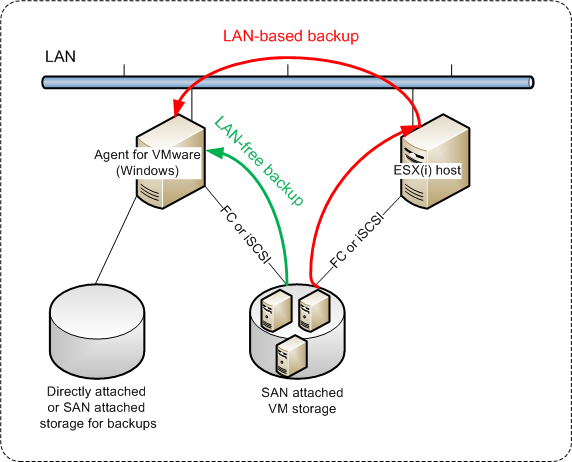
If your ESXi uses a SAN attached storage, install the agent on a machine connected to the same SAN. The agent will back up the virtual machines directly from the storage rather than via the ESXi host and LAN. This capability is called a LAN-free backup.
The diagram below illustrates a LAN-based and a LAN-free backup. LAN-free access to virtual machines is available if you have a fibre channel (FC) or iSCSI Storage Area Network. To completely eliminate transferring the backed-up data via LAN, store the backups on a local disk of the agent's machine or on a SAN attached storage.
To enable the agent to access a datastore directly
To avoid LUN initialization, the SAN Policy is automatically set to Offline All during the Agent for VMware (Windows) installation.
As a result, the agent will use the SAN transport mode to access the virtual disks, i.e. it will read raw LUN sectors over iSCSI/FC without recognizing the VMFS file system (which Windows is not aware of).
Limitations
Example
If you are using an iSCSI SAN, configure the iSCSI initiator on the machine running Windows where Agent for VMware is installed.
To configure the SAN policy
To configure an iSCSI initiator
Tip. To find the Administrative Tools applet, you may need to change the Control Panel view to something other than Home or Category, or use search.
If the LUN is not displayed, ensure that the zoning on the iSCSI target enables the machine running the agent to access the LUN. The machine must be added to the list of allowed iSCSI initiators on this target.
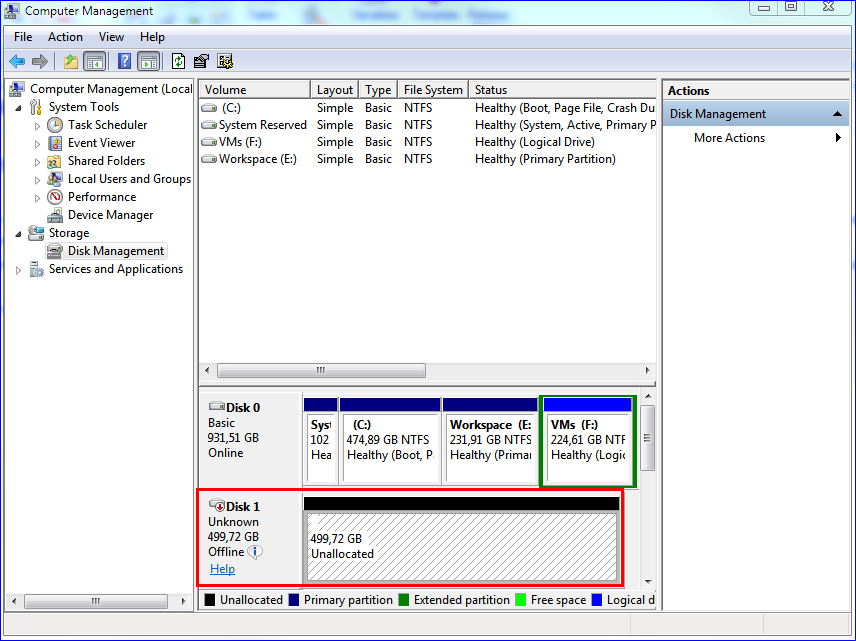
The ready SAN LUN should appear in Disk Management as shown in the screenshot below.