Important Creating custom scripts requires the knowledge of the Bash command language and JavaScript Object Notation (JSON). If you are not familiar with Bash, a good place to learn it is http://www.tldp.org/LDP/abs/html. The JSON specification is available at http://www.json.org.
Files of a script
Your script must be located in the following directories on the machine where Bootable Media Builder is installed:
The script must consist of at least three files:
This file and any additional files that the script includes (for example, by using the dot command) must be located in the bin subfolder. In the script, specify the additional file paths as /ConfigurationFiles/bin/<some_file>.
#!/bin/sh
. /ConfigurationFiles/bin/variables.sh
. /ConfigurationFiles/bin/<script_file>.sh
. /ConfigurationFiles/bin/post_actions.sh
Structure of autostart.json
Top-level object
Pair |
Required |
Description |
|
|---|---|---|---|
Name |
Value type |
||
displayName |
string |
Yes |
The script name to be displayed in Bootable Media Builder. |
description |
string |
No |
The script description to be displayed in Bootable Media Builder. |
timeout |
number |
No |
A timeout (in seconds) for the boot menu before starting the script. If the pair is not specified, the timeout will be ten seconds. |
variables |
object |
No |
Any variables for <script_file>.sh that you want to configure via Bootable Media Builder. The value should be a set of the following pairs: the string identifier of a variable and the object of the variable (see the table below). |
Variable object
Pair |
Required |
Description |
|
|---|---|---|---|
Name |
Value type |
||
displayName |
string |
Yes |
The variable name used in <script_file>.sh. |
type |
string |
Yes |
The type of a control that is displayed in Bootable Media Builder. This control is used to configure the variable value. For all supported types, see the table below. |
description |
string |
Yes |
The control label that is displayed above the control in Bootable Media Builder. |
default |
string if type is string, multiString, password, or enum number if type is number, spinner, or checkbox |
No |
The default value for the control. If the pair is not specified, the default value will be an empty string or a zero, based on the control type. The default value for a check box can be 0 (the cleared state) or 1 (the selected state). |
order |
number (non-negative) |
Yes |
The control order in Bootable Media Builder. The higher the value, the lower the control is placed relative to other controls defined in autostart.json. The initial value must be 0. |
min (for spinner only) |
number |
No |
The minimum value of the spin control in a spin box. If the pair is not specified, the value will be 0. |
max (for spinner only) |
number |
No |
The maximum value of the spin control in a spin box. If the pair is not specified, the value will be 100. |
step (for spinner only) |
number |
No |
The step value of the spin control in a spin box. If the pair is not specified, the value will be 1. |
items (for enum only) |
array of strings |
Yes |
The values for a drop-down list. |
required (for string, multiString, password, and enum) |
number |
No |
Specifies if the control value can be empty (0) or not (1). If the pair is not specified, the control value can be empty. |
Control type
Name |
Description |
|---|---|
string |
A single-line, unconstrained text box used to enter or edit short strings. |
multiString |
A multi-line, unconstrained text box used to enter or edit long strings. |
password |
A single-line, unconstrained text box used to enter passwords securely. |
number |
A single-line, numeric-only text box used to enter or edit numbers. |
spinner |
A single-line, numeric-only text box used to enter or edit numbers, with a spin control. Also, called a spin box. |
enum |
A standard drop-down list, with a fixed set of predetermined values. |
checkbox |
A check box with two states - the cleared state or the selected state. |
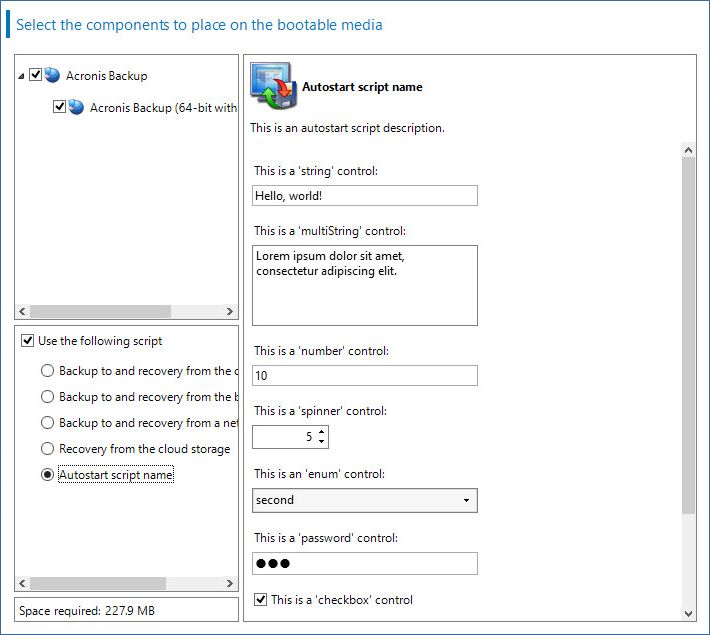
The sample autostart.json below contains all possible types of controls that can be used to configure variables for <script_file>.sh.
{
"displayName": "Autostart script name",
"description": "This is an autostart script description.",
"variables": {
"var_string": {
"displayName": "VAR_STRING",
"type": "string", "order": 1,
"description": "This is a 'string' control:", "default": "Hello, world!"
},
"var_multistring": {
"displayName": "VAR_MULTISTRING",
"type": "multiString", "order": 2,
"description": "This is a 'multiString' control:",
"default": "Lorem ipsum dolor sit amet,\nconsectetur adipiscing elit."
},
"var_number": {
"displayName": "VAR_NUMBER",
"type": "number", "order": 3,
"description": "This is a 'number' control:", "default": 10
},
"var_spinner": {
"displayName": "VAR_SPINNER",
"type": "spinner", "order": 4,
"description": "This is a 'spinner' control:",
"min": 1, "max": 10, "step": 1, "default": 5
},
"var_enum": {
"displayName": "VAR_ENUM",
"type": "enum", "order": 5,
"description": "This is an 'enum' control:",
"items": ["first", "second", "third"], "default": "second"
},
"var_password": {
"displayName": "VAR_PASSWORD",
"type": "password", "order": 6,
"description": "This is a 'password' control:", "default": "qwe"
},
"var_checkbox": {
"displayName": "VAR_CHECKBOX",
"type": "checkbox", "order": 7,
"description": "This is a 'checkbox' control", "default": 1
}
}
}
This is how it looks in Bootable Media Builder.