Vulnerability assessment widgets
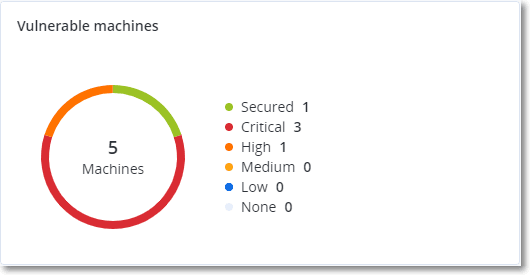
Vulnerable machines
This widget shows the vulnerable machines, grouped by the vulnerability severity.
The found vulnerability can have one of the following severity levels according to the Common Vulnerability Scoring System (CVSS) v3.0:
- Secured: no vulnerabilities are found
- Critical: 9.0 - 10.0 CVSS
- High: 7.0 - 8.9 CVSS
- Medium: 4.0 - 6.9 CVSS
- Low: 0.1 - 3.9 CVSS
- None: 0.0 CVSS
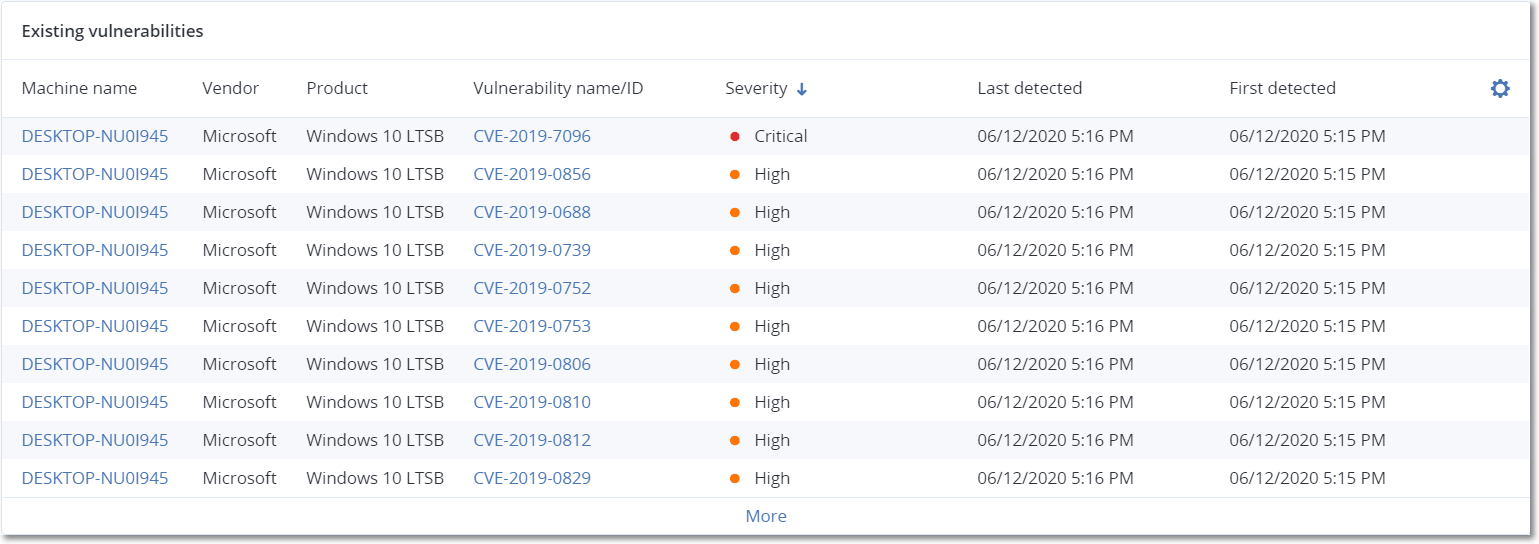
Existing vulnerabilities
This widget shows currently existing vulnerabilities on machines. In the Existing vulnerabilities widget, there are two columns showing timestamps:
- First detected – Date and time when a vulnerability was detected on the machine for the first time.
- Last detected – Date and time when a vulnerability was last detected on the machine.
Vulnerable workloads
This widget shows the detailed information about pending software updates for machines. The table includes only machines that are reported to have missing patches.
The widget has the following columns:
- Machine name - Click a machine name to open the device details.
- Operating system
- Last login
- Last login date
- Patch name
- Version
- Severity
- Category
- Release date
- Stability
- Vulnerabilities
You can filter the widget by machine name, severity, category, approval status, and release date. You can group the widget by machine name, protection plan, category, release date, and approval status. By default, the widget groups by approval status.
Vulnerable applications
This widget shows the top vulnerable applications on your devices, and the average outdated age for each product.
The widget has the following columns:
- Application
- Vulnerabilities count
- Oldest patch - The release date of the oldest available patch that is not yet installed.
- Machines
- Category
You can filter the widget by product name, category, and release date of the latest patch. You can group the widget by product name and category.