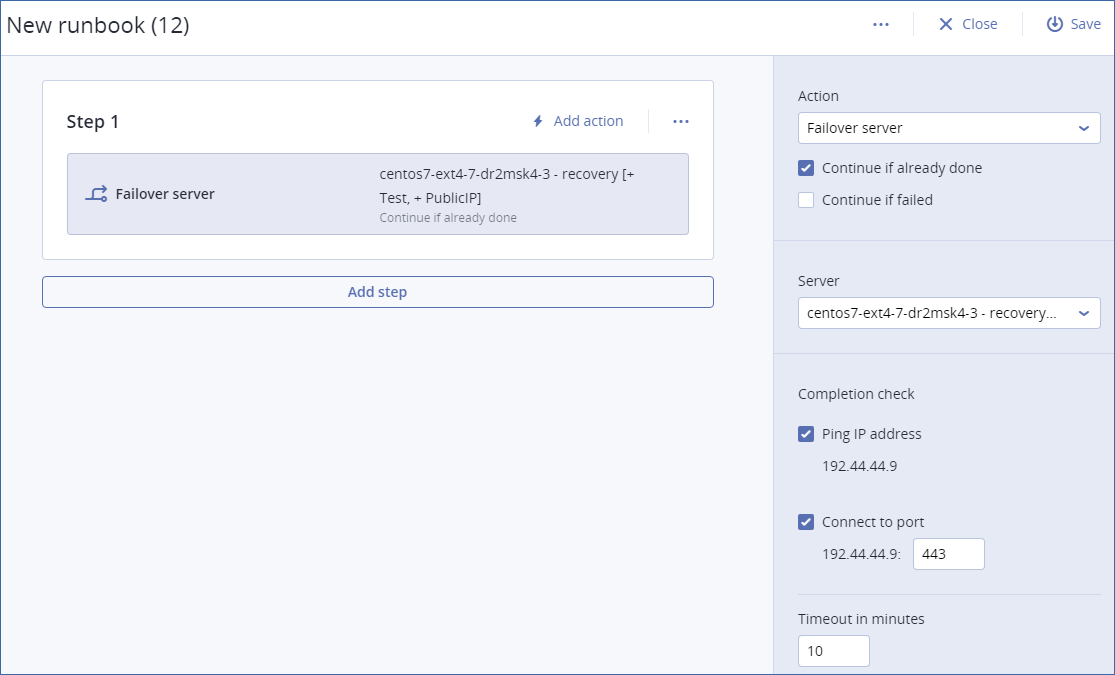
To start creating a runbook, click Create runbook > Add step > Add action. You can use drag and drop to move actions and steps. Do not forget to give a distinctive name to the runbook. While creating a long runbook, click Save from time to time. Once you are finished, click Close.
Steps and actions
A runbook consists of steps that are executed consecutively. A step consists of actions that start simultaneously. An action may consist of:
A runbook can include only one execution of a given runbook. For example, if you added the action "execute Runbook A", you can add the action "execute Runbook B", but cannot add another action "execute Runbook A".
Note In this product version a user has to perform a failback manually. A runbook shows the prompt when it is required.
Action parameters
All operations with cloud servers have the following parameters:
This parameter defines the runbook behavior when the required operation is already done (for example, a failover has already been performed or a server is already running). When enabled, the runbook issues a warning and proceeds. When disabled, the operation fails and the runbook fails.
This parameter defines the runbook behavior when the required operation fails. When enabled, the runbook issues a warning and proceeds. When disabled, the operation fails and the runbook fails.
Completion check
You can add completion checks to the Failover server and Start server actions, to ensure that the server is available and provides the necessary services. If any of the checks fail, the action is considered failed.
The software will ping the production IP address of the cloud server until the server replies or the timeout expires, whichever comes first.
The software will try to connect to the cloud server by using its production IP address and the port you specify, until the connection is established or the timeout expires, whichever comes first. This way, you can check if the application that listens on the specified port is running.
The default timeout is 10 minutes. You can change it if you wish.