Reviewing the Risk dashboard
The Risk dashboard highlights any risks (or deviations) to a Microsoft 365 tenant's baselines, baseline categories, and user accounts.
You can access the Risk dashboard for a specific tenant by clicking the relevant tenant row in the Security posture screen (see Reviewing security posture).
Alternatively, to view the Risk dashboard for the Microsoft 365 tenant(s) mapped to a specific customer, select the customer from the All customers dropdown (located above the navigation menu).
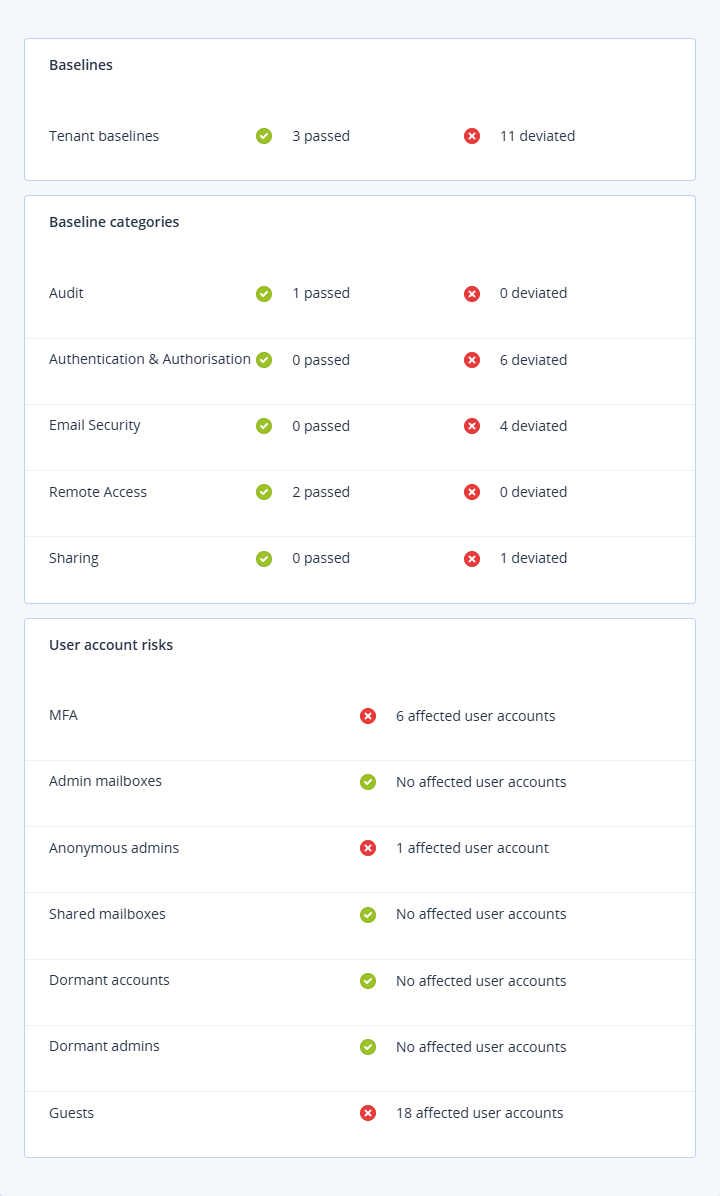
The Risk dashboard includes the following information:
-
Baselines
- Tenant baselines (with the number of baselines that passed and deviated)
-
Baseline categories (each of the following categories include the number of baselines that passed and deviated)
- Email security
- Authentication and authorization
- Sharing
- Audit
- Remote access
-
User account risks
- MFA (with the number of affected user accounts where MFA is either disabled or not enrolled)
- Admin mailboxes (with the number of user accounts that are global administrator accounts with a mailbox)
- Anonymous admins (with the number of user accounts that might be shared administrator accounts)
- Shared mailboxes (with the number of user accounts that have shared mailboxes)
- Dormant accounts (with the number of user accounts that have not logged in for three months)
- Dormant admins (with the number of user accounts that are administrator accounts but have not logged in for six months)
- Guests (with the number of user accounts which are guest accounts)