Creating a SIEM plan for an individual customer
SIEM forwarding plans are only supported for x64 architecture.
Partner administrator, customer administrator, company administrator, or a custom role with the Manage SIEM forwarding plans permission.
To create a SIEM plan for an individual customer
-
Open the Acronis Protection console for the customer.
-
Select Management from the main menu.
-
Select SIEM forwarding plans.
-
Click Create.
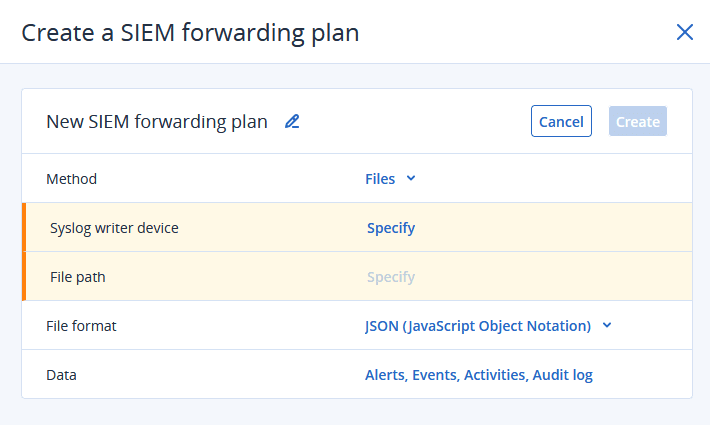
-
Change the plan default name.
-
Click the pencil icon.
-
Edit the name.
-
Click the check mark to accept the changes.
-
-
Select Method for the SIEM forwarding plan:
-
Files
This method can use a Windows or a Linux device as the writer device.
-
Syslog server
This method can only use a Linux device as the writer device.
For more information, see SIEM forwarding plan methods.
-
-
Files method
-
Click Specify to select the Writer device from the list of available protected Windows and Linux devices, and then click Done.
The SIEM forwarding device must remain online at all times for the SIEM forwarding plan to function correctly.
-
Click Specify to change the default File path for the SIEM data store on the writer device, and then click Done.
If the specified directory is removed, SIEM forwarding stops until you either restore the removed directory or modify File path to a valid directory.
Syslog server method
-
Click Specify to select the Writer device from the list of available , protected Linux devices, and then click Done.
The writer device must remain online at all times for the SIEM forwarding plan to function correctly.
-
Click Done.
-
-
Change the File format.
-
CEF (default)
Vendor-neutral, standardized format, designed for security events and detailed event analysis.
-
JSON
Highly flexible format that allows custom, complex data. Best for modern log management platforms.
For more information, see SIEM data format and examples.
-
-
Select the Acronis data types to include in the SIEM forwarding plan.
By default, all available Acronis data types are included.
-
Click on the Data field.
-
Clear the checkboxes of the Acronis data types that you do not want to include in the SIEM forwarding plan.
The Acronis data types are:
-
Alerts
Updates of critical or error messages that require a rapid response.
-
Events
Event log data with insights into system performance and user interactions.
-
Activities
All success, informational, warning, critical, and error messages (e.g., DLP, URL filtering, backups).
-
Audit log
Internal security-relevant events that may impact the safety and integrity of the organization.
Audit log data can be stored for HIPAA compliance purposes.
-
-
Click Done.
-
-
Click Create.