Investigating individual nodes
You can view the details of any node in the Incident Graph. This enables you to drill down to specific nodes and investigate what each node represents in the context of the incident.
The nodes displayed vary, according to which XDR integrations are active. Node details are shown in the Overview tab of the sidebar. Response actions available for integration nodes are shown in the Response actions tab.
To investigate individual nodes
- In the Cyber Protect console, go to Protection > Incidents.
- In the displayed list of incidents, click
 in the rightmost column of the incident that you want to investigate.
 - Go to the Incident Graph tab.
-
Navigate to the relevant node, and click it to display the sidebar for the node.
For example, clicking an email or identity node opens the sidebar for that node.
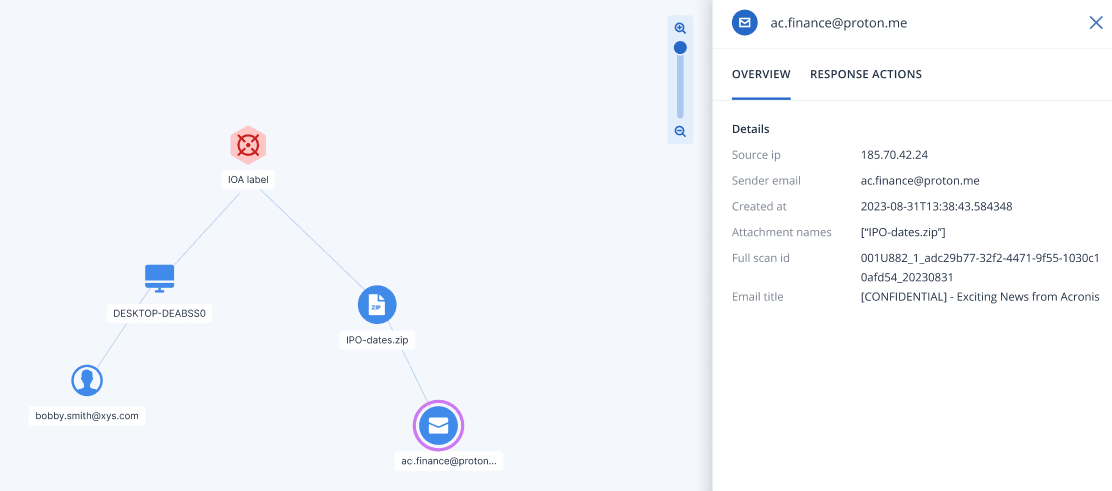
- Investigate the information included in the sidebar tabs:
- Overview: This tab includes details about the selected node, depending on the node type.
Indicator of Attack (IoA) nodes: Includes the detection timestamp, detection severity, detection description, MITRE tactic and technique, and threat name.
Indicator of Compromise (IoC) nodes: Each IoC node type (process, file, or URL) has its own set of fields, which are also used in Endpoint Detection and Response (EDR). For more information, see Investigate individual nodes in the cyber kill chain.
Integration nodes: Includes details on the selected node, depending on the integration.
For example, the Teams, OneDrive, and SharePoint nodes include the file name, its creation date, the user that created the file, the last user to modify the file, and the file size.
Similarly, the email node includes details about the senders IP address, name, and client used, and the name, format, and size of each attachment.
- Response actions: This tab lists the response actions available for integration nodes, depending on the integration. For more information, see Applying response actions to integration nodes.
- Overview: This tab includes details about the selected node, depending on the node type.