DeviceLock Service : Managing DeviceLock Service for Windows : Service Options
  
Service Options
These additional parameters allow you to tune up the DeviceLock Service configuration. Use the shortcut menu available by a right mouse click on every parameter.
When configuring DeviceLock Service options, consider the following:
•The DeviceLock Service options may unexpectedly revert to default settings and the DeviceLock Management Console displays a warning message: “This machine is configured to use Group Policy settings.” This message indicates that the DeviceLock Service works in Group Policy mode. The local settings are overridden by the ones from a Group Policy Object.
•To use local settings for DeviceLock Service, disable the Use Group/Server Policy option. Otherwise, configure DeviceLock Service options in the Group Policy Object that affects the client computer (for instructions, see DeviceLock Group Policy Manager). One more way to configure DeviceLock Service options is by using DeviceLock Enterprise Server Policies.
•DeviceLock Service can receive its settings from the Acronis cyber protection system. The status bar of the DeviceLock Management Console displays the message “Acronis Cyber Protect Policy is enabled for this machine” and you cannot change the settings by using the DeviceLock Management Console. To manage DeviceLock Service in this case, you need to use the Acronis cyber protection service console.
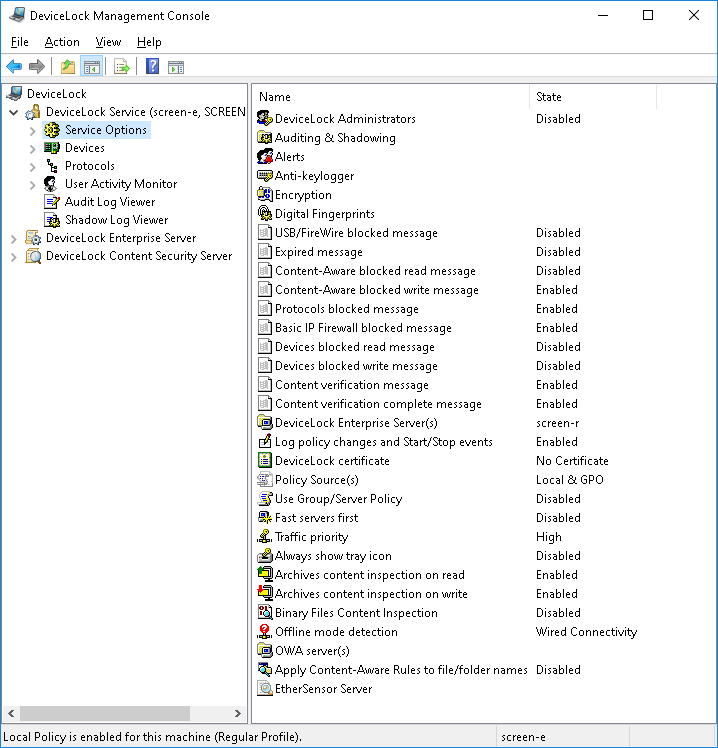
The service options are as follows:
• USB/FireWire blocked message
• Expired message
• Content-Aware blocked read message
• Content-Aware blocked write message
• Protocols blocked message
• Basic IP Firewall blocked message
• Devices blocked read message
• Devices blocked write message
• Content verification message
• Content verification complete message
• DeviceLock Enterprise Server(s)
• Log Policy changes and Start/Stop events
• DeviceLock certificate
• Policy Source(s)
• Use Group/Server Policy
• Fast servers first
• Traffic priority
• Always show tray icon
• Archives content inspection on read
• Archives content inspection on write
• Binary Files Content Inspection
• Offline mode detection
• OWA server(s)
• Apply Content-Aware Rules to file/folder names
• EtherSensor Server
• DeviceLock Administrators
• Auditing & Shadowing
• Alerts
• Anti-keylogger
• Encryption
• Digital Fingerprints