Network and firewall requirements
Before deploying the DR infrastructure, you must create and configure the following networks in Acronis Cyber Frame:
| Name | Description |
|---|---|
|
DMZ+VPN (dmzvpn) |
The public-facing VPN gateways and their proxies. It is used for public access to the servers over the Internet. |
|
Management (drmgmt) |
The network required for general communications between the RunVM components, for outbound access to the Acronis Cyber Protect Cloud, and for the Acronis Cyber Frame OpenStack API access. This network is created automatically when you deploy Acronis Cyber Frame with the default name Public. If you are using an existing Acronis Cyber Frame, the network might have been renamed. |
|
Content (content) |
The network required for transferring backed-up data by using the NBD protocol between the RunVM components and the Acronis Cyber Frame nodes. Note that this network is unprotected and not encrypted users' backup data are passed. |
|
DR Backup storage (drcoldstorage) |
The network providing fast, direct access to the cold storage backup gateway that contains customer backups. |
|
Private |
The network that is used for storage traffic. This network is created automatically when you deploy Acronis Cyber Frame. If you are using an existing Acronis Cyber Frame, the network might have been renamed. |
|
acioverlay |
The network that is used for overlay network traffic between virtual machines. |
In the diagram below, you can find these networks.
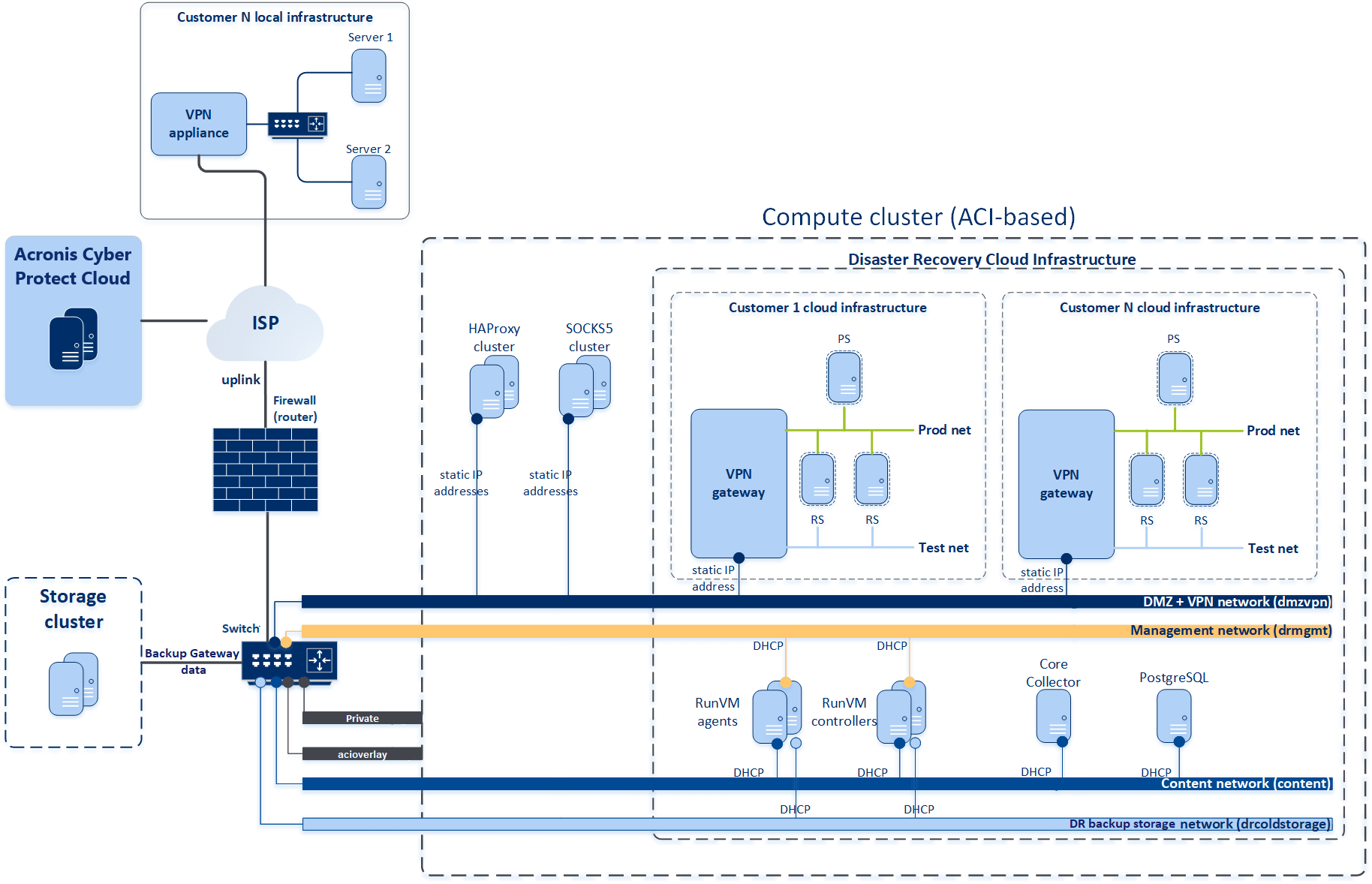
General requirements to networks
All networks must meet the following requirements:
- The address assignment in all networks must be managed by Acronis Cyber Frame. When creating the network in the UI, you must enable DHCP.
- There are no external DHCP servers in any of the networks.
Firewall requirements: protocols and ports
You must set the following firewall rules to ensure that Disaster Recovery works properly.
| VLAN | Protocol | TCP ports | Connection direction | Comments |
|---|---|---|---|---|
| dmzvpn | VRRP | n/a | Cyber Frame ↔ Cyber Frame | VRRP traffic among highly available proxy nodes (to be deployed on different Cyber Frame nodes) |
| TCP | 443 | Internet → Cyber Frame | VPN traffic from the local client environments to the VPN servers | |
| TCP/UDP | <any> | Internet → Cyber Frame |
Any traffic directed to client servers must be allowed (Further filtering must be configured on each VPN Server) |
|
| <any> | <any> | Cyber Frame → Internet | Recovery/primary servers can freely connect to the Internet resources | |
| content | TCP |
10809 49300-65535 |
Cyber Frame ↔ Cyber Frame |
Auxiliary VM → RunVM Controller (NBD server) :10809 Cyber Frame (internal NBD server) → Auxiliary VM :49300-65535 |
| drmgmt | TCP |
22 2650 5432 8080 8888 9090-9653 OpenStack API ports (see default OpenStack ports) 9090 |
Cyber Frame ↔ Cyber Frame |
Cyber Frame (a service workstation) → RunVM Agent, RunVM Controller, PostgreSQL, Core Collector :22 (ssh access for troubleshooting) RunVM Agent → RunVM Controller :2650 (to manage Controller) RunVM Agent, RunVM Controller → PostgreSQL :5432 (to acquire/release distributed locks) RunVM Agent, RunVM Controller → Core Dump Collector :8080 (to post Cyber Frame Admin panel:8888 Cyber Frame → RunVM Agent :9090-9653
RunVM Agent → Cyber Frame : (see default OpenStack ports) RunVM Agent → Cyber Frame :9090 (request from the agent to Cyber Frame's Prometheus the used disk space) |
| UDP | 123 | Internet ↔ Cyber Frame | The NTP protocol for NTP clients running in RunVM Agent VMs | |
| drcoldstorage | TCP |
44445 443 |
Cyber Frame → ABGW | RunVM Agent, RunVM Controller → ABGW :44445, :443 |
| Deployment/update using Acronis DCO jenkins | TCP |
22 (ssh) OpenStack API ports (see default OpenStack ports) |
Acronis Cyber Protect Cloud ACC ↔ Cyber Frame (DCO jenkins job placed into ACC) | Access can be limited by jenkins container IP address |
Networks used by the Cyber Frame cluster
| Network name | IP network | DHCP | Description |
|---|---|---|---|
| dmzvpn |
vpn—100.64.0.0/10 dmz—data center specific (public IP pools) The default gateway is to be assigned on the compute network |
None |
Customer VPN traffic from customer premises to their private cloud environment. There are 2 IP networks configured over a single vlan. The DR service assigns IP addresses to VPN servers. The range is configured during the DR infrastructure deployment as a subset of 100.64.0.0/10. |
| content |
x.x.x.x/16 Not routable outside of the network No default gateway |
yes, managed by Cyber Frame | Data traffic: read/write of virtual disk data between RunVM Agent/Controller and Cyber Frame internal processes (possible location on different Cyber Frame nodes). The communication is done within the same VLAN. |
| drmgmt |
y.y.y.y/24 The default gateway is to be assigned on the Cyber Frame host interfaces |
|
Connection from RunVM Agent/Controller to Acronis Cyber Protect Cloud (ACPC) component. Connection among RunVM Agent, RunVM Controller, and PostgreSQL VMs. Connection from RunVM components to the Internet. Public network in terms of Cyber Frame. |
| drcoldstorage |
z.z.z.z/16 No default gateway |
yes, managed by Cyber Frame |
Data traffic: RunVM Agents/Controllers read archives located on Backup (cold) storage. RunVM Agents (backupers) write new backups to Backup (cold) storage. Access to the Backup (cold) storage is done using public DNS names (IPs of Backup storage). Maximum throughput and minimum latency over this RunVM ↔ Backup storage communication is critical for the main DR service operation. |
| Private |
c.c.c.c/24 Not routable outside of the network No default gateway |
None |
Inter Cyber Frame cluster communication: storage Storage Internal network in terms of Cyber Frame, see Network requirements and recommendations. |
| acioverlay |
d.d.d.d/24 Not routable outside of the network No default gateway |
None |
Stretching the internal (virtual) networks across the Cyber Frame cluster (encapsulation of private vxlan traffic) Overlay Networking network in terms of Cyber Frame, see Network requirements and recommendations. |
Cyber Frame cluster network configuration
Cyber Frame infrastructure traffic type configuration
|
acioverlay |
Private | content | dmzvpn | drcoldstorage | drmgmt | ||
|---|---|---|---|---|---|---|---|
| Exclusive traffic types | Storage | yes | |||||
|
Internal management |
yes | ||||||
| OSTOR private | yes | ||||||
| ABGW private | yes | ||||||
| VM private | yes | ||||||
| Compute API | yes | ||||||
| VM backups | yes | ||||||
| Regular traffic types | S3 Public | yes | |||||
| NFS | yes | ||||||
| Admin panel | yes | ||||||
| SSH | yes | ||||||
| VM public | yes | yes | yes | yes | yes | ||
| Self-service panel | yes | ||||||
| Custom traffic types | Prometheus | yes |