






Author: Alexander Ivanyuk
Executive summary
Acronis Cyber Platform has a built-in AI assistant. Type a plain-language question into the console, and it generates an answer or completes a supporting task within the console.
Our research shows that managed service providers (MSPs) and other partners are roughly six times more likely to try the AI assistant than the businesses they serve. But this number conceals more than it reveals. Confirmed MSPs, recognized by Acronis sales or identified by the remote-management software they use on their customers’ machines, try the assistant far more than other partners, including distributors and resellers.
The customers who do adopt it use it more intensively than MSPs who try it. In August 2026, average active customer made close to 10 requests; the average active MSP made just over five.
There is one place where the pattern flips. Customers — businesses that purchase Acronis Cyber Platform to manage their own computers and backups — are grouped here by the MSP managing them. With that grouping, the smallest MSPs deliver the highest customer adoption of any group at 4.5%, more than four times the rate seen under the largest MSPs.
Growth of AI assistant usage has been significant, and it keeps compounding. Active accounts across both customers and MSPs have nearly tripled from April to August, climbing each month without exception. Among customers specifically, the gain is steeper still. Requests per active customer rose around 50% over the same period, from six per month to 10. Some of that growth may come from new people finding the assistant for the first time, and some may come from existing users replying on it more.
The findings tell a clear story: Adoption is growing every month, and average usage among active users is increasing. The AI assistant is not a feature to evaluate later — it is already being used by thousands of MSPs and businesses today. Try it on the task you repeat most often and let the data speak for itself.
Why AI assistant adoption is worth measuring
Business AI adoption has moved from experiment to expectation faster than most software categories in recent memory. Stanford's 2026 AI Index found 88% of organizations surveyed using AI in at least one business function in 2025, up from 78% the year before, and Gartner expects task-specific AI agents in 40% of enterprise applications during 2026, up from under 5% in 2025. A conversational assistant built into day-to-day IT and security tooling fits squarely into that shift.
Adoption and value are not the same thing, and the industry has learned that the hard way. This report gets closer to that distinction, measuring not just who used the assistant, but also how intensively they used it. MIT's Project NANDA studied enterprise generative-AI deployments across 2025 and found that most delivered no measurable financial return — not because the models were weak, but because the tools never got woven into daily workflow.
This report measures that exact distinction inside one product. The pattern is encouraging: Average requests per active account is increasing each month, a possible sign that the AI assistant is finding its way into real daily work, not just a first experiment.
There is a governance angle as well, and it is where this assistant may have an advantage. NIST’s AI Risk Management Framework treats generative AI as something to govern as a system, not something to simply switch on. An assistant built into a console that IT departments already manage starts from a different position than one that employees download independently — a point this report comes back to in its recommendations.
How adoption varies by account size
MSPs and other partners, including resellers and distributors, try the assistant roughly six times more than direct customers — businesses using Acronis Cyber Platform to manage their own computers and backups. The gap makes intuitive sense: An MSP working across dozens of client accounts can benefit repeatedly from time saved on a routine task, while a business managing its own machines may have fewer moments where the assistant earns its keep.
The bigger the operation, the higher the usage, and that pattern holds consistently across every size band without exception. A business running ten computers or fewer tries the assistant at under 2%. A business running more than five hundred tries it at nearly half. Each step up in size brings a meaningful jump in adoption — the chart below shows how cleanly that gradient holds.
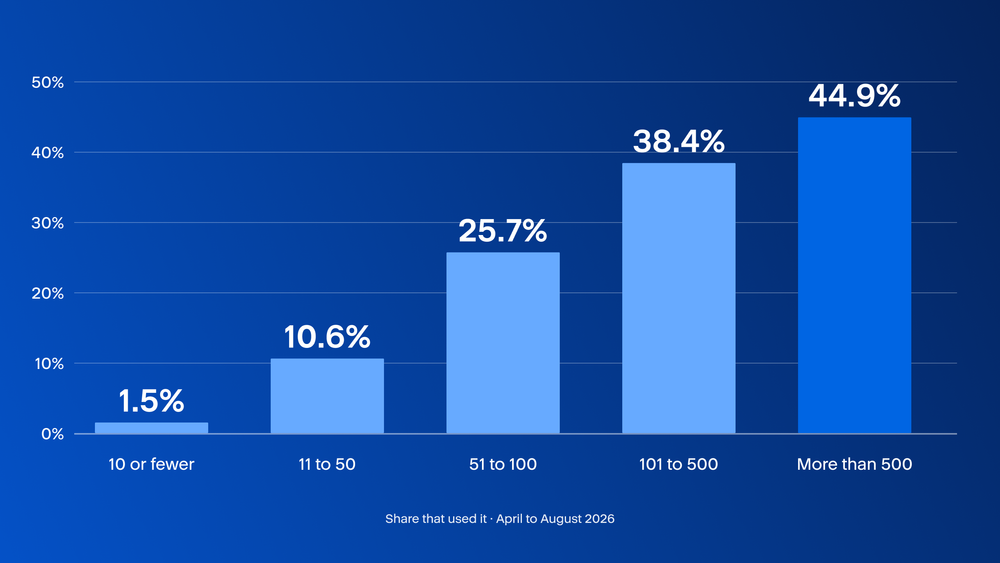
Adoption climbs steadily from under 1% at the smallest accounts to nearly 45% at the largest, and one possible reason is simple: More computers mean more routine console work, and more routine work means more moments where asking beats clicking. A business with six machines may rarely have a question worth delegating. A business with four hundred may have several per day. Bigger operations are also more likely to have someone on staff whose job includes trying new tools, rather than a single person juggling IT alongside three other roles.
Not every account in the partner category operates the same way. Alongside genuine MSPs, it includes resellers who sold the license and never touched the machines, telecom and hosting companies bundling backup into a broader package, and distributors several steps removed from the computers being protected. Grouping them together understates how actively confirmed MSPs use the assistant. The chart below separates them.
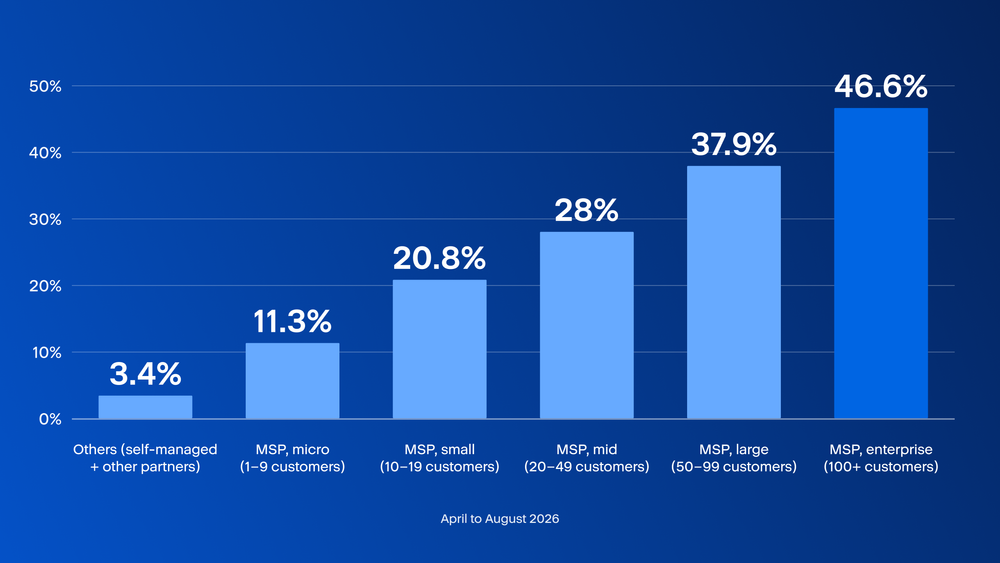
Confirmed MSPs try the assistant at a rate that climbs from 11% among the smallest practices to 47% among the largest. The pattern is consistent: The more customer accounts an MSP manages, the more likely it is to reach for the assistant.
Other partners — resellers, telecom providers and distributors — try it at a fraction of the rate confirmed MSPs do, and closer to the customer baseline than to any MSP tier. That gap makes sense: Without a team of technicians logging into customer consoles every day, there may be fewer routine tasks for the assistant to slot into.
Splitting the partner category this way turns one blended number into a sharper story. The high adoption rate on the partner side is driven primarily by MSPs doing hands-on technical work, not by the broader group of businesses that simply resell the product.
How MSP size relates to customer adoption
Size predicts adoption consistently everywhere in this report so far — larger customers use the assistant more, and larger MSPs try it more.
But if we look at customers by the size of the MSP managing them, we see that the pattern changes. Customers managed by the smallest MSPs — providers who manage fewer than ten client accounts — are more than four times as likely to use the assistant as those managed by the largest MSPs. It is worth understanding why this pattern emerged.
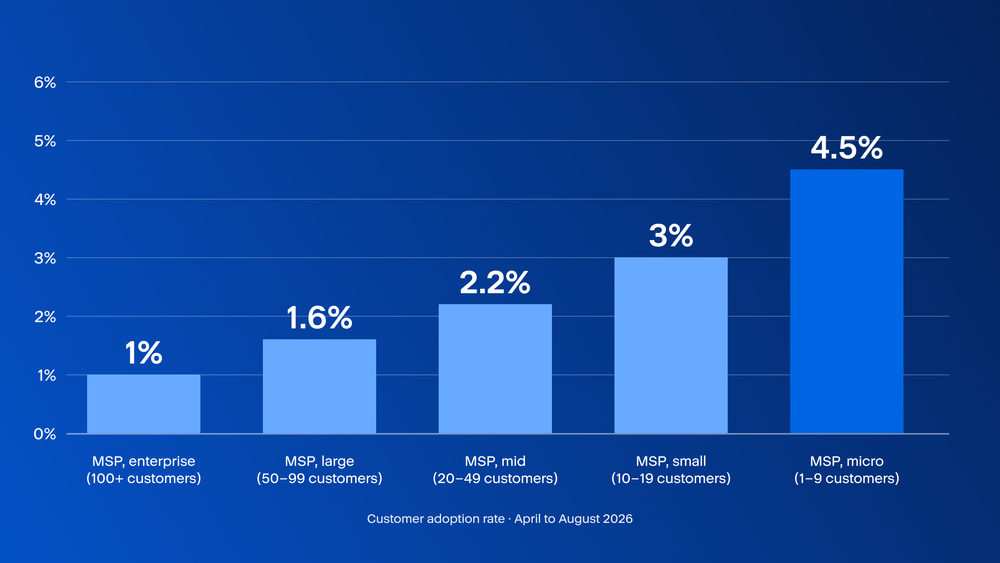
The likeliest explanation is distance from the decision. A small MSP running a handful of accounts can turn something on and mention it to a client, or simply leave it visible in the console — no committee required. A large MSP running hundreds of accounts standardizes its build across all of them, and whatever sits outside that build rarely reaches any single customer. The customer’s own appetite may be identical either way; what differs is how many steps sit between them and a new capability.
A second explanation runs in the opposite direction from what you might expect. Smaller MSPs may be more stretched, managing the same range of customer needs with fewer people. Customers under those practices may find themselves waiting longer for support and turn to the assistant to fill the gap. Under a larger MSP with deeper staffing, the same customer has less reason to self-serve. The assistant may be doing more useful work precisely where human support is thinnest.
Growing fast, and gaining momentum every month
Active accounts across both customers and MSPs have climbed every single month from April to August, with no exceptions. Customer accounts have grown the fastest — roughly six times the April figure by August. MSP accounts have grown more steadily alongside them.
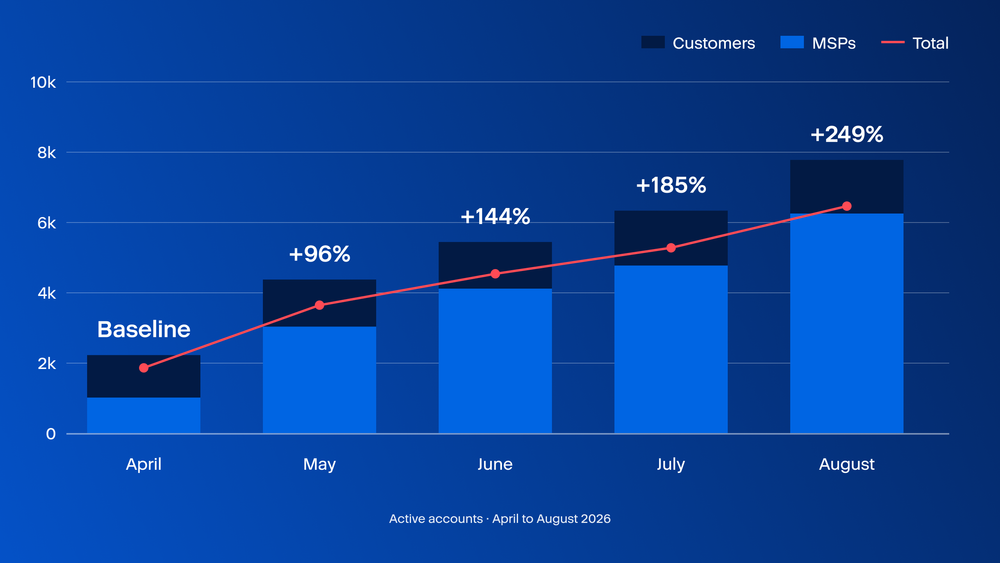
What makes this pattern meaningful is that it has compounded rather than flattened. Early adoption curves for new tools typically show a sharp initial spike as curious users try something new, followed by a plateau as the novelty fades. That plateau has not appeared here. Each month has brought more active accounts than the last, suggesting that interest in the assistant continues to expand.
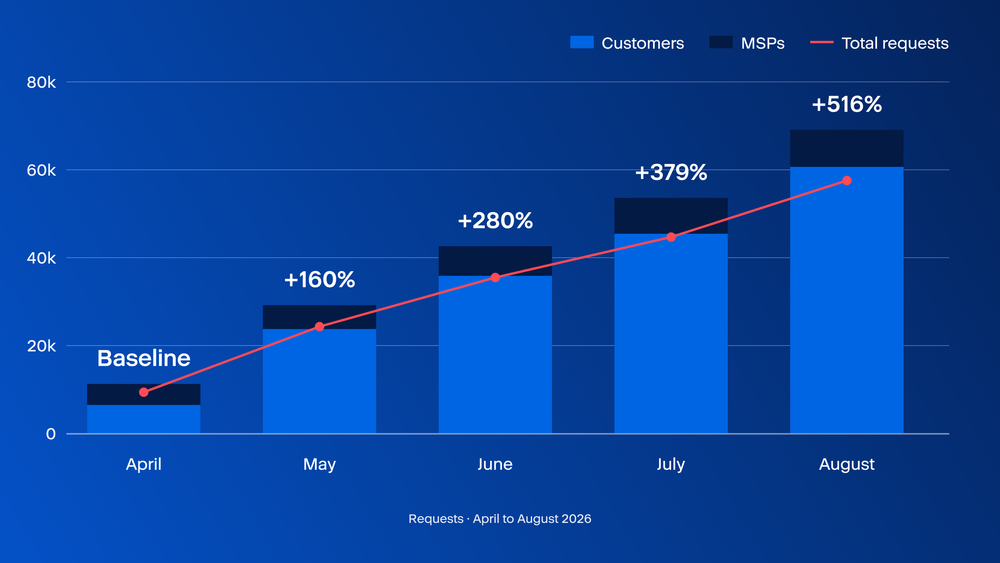
Requests have kept pace with that growth, rising every month on both sides. The assistant is reaching more accounts each month, and average requests is also increasing.
Growing adoption numbers tell part of the story. The other part is what happens after someone tries the assistant for the first time, and here the data is equally encouraging. Average usage is increasing across both customer and MSP segments.
This is the kind of pattern worth investigating when assessing whether a tool is finding its place in daily work rather than being tried once and forgotten. The committed may be doing more with the assistant over time.
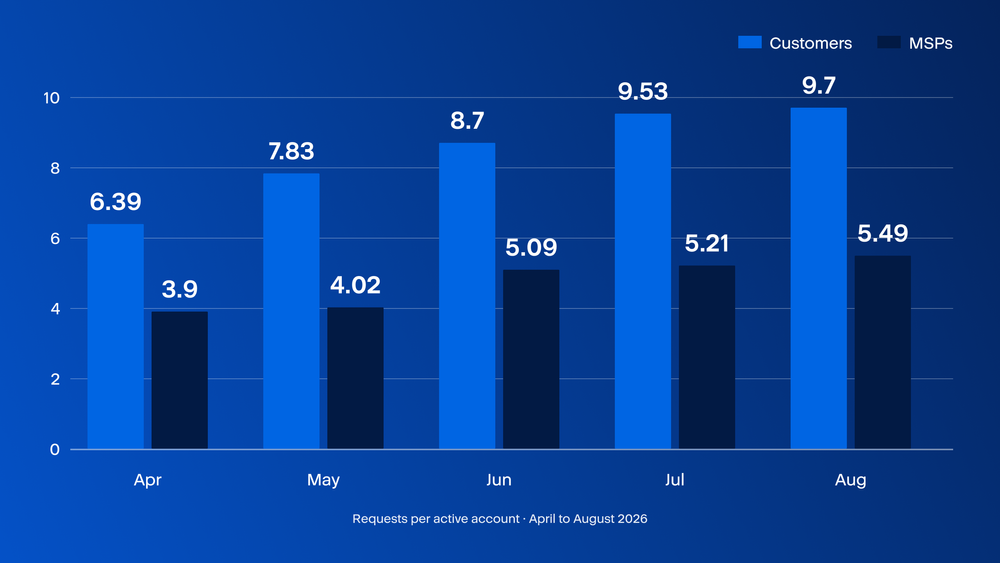
Requests per active customer rose 48% over the four months; per active MSP, 34%. That growth occurred while the number of active accounts was also increasing.
The comparison between the two groups is the most telling part. In August, the average active customer made 9.7 requests against an MSP’s 5.49. Sessions per account tell a similar story, with customers recording 4.6 against MSPs’ 2.6 in July.
Whatever brings an MSP to the assistant appears to be a lighter, more occasional need than whatever brings back a customer who has already adopted it.
The likely explanation is supported by the use-case data later in this report: MSPs treat it as a general convenience across many tenants, using it when it’s handy. Customers who adopt it appear more likely to attach it to one specific, recurring job. A tool tied to a repeating task is used repeatedly, while a tool used for general convenience is used only when convenient.
A handful of heavy users drive the majority of activity
Activity is concentrated in a small group of heavy users. The busiest 10% of accounts generate 71% of all requests — the remaining 90% share the other 29%. Most individual sessions are short and task-focused, averaging roughly two requests each.
The busiest 1% of accounts generate 35% of all requests — more than a third of total activity from a tiny fraction of users. At roughly two requests per session across the board, most individual interactions are short and task-focused — the concentration appears to come not from unusually long conversations, but from a small group returning to the assistant far more often than everyone else.
This kind of concentration is not necessarily a warning sign by. What matters is reading two ends separately rather than averaging them together: A committed group accounts for much of the assistant’s activity, while a much larger group uses it less frequently. Any decision built from the average would be aimed at a user who barely exists.
Adoption numbers tell you how many accounts tried the assistant. Use-case data helps explain what they use it for. The chart below breaks down what customers and MSPs asked the assistant to do, and the split between the two groups is one of the clearest findings in this report. The same tool, used by two different audiences, has effectively become two different products.
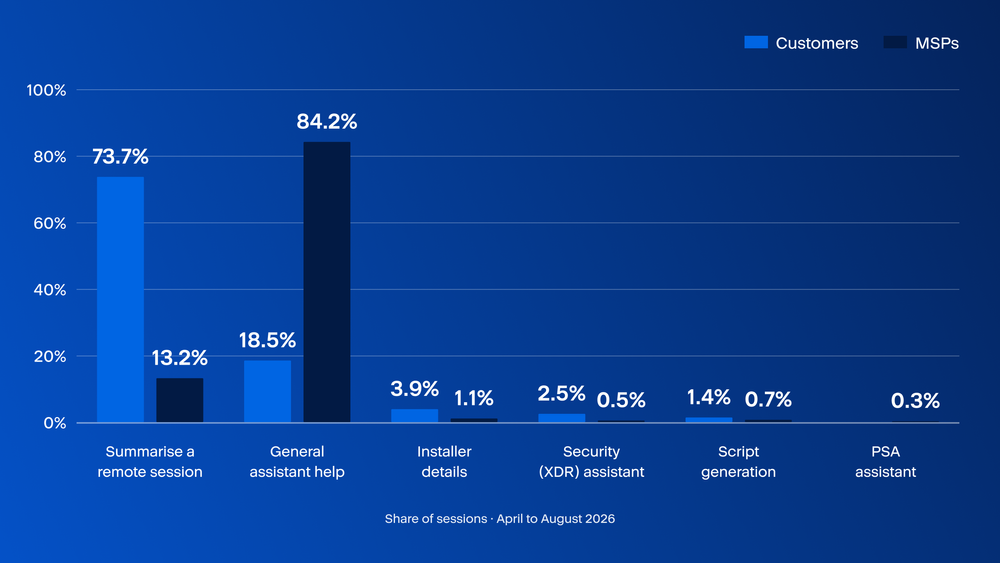
Customers overwhelmingly reach for the assistant to do one job: make sense of a remote support session after it happened. That is narrow, it can repeat, and it is exactly the kind of task that can turn into a habit. MSPs use it as a general helper spread across the console — genuinely useful, but with no particular moment that tells anyone to open it today rather than tomorrow.
Session language
The assistant is available in more than 25 languages and responds in the language the user writes in. The chart belowshows the breakdown of sessions by language. The distribution reflects both where Acronis's users are located and how IT professionals tend to communicate in practice.
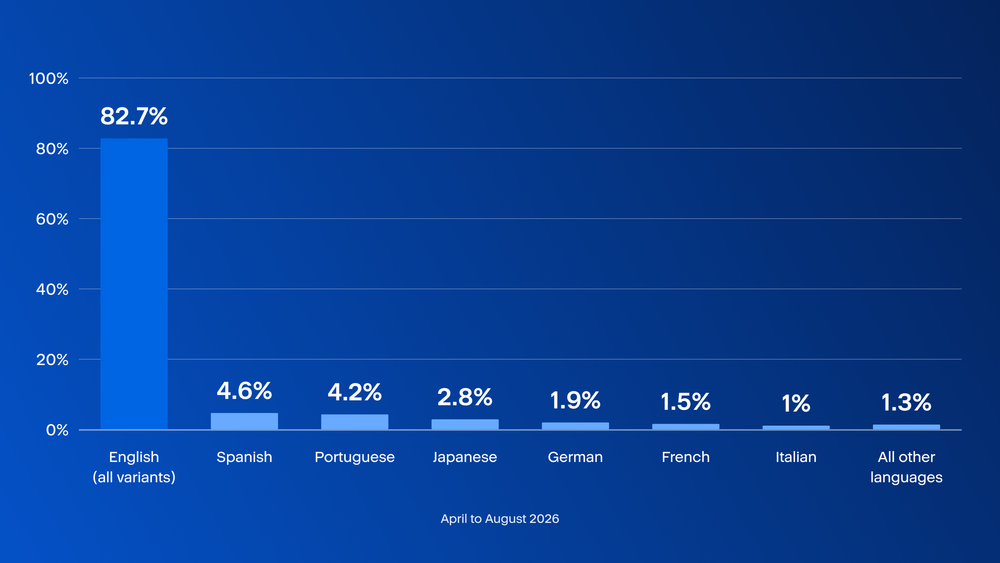
English dominates at 82.7%. The high share of English sessions does not simply reflect an English-speaking user base. It may also reflect the role of English as a working language of IT and cybersecurity globally.
The 17% of sessions in other languages is still meaningful. Spanish, Portuguese, Japanese, German, French and Italian together account for the bulk of non-English sessions, and that distribution is geographically consistent with Acronis's customer base across Europe and Asia-Pacific.
For MSPs and customers working primarily in their local language, the assistant offers a way to interact in that language— roughly one in six interactions already happens outside English.
Conclusions
The finding that should reshape how this product gets discussed is the split between breadth and depth. Two different audiences were being described by one number, and the number flattered the audience that turns out to be less intensive in its usage. MSPs are the real engine behind the partner-side statistics in this report — separating them from resellers and other partners tells a far sharper story.
A customer managed by the smallest MSPs is several times more likely to use the assistant than one managed by the largest. One likely mechanism is distance from the decision: A small MSP can turn something on with a conversation, while a large one standardizes across hundreds of accounts and rarely deviates from that build.
Large MSPs may be insulating their own customers from a capability those customers would happily take up — a question for how those providers roll out new tools, not necessarily a flaw in the tool itself.
The industry conversation around enterprise AI keeps circling this same problem. MIT's Project NANDA frames it as a learning gap: Tools that help someone in the moment without ever becoming part of how the work gets done. The one job with a natural trigger may be more likely to become a habit. The one without a trigger may remain an occasional convenience.
The deciding factor may not only be the quality of the answer, but whether anything happened during the workday that reminded a user to ask the assistant.
The opportunity is not simply to make a better assistant in general. It is to find more tasks like remote-session summarization and place the assistant exactly where those tasks already happen.
The assistant also has a structural advantage worth naming. It runs inside the management console your team already uses — not in a personal browser tab or through a third-party app someone downloaded without informing IT. Requests in this report came through authenticated accounts. That provides a useful starting point for extending governance practices to AI-assisted workflows.
The signal in this data is unambiguous: Active accounts have grown sixfold from April to August, average requests per active customer rose by approximately 50%, and overall usage increased every month. The assistant has found a real job with a real audience — and that audience is growing.
Recommendations
The recommendations below are organized by user type, because the useful next step differs sharply depending on whether you are using the assistant yourself or deploying it across a book of customers.
For customers, especially those with smaller IT environments
The data shows a clear path to getting value from the assistant quickly. The evidence from heavier users points to one clear starting move: Pick the task the assistant is demonstrably good at and use it there consistently. Customer sessions are heavily concentrated on one task: summarizing remote support sessions. Start there.
Ask the assistant more than one question before making a judgment. Average usage per active account increased substantially between April and August, suggesting that a single trial may not provide a complete picture of how the assistant fits into your workflow.
For MSPs
The MSP usage gap shows up clearly in the use-case data — MSPs treat it as a general console helper with no obvious recurring trigger, while customer usage is heavily concentrated on specific, repeatable job.
One practical step to increasing usage and realizing the benefits of the assistant is to pick one recurring task in your own workflow and route it through the assistant whenever appropriate, rather than using it only when convenient. Which task matters less than the fact that it keeps repeating.
There is a bigger opportunity sitting in your own book of business. Your customers adopt at a fraction of your own rate but use the assistant more intensively once they do. You are well positioned to help close that gap— you already work within their consoles, you already onboard their staff, and you can point them toward a use case that has demonstrated strong adoption rather than leaving them to discover it on their own.