






Backup reliability is judged by whether recovery points are actually available when needed, not by whether a platform offers a retry button. Microsoft's Azure Backup automation guidance states that retrying transient backup job failures helps avoid unintentional breaches in recovery point objective (RPO), while the Azure Architecture retry pattern says retries are appropriate for self-correcting faults such as brief connectivity loss or temporary service unavailability and should stop after a defined maximum number of attempts.
AWS Backup documentation adds a monitoring reality that matters to operators: Its dashboards classify Failed, Expired and Completed with issues as problematic jobs, but completed with issues is specific to the AWS Backup console and is not exposed as a CloudWatch status. Together, these sources show that retries are only one part of backup resilience; policy design, observability and escalation rules matter just as much.
That broader context is why retry policy deserves separate analysis. In modern backup environments, retries are expected, but the industry guidance treats them as a controlled response to transient conditions, not as a substitute for diagnosis. The real operational question is not whether a product can retry, but whether teams can distinguish between temporary failures that recover with one more attempt and persistent faults that should immediately trigger investigation.
Acronis telemetry analysis for H2 2025 reveals a critical insight about retry behavior. Policies with one run per day show a 1.6% error rate because they are healthy policies that succeeded on the first attempt. Policies with two runs show a 15%–23% error rate because they are policies where the first run failed and triggered a retry. The data shows correlation (failing policies retry more), not causation (retries fix failures). Meanwhile, policies with 10+ daily runs generated approximately 4.7 million errors in October 2025 alone, with always_full backup schemes showing the worst per-job error rate at 10.01%. The top two failure causes — quota exhaustion (15.9%) and VSS writer failures (11.48%) — are persistent and cannot be resolved by retries.
What the industry says about retries
Industry guidance confirms that retries are common, but the operational rules are product-specific rather than universal. Google Cloud Backup and DR states that a failed scheduled job is retried up to three more times, with retries queued after 4, 16 and 64 minutes. It also notes that queued retries still contend for limited job slots and may never start if the policy window closes first. That is an important point for operators: retries do not come for free; they consume scheduler capacity and time.
Microsoft guidance draws a hard line between transient and persistent failures. Azure Backup guidance recommends automation to rerun failed jobs when the failure is transient or tied to a planned or unplanned outage, because this helps avoid accidental RPO breaches. But Microsoft also states that some persistent errors require in-depth analysis and that retriggering is not always viable. Separate Windows Server and SQL Server troubleshooting guidance makes the same distinction at the platform layer: if a VSS writer errs, the whole backup can fail, and for certain nontransient writer states, a retry is likely to fail again.
AWS Backup shows why this distinction matters operationally. Its documentation states that a Windows backup job may end as Completed with issues when the VSS portion fails and only a crash-consistent backup succeeds. AWS also classifies Failed, Expired and Completed with issues as problematic jobs in its jobs dashboard, yet notes that Completed with issues is specific to the AWS Backup console and cannot be tracked through CloudWatch metrics. In practice, that means retry-related degradation can be easy to miss unless operators review detailed job status rather than relying only on high-level success counts.
Acronis Backup policies that attempted 10 or more runs in a single day generated approximately 4.7 million errors in October 2025 alone — far more than all other retry buckets combined. Each retry consumed CPU, network bandwidth and storage I/O without resolving the underlying problem. Retries are backup's most misunderstood feature. The logic seems sound: if a backup fails, try again. Maybe it was a transient network blip. Maybe a file was briefly locked. The second attempt often succeeds. So, operators configure three retries, or five, or leave it at the default "retry until success" and then discover that a single misconfigured policy is hammering their server all day while users complain that everything is slow, and the backup is still red at 18:00.
The Acronis telemetry evidence: The retry math
The H2 2025 telemetry analysis shows that comparing error rates across run-count buckets does not show the effectiveness of retries. The relationship between run count and error rate reflects selection effects: Policies that run more times per day do so because they are failing, not the other way around. In the data:
One-run policies show a low error rate (1.6%–2.2% depending on backup type) because they are healthy policies where the backup succeeded on the first attempt. There was no failure to trigger a retry, so only one run occurred.
Two-run policies show a high error rate (15%–23%) because these are policies where the first run failed. The second run exists precisely because there was a problem. Observing that two-run policies have higher error rates than one-run policies does not mean retries are harmful; it means the data is sorted by outcome, not by treatment.
This is the same statistical pattern as observing that patients who visit the emergency room have worse health outcomes than those who do not. The visit does not cause the bad outcome; the bad outcome causes the visit. Similarly, high error rates do not cause retries; the failures that produce errors are what cause the additional runs.
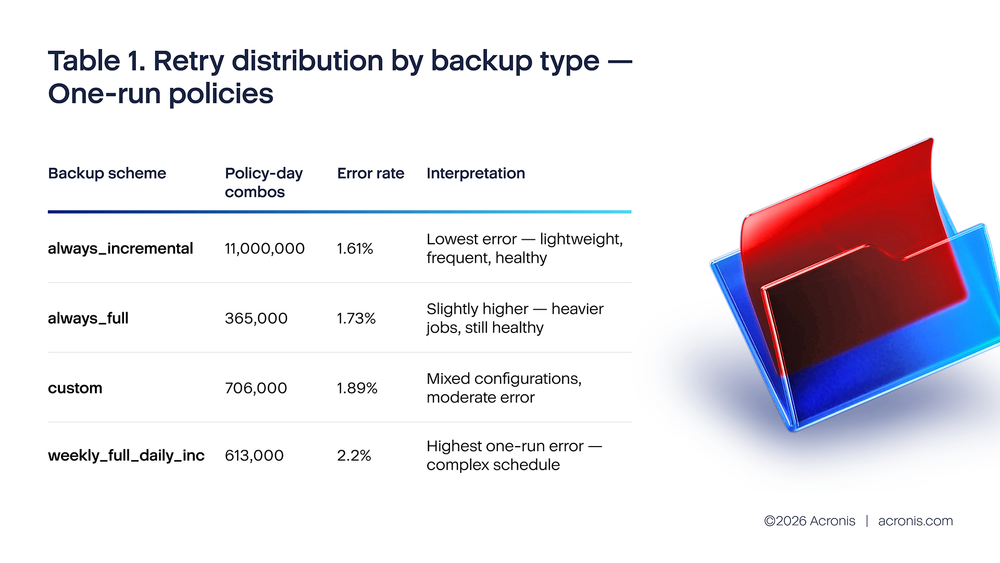
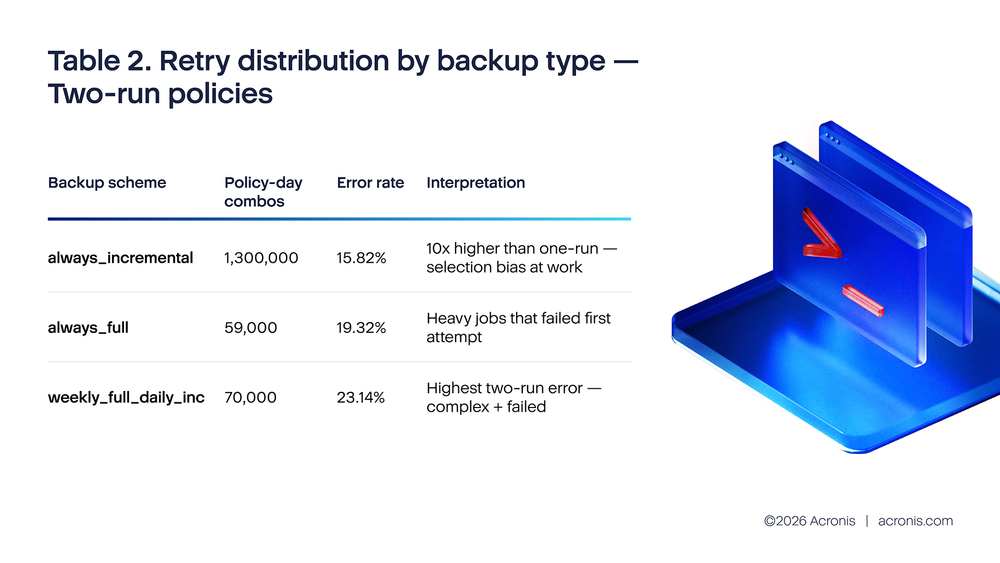
The pattern is unmistakable: Two-run policies have error rates 8–12 times higher than one-run policies of the same backup type. This is not because the retry made things worse. It is because the two-run bucket selects for policies that already had a failure. The retry is the consequence of the error, not the cause.
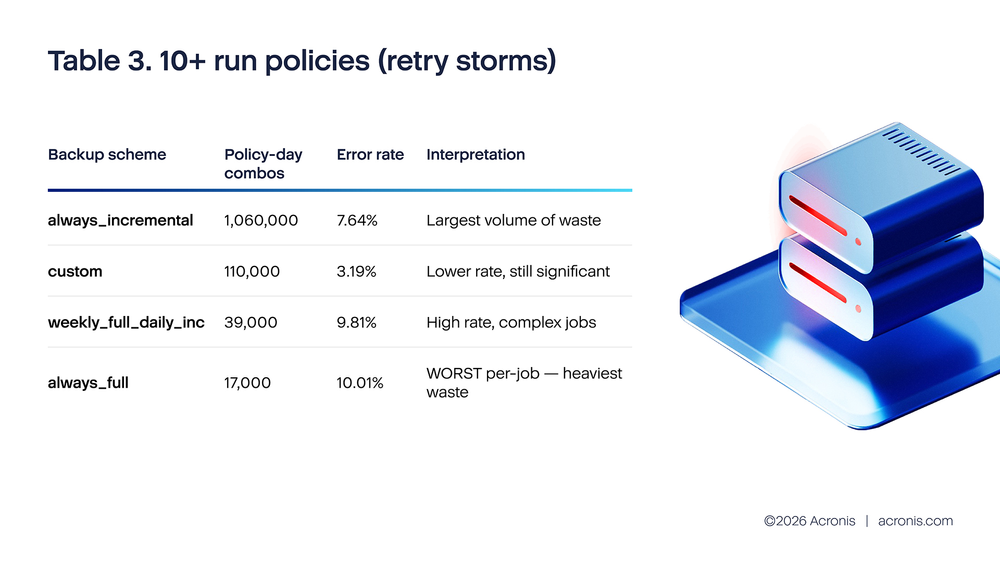
Total errors from 10+ run policies in October 2025 alone: approximately 4.7 million. These retry storms span roughly 1.23 million policy-day combinations, with an average of 43 runs per combination (54 million total runs / 1.23 million combinations). The always_full scheme stands out: despite having the smallest number of 10+ run combinations (17,000), it shows the highest error rate (10.01%) and the heaviest per-job resource cost because each full backup attempt reads the entire source dataset.
What the data actually shows is that retry behavior is a strong signal of policy health: Policies that need many retries have underlying problems that retries cannot fix. The operational implication is the same — limit retries, investigate failures — but the reasoning is now grounded in correct causal interpretation rather than a statistical artifact.
What is driving the 10+ run policies
In H2 2025 Acronis telemetry error breakdown filtered to business hours and local datacenter time, the top failure causes are both persistent:
- SpaceQuotaReachedHard (15.9% of business-hours failures): The backup destination has no space. Running the backup again does not free space. Every retry adds more failed-attempt metadata, may write partial data and consumes bandwidth. In the worst case, repeated retries of a quota-exhausted policy can fill the remaining buffer space with retry artifacts, making the quota problem worse.
- MemoErrorVssWriterFail (11.48% of business-hours failures): The Windows Volume Shadow Copy Service failed to create a consistent snapshot. This is often caused by a hung or misconfigured application (a database, an antivirus engine, a legacy backup agent) that has registered a VSS writer and is not responding. Until that application is restarted or its VSS writer is reset, every backup attempt will fail at the snapshot step. Twelve retries produce twelve identical VSS failures, each of which takes several minutes to time out — keeping the server under backup I/O stress for hours.
- ConnectToPlatformFailedNetwork (9.11% of business-hours failures): The backup agent cannot reach the Acronis platform. While some network issues are transient, a significant portion represents persistent connectivity problems (firewall changes, proxy misconfigurations, expired certificates) where retries are futile.
Together, quota exhaustion and VSS writer failures alone account for 27.38% of all business-hours failures — and neither can be resolved by retries. The analysis also introduces failure_type classification, which shows that the vast majority of errors are customer_side_failures: problems originating from the customer's environment (full disks, broken VSS, network issues) rather than platform-side transient errors. This further undermines the case for aggressive retry policies, since retrying a customer-side failure does not fix the customer's infrastructure.
The resource cost you are not seeing
What makes retry storms particularly insidious is that their cost is invisible in the backup console. The console shows "failed" — which looks the same whether the job tried once or forty-three times. But the server is not experiencing equal attempts. Each retry cycle:
1. Initiates a new VSS snapshot attempt (if VSS-based) — placing consistent but temporary load on all VSS-registered services.
2. Opens new network connections to the backup target.
3. Reads source data from disk (for changed blocks), generating I/O even if the upload ultimately fails.
4. Writes retry state and metadata to the backup agent's local database.
For a policy backing up a 500GB VM forty-three times per day (the average for 10+ run combos), the retry storm may be reading and discarding 20+TB of source data per day while the backup shows as "failed." Users notice sluggishness. Storage arrays show elevated I/O. Network utilization is high. And nothing useful is happening.
Estimated infrastructure waste from retry storms (example of October 2025):
Using the ~1.23 million policy-day combinations with 10+ runs as a monthly baseline (approximately 41,000 per day):
- At an average of 43 runs per policy-day and an average read size of 5GB per attempt.
- Estimated wasted disk I/O: ~8.8PB per day across the platform (41K combos × 43 runs × 5GB).
- Estimated wasted network bandwidth: proportional to data read, minus deduplication (est. 3–4PB / day).
- Estimated wasted CPU time: 43 VSS snapshot attempts × 3 minutes each = 129 minutes per policy per day, totaling ~88,000 CPU-hours per day of unproductive backup processing.
- Full backup retry storms (always_full at 10+ runs): 17,000 monthly combos generating 80,000 errors — the most wasteful per job because each attempt reads the entire source dataset, not just changed blocks.
The MSP amplification effect
For MSPs managing hundreds or thousands of policies, a single misconfigured retry policy at one client can trigger alerts, consume shared infrastructure resources and cause visible slowdowns for neighboring clients on the same backup infrastructure. In October 2025, the 1.23 million policy-day combinations with 10+ runs represent a concentrated failure cluster that produces disproportionate noise — their 4.7 million errors account for the majority of the BackupFailed alert volume that MSP operators experience as unexplained "bad days."
The backup type breakdown adds a new dimension to MSP triage. The always_full scheme at 10+ runs has the worst error rate (10.01%) and the heaviest per-job resource cost. An MSP with even a few clients running always_full policies with unlimited retries will see those clients dominate backup infrastructure utilization during retry storms. Identifying and capping retries on full backup policies should be the first action for any MSP experiencing unexplained backup infrastructure slowdowns.
The industry push toward automation — which is broadly correct — has an unintended side effect on retry behavior. The MaxTech 2025 guide recommends automating backup schedules "based on data sensitivity and change frequency." NovaBackup's 2025 trends report emphasizes "incremental forever backups" and "hybrid environments" as MSP best practices. Both assume that automated retries are beneficial.
They are — up to a point. The Acronis data shows that retry behavior is primarily a signal of policy health, not a treatment for policy failure. Policies that need retries are overwhelmingly policies with underlying problems. Automation without investigation is automating waste.
The cost is real. Industry research from Infrascale (2025) shows that downtime costs SMBs $137–$427 per minute. A retry storm that keeps a server under I/O stress for eight hours — while users experience sluggishness and the backup never completes — represents $66,000–$205,000 in degraded-performance costs at the Infrascale estimate, even without a complete outage.
A practical retry configuration guide
The right retry configuration varies by workload and backup type. The following recommendations are supported by the Acronis H2 2025 telemetry data, with specific guidance per backup scheme:
For always_incremental policies (workstations and small servers): set maximum two retries, 20-minute delay between retries. This scheme showed the lowest one-run error rate (1.61%) and the largest volume of 10+ run retry storms. The lightweight nature of incremental backups makes retries less costly per attempt, but the sheer volume makes uncapped retries the largest source of platform-wide waste. If both retries fail, stop and alert. Do not continue retrying until the next scheduled run.
For always_full policies (servers, critical systems): Set maximum one retry, 30-minute delay. Full backups are heavy — each attempt reads the entire source dataset. This scheme showed the worst 10+ run error rate (10.01%) and the highest per-job resource cost. A single failed full backup retry is more costly than multiple failed incremental retries. If the retry fails, alert immediately and wait for operator intervention.
For weekly_full_daily_inc policies: Set one retry for the full component, two retries for the incremental component. This scheme showed the highest two-run error rate (23.14%), indicating that its failures are disproportionately persistent. The complexity of managing both full and incremental schedules makes diagnosis more important than retries.
For cloud-destination policies: Set two retries, 15-minute delay. Cloud failures are more often transient (temporary API unavailability, throttling), so the second retry is more likely to succeed than for on-premises failures. However, if ConnectToPlatformFailedNetwork is the recurring error (9.11% of failures), the issue is likely persistent and should be investigated rather than retried.
For any policy that shows a recurring failure pattern: do not increase retries — investigate the root cause. The data shows that the vast majority of failures are customer_side_failures (full disks, broken VSS, network issues). If a policy fails more than three days in a week for any reason, treat it as a configuration or infrastructure problem, not a retry problem.
Additionally, configure a retry storm alert: if any single policy executes more than four runs in a day, trigger an operational alert. Given that the average 10+ run combo executes 43 times, early detection at four runs prevents the cascade that leads to 43-run retry storms.
Key takeaway
Retries do not reduce error rates — comparing run-count buckets reflects policy health, not retry effectiveness. What the data actually shows is that retry count is a diagnostic signal: policies that need many retries have persistent problems that retries cannot fix. Million errors from 10+ run policies represent pure waste — CPU, network, storage I/O and operator attention consumed with zero recovery value.
The right response to a persistent backup failure is investigation and remediation, not more retries. Limit retries to one or two depending on backup type, set meaningful delays, alert on anything beyond four runs per day, and treat retry storms as infrastructure incidents requiring root cause analysis. The backup type breakdown shows where to start: always_full policies with unlimited retries are the single most wasteful configuration in the data protection ecosystem.
References
1. Google Cloud. "Backup plans in the management console." https://cloud.google.com/backup-disaster-recovery/docs/concepts/backup-plan.
2. Google Cloud. "Optimize backup plan policy performance and job scheduling in the management console." https://cloud.google.com/backup-disaster-recovery/docs/concepts/backup-plan-policy-best-practices.
3. Microsoft Learn. "Automation in Azure Backup." https://learn.microsoft.com/en-us/azure/backup/automation-backup.
4. Microsoft Learn. "Windows Server backup may fail because of the SQL Server VSS writer." https://learn.microsoft.com/en-us/troubleshoot/windows-server/backup-and-storage/backup-fails-vss-writer.
5. Microsoft Learn. "Non-component VSS backups such as Azure Site Recovery jobs fail on servers hosting SQL Server instances with AUTO_CLOSE DBs." https://learn.microsoft.com/en-us/troubleshoot/sql/database-engine/backup-restore/revocery-jobs-fail-servers.
6. AWS Backup. "Create Windows VSS backups." https://docs.aws.amazon.com/aws-backup/latest/devguide/windows-backups.html.
7. AWS Backup. "AWS Backup console dashboards." https://docs.aws.amazon.com/aws-backup/latest/devguide/backup-dashboards.html.
8. Microsoft Learn. "Retry pattern." https://learn.microsoft.com/en-us/azure/architecture/patterns/retry.
9. AWS Backup. "AWS Backup metrics with Amazon CloudWatch." https://docs.aws.amazon.com/aws-backup/latest/devguide/cloudwatch.html.