






Author: Alexander Ivanyuk
Executive summary
We analyzed anonymized telemetry from more than 1.8 million business computers protected by Acronis that were online on September 30, 2026. A computer is like a kitchen drawer: junk goes in, but very little comes out. The average Windows PC carries 38 apps, and more than one PC in five (22.3%) carries more than 50.
Much of this software is quite old. One quarter (25.6%) of the Windows apps with a known install date were installed more than three years ago. Software also leaves late. The Windows apps removed in the third quarter had been installed for 677 days on average, and 46.3% of them for more than a year.
The bigger risk is the update that never gets installed. On 22.1% of the Windows PCs where we can see update data, a security update for an everyday app had been available for more than 30 days and was still not installed. On 77% of them, the waiting update fixes a weakness that criminals are already using. The apps most often affected are WinRAR, Java, Firefox, Notepad++ and 7-Zip.
Speed explains the difference. Browsers get their updates in a median of four to six days. WinRAR takes 35 days, and the Java updates installed this quarter were released almost three years earlier. Switching on patching will help, but it does not close the gap. 22.4% of the PCs with patching on still have an update waiting for more than 30 days, against 31.3% of the PCs that only scan.
Nearly one Windows PC in four (22.8%) runs at least one product that its maker no longer supports. Examples are Silverlight, Flash Player, Office 2016 and 2019, and very old versions of Acrobat and Java. The problem is worst on Windows 10 and older PCs (50% against 17% on Windows 11). It is also worse in the smallest customers (27% against 20% in customers with 100 or more computers).
On Macs, where we can see when an app was last opened, one app in five (21.1%) has not been opened for more than 90 days. Another 45,000+ Windows PCs (2.6%) carry an app that has not changed for more than two years, mostly harmless support files.
Why forgotten software matters
Every business computer collects software over time. Some apps come with the computer. Some are installed for one job and then forgotten. Others arrive quietly with another program. Few are ever removed, and almost nobody keeps a list. This matters because attackers look for old software with known vulnerabilities.
Security researchers give every flaw an ID number called a CVE. The CVE Program published 48,244 new CVE records in 2025, which is 20.4% more than in 2024. Attackers use these weaknesses. In the unauthorized-access incidents where ENISA, the cybersecurity agency of the European Union, could tell how attackers got in, six in ten used a vulnerability. The Verizon 2026 Data Breach Investigations Report says that using a vulnerability is now the most common way in, at 31% of breaches with a known entry route. It also found that only 26% of critical weaknesses that criminals were known to use were fully fixed.
The U.S. cybersecurity agency CISA keeps a list of vulnerabilities that criminals already use. It added 245 to the list in 2025 and 255 in 2026 up to October 8, which is already more than all of 2025. Of the 245 added in 2025, 94 (38%) had a CVE number from 2024 or earlier. Old vulnerabilities stay dangerous.
Small businesses are often slow to install updates. In the U.K. Cyber Security Breaches Survey 2025/26, only 34% of businesses said they have a rule to install security updates within 14 days. The NIST guide to patch management says that good patching starts with a complete list of the software on every computer. Many small businesses do not have one. In August 2026, a Gartner survey of senior risk managers named AI-assisted discovery of weaknesses as the top emerging risk. Flaws can now be found and used faster than before.
This report follows the life of the software on a business computer. It covers how many apps there are, how old they are and which ones never change. It also covers which ones the maker has given up on, how long they stay and which ones are missing security updates.
A typical Windows PC carries 38 apps
We looked at the Windows PCs and Macs that were online on September 30, 2026. In this report, a PC means any Windows computer, including servers. The average is 38 apps per Windows PC. Macs carry more, 77 on average, and many of the Mac entries look like small helper programs that come with bigger apps.
Table 1. Number of installed apps per Windows PC, September 30, 2026
A busy PC is not a problem. The question is how many of these apps are still needed and still updated. The count is also probably a minimum, because it only includes apps that register themselves in the normal way. More than one Windows PC in five has more than 50 apps, and these PCs are the hardest to keep in order. Windows records the install date for about six in 10 apps. The percentages below show these apps.
Table 2. Age of installed Windows apps with a known install date, September 30, 2026
One install in four (25.6%) is more than three years old, and 46.7% of Windows PCs carry at least one app that old. Age alone is not a fault. Some tools are meant to stay for years. But an old app that nobody updates is exactly what attackers look for, so age tells us where to look.
For every app, the system keeps a record that changes when something happens to the app: a new version, a repair or a reinstall. If the record has not changed for two years, nobody has updated or touched the app in that time. This does not prove that the app is unused or unsafe. It shows where nobody is looking.
One caution: About four in five of the records that have not changed for two years were not checked by a full software scan, so some of them may simply be records that nobody refreshed, and the real share of untouched apps may be lower.
Table 3. Windows installs whose record has not changed, by time without change, September 30, 2026
In total, 2.6% of Windows PCs carry an app that has not changed for two years or more. These PCs belong to about 8% of the customer accounts. The next table names the apps behind this number.
Table 4. The 18 Windows apps most often unchanged for two years or more, September 30, 2026
Most of this list is harmless background material. The Visual C++ libraries, found on 2% of Windows PCs, are installed by other programs and are never chosen by anyone. Microsoft no longer supports any of them: Support ended between 2016 and 2024, depending on the version. Among the unchanged apps are the SQL Server 2008 support files (0.2% of Windows PCs) and Silverlight (.2%).
The list also holds tools that people chose themselves: WinRAR (0.43% of Windows PCs), 7-Zip (0.38%), Java (0.37%) and Zoom (0.26%). The Mozilla Maintenance Service, a small helper that lets Firefox install updates quietly in the background, is on 0.49% of Windows PCs with no change in over two years. It is worth checking that Firefox itself is still updating on those PCs.
Software the maker has given up on
A product reaches its end of support when the maker stops fixing security flaws. After that date every new flaw stays open for good. We searched the app lists for products and versions that are past this date. The support dates come from the makers themselves.
Table 5. Products and versions past their end of support on Windows PCs, September 30, 2026
Nearly one Windows PC in four (22.8%) runs at least one of these products. The largest single group is Office. Microsoft ended support for Office 2016 and 2019 on October 14, 2025, and they are on 9.8% of Windows PCs, about one in ten. Silverlight is on 5.4%. Flash Player, which Adobe stopped supporting on December 31, 2020, is still on 1.8% of Windows PCs.
The Chrome row has a different meaning. Chrome 109 is the final release that runs on Windows 7, 8 and 8.1. A PC stuck on Chrome 109 or older is very likely running an old operating system. This fits the data: 84% of the Windows 7 and 8.x PCs and 67% of the Server 2008 and 2012 machines run Chrome 109 or older. Old versions of well-known tools also remain: Acrobat and Reader 9, X or XI on 2.9% of Windows PCs, and Java 6 or 7 on 1.2%.
On the Mac, one app in five sits unopened
macOS records when each app was last opened, so we can measure unused software directly on Macs. This is possible on the 34% of Macs that completed an app scan. On those Macs, 21.1% of apps have not been opened for more than 90 days.
Table 6. macOS apps not opened for more than 90 days, September 30, 2026
Table 7. The Mac apps most often left unopened for more than 90 days, September 30, 2026
The list shows two groups. The first is Apple software that comes with every Mac: GarageBand, iMovie, Keynote, Pages and Numbers. A business that never edits video or music has no reason to open them. Safari tops the list too: It was not opened on 46.6% of the Macs that have it, which suggests that many people use another browser.
The second group is Adobe helper software. The Adobe Acrobat Updater was unopened on 99.9% of the Macs that have it. Helper programs are not meant to be opened by a person, so a long gap is normal for them. They still belong on the cleanup list when the main Adobe app is gone. Old printer tools from EPSON, last opened in 2015, remain on hundreds of Macs.
Software stays (unpatched) longer than you think
We measured how long the apps removed during the third quarter of 2026 had been installed. Windows did not record an install date for 45% of its removals, so the shares below use only the removals with a known date.
Table 8. How long removed software had been installed, Q3 2026
Windows software is removed late. Almost half of the removed apps (46%) had been installed for more than a year, and only 35% left within 90 days. On the Mac the pattern is the opposite: 68% of removed apps left within 90 days. One possible reason is that a Mac app is simple to delete, while a Windows app often leaves parts behind and needs a proper uninstall. A long stay is the risk, because every month an app stays is another month it can fall behind on updates.
Acronis patch management checks which updates exist for the apps on a PC. Each update is listed as new, failed, waiting for a restart, installed, or replaced by a newer one. We counted updates that are still new, failed or waiting for a restart. They fix at least one known security weakness, and they came out more than 30 days earlier. We call these waiting updates. Each update also has a rating: low, medium, high or critical. The rating describes how important the update is, not a single weakness, because one update can fix many weaknesses. We look at updates for single apps, such as browsers, file tools and meeting software. We leave out operating system updates.
Update data exists for 41.5% of the Windows PCs we chose for this research. For the other PCs we cannot see the update status, so the shares below are shares of the PCs with data.
On 22.1% of the PCs with data (9.2% of all Windows PCs), at least one waiting update was for an app. On 7.4% of the PCs with data, a waiting update was rated critical. Counting the other updates released by Microsoft too, 34.6% of the PCs with data have a waiting update.
Table 9. Apps most often waiting for a security update (30 days or more), September 30, 2026 (the critical and known-exploited columns are shares of the PCs that wait for that app)
The known-exploited column carries the most important message. On 77% of the PCs with a waiting update, the update fixes a weakness that is on the CISA list of weaknesses that criminals already use. On 57.2% of them the weakness has also been used in ransomware attacks. For WinRAR it is 99.6% of the PCs, for Java 96.7%, for Firefox 87.1%. These shares are probably a minimum, because our list of linked updates only contains updates we have seen.
The table shows how many PCs are affected. The next chart shows how serious the waiting update is. The most common apps, WinRAR, Notepad++ and 7-Zip, mostly wait with medium or highly rated updates. The picture is different for VLC, Chrome, Firefox, Foxit Reader and two remote-control tools, TightVNC and UltraVNC. For these, most waiting updates are rated critical. Count and seriousness together tell you which app to fix first.
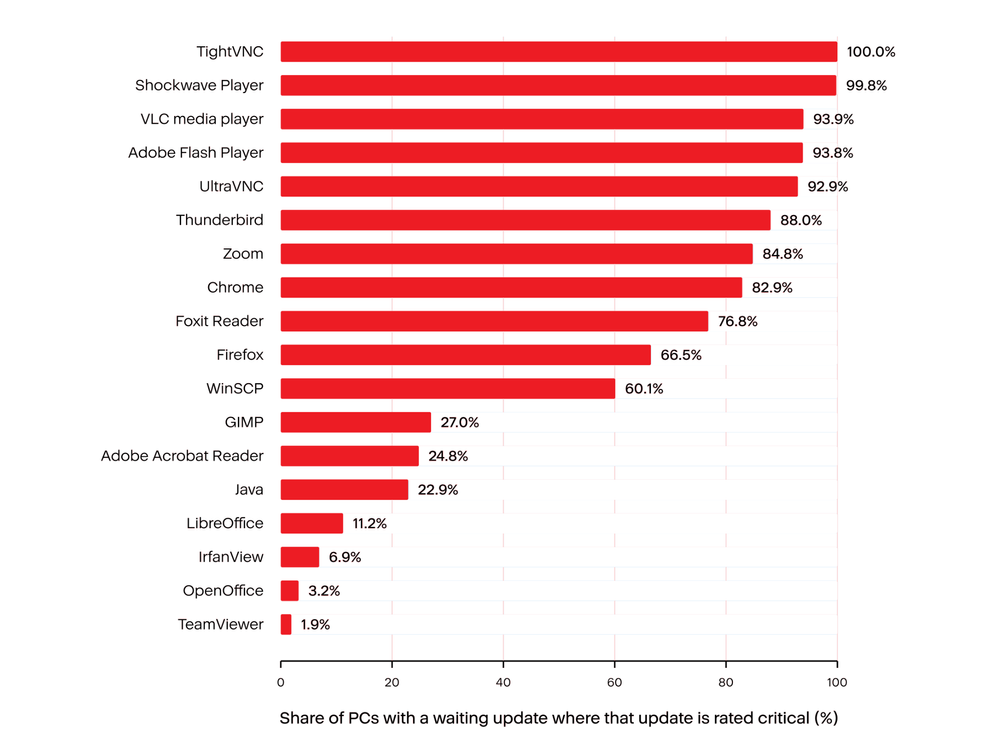
CISA lists known attacks for several of these apps. Its catalog contains five weaknesses in WinRAR, one in 7-Zip, twelve in Firefox, thirteen in Java and twenty-four in Adobe Acrobat and Reader. It lists none for VLC, Zoom or OpenOffice. One WinRAR weakness, CVE-2023-38831, is marked as used in ransomware campaigns.
Java needs a separate note. 4.9% of the PCs with update data have a waiting Java update. For Java 8, which many businesses still run, Oracle ties updates for business use to a paid subscription. A paid line item is easy to skip, and the update may simply never be installed.
Some waiting updates belong to products that no longer have a maker who supports them. Adobe discontinued Shockwave Player in April 2019, and Flash Player and Shockwave Player have waiting updates on 0.24% and 0.15% of the PCs with update data. No update will ever fix them, so the only answer is to remove them. Apache OpenOffice has a waiting update on 0.5% of the PCs with update data. In October 2026 the project published a critical in its current version and said a fix is expected in the next release.
Remote-control tools deserve extra care because they let a person take over a PC. TeamViewer has a waiting update on 0.3% of the PCs with update data, TightVNC on 0.3% (all rated critical) and UltraVNC on 0.2% (93% rated critical). An old remote-control tool can give an attacker the same access as the owner, without the need to trick anyone.
Fast for browsers, slow for everything else
The waiting updates are the ones that never arrived. We also looked at the ones that did. We took every security update for an app that was installed during the third quarter. For each update we measured the days between its release and its first install.
Table 10. Days from release to install for security updates installed in Q3 2026
Half of all updates are installed within 6 days, and 90.7% within 30 days. This is good news, and it comes mostly from browsers. Chrome updates are installed in a median of four days and Firefox updates in six. Both browsers update themselves. The picture changes for tools that need a person to act. WinRAR updates take a median of 35 days, and only 44.7% arrive within 30 days. UltraVNC takes 63 days and VLC 71.
Java is the extreme case. The Java updates installed this quarter had been released a median of 1,000 days earlier, almost three years. None of them arrived within 30 days. These are the lucky PCs, because they caught up in the end. The PCs in the previous section are the ones that have not caught up yet.
Who has the fullest junk drawer?
The same numbers look different depending on the computer and the customer. We split them by operating system and by customer size. Customer size is the number of Windows and Mac computers that the customer had online on September 30, 2026.
Table 11. Windows PCs by operating system: update data, waiting updates and end-of-support products, September 30, 2026
Windows 11 is clearly the cleaner platform. 35.6% of the Windows 10 PCs with update data have a waiting update, against 18.9% on Windows 11. For critical updates the gap is 14.9% against 5.9%. An end-of-support product is found on 50% of the Windows 10 PCs and 17% of the Windows 11 PCs. Old PCs collect old software. Windows 7 and 8.x PCs are worst, with 80%, and the Server 2008 and 2012 machines follow with 67%.
Table 12. Windows PCs by customer size: update data, waiting updates, end-of-support products and unchanged apps, September 30, 2026
The smallest customers have the fullest junk drawer. Customers with 1 to 10 computers have update data for only 35% of their PCs, against 53% for customers with 51 to 99. They run an end-of-support product on 27% of their PCs, against 20% for the largest group, and they carry unchanged apps on 4% of their PCs, against 1%. These are also the customers with the least IT help.
One more result shows why the numbers in this report are a minimum. The PCs without update data run old products about as often as the PCs with data: 23.2% against 23.6%. If those PCs also wait for updates at a similar rate, the real number of PCs with a waiting update is much higher than the 9.2% of all Windows PCs that we can see today. We cannot prove this, because nobody can see their update status.
Conclusions and recommendations: Clean out the drawer
Most of what piles up on a PC is harmless clutter: runtime libraries, drivers and helper tools that arrived with something else. This clutter is difficult to avoid, and clearing all of it could cost more time than it saves. The real danger sits in a short list of ordinary tools that people installed on purpose and then stopped thinking about. These are archive tools, browsers, Java, media players, PDF readers and remote-control programs. Criminals have attacked the same tools for years, and for most of the PCs with a waiting update, the missing fix closes a weakness on the government list of exploited flaws. Cleaning a drawer is a poor plan. Going straight to the few things in it that can hurt is a good plan.
The speed data shows that fixing is possible. Apps that update themselves are patched within days. The trouble starts where a person must act. WinRAR, remote-control tools, media players and Java wait for weeks, months or years. A likely reason is that nobody owns these tools. They are small, easy to forget and no one is responsible for them. Java adds a license problem, because updates for business use of its older version cost money.This points to a management gap as well as a technical one. A consistent routine can help close it.
Switching patching on is part of that routine, but it is not the whole routine. PCs with patching on do better than PCs that only scan, and yet one PC in five still waits. The updates are not failing. They are not being installed. So, the next step after switching patching on is to look at approvals, schedules and restarts, because that is where the updates are stuck.
The second lesson is about visibility. Update data exists for only four Windows PCs in 10, and the PCs without data carry old software as often as the PCs with data. A PC that is not scanned is not safe; it is unknown. For most businesses the fastest improvement is to extend scanning and patching to every PC before trying anything cleverer.
The third lesson is about age. Old PCs collect old software. PCs on older versions of Windows have far more end-of-support products and far more waiting updates than PCs on the newest version. The oldest machines carry the most. Replacing or upgrading an old PC removes a whole group of problems at once. Some products have reached the end of their life, such as Flash Player, Shockwave Player, Silverlight and the old Office suites. They can never be fixed, so removal is the only answer. People do remove software, but late: Almost half of the removed Windows apps had been installed for more than a year. A routine review would move that moment earlier.
The fourth lesson is about who needs help. The smallest customers have the least update data, the most end-of-support software and the most apps that nobody has touched. They are also the customers have the lowest update visibility. For a service provider, this represents a clear risk and an opportunity to help.On Macs the picture is calmer. Software leaves faster, and what stays unopened is mostly bundled apps and helper tools.
The same small teams responsible for clearing old software also need someone to investigate suspicious activity while that work continues. Acronis Managed Detection and Response (MDR) can support this effort by providing 24/7 monitoring, analysis and initial containment through Acronis EDR / XDR, including outside normal working hours. This gives a small business or its service provider access to security specialists while its own staff concentrate on removing unused applications and resolving overdue updates. Software maintenance reduces exposure; managed detection and response adds the people needed to investigate and act when an alert signals a possible attack.
These findings describe computers, not breaches. A waiting update does not mean that a PC was attacked. It shows where a door is open.
If you run the IT of your own small or medium business, start with a list. Write down the apps on each PC and remove every product whose maker has stopped supporting it. Silverlight, Flash Player, Shockwave Player and the old Office and Acrobat versions go first, and a plan for the Office versions that lost support last year should follow. Then check the short list: your browser, Java, archive tool, PDF reader and media player.
Ensure sure they are on the latest version and switch on automatic updates where the app allows it. Treat remote-control tools with extra care and remove them when the job is done. Replace PCs that cannot run a supported version of Windows. Put a reminder in your calendar to repeat this every few months, including any update that failed or is waiting for a restart.
If you are an MSP, make update scanning cover every PC you manage, and switch on patching for third-party apps, not only scanning. Treat a PC without update data as a finding. Then watch the updates that stay new: Review approvals and maintenance windows so that nothing waits for more than a few weeks.
Fix first the updates that close weaknesses on the exploited list, because these are the ones criminals use. Decide what to do about Java for each customer: license it, replace it or remove it, but do not leave it unmanaged. Pay special attention to your smallest customers and to every PC that runs an old version of Windows. Offer a yearly clean-up for end-of-life software and old installer leftovers, because customers will not ask for it, and it removes risk that no patch can.