






Executive summary
Patch prioritization in SMB environments often starts with software vendor severity. Critical patches go first, then high-severity patches, then everything else. Severity answers only one question: How risky is it to leave a vulnerability unresolved? It says nothing about how hard the fix is to deploy, how often it causes issues or how much testing it needs.
Acronis’ AI-based patch quality scoring adds that operational view. It draws AI-generated risk scores from incident reports across global IT communities and open-source threat intelligence to flag how risky a patch is likely to be before deployment, then summarizes each patch into a quality category from stable to critical issues.
Key findings from the SMB Windows fleet analyzed for this report — about 545,000 patch applications between January and May 2026:
- Roughly one in nine patches landed in the caution or critical issues categories and needed closer review before full rollout.
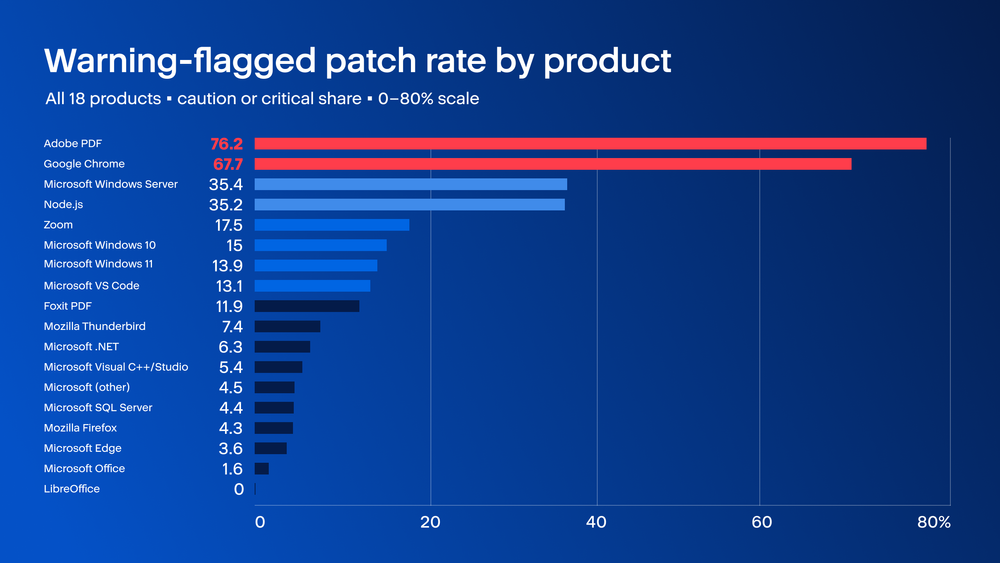
- A few products drive most of the risk. Products with more than 30% of patches flagged: Adobe PDF (76.2%), Google Chrome (67.7%), Microsoft Windows Server (35.4%) and Node.js (35.2%).
- Severity and patch quality are different signals. High-severity patches were about four times more likely than medium-severity patches to fall into the critical issues category, so rollout order should weigh both.
- Chrome and Adobe PDF rank near the top on both warning rate and install base. Chrome has the largest third-party install base among the products analyzed (Edge sits on more machines but ships with Windows, so it rarely needs review); Adobe PDF has the highest warning rate at 76.2%. Give these two the testing capacity first.
- Chrome's warning rate swings sharply month to month. About one in five Chrome patches were flagged in January, then 83.0% in February, 85.9% in March, 77.5% in April and 54.3% in May. Planning from January alone would leave testing capacity short for the rest of the period.
Install base is measured as the share of managed Windows machines that report installed software. Windows 10, Windows 11 and Windows Server are excluded because the dataset does not track the OS itself as an installed application, even though Windows runs on more endpoints than any individual app. Products such as Node.js, Foxit PDF and Zoom still need attention where warning rates are high, but testing can focus on the tenants and endpoints where they are installed.
Why patch quality is a useful signal alongside vendor severity
For an MSP, a patch that installs cleanly across endpoints is very different from a patch that causes crashes, application errors, or system instability. Vendor severity labels help MSPs understand how serious the underlying vulnerability is. However, they do not show whether the fix itself is likely to deploy cleanly or cause problems across customer environments.
That’s where the patch quality score becomes useful. Acronis measures how risky the patch is to install. The patch quality category is calculated from real deployment telemetry across the SMB Windows fleet: how many times each patch was applied to endpoints and what share of those applications failed, errored, or left the machine unstable. A patch lands in caution or critical issues because it produced problems at a measurably higher rate than a clean patch.
Severity score comes from the vendor and describes the vulnerability while the patch quality score is generated by Acronis and describes the behavior once the patch is installed. Looking at the two together gives MSPs a fuller view of patch risk across the SMB Windows fleet. It helps show which vendors tend to ship updates that install cleanly, and which vendors are more likely to produce patches that need closer review before broad rollout.
The Acronis Cyberthreats Report H2 2025 names patch latency as the biggest risk factor for MSPs handling zero-days, with close to 3,000 critical vulnerabilities discovered in 2025. This article looks at the same problem from the deployment side. It focuses on what happens after patches reach endpoints, including which vendors tend to ship updates that install cleanly and which ones are more likely to cause problems during rollout.
How patches break down across the four quality categories
Between January and May 2026, the Acronis patch quality scoring feed classified about 545 thousand patches that reached SMB Windows endpoints. 88.8% landed in the routine stable or minor issues groups, patches that install predictably or with side effects small enough that automation is the right answer. The remaining 11.2% fall into the caution or critical issue categories, which are the ones most worth reviewing before deployment. This combined share is what we’ll refer to in this blog as “warning rate.”
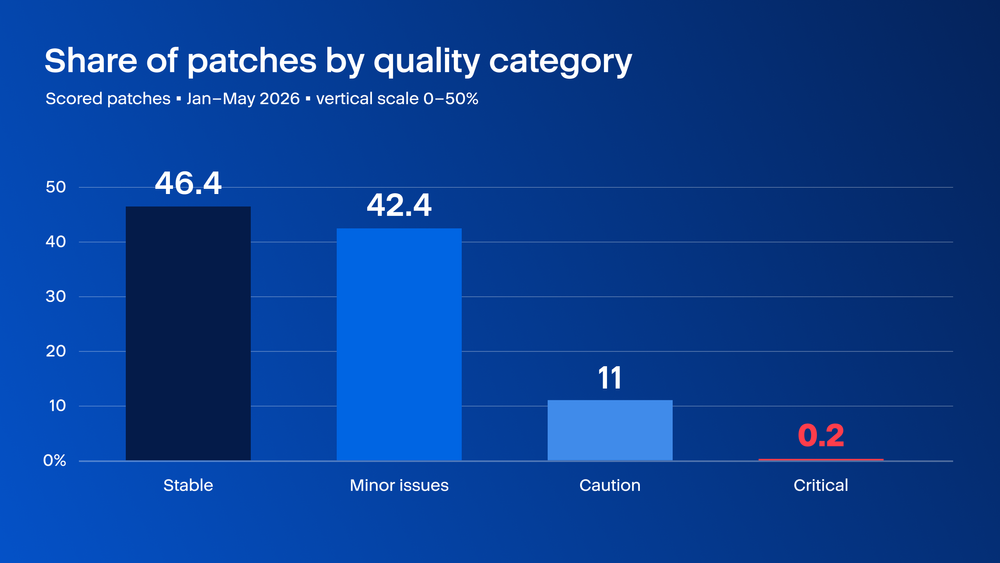
The 11.2% warning rate (caution + critical issues) does not mean every vendor creates the same amount of work. Many of the caution and critical issue patches come from a small group of vendors. Critical issues are rare, at only 0.2% of the total, but they matter because they point to patches with a higher chance of serious deployment problems.
This supports a risk-based patching approach. NIST SP 800-40 Rev. 4 and ISO/IEC 27001:2022 Annex A.8.8 both recommend prioritizing patch activity based on risk, not just on a fixed schedule or vendor reputation. In practice, that means MSPs should spend more testing time on vendors whose patches have a stronger history of deployment issues.
Per-product warning rates and the three tiers they fall into
The analysis focuses on products that appear often across SMB Windows environments and receive enough patches to measure their behavior. These include major Microsoft products, browsers, email clients, PDF readers, office suites, developer runtimes and conferencing apps. Products such as LibreOffice, Foxit PDF and Thunderbird are also included because many SMBs use them as alternatives to Microsoft Office, Adobe PDF and Outlook.
Across the 18 products with at least 50 scored patches in 2026, the share of patches flagged caution or critical issues ranges from 0% for LibreOffice to about 76.2% for Adobe PDF. Three clear groups stand out.
The high-attention group includes products with more than 30% of patches flagged for caution or critical issues. Adobe PDF leads this group at 76.2%, followed by Google Chrome at 67.7%, Microsoft Windows Server at 35.4% and Node.js at 35.2%. For these products, a new patch has a meaningful chance of needing review before broad deployment.
The mid-range group includes products with warning rates between 10% and 25%. Zoom was at 17.5% and Foxit PDF at 11.9%. Several Microsoft products also fall into this group, including Windows 10 at 15.0%, Windows 11 at 13.9% and VS Code at 13.1%. These products may benefit from review, but they do not need the same level of testing on every patch.
The quiet group includes products with warning rates below 10%. This group includes Mozilla Thunderbird (7.4%), Microsoft .NET (6.3%), Visual C++/Studio (5.4%), Microsoft SQL Server (4.4%), Mozilla Firefox (4.3%), Microsoft Edge (3.6%), Microsoft Office (1.6%) and LibreOffice (0.0%). Most patches from these products can move through normal automation with lighter review.
Two comparisons are especially useful for MSP planning. Firefox and Chrome are both major browsers found across SMB environments, but their patch behavior looks very different. About 1 in 12 Firefox patches were flagged, compared with roughly 2 in 3 Chrome patches. Microsoft Office also stands out. Although Office has a reputation for installer problems, the 2026 data does not support treating it as a high-risk patch source. Office had the lowest warning rate in Microsoft’s product set at 1.6%.
The same products appear in the top ten vulnerable products list in the Acronis Cyberthreats Report H2 2025, which counts CVEs per product.
How vendor severity and install quality outcomes compare
Every patch arrives with a severity label from the vendor: critical, high, medium, or low. That label describes the vulnerability the patch is meant to be fixed. The quality category describes the patch itself, including whether it installs cleanly or is more likely to cause deployment problems.
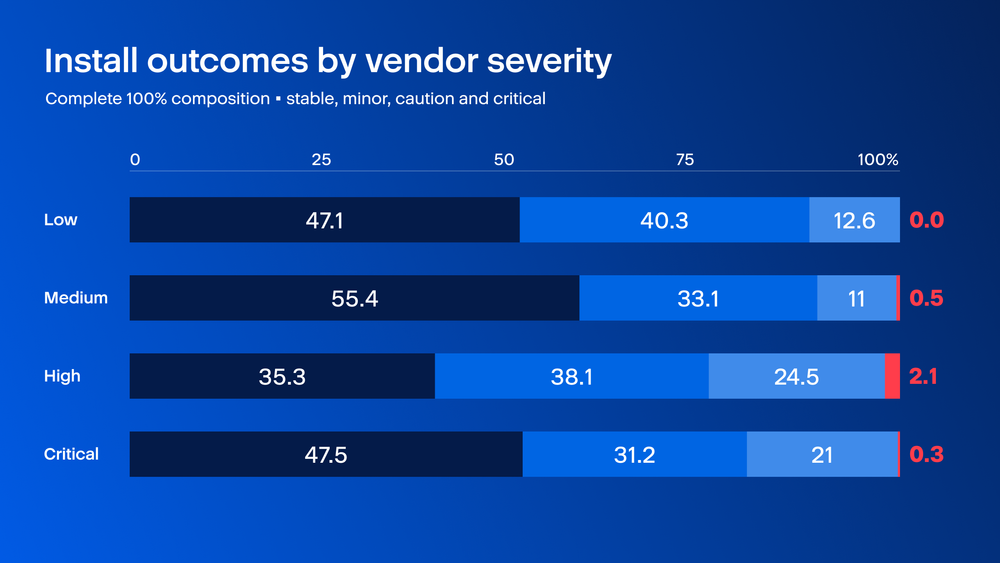
Medium-severity patches provide a useful baseline. In this group, 11.0% ended up in the caution category. For vendor critical-severity patches, the caution share increased to 21.0%. High-severity patches had the highest issue rate: 24.5% landed in caution, and 2.1% reached the critical issues category.
This shows why MSPs should not rely on severity alone. Severity helps decide how urgent a patch is. Patch quality helps decide how carefully that patch should be tested and rolled out. The 2026 data support the same basic approach recommended in NIST SP 800-40 Rev. 4: use both vulnerability risk and deployment impact when prioritizing patches.
Monthly warning rate trends per product
A per-product average does not show whether a product is steady or unpredictable, and that matters for MSP patch planning. A vendor with 30% of patches flagged every month creates a very different workload from a product with 10% flagged in January and 80% flagged in May, even if their five-month averages look similar.
Table 1. Monthly warning rate by product, January-May 2026.
Chrome had the largest month-to-month swing in this five-month window. About one in five Chrome patches were flagged in January. The rate then jumped to 83.0% in February, 85.9% in March, 77.5% in April, and 54.3% in May. An MSP that planned Chrome testing based only on January would not have reserved enough testing time for the rest of the period. The H2 2025 Cyberthreats Report also flagged Chrome zero-days CVE-2025-13223 and CVE-2025-6558 as actively exploited Windows-targeting issues, so the volatility shows up on the exploit side too.
Adobe PDF showed a different pattern. Its warning rate stayed high across the first five months of 2026, ranging from about 36% to 91%. That makes Adobe PDF a predictable testing priority. Chrome is harder to plan because its warning rate moves sharply from month to month. Firefox showed the opposite behavior. Four of the five months stayed below 10% flagged, with one January reading at 15.1%. Microsoft Edge was calm and steady all five months (about 1% to 8%), behaving more like Firefox than like Chrome. The operating systems were also steadier, with Windows 10 and Windows 11 ranging between about 10% and 21% across the five months. Windows Server stayed higher, between about 24% and 56%, which makes it consistently demanding but not as unpredictable as Chrome. Node.js stayed mostly between 40% and 60%, then dropped sharply in May.
For MSPs, the planning rule is simple: steady vendors can stay in scheduled monthly testing slots. Vendors with sharp monthly swings need flexible testing time so teams can respond when a bad patch month appears.
Ranking products by warning rate and by install base
Warning rate alone does not show the full operational impact. A 90% warning rate for software installed on 100 endpoints matters to the tenants that use it, but it may not change fleet-wide planning. A 10% warning rate for software installed on 50,000 endpoints can create more total work.
To make the patch quality signal useful, MSPs need two numbers: how often a vendor’s patches need review, and how widely that software is installed across the SMB Windows fleet. This analysis compares the warning rate with the percentage of endpoints that each application has installed.
Table 2. Per-product warning rate and install base (share of managed Windows machines) for the thirteen products with both signals populated, 2026.
Chrome and Adobe PDF stand out because they combine high warning rates with meaningful endpoint coverage. Adobe PDF has the highest warning rate at 76.2% and is installed on 19.1% of machines. Google Chrome has the second-highest warning rate at 67.7% and is installed on 50.1% of machines. For MSPs planning next month's testing capacity, these two products should be at the top of the list.
Some products look different once install base and warning rate are read together. Microsoft Edge is the clearest example: it sits on more machines than any other browser (56.8%), yet has one of the lowest warning rates (3.6%), because it ships with Windows and rarely produces risky patches. Firefox is installed on 22.8% of machines, but its 4.3% warning rate puts it near the bottom of the risk list, so it can usually move through standard automation with lighter review. SQL Server shows a similar pattern. It is installed on 29.8% of machines - third, behind Edge and Chrome - but its warning rate is only 4.4%, so it does not need testing attention in proportion to its footprint. Microsoft Office pushes this further. It is widely installed, but its warning rate is just 1.6%, the lowest in the dataset among broadly deployed products.
The opposite pattern appears with Node.js, Foxit PDF and Thunderbird. Node.js has a 35.2% warning rate, but it is installed on only 1.1% of machines. Foxit PDF has an 11.9% warning rate and Thunderbird has a 7.4% warning rate, but both have relatively small install bases. These products still need careful review, but only for tenants where they are actually deployed. This is where per-application visibility matters. MSPs need to know not only which patches are risky, but also which customers and endpoints are exposed to those patches. OWASP’s Software Component Verification Standard supports this kind of visibility in tooling by emphasizing the need to identify and verify software components.
One limitation of this ranking is that operating systems are not included as installed software entries. Windows 10, Windows 11 and Windows Server are the platforms the applications run on, so they do not appear in the install-base ranking even though they account for much of the fleet's exposure. Install base here is measured as the share of managed Windows machines that report installed software, so the percentages reflect real endpoint coverage rather than every catalogued resource.
Recommendations
MSPs should not spend the same amount of testing time on every vendor. The 2026 data shows that patches needing closer review are concentrated among a small group of vendors. Products with steadier patch behavior can stay in the normal monthly patch window, while higher-warning vendors need more focused testing.
Based on our current data, Chrome and Adobe PDF should receive the most attention when it comes to testing before rolling out a patch. Both products combine high warning rates with broad endpoint coverage, which means testing work on them protects a larger share of the SMB fleet. Chrome also shows why testing plans need to stay flexible. Its warning rate was about 19% in January, then rose to between 78% and 86% across February, March and April. For Chrome and Adobe PDF, the safest approach is to release the patch in stages instead of pushing it to every endpoint at once. It is recommended to follow these three phases:
- Start off with a few low-risk machines. Check that it installs without errors, the application opens and works normally, and the everyday tasks still work. Watch for crashes or machines slowing down. If something breaks here, you've caught it before it reaches anyone important.
- If those machines look clean after a day or two, roll the patch out to a small group of users across a few different departments. Real users run into compatibility problems that an IT-only test group won't. Keep an eye on how many installs succeed, any crash reports, and help-desk tickets for several days.
- Only deploy to the rest of the fleet once both earlier groups run clean. Before you start, decide what would make you stop. For example, "roll back if installs fail on more than a few percent of machines, or if a core task breaks." Keep the previous version on hand so you can fall back quickly if needed.
More predictable products can remain in scheduled monthly testing slots. Windows 11, Microsoft Edge, .NET and SQL Server showed steadier signals, which makes them better fits for planned testing cycles. High-warning products with smaller install bases, such as Node.js, Foxit PDF and Zoom, should be handled per tenant. They still need careful review, but only where those applications are actually installed.
Pre-deployment review should include two signals. Vendor severity shows how urgent the vulnerability is. Patch quality shows how much deployment risk the fix may introduce. Reading both together gives MSPs a clearer basis for rollout order, testing scope, and customer communication. This approach also aligns with the risk-based prioritization recommended in the H2 2025 Cyberthreats Report and NIST SP 800-40 Rev. 4.
Conclusion
Five months of 2026 patch installation data show that patch quality is useful for MSP planning. The share of patches needing closer review ranged from zero to more than three in four, depending on the product. Severity and patch install quality measure different parts of the same patch decision: severity describes the risk of leaving a vulnerability unresolved, while install quality describes what can happen when the patch reaches the endpoint. In this dataset, high-severity patches were about four times more likely than medium-severity patches to reach the critical issues category.
Chrome and Adobe PDF are the main testing priorities because they rank high in both warning rate and install base. Microsoft Edge, Office, Firefox and SQL Server show that broad deployment does not always mean high deployment risk. Node.js, Foxit PDF and Thunderbird need close review only for tenants that actually run them. Because product patch behavior and issue rates can shift, MSPs should refresh this analysis each quarter.