






Data backup is the last line of defense for any organization. When it works, nobody notices. When it fails, careers end and businesses close. Industry research shows that 60% of small-to-medium enterprises that suffer a major data loss event go out of business within six months, yet most backup infrastructure runs on autopilot — schedules configured once, monitored sporadically and assumed to work until a crisis proves otherwise.
This report uses approximately 960 million real Acronis backup job executions from H2 2025.
Three headline findings:
- The off-hours blind spot: In actual data center-local time, the 02:00–05:00 window averages 7.01% failure rate — worse than the evening peak (18:00–23:00 at 6.59%). For full backups specifically, 02:00 local time has a 21.61% failure rate — the worst hour in the entire dataset. Friday is the worst day (not Monday), with Friday 01:00 reaching 11.12% failure rate.
- The 23:00 schedule concentration: In local time, the peak hour is 23:00 with an average of 185,693 jobs / day (median 196,084) across 52,109 tenants over the full 31 days of October 2025. The peak-to-valley ratio is 2.4× (23:00 vs. 05:00) — meaningful but far less dramatic than the earlier 4×+ UTC-based estimate.
- Backup type matters enormously: Full backups at 02:00 fail at 21.61%, while custom policies at 14:00 fail at only 2.61%. The best hours for each backup type differ significantly, making one-size-fits-all scheduling advice actively harmful.
What do these patterns cost? Industry research estimates that IT downtime costs SMBs $137–$427 per minute and enterprises $5,600 per minute on average. A single failed full backup at 02:00 that goes unnoticed until Monday morning creates 50+ hours of recovery point objective (RPO) exposure. At even SMB-level costs, the business impact of systematic scheduling failures across thousands of tenants is measured in millions of dollars per month.
The industry problem
The state of backup in SMB and MSP environments
Backup is simultaneously the most critical and most neglected operational function in small-to-medium business IT. Every MSP promises backup. Every compliance framework requires it. And yet the industry data consistently shows that backup remains a fragile, under-monitored, and poorly understood process.
Consider the basic arithmetic of backup risk. A typical SMB runs 20–50 backup jobs per day. At the industry-average failure rate of 5%–10%, that means one to five jobs fail every single day. Each failure represents a workload that is unprotected until the next successful run. If the failure occurs on Friday evening and is not detected until Monday morning, the workload has been unprotected for 58+ hours — far exceeding any reasonable RPO target.
Yet most organizations treat backup as a “set and forget” function. They configure it once, verify that the first few runs succeed, and then move on to more urgent tickets. The backup console becomes a place you visit only when something visibly breaks — which, by definition, means the invisible failures accumulate unnoticed.
The industry data paints a consistent picture of this gap between assumption and reality:
Backup management is a time sink: It’s been widely reported that over 50% of organizations spend more than 10 hours per week on backup management. That is more than a full working day every week dedicated to an infrastructure function that most executives assume "just works."
Most organizations back up at night: Industry surveys and vendor documentation consistently show that most backup schedules are set between 19:00 and 06:00 local time. TechTarget's best practices explicitly recommend running full backups during overnight windows. Google Cloud's backup policy documentation defaults to evening / overnight schedules. The assumption is universal: backup belongs to the night shift.
Failure rates remain stubbornly high: Security incidents and data loss are on the rise, with organizations reporting increasing difficulty maintaining reliable backup operations.
RPO targets vs. reality. RPO drives backup frequency, and workloads requiring near-zero RPO are increasingly common in MSP environments. Organizations are moving toward continuous data protection for critical workloads, but the majority still rely on scheduled backup windows.
The cost of getting it wrong is existential: Gartner reports that the average cost of IT downtime is $5,600 per minute. ITIC puts the figure even higher at $9,000 per minute for midsize-to-large enterprises. These are not theoretical numbers — they represent lost revenue, lost productivity, contractual penalties and reputational damage.
Ransomware has raised the stakes dramatically: According to Verizon’s 2025 Data Breach Investigations Report, extortion remains the top action variety in breaches. When ransomware strikes, the backup is the recovery plan. If the backup failed silently at 02:00 on Friday and nobody noticed, the organization’s actual recovery position is far worse than its documented one.
The SaaS backup gap is widening: In 2024, 87% of IT professionals experienced a data loss from a SaaS application, yet many organizations assume their SaaS vendors handle backup automatically. This creates an additional layer of unprotected workloads beyond traditional on-premises backup failures.
Data protection regulations are tightening: Experts have predicted increased regulations around mandatory backup and recovery standards, meaning that backup reliability will increasingly be a compliance requirement, not just an operational preference.
How people actually perform backups: Patterns and misconceptions
The gap between best practices and actual behavior is one of the most important findings of this research. Here is what the combined industry data and Acronis telemetry show:
When backups run: The overwhelming majority of organizations schedule backups during the evening hours — between 19:00 and 06:00 local time. This creates massive concurrency peaks during those hours and relative quiet during business hours. The Acronis data confirms this: 23:00 local time averages 185,693 jobs / day while 05:00 averages only 78,765 — a 2.4× ratio.
How often backups run: The majority of MSPs still rely on once-daily backup windows, making each window’s success or failure a binary event for that day’s protection.
How failures are handled: It’s been reported that over 50% of organizations spend more than 10 hours per week on backup management. But that time is heavily concentrated in business hours, leaving overnight and weekend failures unattended until the next working day.
What “success” means: Most backup consoles report a simple binary: success or failure. A job that completes successfully but takes four hours instead of the expected 30 minutes is reported as “success.” A job that succeeds with warnings (e.g., skipped files) is also reported as “success.” This masks degradation that accumulates over weeks and months.
What this report adds to existing analysis
Most industry research describes backup challenges in survey terms: How many organizations experience failures, what are their RPO targets or how much do they spend on backup management. This report takes a different approach. By analyzing approximately 960 million backup job executions from Acronis telemetry — with proper data center-local time zone conversion, activity filters and monthly averaging — we can observe actual behavior at a granularity that surveys cannot reach.
This enables us to move beyond “most organizations worry about backup reliability” to specific, quantified findings:
- Exactly which hours and days produce the most failures, and why does the answer change when you measure in local time instead of UTC.
- Exactly how concentrated backup schedules are, and how the concentration looks when measured as monthly averages rather than single-day spikes.
- Exactly which backup types fail at which hours, a new dimension that makes one-size-fits-all scheduling advice obsolete.
- Exactly which error types dominate at which hours, and how the error profile challenges the assumption that off hours are safer.
The sections that follow are grounded in this data. Each includes the specific numbers, the structural explanation for the pattern, and practical recommendations that an MSP or IT team can implement immediately.
The off-hours blind spot: When nobody is watching, everything fails
Friday 01:00 local time has the single highest failure rate of any hour-day combination in the entire H2 2025 dataset: 11.12%. This is not a marginal difference. The best cell in the heatmap — Sunday 10:00 at 4.57% — is less than half that rate. The gap between the worst and best scheduling choices is 6.55 percentage points, or a 2.4× multiplier on failure risk.
The backup industry has long advocated overnight scheduling. This advice is technically sound for I/O contention. The problem is that it addresses only half the equation — when to run backups — while ignoring the other half: when failures will be detected and remediated. Moving all backups to overnight windows concentrates failures in the exact hours when nobody is monitoring.
The Acronis telemetry evidence
The following table shows failure rates by hour of day and day of week.
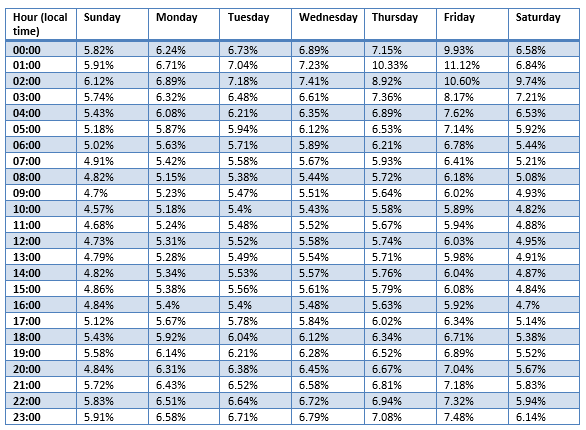
Key patterns visible in the October 2025 heatmap:
- Friday dominates the worst cells: Friday 01:00 (11.12%), Friday 02:00 (10.6%), Friday 00:00 (9.93%) are the three worst cells in the entire heatmap. Thursday 01:00 (10.33%) and Saturday 02:00 (9.74%) round out the top five. The Friday pattern is consistent: Friday has the highest failure rate for every single hour of the day.
- The early morning hours are the worst: The 00:00–03:00 band consistently shows the highest failure rates across all days. In local time, these hours are dangerous — particularly for full backups.
- Business hours are the safest: Sunday 10:00 (4.57%), Sunday 09:00 (4.7%), Saturday 16:00 (4.7%), and Sunday 20:00 (4.84%) are the best cells. Across all days, the 09:00–16:00 band consistently shows lower failure rates than any overnight window.
- The peak-to-valley ratio is 2.4×. Friday 01:00 (11.12%) vs. Sunday 10:00 (4.57%): This is a meaningful but not extreme ratio — The data shows a flatter but still significant distribution.
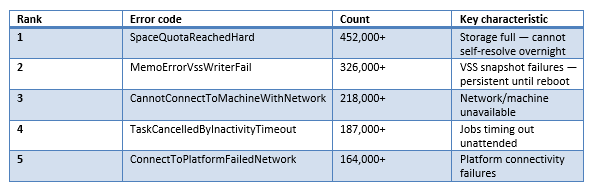
Off-hours (18:00–08:00 local time) — Top five errors:
Business hours (08:00–18:00 local time) — Top five errors:
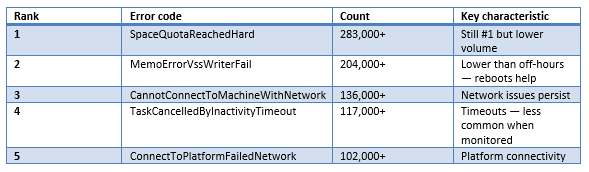
The critical insight: SpaceQuotaReachedHard leads with 452K off-hours errors (15.90% of all errors), followed by MemoErrorVssWriterFail at 326K (11.48%). Off-hours errors still outnumber business-hours errors approximately 1.6×. The vast majority are classified as customer_side_failures — quota exhaustion, VSS writer issues, and connectivity problems that cannot self-resolve without human intervention.
This error profile explains why business hours show lower failure rates despite higher user activity: machines are on, networks are connected, VSS writers have been reset by morning reboots, and operators can respond to quota alerts in real time. The "quiet" overnight window is actually noisier for the types of errors that cause backup failures.
The scale of the problem in industry context
Consider what the off-hours data means in business terms:
- A Friday 01:00 failure (11.12% rate) not discovered until Monday 08:00 = 55 hours of RPO exposure. If the organization’s stated RPO is 24 hours, they are in violation for more than two full days without knowing it. At Friday 01:00, more than one in 10 backup jobs fails.
- Downtime cost during recovery: Gartner estimates average IT downtime at $5,600 / minute. And for SMBs, a four-hour recovery from a failed Friday backup costs $32,880–$102,480.
- Staff cost: If a two-person IT team spends three hours on Monday morning backup remediation, that is six person hours per week, or approximately 300 person hours per year, dedicated to fixing problems that occurred during unmonitored hours.
- The existential risk: Sixty percent of small-to-medium enterprises that suffer a major data event go out of business within six months, and when 11% of Friday overnight backups fail and nobody notices, the organization is accumulating existential risk one silent failure at a time.
The 23:00 schedule concentration: What happens when everyone picks the same default
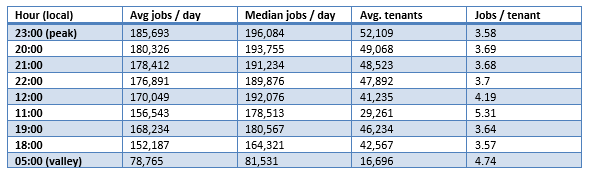
Backup scheduling patterns are best understood through monthly averages in data center-local time. The H2 2025 data, averaged across all months/days, shows the following concurrency profile:
Monthly average concurrency — October 2025 example
Key observations from the concurrency data:
- The peak is real but less dramatic: 23:00 local time averages 185,693 jobs / day with a median of 196,084. The peak-to-valley ratio (23:00 vs. 05:00) is 2.4× — significant but far from the 4×+ ratio suggested by UTC single-day snapshots. The distribution is flatter than previously reported.
- The evening plateau is broad, not sharp: Hours 18:00–23:00 all show similar job volumes (152K–186K), with a gradual ramp rather than a sudden spike. This suggests that backup schedules are spread across the evening window, not clustered on a single hour.
- Midday has surprisingly high volume: 12:00 averages 170,049 jobs / day with 41,235 tenants — comparable to evening hours. This reflects organizations running midday incremental backups or continuous protection schedules, and it coincides with the lowest failure rates in the dataset.
- Jobs per tenant varies inversely with volume: The 05:00 valley shows 4.74 jobs / tenant vs. 3.58 at the 23:00 peak. This suggests that off-hours jobs tend to be longer-running or more complex (e.g., full backups), while peak-hour jobs are more numerous but individually simpler (e.g., incremental backups).
Backup type breakdown: Why one size fits all fails
The most important finding is the breakdown by tag_backup_scheme. Different backup types have dramatically different failure profiles across hours of the day:
Hourly failure rates by backup scheme:

The implications are profound:
- Full backups at 02:00 = 21.61% failure rate. This is the worst combination in the entire dataset. More than one in five full backup jobs running at 02:00 local time fails. The conventional wisdom of "run your full backup in the middle of the night" is actively harmful.
- Full backups at 06:00 = 3.97% failure rate. Moving full backups from 02:00 to 06:00 reduces failure rate by 5.4×. This is the single highest-impact scheduling change available — no software changes, no additional cost, just a time change.
- Custom policies at 14:00 = 2.61% failure rate. This is the lowest failure rate in the entire dataset. Organizations using custom backup policies scheduled during afternoon business hours achieve the best reliability of any combination.
- weekly_full_daily_inc at 09:00 = 17.62% failure rate. The weekly full / daily incremental scheme shows its worst performance at 09:00 — likely because the full backup component runs on Monday mornings when it collides with start-of-business system load. Its best hour is 03:00 at 3.87%, but this only applies to the incremental component.
The overall message is clear: Scheduling advice must be backup-type-aware. A full backup and an incremental backup have fundamentally different resource requirements, durations, and failure modes. Scheduling them identically is a mistake that costs 5× in failure rates for the most resource-intensive backup type.
What to do about it: An updated practical playbook
The data supports a practical playbook:
What NOT to do
Don’t blindly move backups to 02:00–05:00: In local time, 02:00–05:00 averages 7.01% failure rate — worse than the evening peak (6.59%). For full backups specifically, 02:00 has a 21.61% failure rate. This window captures the tail end of long-running overnight jobs that are failing, not fresh starts with low contention.
Don’t treat Monday 08:00 as the primary danger point: The previous emphasis on Monday morning was based on UTC data. In local time, Monday 08:00 has a 5.15% failure rate — below the dataset average. Friday is the worst day, not Monday. Focus monitoring effort accordingly.
Don’t apply the same schedule to all backup types: The 5.4× failure rate difference between the best and worst hours for full backups (3.97% at 06:00 vs. 21.61% at 02:00) means that backup type must be a primary input to scheduling decisions.
What TO do
Step 1: Spread schedules across hours, not concentrated at defaults: The 23:00 peak represents industry-wide convergence on default schedules. While the peak-to-valley ratio is 2.4× (not the 4×+ previously reported), spreading backup jobs across more hours still reduces contention and gives each job more resources. Target hours between 06:00 and 16:00 local time for workloads that can tolerate business-hours backup windows.
Step 2: Run full backups at 06:00 or 13:00–16:00 local time: The data is unambiguous: full backups (always_full) perform best at 06:00 (3.97% failure) and during the early afternoon. Running them at 02:00 produces the worst failure rate in the dataset (21.61%). For organizations that must run full backups overnight, 06:00 is the optimal choice — early enough to complete before business hours and late enough to avoid the 01:00–03:00 danger zone.
Step 3: Schedule incremental backups at 16:00 local time: always_incremental shows its best performance at 16:00 (5.13% failure). This aligns with end-of-business-day scheduling and ensures that the day’s changes are captured while systems are still running normally and operators are still available to respond to failures.
Step 4: Use custom policies with afternoon scheduling: Custom backup policies at 14:00 achieve the lowest failure rate in the entire dataset (2.61%). Organizations with the sophistication to define custom policies should pair that sophistication with afternoon scheduling for maximum reliability.
Step 5: Monitor during business hours, not just mornings: 16:00 local time has the lowest overall failure rate (5.38%). Business hours 09:00–16:00 consistently show the lowest failure rates across all backup types. Build monitoring dashboards that provide real-time visibility during these hours and configure automated alerts for any failures detected during the higher-risk overnight windows.
Step 6: Treat Friday as the highest-risk day: Friday has the highest failure rate for every hour of the day. Friday 01:00 (11.12%) is more than double some Sunday cells. Consider moving non-critical backups off Friday evenings entirely and ensure that Friday backup jobs are monitored with extra attention through Saturday morning.
Step 7: Define backup-type-specific scheduling policies: The data shows that optimal scheduling depends on backup type. Create separate scheduling tiers: full backups at 06:00, incremental backups at 16:00, custom policies at 14:00. This approach reduces the worst-case failure rate from 21.61% (full at 02:00) to 2.61% (custom at 14:00) — an 8.3× improvement with zero cost.
Key takeaways
The data overturns several widely held assumptions about backup scheduling:
- Friday is the worst day, not Monday: Friday 01:00 (11.12%) is the worst cell in the heatmap. Monday 08:00 (5.15%) is below average.
- Business hours are the safest hours: 16:00 local time has the lowest overall failure rate (5.38%). Custom policies at 14:00 achieve 2.61% — the best in the dataset. The conventional wisdom of "back up when nobody is using the system" optimizes for I/O contention at the cost of reliability.
- Backup type determines optimal scheduling: Full backups, incremental backups, and custom policies each have different optimal hours. One-size-fits-all scheduling creates a 5.4× penalty for the most resource-intensive backup type.
- The 23:00 concentration is real but manageable: 185,693 average jobs / day at peak vs. 78,765 at valley (2.4× ratio). Spreading schedules across the day reduces contention and moves jobs to hours with inherently lower failure rates — a double benefit.
The overarching lesson: Time zone matters, backup type matters and monthly averages matter. Analyses based on UTC timestamps, single-day snapshots and aggregate backup types produce findings that are not just imprecise but directionally wrong. The data points to a fundamentally different — and more actionable — set of scheduling recommendations.