






Executive summary
Backups were once judged by a single question: Did the job succeed? That is no longer enough. In a ransomware event, the more important question is whether the attacker can delete or change the recovery points before the business starts to recover. Immutable backup storage addresses that exact problem by making a protected backup copy impossible to delete or overwrite for a defined number of days.
Public industry data shows that immutability is now a mainstream topic, but not yet a universal practice. A 2025 U.K. resilience survey reported that 59% of organizations have immutable backups and 72% have air-gapped backups, while a 2024 enterprise survey found that 94% already use or plan to use immutable storage within 12 months. At the same time, Sophos reported in 2025 that only 54% of attacked companies used backups to restore their data. The conclusion is clear: awareness is high, but recovery practices remain inconsistent.
The Acronis telemetry adds a different and more operational view. Surveys usually ask whether a company has immutability somewhere. This dataset captures both tenant‑level adoption and the actual storage volume protected by immutability. Today, approximately 170,000 Acronis customer tenants have immutable storage actively enabled and in use, protecting roughly 49 petabytes of customer data — about 1.4% of the total 3,600PB storage footprint. The average partner with immutability enabled holds about 5,300GB (~5TB) of immutable storage. That is meaningful but still a small share of the overall estate.
The gap should not be read as a product problem. Modern backup ecosystems already support immutable storage through tenant-level settings and storage-layer features such as WORM and object lock. The real blockers are more ordinary: storage planning, fear of higher cost, uncertainty about retention settings, and the simple fact that busy teams focus on today’s failures first. The H2 2025 Acronis telemetry data shows no meaningful performance difference in success rate, duration or retry behavior between immutable and non-immutable policies when immutability is enabled.
Why immutable backups matter
Official guidance is very clear on this point. CISA’s ransomware guide says organizations should maintain offline, encrypted backups of critical data and test the availability and integrity of those backups on a regular basis. The reason is practical: Many ransomware variants try to find and delete or encrypt accessible backups before they attack production systems.
This is not only general advice. In June 2025, a joint advisory from CISA, the FBI, and the Australian Cyber Security Centre said the Play ransomware group had exploited about 900 entities as of May 2025, and the advisory again told organizations to maintain offline backups and test their recovery plan. The industry has moved from “backups are good practice” to “protected backups are part of active cyber defense.”
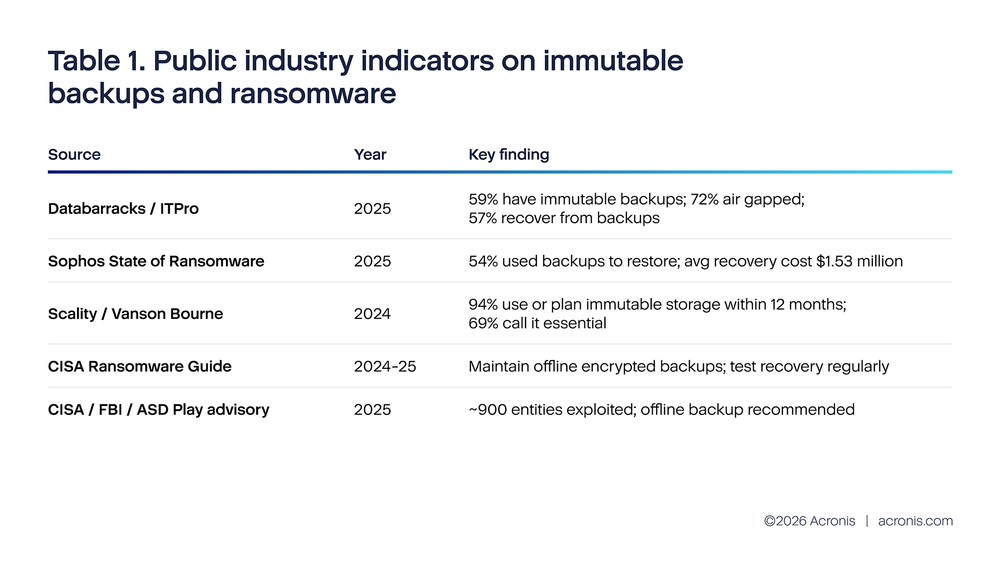
These public numbers point in the same direction. Ransomware is still active, recovery still depends heavily on backups, and more organizations are adding immutability or air gap controls. At the same time, the market is not finished. Even more optimistic surveys do not show universal use. In the Databarracks survey, 41% of organizations still did not report immutable backups. In the Scality / Vanson Bourne survey, the strongest result is not full deployment but strong intent to deploy soon.
It is also important to understand what these surveys measure. They count organizations, not backup objects. An organization may accurately report having immutable backups even when immutability is applied only to a limited set of repositories or workloads. That is why telemetry is so useful here. It measures coverage at the object level and shows whether immutability is broad, narrow or mostly absent in day-to-day operations.
Real immutable coverage
The Acronis platform tracks immutable storage at two levels. First, one table records whether immutability is enabled or disabled per tenant, including the retention period and mode (governance or compliance). Second, another table records actual immutable storage consumption in bytes per tenant per infrastructure. Together, these give a much more accurate picture than counting individual backup object flags.
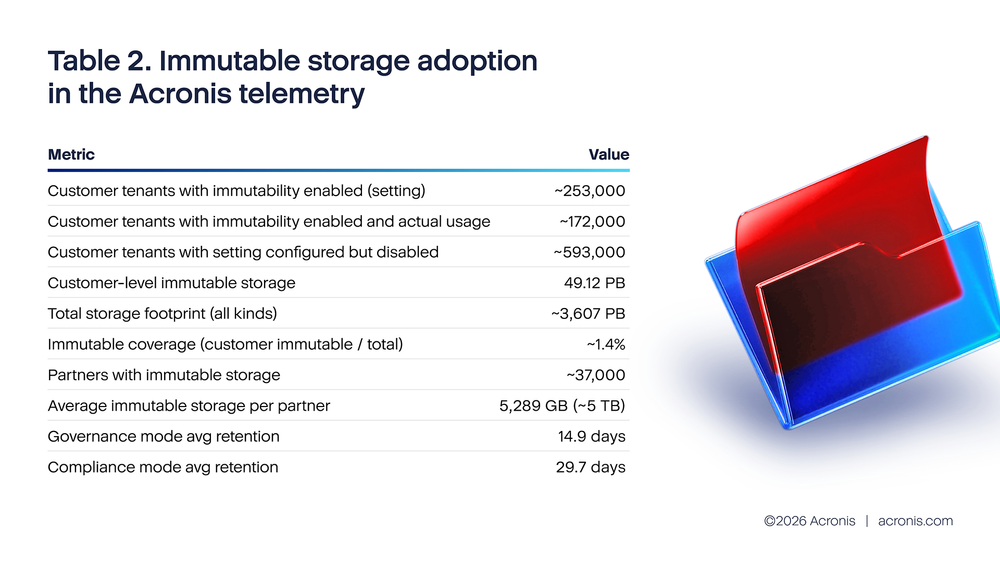
Approximately 846,000 customer tenants have immutability settings in their configuration, with about 253,000 currently enabled (roughly 30% of configured tenants). Of those enabled, about 172,000 have actual immutable storage usage. The enabled tenants protect approximately 49PB of customer-level data. The average retention period is about 15 days for governance mode and 30 days for compliance mode.
These numbers are meaningful but still represent a small fraction of total storage. With roughly 3,600PB of total backup storage and 49PB of immutable storage at the customer level, immutable coverage stands at about 1.4%. At the partner level, approximately 37,000 partners hold immutable storage with an average of about 5,300GB (~5TB) each. This is not near zero — it shows real operational adoption — but it also means that the vast majority of backup data remains mutable and therefore vulnerable to deletion in a ransomware scenario.
There is also an important industry lesson here. The public surveys and the telemetry are not in direct conflict; they measure different things. The survey that found that 59% of organizations have immutable backups is consistent with a world where many organizations have enabled immutability for some tenants or workloads but not across their entire estate. The 1.4% storage coverage figure from telemetry shows that even among adopters, most backup data is still not protected by immutability. The gap between “we have it somewhere” and “our critical data is broadly covered” remains significant.
Why coverage stays low in real operations
The data points to several practical reasons for the coverage gap. The first is partial enablement: Of the approximately 846,000 customer tenants with immutability configured, about 593,000 have it currently disabled. Some may have tested and turned it off; others may have inherited a default configuration they never activated. The second is storage fear: Once immutability is enabled, all new archives are protected and cannot be deleted early to free space. The third is a mistaken belief that immutability slows jobs down. The telemetry explicitly rejects that concern — policies with immutability enabled show no meaningful difference in success rate, duration, or retry frequency. The last reason is simple complacency: many teams assume the attack will happen somewhere else first.
Concern about storage growth deserves serious consideration, because it is grounded in real operational pressure. The Acronis telemetry for H2 2025 shows backup count grew approximately 14% during the period, while the data churn metric grew about 35%. That means backup environments are already getting busier. If a team adds immutability without planning quota and retention, it can create avoidable pressure later.
Assuming a storage cost of $0.025 per gigabyte, this table shows why operators worry about storage. If a workload is protected with image backup, storage use can become very large very quickly. In the report’s examples, Exchange 1TB as an image backup produces 24.76TB of archive over 30 days, while an application-aware Exchange database backup produces 380GB for the same period. The monthly cost difference in the example is even more direct: $619 versus $9.50. The SQL example shows the same pattern, though the gap is smaller.
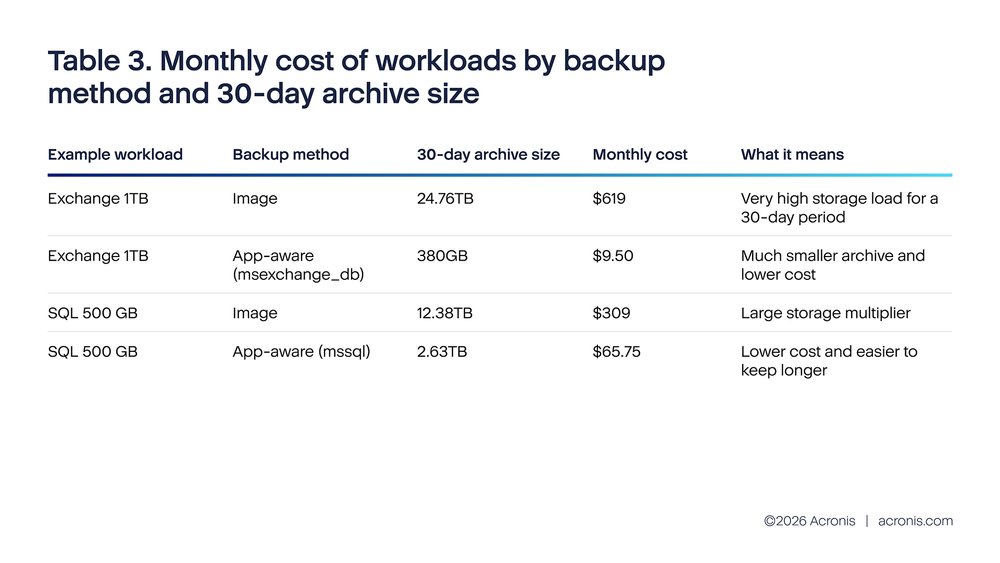
The important point is not that image backup is “wrong.” Image backup is useful and sometimes necessary. The point is that immutability becomes much easier to adopt when the storage design is smarter. If a team tries to make every heavy image backup immutable without changing anything else, storage costs will rise fast and the team will naturally resist. If the same team uses application-aware backup where it fits, chooses the right retention window, and starts with weekly full backups instead of every object, immutability becomes operationally realistic.
This is why the best answer to storage pressure is not to skip immutability. The better answer is to reduce waste first, then protect the copies that matter most. In simple terms: choose efficient backup methods, protect the important copies, and let the program grow in stages instead of trying to lock everything on day one.
Where immutability is easiest and safest to start
Cloud object storage is usually the easiest first place to enable immutability because the storage platforms already support strong retention controls. Amazon S3 Object Lock uses a write-once-read-many model and can prevent objects from being deleted or overwritten for a fixed period or indefinitely. Microsoft Azure supports version-level WORM policies for immutable blob data and notes that versioning must be enabled, with billing impact considered.
The telemetry report also helps answer a practical question: If you are choosing where to start, which destination pattern gives the best operational foundation?
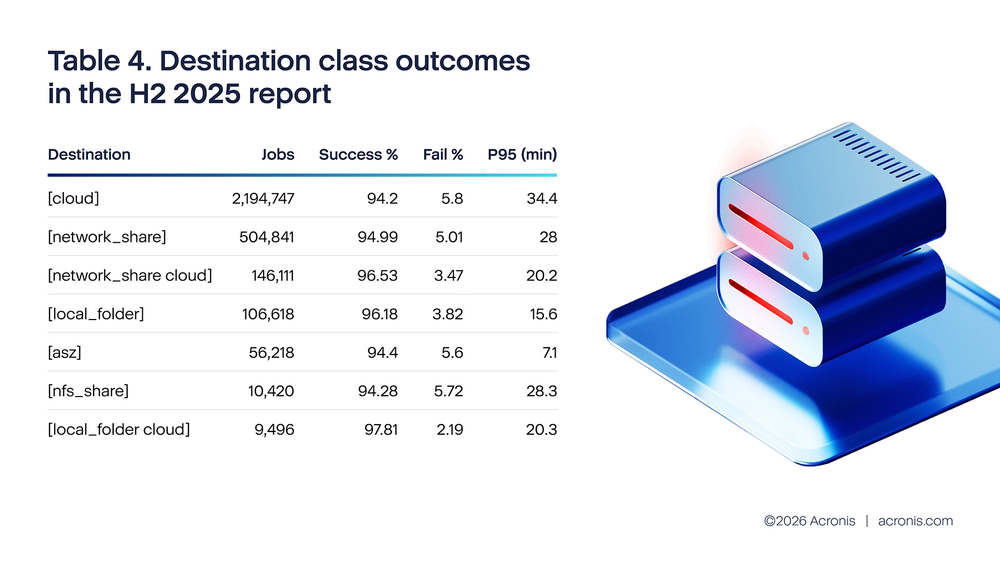
The destination-class data shows that single-destination configurations — whether cloud-only, network-share-only, or Acronis Secure Zone (ASZ) — all have similar failure rates in the 5%–6% range when measured by high-level backup activity outcomes (including warnings as success and cancellations as failure). Cloud-only has a 5.80% failure rate, network-share-only 5.01%, and ASZ 5.60%. The differences between these are modest.
The clear pattern is that dual-destination configurations perform better. Network-share plus cloud reaches a 3.47% failure rate, and local-folder plus cloud reaches 2.19%. These are meaningfully lower than any single-destination option. This supports the architectural recommendation of keeping one fast local copy and one protected off-site copy.
P95 duration — measured from job creation to completion, including queue wait time — varies significantly by destination. Local folder is fastest at 15.6 minutes, followed by dual-destination patterns at 20 minutes, network share at 28 minutes and cloud-only at 34.4 minutes. The longer cloud p95 is consistent with remote transfer time and the larger payload sizes typical of cloud-targeted backup policies.
A key architectural principle emerges: Separate two objectives. Keep one copy that is easy to restore quickly and one that is hard to delete. In many environments, that means a local or near-local copy for day-to-day recovery and a cloud copy with immutability for cyber resilience. That design also makes internal reporting easier, because the team can tell a simple story: Fast restore from one copy, protected last-resort recovery from the other.
Architecture patterns that make immutability workable
We also can recommend architecture patterns by organization type based on backup related telemetry. This is useful because the right design is not the same for a small business with one site, a regulated midmarket company and an MSP serving many customers.
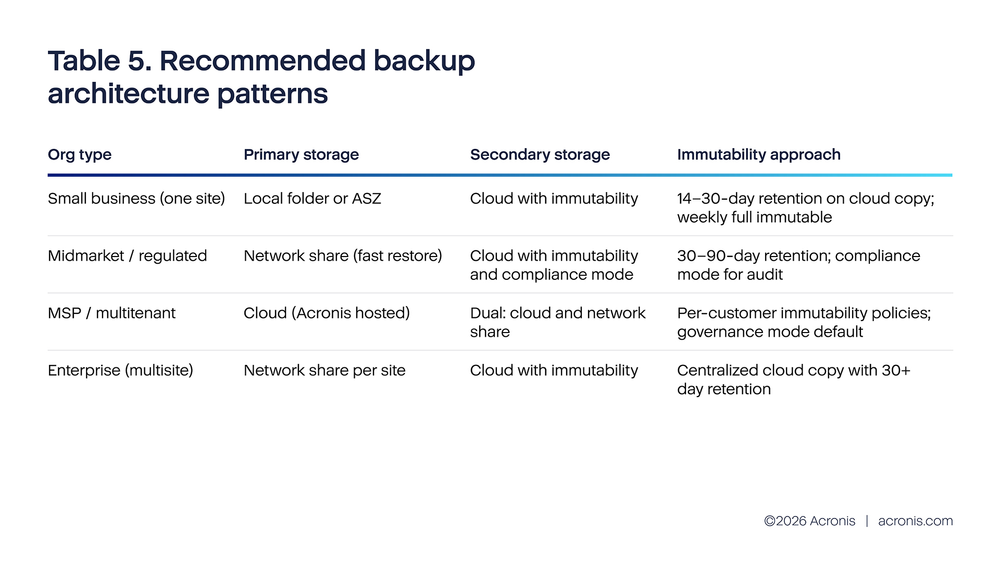
This table is best read as a starting pattern, not a hard rule. For an SMB that mainly wants fast restore, local folder or ASZ primary storage can make sense because restore speed is strong. For an SMB that is more worried about ransomware, cloud with immutability is the cleaner first move. For a company that wants both speed and resilience, the report points to dual destination.
This again is not a product-quality conclusion. It is a system-design conclusion. Backup success depends on how many independent failure paths are reduced, how clear the retention model is, and whether the protected copy can survive an account compromise or administrative mistake.
What to watch after rollout
Enabling immutability is not a “set it and forget it” change. It needs a small operating model around it. The Acronis telemetry provides useful thresholds that can be reused for an immutability rollout.
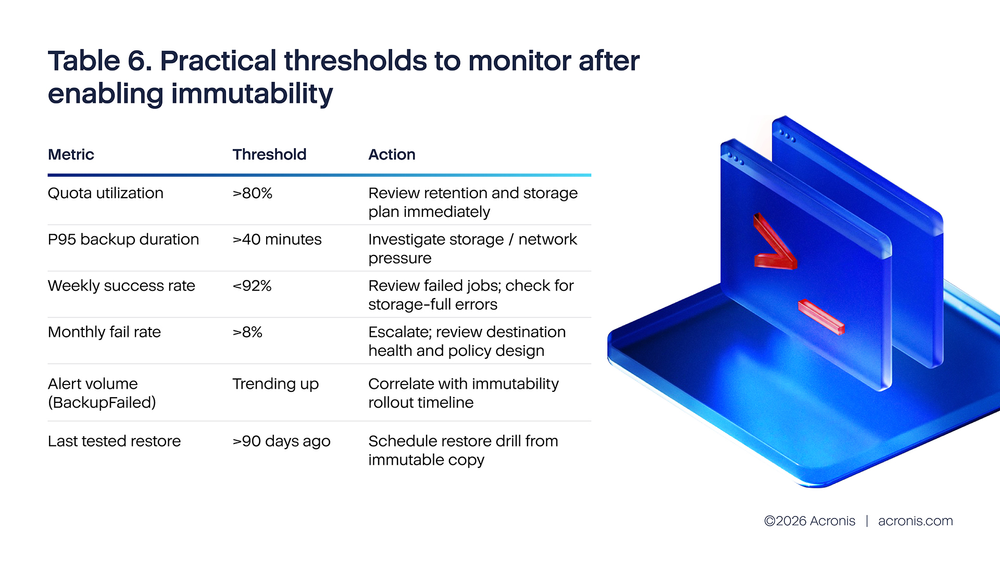
Quota utilization is typically the first warning indicator. If immutable objects cannot be deleted before the retention period ends, then the environment needs earlier storage warnings than before. That is why quota utilization above 80% should already trigger action. Waiting until storage is nearly full is risky, because immutable data can limit the team’s emergency cleanup options.
Duration is the second warning light. If p95 duration moves above 40 minutes, that usually means the environment is under more storage or network pressure than expected. The Q3 2025 data shows p95 at 30–32 minutes (including queue wait time), which leaves reasonable headroom before the 40-minute threshold. This does not prove immutability caused the problem, but it shows the rollout has to be managed as part of the whole backup system, not as a separate checkbox.
The alert layer matters too. A slice of Acronis H2 2025 telemetry recorded about 20.1 million backup alerts, including 7.1 million BackupQueued alerts and 6.4 million BackupFailed alerts. In a noisy environment, teams can easily miss the few signals that matter most. That is why immutability rollout should be paired with simple daily review habits, cleaner thresholds and a small set of customer-facing KPIs rather than a flood of low-value alerts.
The monthly success rate data (Q1) shows a positive trend over H2 2025: from 92.41% in July to 94.11% in December. The corresponding fail rate dropped from 7.59% to 5.89%. These percentages include warnings as success and cancellations as failure, giving a clean partition that sums to 100%. The “<92% weekly success rate” threshold in Table 6 is calibrated against this baseline.
Conclusions
The main conclusion from this research is that immutable backup adoption is real and growing, but coverage remains thin relative to the total storage estate. Public surveys show that the topic is now well understood. Many organizations say it matters, many say they are adopting it, and official guidance continues to treat protected backups as a core response to ransomware. The Acronis telemetry confirms meaningful adoption: approximately 170,000 customer tenants have immutability enabled with actual usage, protecting about 49PB of customer data across Acronis-hosted, Google, Azure and service-provider infrastructure. But 49PB out of ~3,600PB total means roughly 98.6% of backup storage remains mutable. This is the difference between early adoption and operational maturity.
A second conclusion is that the remaining coverage gap is not a backup-engine problem. The feature exists and works: In Acronis, immutability is a tenant-level setting that automatically protects all new archives once enabled. No per-object configuration is needed. The 593,000 customer tenants who have immutability configured but currently disabled represent a concrete activation opportunity. For many of them, the technical setup is already in place — the barrier is operational: Storage planning, retention decisions and confidence that enabling the feature will not create quota pressure.
The third conclusion is about cost and design. Storage fear is real, especially when organizations rely heavily on full image backup for large workloads. The source report’s own storage examples show why teams hesitate. But those same examples also show that the right design can make the problem much smaller. If backup methods are chosen carefully, if critical weekly fulls are protected first, and if quota is planned in advance, immutability becomes manageable for far more organizations than many teams assume.
The final conclusion is practical. The most useful standard is not “immutability everywhere tomorrow.” The better standard is this: every critical workload should have at least one recent, tested, immutable recovery path that can survive an administrator compromise or ransomware attack. Once that standard is in place, broader coverage becomes an improvement program instead of an emergency catch-up exercise.
Recommendations
Make one immutable copy a default requirement for critical workloads
The first step should be policy, not technology. Decide that every critical workload must have at least one immutable recovery path. This should not be treated as an optional extra that depends on which admin set up the policy or how much time happened to be available that week. If the business would not accept losing a workload for weeks, then that workload should not rely only on mutable backup copies.
For end customers, the language should stay simple: One recent copy must exist that an attacker cannot quickly delete. That statement is easier to govern than a long technical policy and easier to explain to nonspecialists.
Start small, but start with something that matters
The safest first rollout is usually weekly full backups for the most important workloads, with a 14- to 30-day immutability window. This aligns with the industry recommendation and limits storage growth compared with making every incremental object immutable from day one. It also protects the copies that matter most when a team is forced to recover after a serious incident.
A small but real rollout is better than a large plan that never leaves the slide deck. Once the team sees that the storage, quota and restore process are stable, coverage can be expanded workload by workload.
Lower the storage burden before you argue against immutability
If storage cost is the main objection, look first at backup design. The report’s own examples show that some workloads become dramatically cheaper when they move from broad image backup to application-aware backup. That does not mean every image backup should disappear. It means the organization should not use a costly backup design as the reason to avoid a valuable security control.
In practice, this means reviewing the heaviest workloads first, checking which ones truly need image-based protection, and then sizing immutable retention on top of a cleaner storage baseline. This approach is easier to sustain and easier to defend to finance teams.
Put immutability where it is easiest to manage and hardest to delete
For many organizations, that means cloud object storage first. AWS and Azure both provide mainstream WORM-style controls, and the source telemetry suggests cloud or dual-destination designs are usually better starting points for resilient architecture than single-destination models. Where fast restore is also important, keep a local or near-local copy for speed and a second immutable cloud copy for cyber resilience.
The key is not to force every environment into one destination model. The key is to ensure that at least one copy is both recent and difficult to destroy, while another copy can serve day-to-day restore speed if needed.
Treat monitoring and restore testing as part of the feature
Immutability is only valuable if the protected copy can actually be restored. Quarterly restore drills from immutable points should become normal practice. The test should check more than whether a file can be opened. It should confirm that the workload starts, that permissions are correct, and that the recovered version is the one the team expected.
The monitoring side should stay focused. Track immutable coverage for critical workloads, quota utilization, p95 duration, weekly success rate and the date of the last successful restore from an immutable copy. That small set of measures is much more useful than a long dashboard no one reviews.
For MSPs, make immutability visible and make exceptions explicit
Managed providers should treat immutability as part of the default service design for critical data, not as a hidden premium feature that only appears when a customer asks the right technical question. Customer reports should clearly show whether an immutable copy exists, how many days it is retained and when it was last tested.
If a customer chooses not to use immutability, that should be documented as an explicit exception with a stated risk, not left as the silent default. This improves customer understanding and reduces the chance that both provider and customer assume the other side has already covered the issue.
References
[1] ITPro, reporting Databarracks Data Health Check 2025: 57% recover from backups, 72% air gapped, 59% immutable backups. https://www.itpro.com/business/business-strategy/ransomware-victims-are-refusing-to-play-ball-with-hackers-just-17-percent-of-enterprises-have-paid-up-so-far-in-2025-marking-an-all-time-low
[2] Sophos, State of Ransomware 2025 press release: 54% used backups to restore data; average recovery cost fell to $1.53M. https://www.sophos.com/en-us/press/press-releases/2025/06/nearly-half-companies-opt-pay-ransom-sophos-report-finds
[3] Scality / Vanson Bourne survey, 2024: 94% already use or plan to use immutable storage within 12 months; 69% call it essential. https://www.scality.com/press-releases/immutable-storage-cybersecurity-survey/
[4] CISA #StopRansomware Guide: maintain offline, encrypted backups and test them regularly. https://www.cisa.gov/stopransomware/ransomware-guide
[5] CISA/FBI/ASD advisory on Play ransomware, June 2025: about 900 entities exploited as of May 2025; recommendations include offline backups and a tested recovery plan. https://www.cisa.gov/news-events/alerts/2025/06/04/updated-guidance-play-ransomware
[6] AWS S3 Object Lock documentation: WORM protection, retention periods, and legal holds. https://docs.aws.amazon.com/AmazonS3/latest/userguide/object-lock-overview.html
[7] Microsoft Learn, version-level WORM policies for immutable blob data. https://learn.microsoft.com/en-us/azure/storage/blobs/immutable-version-level-worm-policies
[8] NIST data integrity / ransomware recovery practice guides: protect backups against alteration and restore data to the last known good configuration. https://docs.aws.amazon.com/whitepapers/latest/ransomware-risk-management-on-aws-using-nist-csf/nist-practice-guide-goals.html