






Executive summary
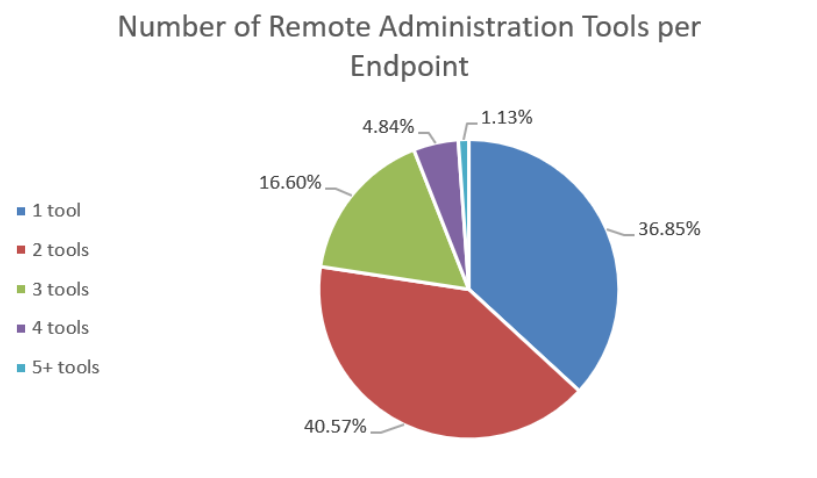
Remote monitoring and management (RMM) tools are widely used in modern IT operations, but cybercriminals are increasingly exploiting them. Acronis analyzed telemetry from over 1.8 million endpoints running Acronis RMM, including incidents recorded between January 2025 and March 2026. We found that 63% of endpoints had more than one remote access tool installed, with over a third having three or more installed. Each additional tool can expand the attack surface and make IT infrastructure harder to manage.
Attackers deploy legitimate and open-source RMM tools directly onto victim machines to blend in with normal traffic. Our investigation of RMM activity and incidents found frequent abuse of open-source tools such as MeshAgent, as well as protocols and tools such as RDP and VNC/UltraVNC. We also observed Ammyy Admin in incidents; leaked source code from that product has been used to create malware.
In the first blog of this two-part series, we analyze the data to discover where RMM-associated risks lie. In part two, we provide practical recommendations for hardening remote access and identifying and responding to RMM-related threats.
The proliferation of RMM tools
The risks associated with privileged remote management platforms are not theoretical. In November 2026, N-able took its hosted N-central environment offline after critical vulnerabilities were publicly disclosed. The decision restricted access to a platform MSPs rely on to manage customer environments while the company developed a fix. N-able released N-central 2026.4 Hotfix 2 on November 10.
The disclosure and shutdown do not, by themselves, establish that MSP or downstream customer environments were compromised. In its November 10 update, Huntress reported that N-able had observed scanning associated with public exploit code, but had no evidence of successful exploitation of customer environments. The incident highlights a fundamental characteristic of RMM platforms: they concentrate privileged administrative access.
An incident affecting the management layer can create two forms of exposure: security risk, because of the privileged access associated with RMM, and operational risk, because MSPs depend on the platform to manage and support customer environments.
RMM tools have become essential infrastructure for modern IT operations, especially for small and medium-sized businesses (SMBs) and managed service providers (MSPs). But the same features that make RMM tools so valuable to IT personnel also make them incredibly attractive to cybercriminals; in particular, ransomware groups.
The vulnerability surface across RMM and remote access tools remains active. N-able’s November 2026 hotfix addressed multiple N-central vulnerabilities, including issues involving authentication, injection and privilege escalation. ConnectWise has also addressed vulnerabilities in ScreenConnect, including the critical authentication bypass CVE-2024-1709. The tools MSPs rely on daily for endpoint management and remote support continue to draw scrutiny from researchers and attackers.
The Acronis Cyberthreats Report H2 2025 also provides historical context. The analysis reported eight vulnerabilities for N-able RMM in 2025, two for ConnectWise ScreenConnect and two for AnyDesk. For TeamViewer, it reported 19 CVEs, including two rated critical. The RMM platform vulnerabilities counted in that analysis were rated high or critical. These figures describe that review and period; they should not be read as a current ranking of product security.
This is by no means an N-able exclusive problem. Many vendors have suffered similar incidents. What the incident highlights is the need to understand the many ways one might be exposed to such a risk. This research digs into the risk associated with the abuse of legitimate RMM tools for malicious purposes and provides an analysis of how these risks can be observed in your environment.
Beyond direct exploitation of vulnerabilities, ransomware groups also use legitimate RMM tools during attacks. Once attackers gain access, they may abuse an existing tool or install one of their own to maintain access, run commands or move through an environment. A compromised management platform can also give an attacker access to multiple customer environments.
In this first article, we use Acronis telemetry from over 1.8 million managed endpoints to answer two questions: Which remote access tools are present in these environments, and which appear in attacks? In part two, we turn to the steps SMBs and MSPs can take to reduce the risks.
Our findings show that nearly two thirds of endpoints have more than one remote access tool installed, adding to the software that IT teams must manage and secure. The incident data also shows which tools appear in attacks and where their presence deserves closer investigation.
Our investigation brought together several datasets. First, we analyzed EDR incidents from January 2025 through March 2026 where threat signatures referenced a remote access or RMM tool. These detections include both existing tools abused by an attacker and tools deployed by attackers.
The second dataset is application inventory data, which shows what is installed across the managed endpoints. Comparing it with EDR incidents helps put the attack data in context, although an inventory entry alone does not establish whether a tool is authorized or actively used.
It’s important to keep in mind that across the entire dataset, all the endpoints have Acronis’ RMM and cyber protection products installed, potentially in addition to other RMMs.

The tool sprawl problem: The RMM and remote access inventory
Across nearly two million managed endpoints, all of which run Acronis RMM, 36% have a single RMM product installed. Another 63.1% have at least one additional RMM or remote access tool, and over a third have three or more tools installed.
For IT teams, these additional tools can serve different purposes, but each one also needs to be accounted for and secured.
The inventory includes machines with three, four and even five tools installed. The number alone does not tell us whether each tool is necessary: a customer may have different support arrangements or be moving between service providers. It does, however, give an IT team a reason to establish who owns each installation and whether it is still maintained.
Why does this matter? Every additional remote access tool is another potential entry point, with its own authentication, update cycle and vulnerabilities. Attackers also deploy RMM software as part of their attacks, as shown in Acronis TRU’s September 2025 investigation of trojanized ScreenConnect installers.
The February 2024 AnyDesk incident illustrates why the security of a remote access provider matters to its users. Attackers breached the company’s production systems; reporting at the time said source code and code-signing certificates had been stolen. AnyDesk replaced its signing certificate and advised users to update. The case shows why teams need to track vendor incident notices and update remote access software as well as review who can use it.
If remote access software is already installed and approved on a victim’s machine, an attacker may be able to abuse it. When an endpoint has several tools installed, such as TeamViewer, ScreenConnect and Splashtop, defenders also have more software to audit, patch and maintain.
The recent N-able issues illustrate another dimension of RMM risk: operational dependency. N-able took its hosted N-central environment offline after critical vulnerabilities were disclosed. For MSPs that rely on an RMM platform for everyday administration, an outage can affect their ability to support and manage customer environments. RMM security therefore also means considering what happens when the management infrastructure itself becomes unavailable.
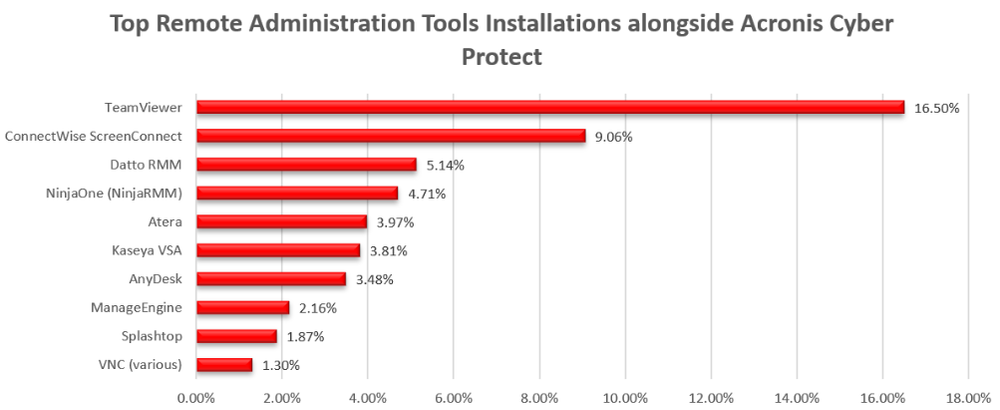
To understand which tools are present alongside Acronis RMM, we looked at the individual products in our inventory. These include platforms used for ongoing management and tools used for remote support. Because Acronis RMM is installed on every endpoint in the dataset, the breakdown below focuses on the additional products.
TeamViewer is present on over 16% of the monitored endpoints, while ConnectWise ScreenConnect is installed on 9%. These figures show how often other remote access tools coexist with Acronis RMM in the environments we analyzed.
Top remote administration tools and protocols (current installations):
RMM tools in action: What does usage data teach us about endpoints with multiple tools?
The inventory reveals which tools are installed across nearly two million devices. It also raises another question: how often are multiple tools actually used on the same machine?
Multiple tools can be present for several reasons: a platform migration, support from more than one provider, different tools for different functions, or an unauthorized deployment. Inventory alone does not tell us which explanation applies.
To add context, we examined a separate dataset on RMM usage. The inventory shows which applications are installed; usage data helps us understand which tools are used and which combinations appear on the same endpoint. This distinction matters because an agent may remain installed after a migration or an occasional support session, even when it is no longer part of day-to-day operations.
According to the usage data, 30% of Acronis RMM endpoints use it as their only tool. That is broadly comparable to the inventory finding that 36% have Acronis RMM as their only installed tool, although the datasets are not directly equivalent.
The remaining 70% show a variety of combinations. We include the top 10, but many others appear in the data. Acronis RMM is used alongside TeamViewer on 8% of devices; other combinations include Acronis RMM alongside products such as ConnectWise and NinjaOne.
One pattern is a primary RMM platform used alongside a general-purpose remote access tool such as TeamViewer or AnyDesk. An IT team might use the RMM platform for scheduled maintenance, patching and monitoring, and a separate tool for ad hoc support sessions with end users. In other cases, an additional tool may remain from a previous provider. These different circumstances call for different responses: a tool used for support needs to be maintained, while an obsolete agent can be reviewed for removal.
End users may also install remote access tools themselves. Whatever the reason, each installation needs an owner, a clear purpose and appropriate security controls. An unused or unapproved tool can otherwise remain available as another route into the endpoint.
Some remote access tools can duplicate functionality already provided by an RMM platform. An additional product may be useful for a particular support arrangement, but an installation left behind after that need ends can still have an account, an agent and a network connection. Removing it after confirming that it is no longer needed reduces the number of systems that have to be patched and monitored.
A second pattern involves multiple management platforms on the same endpoint, such as Acronis RMM and ConnectWise or ConnectWise and Datto. This can occur during a transition between MSPs, for example when an old agent has not yet been removed. In co-managed environments, an organization and its MSP may also each use their own tools.
These arrangements can be legitimate, but each additional tool brings its own authentication, updates and network connections. IT teams should review which agents are still needed, confirm who manages them and remove obsolete installations when it is safe to do so.
A third pattern involves open-source or self-hosted tools, including VNC, RustDesk and smaller numbers of MeshCentral and TacticalRMM installations. These tools can support legitimate remote administration, including lightweight server access or environments where organizations manage their own infrastructure. VNC ranks third overall in our data; RustDesk also offers the option of controlling the relay infrastructure used for connections.
VNC provides a lightweight way to access a system and is available across common platforms. RustDesk can also be self-hosted, which may appeal to organizations that want control over their relay infrastructure. These are legitimate uses, but teams still need to know which servers, agents and connections are authorized.
As the next section shows, attackers can also use some of these tools. Their traffic and activity may be harder to distinguish from legitimate administration when teams do not know which deployments are authorized.
Common RMM tool combinations:

Maliciously managed: The growing abuse of RMM platforms in cyberattacks
Threat actors increasingly use commercially available and open-source remote management tools alongside custom malware. An endpoint running an instance of MeshAgent that the IT team never deployed may appear to be an ordinary managed device. Remote connections and legitimate-looking processes can make the activity harder to identify.
To understand the scope of this problem, we analyzed thousands of incidents involving RMM software. In these incidents, a recognized remote management tool appeared as part of the attack chain, potentially giving the attacker capabilities such as remote desktop access, command execution and file transfer. The impact can extend beyond one endpoint.
The capabilities that make these tools useful to a technician also matter to an attacker. Remote desktop access allows hands-on control; command execution can change the system or run scripts; and file transfer can introduce additional payloads. An alert may therefore need to be investigated alongside account activity, the tool’s installation history and the server to which it connects.
For example, a compromised management system can expose multiple customer endpoints to the same attacker. Our incident data also includes cases involving tools such as ConnectWise ScreenConnect, which can be used to administer many computers from a central location. When a provider manages multiple customers from that environment, a single compromise can consequently have an impact across several organizations.
In real campaigns, a compromised MSP using ScreenConnect can generate hundreds of incidents across its client base within hours. The scale follows from a central management relationship: a single administrative account can reach many customer machines, so an investigation must consider the management system as well as individual endpoints.
These numbers do not capture every attack involving remote access. Attacks that do not trigger a tool-specific signature, including some involving modified or repackaged tools, may be absent from the analysis.
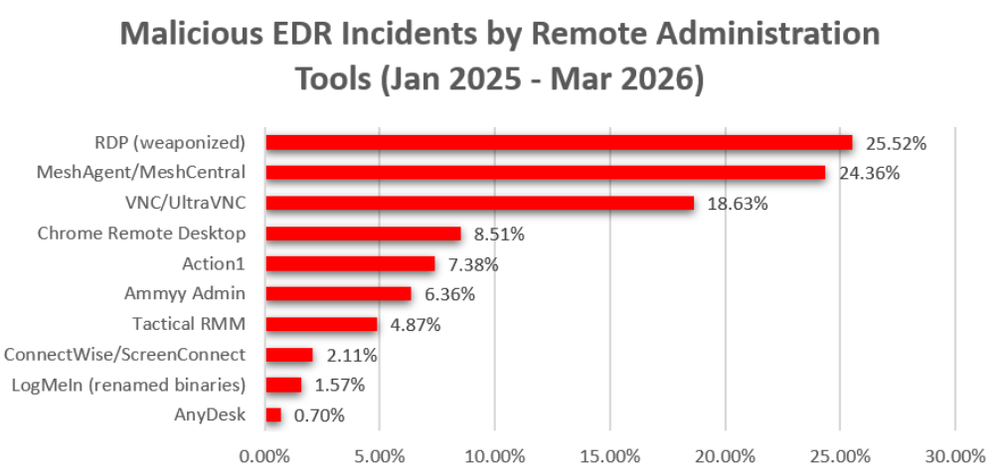
RDP accounted for almost 26% of the remote-access-related malicious EDR incidents in our data. Because RDP is built into Windows for remote administration, attackers can use it after gaining access without necessarily installing another tool. Their permissions depend on the account used.
Comparing the incident data with application inventory adds useful context. The incident dataset shows tools associated with detected attacks; the inventory shows recorded installations. The two datasets measure different things, and the inventory does not establish whether an installation is authorized.
MeshAgent generated almost eight times more malicious incidents than recorded installations, while Ammyy Admin generated almost 153 times more incidents than recorded installations. Both stood out in the analysis and warrant prompt investigation when their presence is unexplained.
By comparison, recorded installations outnumbered incidents by 604 to 1 for ConnectWise ScreenConnect and 1,591 to 1 for AnyDesk. These are comparisons between different datasets: they are not per-installation compromise rates, and an inventory entry alone does not establish authorization.
For an MSP, these comparisons can help set investigation priorities across a customer base. A tool that is uncommon in the inventory but appears often in incidents may warrant particular attention when it turns up unexpectedly. A widely used tool also requires scrutiny when its installation, controlling server or associated activity does not match an authorized support workflow.
A widely deployed tool can also be difficult to assess during an investigation: defenders must distinguish legitimate administrative activity from an unauthorized instance or connection.
This distinction matters for defenders. An unexpected MeshAgent detection should be investigated promptly. An alert involving ScreenConnect also requires context, including whether that endpoint is expected to have the agent and which server controls it.
The breadth of tools in email campaigns has also changed. In a 2025 Virus Bulletin conference abstract Proofpoint researchers said they were regularly observing at least 10 RMM tools, compared with two or three between 2022 and mid-2024. The shift is relevant to defenders because filtering for a single familiar product will not cover the full range of tools attackers may deliver.
Malicious EDR incidents by remote access tool (January 2025 – March 2026):
Rising threats: Monthly trend data
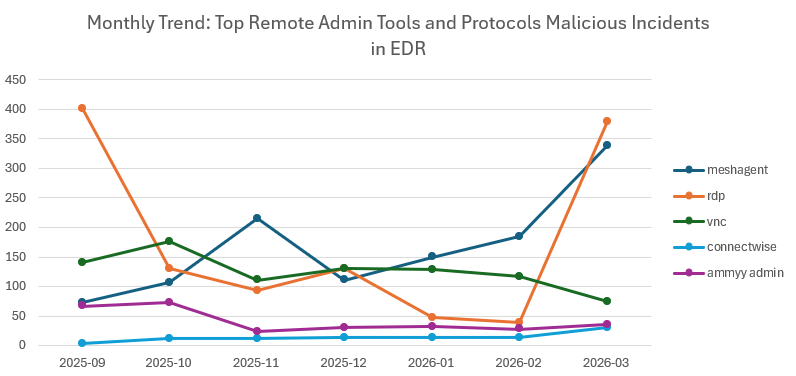
Monthly trend data offers an opportunity to investigate how attacks have changed over the past year:
The takeaways
Open-source RMM tools appear in attack data: MeshAgent generated 1,178 incidents between September 2025 and March 2026. Increased EDR deployment may also contribute to the observed increase in detections. MeshAgent supports remote desktop and shell access and can be used for legitimate administration as well as by attackers. VNC also appeared among the tools in the analysis.
MeshAgent’s features help explain its appeal for remote administration and for attackers: it supports encrypted communication, can work through NAT without port forwarding, and provides desktop and shell access. Our analysis also noted campaigns attributed to the North Korean group Andariel and Iranian-linked actors. VNC, another open-source remote access technology, appeared in the top five tools in the analysis.
Leaked source code can be used to create malware: Ammyy Admin also stood out in our incident data. Proofpoint documented how leaked source code for Ammyy Admin version 3 was used to create the FlawedAmmyy remote access trojan, which has been used by threat groups including TA505.
RDP abuse varies over time: We recorded 402 incidents in September 2025 and 380 in March 2026, compared with 39 in February 2026. RDP involvement can indicate that an attacker has already gained access and is using the protocol to move through the network or maintain control.
The contrast between 39 incidents in February 2026 and 380 in March shows why a single month is a limited view of activity. These counts describe detected incidents in our dataset, rather than all RDP use. When RDP appears in an attack, teams should examine how the account was used, whether the service was newly enabled and what other activity occurred on the affected systems.
Conclusion
A few things stand out from the data above. Most managed endpoints have more than one remote access or RMM tool installed. Some combinations serve legitimate needs, but each additional tool means more software, access and updates for IT teams to manage.
Attackers also use tools that IT teams rely on. Some show up frequently in attack data despite a small inventory footprint. Others are widely deployed for legitimate support, making it harder to distinguish malicious activity from normal administrative work.
Reducing this risk requires more than detecting unauthorized RMM software. SMBs and their service providers also need visibility into remote access, controls over privileged accounts and a plan for maintaining security and recovery capabilities if management infrastructure must be taken offline.
The goal is not to eliminate remote management. It is to limit how far a compromised identity or management system can reach, detect misuse quickly and maintain the ability to recover when disruption occurs.
In part two, we will provide practical hardening guidance for SMBs and MSPs: identifying installed remote access tools, removing those that are not needed, securing the rest and using EDR to distinguish legitimate activity from attacks.