






Executive summary
This report examines how quickly small businesses (companies with 1–99 managed computers) move away from unsupported operating systems, and whether those machines are more likely to carry unpatched vulnerabilities that attackers already know how to exploit. The data covers 12 months — October 2025 through September 2026 — across more than 330,000 small business customer tenants on the Acronis Cyber Platform, representing more than 1.2 million Windows and macOS machines.
Three findings stand out. First, the Windows 10 end-of-life event on October 14, 2025 moved approximately 220,000 small business machines into a category that requires paid Extended Security Updates (ESU) to stay covered — in a single month. Ten months later, in September 2026, 15.8% of the fleet were still in that ESU-eligible state, and only about 18% of the original cohort had upgraded or left the platform since the end-of-life date.
Second, on October 13, 2026 — seven days after the October 6, 2026 data cut-off — almost 200,000 machines are set to lose all patch coverage in a single day. This includes the more than 160,000 machines on Windows 10 22H2 whose ESU Year 1 expires, more than 30,000 machines on Windows Server 2012 and 2012 R2 that exhaust their final ESU year, and almost 1,500 machines on Windows 10 LTSB 2016, which reaches the end of standard extended support with no ESU option available.
Third, about two-thirds of the small business machines that are already behind on vulnerable patches are behind specifically on patches that fix vulnerabilities confirmed to have been exploited in the wild. Among almost 200,000 machines with at least one open, overdue, vulnerable patch in September 2026: 66.7% had at least one patch linked to a U.S. CISA Known Exploited Vulnerability (KEV), and 33.9% had an open patch that ransomware actors have actively weaponized.
Beyond the three points above, the oldest machines in the fleet, those on Windows 7 and 8.x and on Windows Server 2008 and 2012, are still 3.7% of the fleet. They appear in many markets, but their share of the local fleet is highest in Turkey, Taiwan, Argentina and Indonesia, and the old server versions tilt toward the smallest customers.
So, as you can see, the risk from unsupported software in small businesses is not theoretical. It is measurable, it is concentrated in Windows 10, and it is directly linked to the same vulnerabilities that attackers are currently using against real organizations.
Introduction
When a software vendor ends support for a product, two things stop: new features and security patches. Without security patches, every vulnerability found after that date stays open forever. For small businesses, which often run older hardware and cannot always afford rapid upgrade cycles, this creates a long tail of exposure. CISA, the U.S. Cybersecurity and Infrastructure Security Agency, has described end-of-life software as one of the primary risk factors that enable attackers to move quickly through networks, and it maintains a public catalog of exactly which vulnerabilities are being exploited in the wild today: the Known Exploited Vulnerabilities (KEV) catalog. As of October 2026, that catalog lists more than 1,700 confirmed, actively exploited vulnerabilities.
In this research we decided to look into one simple question: Among small business machines running Acronis Cyber Platform, how many are on operating systems that no longer receive patches — and of those that can still receive patches, how many are currently missing patches that fix CISA KEV vulnerabilities? The answers come from anonymized telemetry collected between October 2025 and September 2026. For patch-state data, the report uses Acronis patch management records rather than agent heartbeat data, which means findings apply only to machines where the Acronis patch management module is active. Machines without that module appear in the OS coverage analysis but not in the patch exposure analysis.
The study period was chosen specifically to bracket the most significant Windows end-of-life event in recent years: the October 14, 2025, end-of-life for Windows 10 version 22H2, the last mainstream Windows 10 release. Microsoft's product lifecycle calendar lists every support deadline for every Windows version — but knowing the date and acting on it are two different things. CISA's Binding Operational Directive 26-02, issued in early 2026, requires U.S. federal agencies to remove or remediate end-of-support network-edge devices — and provides the clearest government statement to date that running unsupported software is an unacceptable, not merely inadvisable, risk posture.
The patch management challenge is compounded by the sheer volume of unpatched vulnerabilities in circulation. NIST's Special Publication 800-40 Rev. 4 on enterprise patch and vulnerability management identifies delayed patching of known vulnerabilities as the leading exploitable condition across both government and commercial networks. CISA's FY 2024–2025 Vulnerability Review, published in September 2026, found that the median time-to-exploitation for newly catalogued KEV entries dropped to under 72 hours for the highest-severity vulnerabilities, making any delay in patch deployment a meaningful window of exposure. This report quantifies that exposure for small business machines using real machine-level telemetry.
Operating system support status
Windows 10 version 22H2 reached end-of-life on October 14, 2025. Until that date, it was one of the most common operating systems on small business computers worldwide — and it remained so inside the Acronis platform. In the October 2025 snapshot (sample date: October 1, 2025), 22.0% of the SMB fleet were on Windows 10 22H2 and flagged as expiring within 90 days. By November 2025, those machines had crossed the end-of-life line: the ESU-eligible share jumped from 3.7% to 22.5% in a single month.
After end-of-life, Windows 10 22H2 can still receive patches, but only through Microsoft's paid Extended Security Updates program, which costs $61 per device per year for Year 1 (Year 1 runs to October 13, 2026; Year 2 would cost $122 per device). Whether a machine is enrolled in ESU is not observable from outside — the Acronis patch management records show what patches are open and overdue, but ESU enrollment requires a separate license from Microsoft. The 'ESU-eligible' label in this report means the machine is in a state that requires ESU to stay covered; it does not confirm the machine is enrolled.
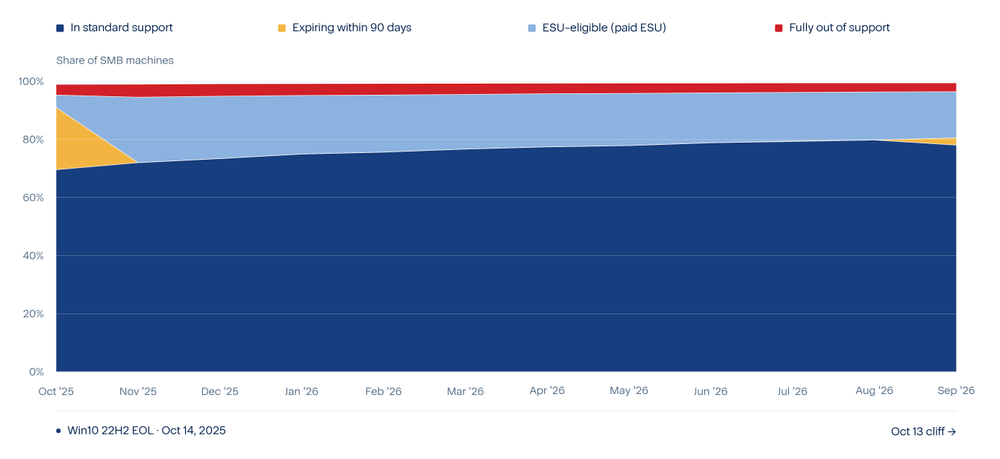
The ESU-eligible count declined from almost 240,000 machines in November 2025 to almost 195,000 machines in September 2026, a reduction of about 18.6% of the original cohort over 10 months. That pace means the remaining Windows 10 22H2 machines on the Acronis platform would not finish migrating for several more years if the trend continued at the same speed. However, this count alone does not tell us whether machines upgraded to Windows 11 or simply left the Acronis platform — both would reduce the number we observe.
Seven days after the October 6, 2026 data cut-off, a second, larger cliff arrives. On October 13, 2026, three separate end-of-support events happen on the same day. First, Windows 10 22H2 Extended Security Update Year 1 expires for commercial customers. Second, the three-year ESU program for Windows Server 2012 and Windows Server 2012 R2 reaches its final day — there are no more paid years available after this date. Third, Windows 10 LTSB 2016 reaches the end of its standard extended support period, and unlike the consumer Windows 10 editions, there is no ESU option available for LTSC and LTSB editions.
Table 1. Machines that lose all patch coverage on October 13, 2026, based on September 2026 snapshot. Win10 22H2 consumer ESU (via Microsoft account, free through Oct 2027) may continue for individual users not under commercial licensing.
The table below shows the detailed breakdown of the 1,231,023 Windows and macOS machines in the SMB fleet as of September 2026, organized by build number and LTSC/LTSB edition detection.
Table 2. Windows and macOS fleet breakdown by OS version, September 2026 snapshot (Sep 2, 2026). Build 17763 instances are separated into Server 2019 and Win10 LTSC 2019 by 'server' keyword in os_name; LTSC/LTSB editions detected by 'ltsc'/'ltsb' keyword in os_name.
Vulnerability patch exposure
To measure how many small business machines are running with open, overdue security patches, this report uses Acronis's patch management records. A patch is counted as 'overdue-vulnerable' if three conditions are all true: The patch has not been installed (status is new, failed or reboot-required); the patch is linked to at least one known vulnerability; and the patch has been available for more than 30 days. The 30-day grace period reflects standard IT patch cycles — a patch released yesterday is not yet overdue for most teams.
Only machines where Acronis patch management is active appear in this analysis. In the September 2026 snapshot, 41.7% of Windows SMB machines had any patch management record. Overdue-vulnerable rates in the tables below use the full machine count as the denominator, so they are floor estimates — the true rate among actively-managed machines is higher.
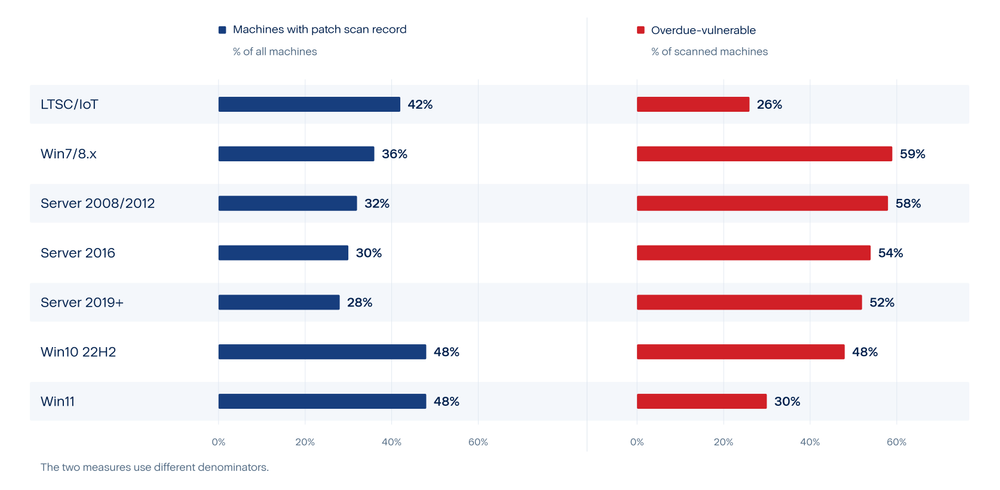
Two patterns stand out. First, the out-of-support groups (Windows 7/8.x, Server 2008/2012) have both high scan coverage (relative to their size) and high overdue rates among scanned machines — 59% and 58%, respectively. These machines are likely being actively managed by IT teams who know they are a problem, but the patches may not exist (Windows 7 reached end-of-life in January 2020, and its ESU program expired in January 2023) or may require costly ESU enrollment. Second, Windows 10 22H2 has an overdue rate of 22.9% of all machines — but among the scanned machines, 48.0% are overdue. This is the highest absolute count outside Windows 11, and as of October 14, 2025, no new patches are being released for non-ESU Win10 22H2 machines, meaning this overdue count will not shrink through normal patching.
Windows 7 machines deserve particular attention. Almost 6,000 Windows 7 / 8.x machines in the SMB fleet have been fully without patch coverage for three or more years — no security fix of any kind has been released for Windows 7 since January 2023 when ESU Year 3 expired. The 59.4% overdue rate among scanned machines reflects patches that were already open before the ESU program ended and have never been closed. These machines are permanently frozen in a vulnerable state: No new Windows 7 security patch will remediate their open CVEs, making migration or replacement the appropriate long-term remediation.
Known-exploited vulnerability exposure
Not all unpatched vulnerabilities are equally dangerous. The U.S. Cybersecurity and Infrastructure Security Agency (CISA) maintains a public catalog — the Known Exploited Vulnerabilities (KEV) catalog — that lists only those CVEs where CISA has confirmed, through evidence collected from real incidents, that threat actors are actively exploiting the vulnerability in the wild. This is a curated, evidence-based list: A CVE does not appear in the KEV catalog because it is theoretically severe; it appears because attackers are demonstrably using it right now. As of October 4, 2026, the catalog contained 1,734 such entries, of which 361 (20.8%) are additionally marked as linked to known ransomware campaigns. A machine with an open patch that covers a KEV-listed CVE is not just theoretically at risk. It is exposed to a specific attack technique that real attackers have already used against real organizations.
To measure this, the report built a patch-to-CVE dictionary from Acronis telemetry. The finished dictionary holds 4,845 distinct patches and 22,929 distinct CVEs. Of those patches, 1,544 (31.9%) are linked to at least one CVE in the CISA KEV catalog, and 575 (11.9%) are linked to a CVE tied to a known ransomware campaign.
Table 3. Machines with open overdue patches linked to CISA Known Exploited Vulnerabilities, September 2, 2026. A patch is 'overdue' if it has been available for more than 30 days and has not been installed. Only machines with Acronis patch management active are included.
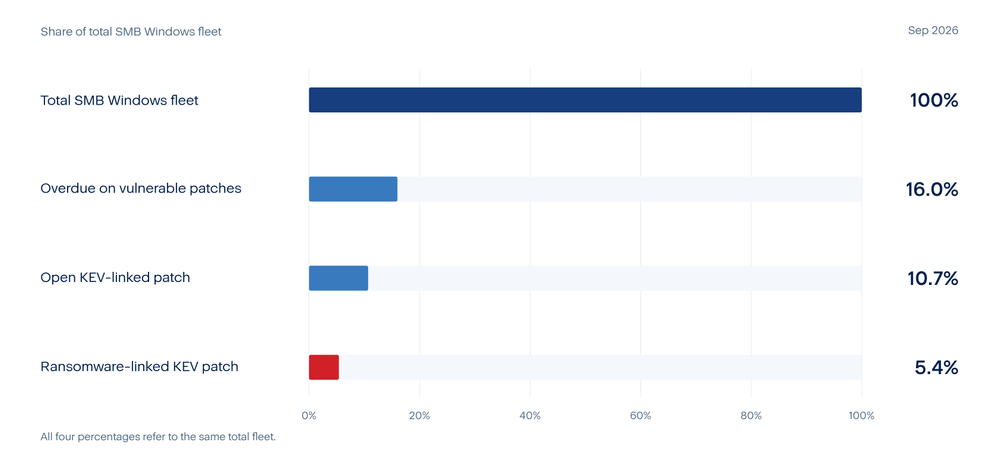
The share of overdue machines with a KEV-linked open patch, 66.7%, is high because the patches that appear most often in the SMB fleet — Windows updates, Chrome, Firefox, Office — are also the products most heavily represented in the CISA KEV catalog. A Windows Update package often covers dozens of CVEs at once, and CVEs for major browsers and office software are disproportionately exploited in practice. In other words: The patches that small businesses most often defer are exactly the patches that attackers most commonly try to exploit. Deferring a Windows or Chrome update can leave known, actively exploited vulnerabilities open.
The ransomware figure (33.9% of machines) is particularly significant. Ransomware attackers often gain initial access through unpatched vulnerabilities or phishing, then move laterally before deploying their payload. Machines with open ransomware-KEV patches represent both an entry point and a lateral movement risk. For small businesses, a single ransomware event could means days or weeks of downtime and recovery costs that exceed the annual IT budget.
Where the long tail sits
The sections above count machines. This section asks where they are. Here the long tail means the two oldest groups in the fleet: Windows 7 and 8.x, and Windows Server 2008 and 2012. Neither group receives regular security updates anymore. Together they hold 3.7% of the 1.2+ million machines small-business fleet.
A customer's country comes from its own contact record on the Acronis platform. When that record has no country, it comes from the contact record of the partner that manages the account. With this rule the country is known for 97.2% of the Windows 7 / 8.x machines and 95.4% of the Windows Server 2008 / 2012 machines. Industry is recorded far less often, for only 16.9% and 11.4% of the machines, so the industry view is a partial picture.
Countries
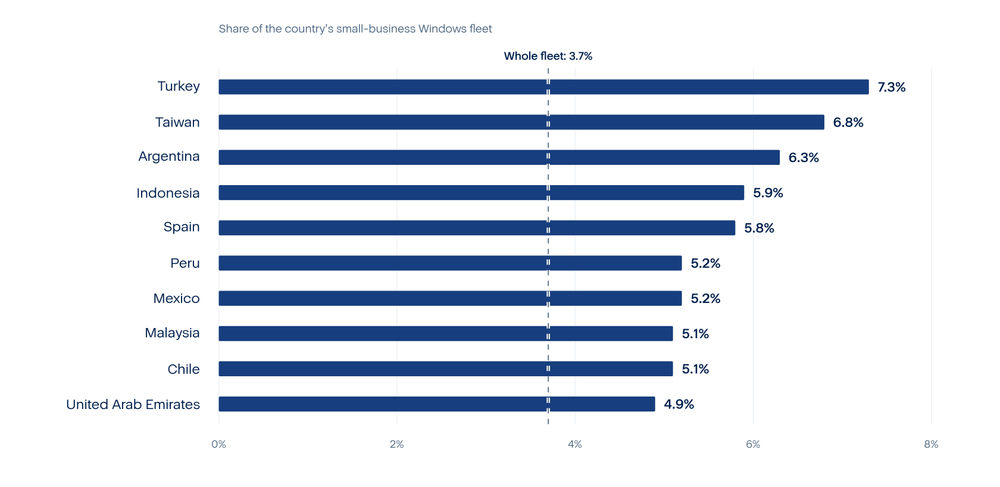
Table 6. Small-business machines on Windows 7 / 8.x and Windows Server 2008 / 2012, by country, September 2, 2026. The ten countries with the most such machines are shown.
United States and Brazil hold the most machines in these two groups. They also have large fleets, so a share view is needed to see where the long tail is thickest. Measured as a share of the local fleet, it is thickest in Turkey (7.3%), Taiwan (6.8%), Argentina (6.3%), Indonesia (5.9%) and Spain (5.8%). Older hardware, slower refresh cycles and tight budgets are the usual reasons small businesses keep old systems, but this data cannot say which of them applies in each country.
Industries
Table 7. Small-business machines on Windows 7 / 8.x and Windows Server 2008 / 2012, by industry, September 2026. The eight industries with the most machines are shown.
The pattern fits how these industries use computers, although the data cannot prove any of the reasons. In manufacturing, old Windows versions often run production equipment, machine controllers and specialist software that the equipment maker has never approved for a newer version. Replacing the computer can mean replacing the machine it controls, and a production stop costs more than the risk feels like. Health care is similar: Scanners, lab devices and practice software are often tied to one Windows version by the manufacturer, and changing it needs the manufacturer’s approval and sometimes a new certification. Retail has a high share of Windows 7 / 8.x machines but a low share of old servers, which is what you would expect from tills and back-office PCs that run one fixed program and are only replaced when they break. Technology shows the opposite: few old desktops but a larger share of old servers. A likely reason is that technology companies keep older servers for testing, for legacy systems or for customers who have not moved.
Two data effects also matter. The industry is the label the customer typed into its own contact record, and only a small part of customers did, so industries whose customers fill in forms more often will look larger. The table also shows each industry’s share of the old machines, not how common old machines are inside that industry. An industry can lead simply because it is a large part of the customer base. To say which industry is truly more exposed, each industry’s share of old machines would have to be compared with its share of all machines.
Customer size
For Windows 7 / 8.x, 51.2% of the machines sit in customers with 1 to 10 machines, 32.7% in customers with 11 to 50, and 16.0% in customers with 51 to 99. That is almost the same mix as the whole fleet (51.6%, 35% and 13.4%), so these machines are not concentrated in any one customer size. Windows Server 2008 / 2012 is different: 70.5% of its machines sit in customers with 1 to 10 machines, 23.8% in customers with 11 to 50, and 5.7% in customers with 51 to 99, a clear tilt toward the smallest customers. Windows 7 / 8.x machines belong to around 4,000customers, so on average each of those customers holds fewer than two of them. The telemetry does not establish why older server versions are more concentrated among the smallest clients.
Conclusions
The picture that emerges from 12 months of Acronis platform telemetry is one of gradual but measurable improvement in OS coverage punctuated by sharp, predictable cliffs where hundreds of thousands of machines lose all patch coverage in a single day. The trajectory since the autumn of the study period shows that small businesses are upgrading Windows 10 machines, but slowly.
Starting from a large base of ESU-eligible machines in the month after end-of-life, the fleet reduced that count by roughly one in six of the ESU-eligible machines over the following ten months. That is meaningful progress. At the same time, it means that nearly 200,000 machines remained in the ESU-eligible state as of late summer, and that the fleet's overall share in standard support grew primarily because new machines were added on current platforms, not primarily because existing machines were upgraded. The long tail is real: A substantial fraction of the existing fleet is staying on Windows 10 for as long as possible.
The mid-October cliff is the clearest expression of this pattern. Nearly 200,000 machines across three product lines will lose all patch coverage on the same date. For the Windows 10 machines, the choice after that date is binary: Pay for Extended Security Update Year Two or stop receiving security patches entirely. For the Server 2012 and 2012 R2 machines, there is no further ESU year — the program ends after Year Three with no extension. And for Windows 10 LTSB, there has never been an ESU option, so the mid-October date is a hard cutoff with no paid alternative. Any organization with machines in any of these three groups that has not already acted faces a hard deadline that cannot be extended.
The vulnerability exposure data adds an urgency dimension that raw end-of-life counts alone do not convey. The machines that are already overdue on vulnerable patches — roughly one in six of the total SMB Windows fleet — are not simply behind on routine maintenance. About two-thirds of those overdue machines are behind specifically on patches that fix confirmed, actively exploited vulnerabilities. This means that the gap between 'patch released' and 'patch installed' is creating real, exploitable exposure today, not theoretical future risk. The CISA Known Exploited Vulnerabilities catalog was designed specifically to identify where that real exploitation risk is concentrated, and the data shows that small business machines are heavily represented in the categories most often targeted: Windows operating systems, web browsers and office productivity software.
The ransomware finding deserves particular attention. Roughly one in three machines with an overdue vulnerable patch has an open patch that covers a CVE specifically linked to ransomware campaigns in the CISA catalog. Ransomware remains the highest-cost category of cyber incident for small businesses; recovery typically requires days to weeks of downtime, data restoration costs and in many cases a public disclosure obligation. The patch management gap on these machines is not a background risk — it is a near-term one, because ransomware operators actively scan for known unpatched systems before launching campaigns. The data in this report identifies exactly which machines those scans will find.
The long tail is not spread evenly. The oldest machines, the legacy desktop and server versions that no longer receive regular security updates, are a small share of the fleet. A few markets keep a clearly larger share of their machines on those versions than the fleet, and the oldest server versions tilt toward the smallest customers. Industry is recorded for too few of these machines to say which sectors are most exposed.
Taken together, these findings suggest that the risk from unsupported and under-patched software in small businesses follows a predictable and observable pattern. The pattern can be measured, it can be tracked over time, and crucially, it can be acted on before the next cliff. Organizations still on Windows 10 22H2 have a clear deadline approaching — and a clear decision to make. Organizations that have patch management deployed but are not resolving overdue patches within a standard patching window are building a backlog of known-exploited vulnerability exposure that grows every week patches sit uninstalled. The data shows what is happening across the small business market; the question for each individual organization is whether they are among the machines already in the overdue-vulnerable category or whether they will act in time to stay outside it.
Recommendations for IT administrators and small business leaders
- Audit which machines on Server 2012 and 2012 R2 have a migration path: Server 2012 and 2012 R2 have no patch option after October 13, 2026. The final ESU year ends on that date, and there is no Year 4. If you are still running workloads on these server versions, you should be in active migration to Server 2022 or 2025 or planning workload consolidation or decommission. Server 2012 and 2012 R2 running in Azure received free ESU through an earlier date, so on-premises instances are the primary concern.
- Deploy patch management to machines that currently have no scan record: Nearly three out of five SMB machines in this dataset have no patch management record at all. Among machines that do have records, more than a third are overdue on vulnerable patches. The overdue rate likely understates the true exposure: machines without patch management may be more, not less, likely to have open patches, because they are receiving less active attention. For IT service providers and MSPs, deploying a patch management module to previously unmanaged machines is the single highest-leverage action for reducing known-exploited vulnerability exposure across your customer base.
- Prioritize CISA KEV patches within your patch backlog: If you have a backlog of open patches, sort it by KEV status first. The CISA Known Exploited Vulnerabilities catalog is free, updated regularly and identifies exactly which patches cover vulnerabilities that attackers are actively using today. A machine with an open KEV-linked patch is in a fundamentally different risk category than a machine with open patches for newly reported, not-yet-exploited CVEs. Applying KEV patches within thirty days removes your organization from the most actively targeted group.
- Treat ransomware-linked KEV patches as a critical priority: More than one in three of the patches in this study that fix a vulnerability on the CISA KEV list also fix a CVE that ransomware operators have specifically exploited. Applying these patches does not guarantee ransomware protection, but it removes one of the most used initial access vectors. For small businesses without dedicated security staff, filtering a vulnerability scanner's output to 'KEV plus ransomware-linked' is a practical way to prioritize remediation without needing deep security expertise. Your patch management provider should be able to apply this filter automatically.
- Respond to attacks quickly: Migration plans should include clear responsibility for detecting and responding to attacks while upgrades are under way. On systems supported by Acronis EDR or XDR, Acronis Managed Detection and Response (MDR) provides continuous monitoring, expert investigation and threat containment. This can help small businesses maintain security oversight during the transition without building their own round-the-clock security team. Its role is to support the migration and patching effort: Administrators still need to replace unsupported systems and close known vulnerabilities, while MDR analysts investigate detected threats and guide the response.
- Establish a quarterly OS lifecycle review: The pattern of surprise at EOL dates is preventable. Microsoft publishes its lifecycle calendar years in advance. Building a quarterly review of which operating systems in your environment are approaching end-of-life — and starting upgrade projects twelve to eighteen months before the deadline — avoids the rush and the ESU cost premium. The October 2025 event was announced well in advance.