




You are on United States website. Change region to view location-specific content:
Global
English
Select another region
Choose region and language
Americas
  • BrasilPortuguês
  • CanadaEnglish
  • CanadaFrançais
  • LATAMEspañol
  • United StatesEnglish
Asia-Pacific
  • AustraliaEnglish
  • Chinese Simplified简体中文
  • Chinese Traditional繁體中文
  • IndiaEnglish
  • Japan日本語
  • Korea한국어
  • SingaporeEnglish
Europe, Middle East and Africa
  • BulgariaБългарски
  • CzechČeština
  • EuropeEnglish
  • FranceFrançais
  • GermanyDeutsch
  • HungaryMagyar
  • Israelעברית
  • ItalyItaliano
  • NetherlandsDutch
  • PolandPolski
  • RomaniaRomână
  • SpainEspañol
  • SwedenSvenska
  • SwitzerlandDeutsch
  • TürkiyeTürkçe
  • United KingdomEnglish
Worldwide
  • GlobalEnglish
  • Americas
    • BrasilPortuguês
    • CanadaEnglish
    • CanadaFrançais
    • LATAMEspañol
    • United StatesEnglish
  • Asia-Pacific
    • AustraliaEnglish
    • Chinese Simplified简体中文
    • Chinese Traditional繁體中文
    • IndiaEnglish
    • Japan日本語
    • Korea한국어
    • SingaporeEnglish
  • Europe, Middle East and Africa
    • BulgariaБългарски
    • CzechČeština
    • EuropeEnglish
    • FranceFrançais
    • GermanyDeutsch
    • HungaryMagyar
    • Israelעברית
    • ItalyItaliano
    • NetherlandsDutch
    • PolandPolski
    • RomaniaRomână
    • SpainEspañol
    • SwedenSvenska
    • SwitzerlandDeutsch
    • TürkiyeTürkçe
    • United KingdomEnglish
  • Worldwide
    • GlobalEnglish
Back to homepage
Search in acronis websites
  • Contact sales
  • Contact support
  • Contact renewals
  • All contacts
  • Login for service providersAcronis Cyber Protect Cloud
  • Login for business customersAcronis Cyber Protect, Acronis Snap Deploy
  • Login for home usersAcronis True Image
  • Login to Partner PortalAcronis Partner Portal
  • Login to ConnectAcronis Cyber Protect Connect
  • Products
    For service providers
    For business
    For home
    Acronis Cyber Protect CloudEmpowering service providers with backup, disaster recovery, cybersecurity, and endpoint management in one integrated solution.
    • Try it free
    Cybersecurity
    Extended Detection & Response (XDR)
    Endpoint Detection & Response (EDR)
    Managed Detection & Response (MDR)
    Data Loss Prevention (DLP)
    Security Posture Management
    Email Security
    Email Archiving for Microsoft 365
    Collaboration Security
    Security Awareness Training (SAT)
    Infrastructure
    NEW
    Cyber Frame
    Data protection
    Backup
    Backup for Microsoft 365
    Disaster Recovery
    Direct Backup to Public Cloud
    Archival Storage
    Cloud Storage
    MSP operations
    RMM
    PSA
    Workflow Automation
    More products
    Acronis Cyber Protect Home & BusinessSecure backup and AI-powered anti-malware solution that service providers, telecoms or ISPs can easily integrate to their service suite.
    • All products
    • Compare products
    Looking to update or renew your product or contact us for help?
  • Solutions
    Solutions
    For service providers
    For business
    • Microsoft 365 protection
    • Protected Server
    • Protected Workspace
    • Endpoint protection
    • Hybrid disaster recovery
    • Disaster recovery to Azure
    • Prevention
    • Solutions for service providers
    • Compliance Navigator
    • Managed server backup
    • Ransomware protection
    • Managed anti-malware protection
    • Hosting service providers
    • MSP patch management
    • Recovery
    • Management
    • Automation
    • Security
    • Data Protection
    • All integrations
  • Pricing
    • For Service Providers
    • For Businesses & Enterprise
    • For Home
    • Compare products
  • Partners
    Partner with Acronis
    • Acronis Partner ProgramMeet customer demand with one partner program for MSPs, VARs, OEMs and Hybrid Partners
    • Join the partner program
    • Acronis Technology Alliances Program (TAP)Integrate with Acronis to build powerful solutions for the MSP ecosystem
    Partner success kit
    • MSP AcademyTraining and resources to grow your MSP business
    • Active promotionsExplore current deals and limited-time offers
    • Partner CertificationPartners now have access to all sales and technical training — a $999 annual value per partner
    Locators
    • Find an IT providerBrowse verified Acronis IT service providers worldwide by region and specialization
    • Find a distributorBrowse verified Acronis distributors worldwide by type and location
  • Support & Resources
    Support
    • Customer service and supportGet help, find answers, and contact our support team
    • Product documentationEverything you need to understand and use the product
    • Support knowledge baseSelf-service support with guides and solutions
    Resources
    • Resource centerAll-in-one hub for expert insights and resources
    • Acronis blogExplore articles on security, backup, and innovation
    • Acronis Threat Research UnitInsights on cyber protection, tech trends, and news
    Events, Webinars & Demos
    • Upcoming events and webinarsRegister for live demos and webinars led by Acronis experts
    • On-Demand webinarsWatch on-demand webinars at your convenience and learn from Acronis' top experts
    • Demo CenterExplore on-demand demos to see how Acronis solutions protect your data and business
  • Why Acronis
    • About AcronisLearn about our mission, vision, and team
    • Industry recognitionsRecognized by industry leaders for innovation and excellence
    • Compliance and certificationSee how we meet global compliance and regulatory requirements
    • Customer storiesReal-world success stories from our global clients
    • Acronis vs competitionWhy businesses choose Acronis over the competition
  • Trials
    • For Service Providers
    • For business and enterprise
    • For Home
  • Buy online
    • For business and enterprise
    • For Home
  • Contact us
    • Contact sales
    • Contact renewals
    • Contact support
    • All contacts
Choose region and language
Americas
  • BrasilPortuguês
  • CanadaEnglish
  • CanadaFrançais
  • LATAMEspañol
  • United StatesEnglish
Asia-Pacific
  • AustraliaEnglish
  • Chinese Simplified简体中文
  • Chinese Traditional繁體中文
  • IndiaEnglish
  • Japan日本語
  • Korea한국어
  • SingaporeEnglish
Europe, Middle East and Africa
  • BulgariaБългарски
  • CzechČeština
  • EuropeEnglish
  • FranceFrançais
  • GermanyDeutsch
  • HungaryMagyar
  • Israelעברית
  • ItalyItaliano
  • NetherlandsDutch
  • PolandPolski
  • RomaniaRomână
  • SpainEspañol
  • SwedenSvenska
  • SwitzerlandDeutsch
  • TürkiyeTürkçe
  • United KingdomEnglish
Worldwide
  • GlobalEnglish
  • Americas
    • BrasilPortuguês
    • CanadaEnglish
    • CanadaFrançais
    • LATAMEspañol
    • United StatesEnglish
  • Asia-Pacific
    • AustraliaEnglish
    • Chinese Simplified简体中文
    • Chinese Traditional繁體中文
    • IndiaEnglish
    • Japan日本語
    • Korea한국어
    • SingaporeEnglish
  • Europe, Middle East and Africa
    • BulgariaБългарски
    • CzechČeština
    • EuropeEnglish
    • FranceFrançais
    • GermanyDeutsch
    • HungaryMagyar
    • Israelעברית
    • ItalyItaliano
    • NetherlandsDutch
    • PolandPolski
    • RomaniaRomână
    • SpainEspañol
    • SwedenSvenska
    • SwitzerlandDeutsch
    • TürkiyeTürkçe
    • United KingdomEnglish
  • Worldwide
    • GlobalEnglish
Acronis True Image
FOR HOME
MenuMenu
Acronis True Image
Acronis

Backup, cloning, cyber protection and privacy tools for home users

Compare set of features

Acronis True Image (formerly Acronis Cyber Protect Home Office)

#1 integrated backup and security

Protect your data with easy-to-use, fast, and reliable backup and security trusted by millions of IT professionals and home users.
Acronis
…
1:24
  • Easy, intuitive backup and antivirus
    Easy, intuitive backup and antivirus
    Protects everything – photos, files, applications, systems, and the devices they’re on – through an intuitive interface that’s accessible from anywhere.
  • Efficient all-in-one protection
    Efficient all-in-one protection
    Unifies reliable backup and advanced antimalware in one full feature solution, eliminating the cost and complexity of managing multiple tools
  • Secure from all cyberthreats
    Secure from all cyberthreats
    Stops any threat from disrupting your digital life, from disk failure to lost/stolen devices to the latest cyberattacks – including those never seen before

Easy to use and manage

Learn how Acronis True Image combines reliable backups and advanced antimalware to create powerful integrations

Set-and-forget backups and comprehensive protection mean you’ll never lose precious files or expensive applications – and you can always restore your system in a flash
  • Flexible backups enable you to back up what you want – from full system images to individual files – to the storage you want
  • Recoveries are fast and reliable, and in just a few clicks you can restore your entire system to the same or new hardware
  • Disk cloning, all-in-one recovery drives, end-to-end encryption, and other innovations ensure your data is always safe
Acronis
Integrated real-time protection and signature-based defenses work together to stop any cyberattack from harming you, even if those threats have never been seen before.
  • On-demand antivirus scans of your full system or those files typically targeted by malware ensure infections cannot hide
  • AI-enhanced behavioral detection stops attacks in real-time, before malware, ransomware, or cryptojackers cause damage
  • Web filtering and videoconference protections keep accidental infections and unwanted hackers from your valuable data
Acronis
One solution that’s purpose-built for all of your cyber protection needs closes security gaps, is easier to manage, and costs less than using multiple, incompatible products.
  • Tight integrations deliver clear performance advantages, such as restores that are up to 10-times faster than other solutions
  • Subscriptions gain integrated cloud backups and other cloud-based features for off-site protection and anywhere access
  • Managing all your protections through a single, intuitive interface is easier than using a different UI for several solutions
Acronis

Choose the Acronis True Image plan that meets your needs

Please wait, this may take

a few seconds...

100% Detection Rate and 0 False Alarms in independent tests
Best Windows backup software, PCWorld
Cybersecurity Excellence Awards Winner
Editors' Choice, PCWorld
OPSWAT Anti-malware Platinum certification
TIME's Best Cloud Backup Services

As threats evolve, so should your protection

Get the full version of Acronis True Image and unlock next-level cyber protection

Acronis True Image
Acronis True Image for Crucial
Number of devices
Protects up to 5 PC/Macs and unlimited number of mobile devices
Protection is limited to partner's solution(s)
Licensing type
Subscription
Perpetual
Cloud backup
Plans include up to 10TB cloud storage
Supported operating systems
Windows, macOS, Android, iOS
Windows, macOS
Reliable data protection: backup, cloning, and recovery
Full image backup
Active disk cloning
Files and folders backup
Disk and partition backup
Recovery to dissimilar hardware
Microsoft 365 backup, including Outlook.com and OneDrive
Local-to-cloud backups
Cloud restores
Cloud sync and share *
Remote backup management
Automatic mobile backups
Integrated anti-malware and privacy features
Antiransomware
Cryptojacking protection
Real-time anti-malware protection
Antivirus scan
Vulnerability assessment
Web filtering
Videoconference app protection
User-defined passwords
Back up on selected Wi-Fi
Easy-to-use and manage
User-friendly cyber protection dashboard
Incremental and differential backups
Backup scheduling
Protection pause
All-in-one recovery drive
Control backup-on-battery
Protection pause
Desktop tray notification center

What the experts say

  • An all-encompassing tragedy-prevention solution

    …

    Jon L. Jacobi
    PCWorld

Looking for Help?

Frequently Asked Questions

  • How do you back up a computer?

    A computer backup is a second copy of your data that you store separately from the original. That includes family photos and videos, documents, emails and contacts, and the apps and operating system that powers your computer. If the originals are located on your laptop or a mobile device, you keep the backup somewhere else that safe – that way you can use the second copy to restore your files or system in case something happens to the original.

    To ensure all of this data is accurately copied so you can use it to recover your computer, backup software is a must. A solution like Acronis True Image (formerly Acronis Cyber Protect Home Office) automatically captures changes to everything, including hidden files that can be missed by manually copying files, and makes the process of recovery easy and efficient.

  • How do you back up a computer to external hard drive?

    With Acronis True Image (formerly Acronis Cyber Protect Home Office), creating a full image backup on an external hard drive is as easy as two clicks. Once the drive is connected and Acronis True Image is running, you click Add backup. The entire computer is the default backup source, so you simply need to assign the external drive as the Backup destination and then click Back up now.

  • What does it mean to back up a computer to the cloud?

    Computer backups need to be stored someplace safe. Acronis recommends the 3-2-1 backup rule, which includes storing a copy of your backup files locally (on external hard drives, network drives, and NAS devices) and another copy off-site. That way, if a fire or flood damages both your original files and the local backup, the off-site copy is available to use for recovery.

    "The cloud" is a term that describes a remote network of computers and servers that you access via the internet. Because you just log in via the internet, the cloud is a convenient way to store your files off-site, where they are safe from local damage. Subscriptions to the Advanced and Premium editions of Acronis True Image (formerly Acronis Cyber Protect Home Office) include cloud storage, as well as cloud-based features and anywhere access to your data.

    With Acronis True Image, you also have the ability to automatically replicate local backups in the Acronis Cloud, so you always have an off-site copy of your data available without having to manage a separate backup plan. By choosing this option, after the first successful backup, your backup and replication will be done simultaneously, in parallel.

  • What is Acronis anti-malware protection?

    Acronis’ advanced anti-malware gives you peace of mind by delivering outstanding multilayered threat protection. It uses a set of integrated technologies that address specific attack vectors:

    • Superb protection against known and unknown malware, including ransomware, cryptojackers, and fileless attacks.
    • Behavioral analysis and dynamic detection rules that combat any emerging threats.
    • On-demand antivirus scan that checks all files on your computer for any kind of malware: Trojans, viruses, backdoors, worms, keyloggers, spyware, and others.

    Acronis continuously safeguards your device and backups from the latest cyberthreats.

  • Do I need Acronis anti-malware protection if I already have specialized antivirus, anti-malware, firewall, or other security software?

    Yes. Acronis anti-malware uses a set of integrated technologies that deliver data protection capabilities many third-party antiviruses don’t. Such as:

    • It keeps your backup safe. A dedicated module of Acronis anti-malware protection guards your backup files and the backup agent, preventing deletion or alteration by malware.
    • It restores ransomware-affected files automatically. The majority of other security software only prevents the attack, without automatically recovering the ciphered data.
  • Is Acronis' anti-malware protection compatible with other anti-malware solutions?

    We are aware that you probably have specialized antivirus, web filtering, or other security software installed on your device. Even though we recommend uninstalling the third-party software and fully relying on Acronis' anti-malware solution, you can still keep it active. Acronis' anti-malware protection is compatible with most common anti-malware solutions. They do not conflict with each other for resources and do not create an extra overhead on the system.

    However, our real-time protection switches on only if there is no third-party real-time protection solution running on your device. If third-party software is detected, you'll receive a message on your protection dashboard notifying you that another piece of software is protecting you from malicious files.

    Note: If you continue using an existing third-party solution for device protection rather than Acronis' anti-malware, we cannot guarantee the reliability of that third-party protection.

Product help
If you need product assistance, you can find helpful materials in the Knowledge Base. Or, post questions on our discussion boards.
Technical support
For subscription owners, there is free, 24-hour technical support. Refer to the Technical Support Site to find the appropriate support contact.

Works On Multiple Platforms

Microsoft Windows

  • Windows 11 (64-bit)
  • Windows 10 (64-bit)

Mobile operating systems

  • iOS 15 or later
  • Android 10 or later

File systems on Windows

  • NTFS
  • Ext2/Ext3/Ext4
  • ReiserFS(3)
  • Linux SWAP
  • HFS+/HFSX
  • FAT16/32/exFAT

Apple macOS

  • macOS Tahoe 26
  • macOS Sequoia 15
  • macOS Sonoma 14
  • macOS Ventura 13
  • macOS Monterey 12

File systems on macOS

  • APFS
  • HFS+
  • FAT32
  • NTFS (including Boot Camp)

Acronis Mobile: Easy, secure and portable

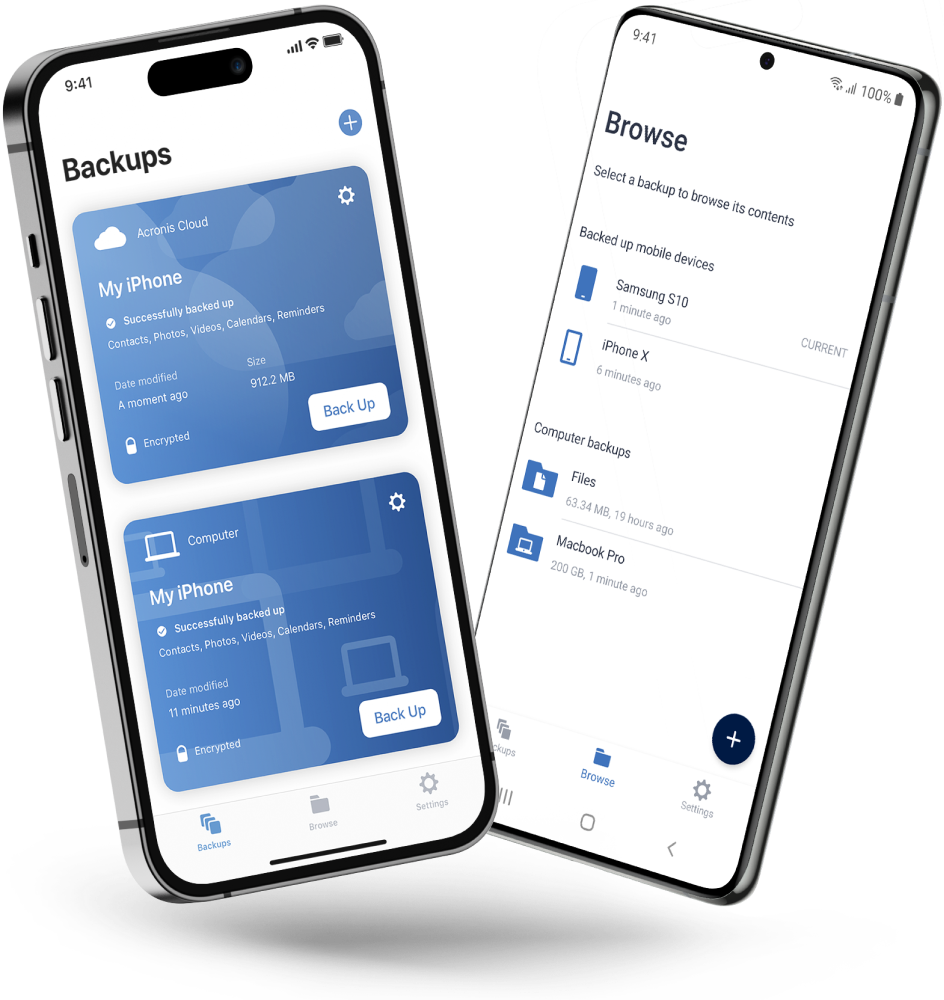
Never worry about losing your photos, videos, contacts or important files again. With the Acronis Mobile app, you can easily back up everything that matters on your phone and keep it safe in the cloud. Access your files anytime, anywhere from the Acronis Cloud, whether you're switching devices or just want peace of mind. It’s fast and always ready to protect your digital life.

  • How to back up your mobile device via Wi-Fi to a PC or Mac
Acronis
  • Company
    Press Releases
    Careers
    Contacts
    Cloud Data Centers
    Forum
  • Service Providers
    Resellers
    Developers and ISVs
    Affiliates
    OEMs
  • Active Protection
    AnyData Engine
    Acronis Notary
    Universal Restore
    Anti-malware
    View all
  • Management
    Automation
    Security
    Data Protection
    View all
  • Acronis #CyberFit Sports
    Acronis Cyber Foundation
    TRU security
    Professional Services
  • ConnectWise
    Microsoft CSPs
  • Veeam
    Sophos
    Trend Micro
    ESET
    SentinelOne
    View all
  • Physical
    Virtual
    Cloud
    Endpoints
    Applications
    Mobile
  • About Acronis
  • Company
  • Press Releases
  • Careers
  • Contacts
  • Cloud Data Centers
  • Forum
  • For partners
  • Service Providers
  • Resellers
  • Developers and ISVs
  • Affiliates
  • OEMs
  • Technologies
  • Active Protection
  • AnyData Engine
  • Acronis Notary
  • Universal Restore
  • Anti-malware
  • View all
  • Integrations
  • Management
  • Automation
  • Security
  • Data Protection
  • View all
  • Programs & Services
  • Acronis #CyberFit Sports
  • Acronis Cyber Foundation
  • TRU security
  • Professional Services
  • Vendor Alliance
  • ConnectWise
  • Microsoft CSPs
  • Compare to
  • Veeam
  • Sophos
  • Trend Micro
  • ESET
  • SentinelOne
  • View all
  • Environments
  • Physical
  • Virtual
  • Cloud
  • Endpoints
  • Applications
  • Mobile
Engage with Acronis
  • twitter
  • blog
  • cpoc
  • yt
  • linkedin
  • reddit
  • facebook

Tips, news and promo offers

  • Legal information
  • Privacy policy
  • Cookie Notice
  • Notice of collection
  • Sustainability & governance
© 2003–2026 Acronis International GmbH.
Back to homepage

Sorry, your browser is not supported.

It seems that our new website is incompatible with your current browser's version. Don’t worry, this is easily fixed! To view our complete website, simply update your browser now or continue anyway.

© 2003–2026 Acronis International GmbH. All rights reserved.
Legal information