The global economy is shifting toward total automation. Almost every industry is moving from manual work to automatic or semi-automatic workflows that act proactively or respond on their own, deliver results faster and operate with minimal human intervention. MSPs should be at the center of this transformation.
This is the beginning of the autonomous MSP era – service providers that deliver reliable, scalable operations with minimal manual work, very high productivity and consistent quality.
Deterministic automation: A backbone of probabilistic automation
Automation is divided into two fundamental types based on how decisions are made: probabilistic automation driven by AI and deterministic automation that is rule based. In reality, the most effective automation strategies combine both. Probabilistic automation powered by AI excels at interpretation, pattern recognition and decision support, but it requires a stable execution layer to turn insights into consistent outcomes. That execution layer is deterministic, rule-based automation.
Deterministic automation provides the structure, guardrails and reliability that AI alone cannot guarantee. It defines how systems should react when specific conditions are met, enforces standard operating procedures and ensures that actions are executed the same way every time. This is especially critical in MSP environments, where predictability, security and accountability matter as much as speed and intelligence.
In practice, deterministic workflows act as the backbone for AI-driven automation. AI can enrich workflows with context, recommendations or prioritization, while rule-based automation ensures that the resulting actions are safe, repeatable and auditable. For example, AI may help assess the severity of an incident or identify anomalous behavior, but deterministic workflows control what happens next: isolating a device, notifying the right teams, triggering remediation steps or enforcing approval paths.
This combination makes AI more effective rather than less constrained. By embedding AI insights into deterministic workflows, MSPs can adopt AI in a controlled and scalable way, avoiding fragile or unpredictable automation. The result is stronger automation that balances intelligence with reliability, speed with safety and flexibility with control.
That is why we’re introducing Acronis Workflow Automation. It establishes a solid deterministic automation layer across Acronis Cyber Protect Cloud, creating the foundation on which AI-powered capabilities can be introduced responsibly and at scale.
What is workflow automation?
Workflow automation is an example of deterministic, rule-based automation. It means defining what should happen when a specific event or condition occurs, then letting the system automatically execute a sequence of steps across one or multiple systems. It connects triggers, conditions and actions into end-to-end workflows that span services and tools, running consistently without human intervention.
For MSPs, this unlocks predictable onboarding, instant alert handling, consistent SOP execution and faster remediation – all without adding headcount.
Introducing Acronis Workflow Automation
Acronis Workflow Automation is a new, no-code automation engine built into Acronis Cyber Protect Cloud. It enables technicians to automate actions across all core Acronis services — backup, DR, RMM, EDR / XDR, PSA — and third-party services through an intuitive, drag-and-drop interface.
It is part of the platform; there is no extra product to buy, install or integrate. Every partner using Acronis Cyber Protect Cloud gets access to automation features out of the box.
Key features and how it works
Acronis Workflow Automation provides a robust set of capabilities for building and managing automations:
- No-code workflow builder with a drag-and-drop approach.
- Rich library of triggers, conditions and actions.
- Cross-service automation across backup, DR, RMM, security and PSA.
- Validation and error handling that prevents misconfigured workflows (coming soon).
- Execution history and monitoring (coming soon).
- Workflow templates to accelerate adoption.
- Multitenant propagation with version control.
- CyberApp-based actions contributed by ISVs and MSPs for ecosystem automation (coming soon).
- Cross-system integrations with third-party services (coming soon).
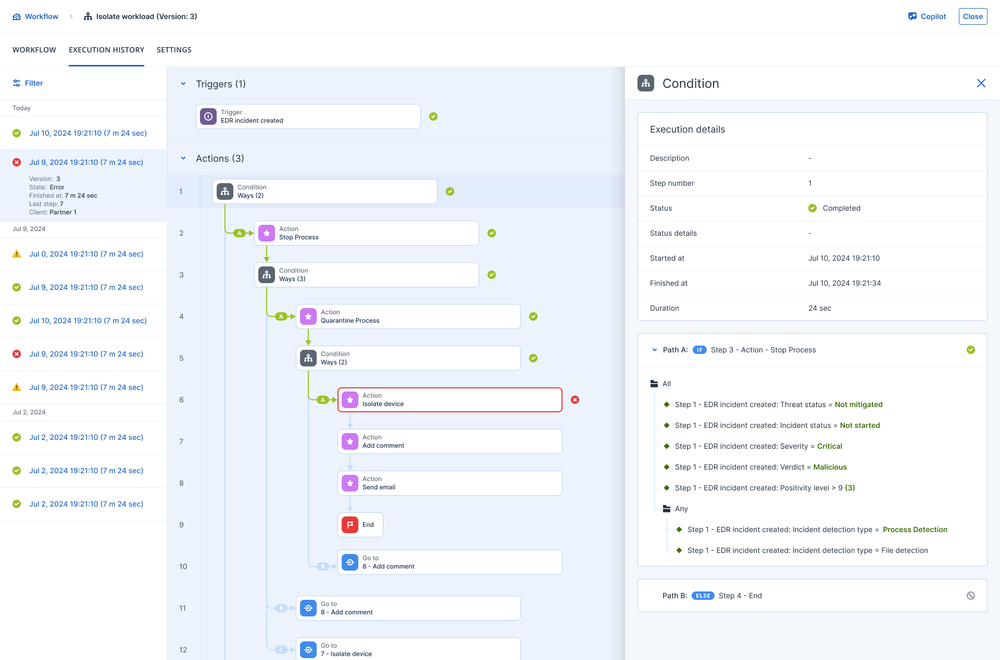
Supported triggers and actions in the initial release range from device registration to alert creation to EDR incident updates, along with actions such as isolating devices, applying protection plans, running patch management, dismissing alerts, creating users, sending notifications and more.
How Acronis compares to Rewst and Zapier
Rewst and Zapier are very well-known tools for automation:
Rewst
A powerful but scripting-heavy automation framework. It supports many systems, yet it requires technical expertise and custom code. It also sits outside the security and protection stack, so many tasks need API integration.
Zapier
Built for general business automation rather than MSP operations. It is not designed for security response, RMM events or deep integration with endpoint protection.
Where Acronis stands apart:
- Native to the Acronis platform with direct access to backup, EDR / XDR, RMM and PSA events.
- Designed for technicians rather than developers.
- Strong focus on security automation with actions like isolate devices, run malware scans, quarantine files and more.
- Multitenant-ready with workflow propagation across all customers.
- Extendable through ISV-built CyberApp triggers and actions.
- No additional cost for Acronis partners.
Supported use cases
The initial release focuses on real, high-impact tasks MSPs handle every day. The list will grow continuously as new triggers and actions are added.
Today, you can automate the following:
Customer onboarding automation
Create users, assign roles and send a welcome email as soon as a new tenant is created.
Device protection upon registration
Automatically apply protection plans, start the first backup and run initial security checks after a new device registers.
Alert noise reduction
Automatically dismiss low-priority alerts while escalating important ones. Ideal for reducing noise and improving technician focus.
EDR / XDR incident response automation
Respond instantly when threats are detected. Automate isolation, internal notifications and follow-up actions.
A complete list of actions and triggers is available in this documentation article.
As Acronis expands the automation engine, more scenarios will be introduced over time.
Getting started
To start using Acronis Workflow Automation, watch this step-by-step demo video:
Conclusion
Acronis Workflow Automation brings MSPs closer to the autonomous future by turning routine tasks and security actions into reliable, repeatable workflows. With its no-code builder and deep integration across Acronis Cyber Protect Cloud, partners can operate faster and more consistently without added complexity. Now is the right moment to try it and bring predictable automation into your daily service delivery.
If you’re new to Acronis, you can try Workflow Automation with a free trial.
If you’re already an Acronis partner, follow the steps in the demo video or use this documentation section to get started and begin automating your operations.
Happy workflow automation!
About Acronis
A Swiss company founded in Singapore in 2003, Acronis has 15 offices worldwide and employees in 60+ countries. Acronis Cyber Platform is available in 26 languages in 150 countries and is used by over 21,000 service providers to protect over 750,000 businesses.