AI is changing the economics of managed services, and productivity and intelligence are becoming critical competitive factors. MSPs need practical AI that helps technicians work more productively, make smarter decisions, move faster, reduce manual effort and resolve issues with better context.
That is why Acronis is expanding Acronis Cyber Platform with new AI-native capabilities built for the next era of managed services.
New Acronis platform services for the new AI era
The Acronis service provider platform is evolving to help MSPs protect, manage and automate more daily operations from one console.
This year, Acronis introduces multiple AI-native solutions that help MSPs increase productivity, improve service delivery and build more scalable operations.
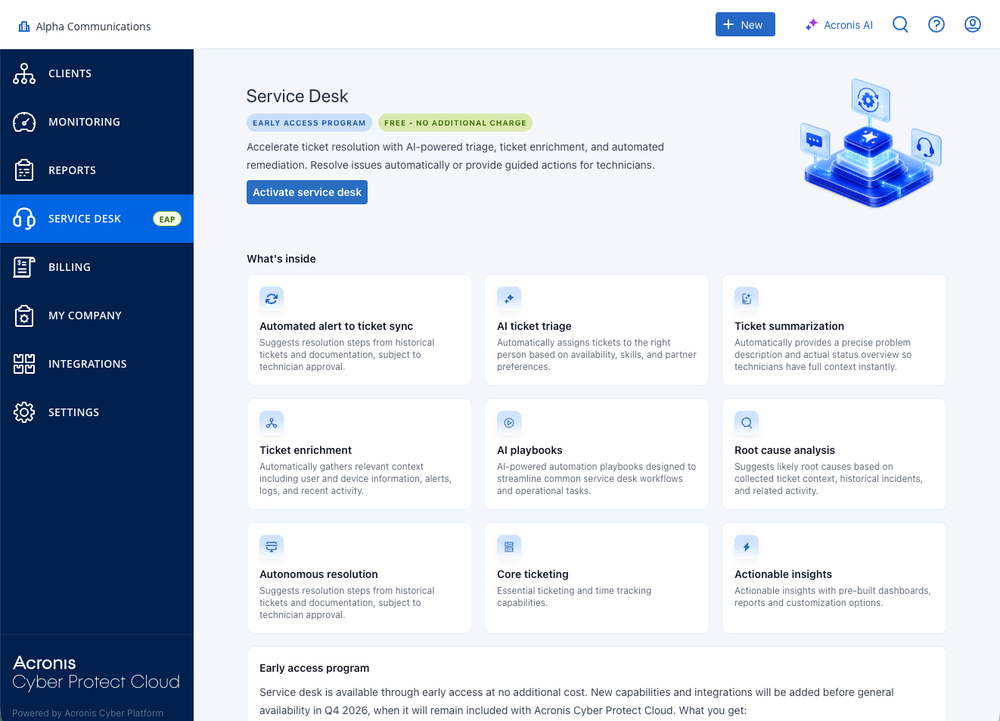
- Acronis Service Desk, now available in EAP, helps MSPs consolidate Acronis alerts into clean, actionable tickets and gives technicians AI-powered insights to accelerate resolution.
- Cyber Intelligence, coming later this year, will help MSPs identify trends, recurring issues, operational risks and service opportunities across customer environments.
- Cyber Studio, also coming later this year, will help MSPs build and orchestrate AI-driven workflows and agents, with human-in-the-loop control for higher-risk actions.
Together, these capabilities create a practical path from AI-assisted ticket handling to AI-native service delivery. The goal is not to replace technicians. The goal is to help every technician do more high-value work with less manual effort.
Introducing Acronis Service Desk
Acronis Service Desk is a new, free service desk solution in Acronis Cyber Platform, built to help MSPs improve technician productivity, reduce operational costs and protect service margins.
In the EAP, Acronis Service Desk focuses on a high-impact use case: Turning Acronis alerts into cleaner, more actionable tickets inside the Acronis Cyber Console.
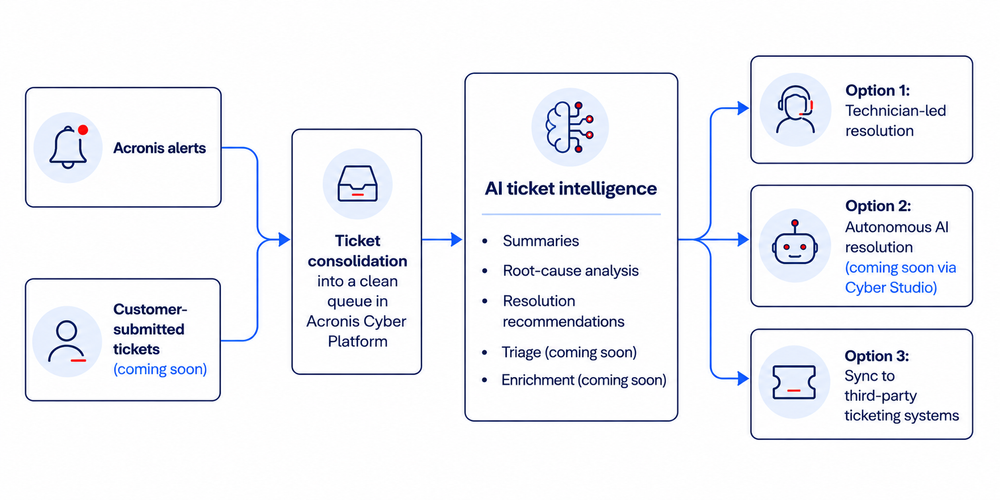
Instead of forcing technicians to review alerts one by one, manually collect context and decide what to do next, Acronis Service Desk helps organize alerts into a ticket queue and provides AI-generated insights that make issues easier to understand and resolve.
Note: The Acronis Service Desk EAP is available to all Acronis service provider partners with a commitment contract. Partners using the pay-as-you-go model are not eligible for the EAP at this stage.
This helps MSPs:
- Reduce manual work around alert handling.
- Give technicians faster access to issue context.
- Improve handoffs and escalations.
- Resolve issues faster with AI-assisted recommendations.
- Increase technician productivity without adding headcount.
For MSPs, that means a more efficient service operation. For customers, it means faster response and a better support experience.
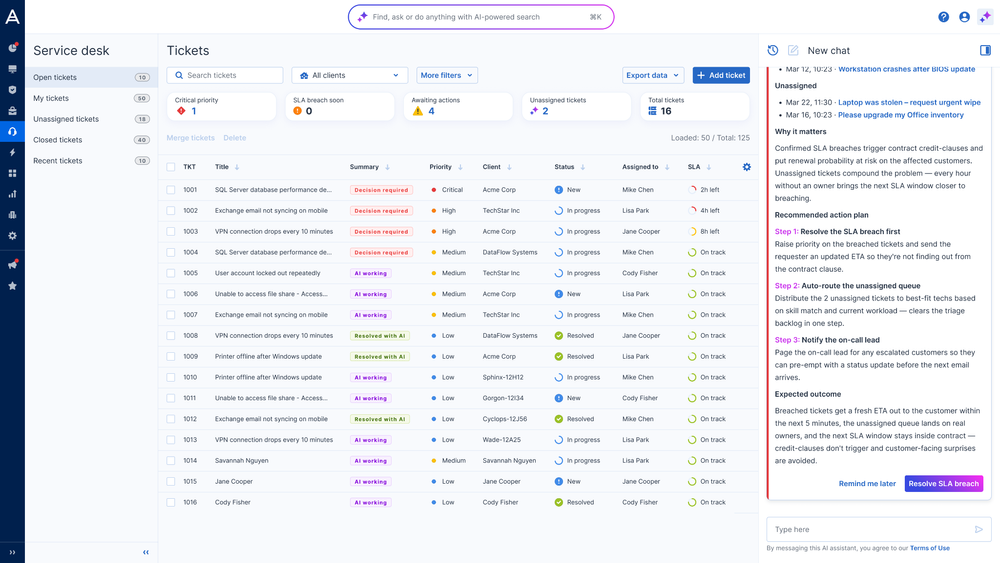
Three ways MSPs can use Acronis Service Desk
Acronis Service Desk is designed to support different MSP operating models. You can start small, use it alongside your existing ticketing process or move more of your service desk operations into Acronis Cyber Platform over time.
1. Use it as a smart alerts-to-tickets layer in the Acronis console
The fastest way to start is to use it as a smart alert consolidation and resolution layer for Acronis alerts.
In this model, Acronis alerts are consolidated into a clean ticket queue in Acronis Cyber Platform. Technicians can review ticket insights, understand the likely cause of the issue and follow recommended resolution steps.
This approach works well for MSPs that already have a ticketing system but want a better way to manage Acronis-related alerts before they become manual work. Acronis Service Desk helps your team reduce noise, understand issues faster and resolve more Acronis alerts directly from the platform.
2. Connect it to your existing ticketing system — Planned for Q3 2026
MSPs will also be able to use Acronis Service Desk as their service desk solution within Acronis Cyber Platform.
With this approach, Acronis Service Desk will consolidate Acronis alert-based tickets and send relevant ticket information to the partner’s existing ticketing tool. This will give technicians better context while allowing them to continue working in the system they already use.
3. Move your entire ticketing into Acronis — Planned for Q4 2026
MSPs will also be able to use Acronis Service Desk as their service desk solution within Acronis Cyber Platform.
This option is designed for partners that want to consolidate service operations, reduce tool sprawl and manage more of the technician workflow from the same platform they use for cyber protection, RMM and automation.
The current EAP focuses on Acronis alert-based tickets. Broader ticketing capabilities, including additional ticket sources and customer-created tickets, are planned for general availability in Q4 2026.
What's available in the EAP?
The current EAP includes the following capabilities:
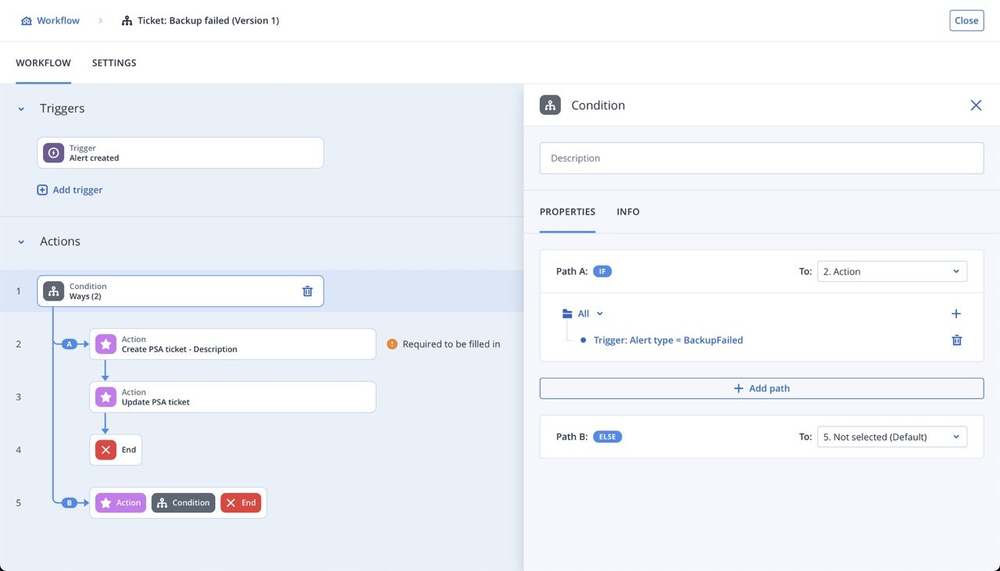
Consolidation of Acronis alerts into a clean ticket queue Acronis alerts are consolidated into organized tickets through Acronis Workflow Automation, making it easier for technicians to review, prioritize and act.
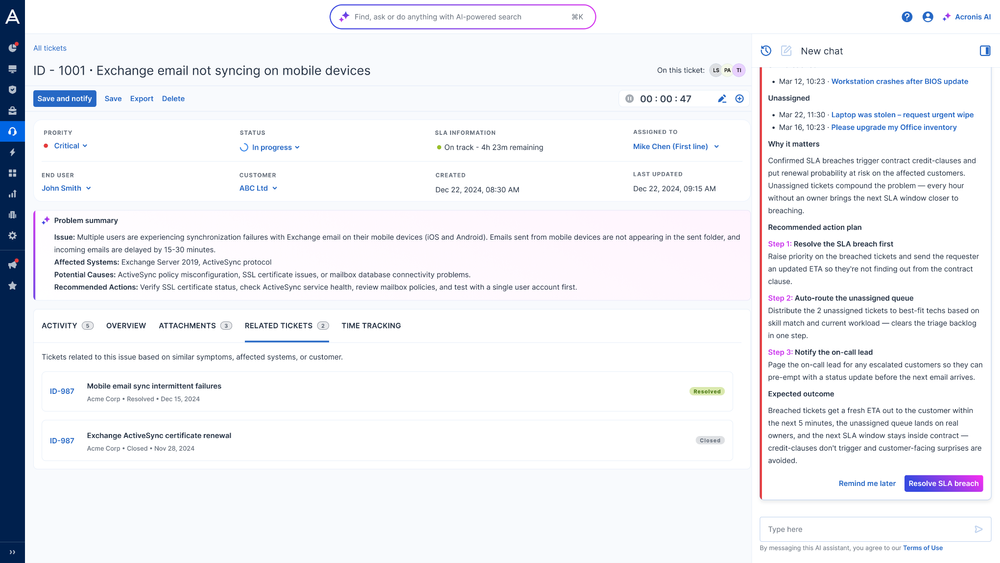
AI-generated ticket summaries Technicians can quickly understand the issue without manually reviewing every alert detail. Summaries help reduce investigation time and improve handoffs between technicians.
Root-cause analysis Acronis Service Desk helps identify the likely cause of an issue based on available alert and ticket context, helping technicians move from symptoms to action faster.
Resolution recommendations Technicians receive AI-assisted guidance on recommended next steps, helping them resolve issues more consistently and with less manual research.
These EAP capabilities are focused on helping MSPs improve alert handling and technician productivity today. Additional capabilities, including triage, enrichment and autonomous AI agentic resolution, are planned for later.
How to get started with Acronis Service Desk
Acronis Service Desk is available to all Acronis service provider partners with a commitment contract and trial users. Partners using the pay-as-you-go model are not eligible for the EAP.
Before activation, ensure that the following requirements are met in the management portal:
- The PSA service is enabled for the partner tenant.
- The PSA service is NOT activated. You can verify this under Settings > PSA.
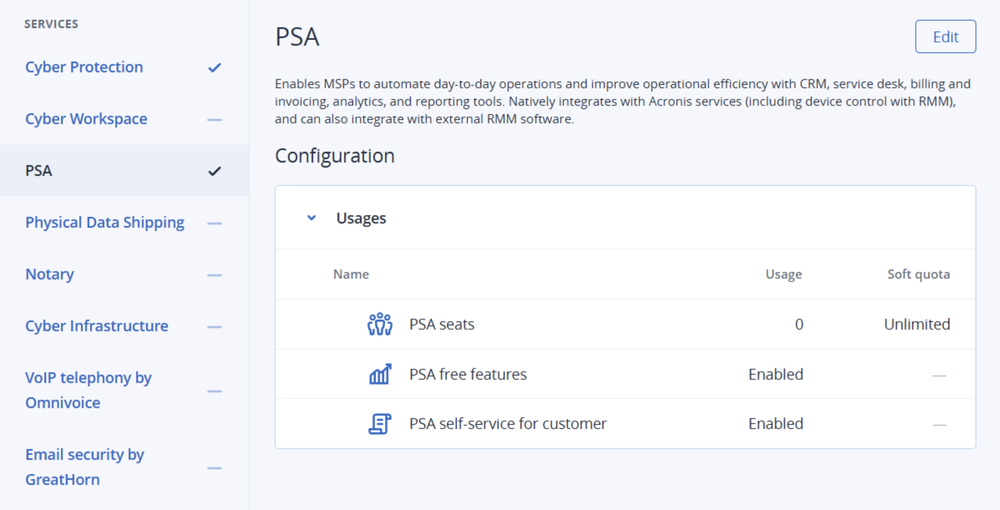
Once these requirements are met, a company administrator can go to the new Service Desk tab in the Acronis management portal, select Activate service desk and join the Early Access Program.
After activation, supported Acronis alerts can be converted into tickets through Workflow Automation templates. Technicians can then use AI-generated summaries, root-cause analysis and resolution recommendations to investigate issues and act faster.
Learn more in the Acronis Service Desk documentation.
Written by
About Acronis
Acronis is a leader in AI-native cyber protection, unifying data protection, cybersecurity, IT operations and hybrid infrastructure to deliver business continuity, security and compliance with less cost and complexity. More than 21,000 service providers trust Acronis to protect over 750,000 businesses in 150 countries. Acronis is headquartered in Schaffhausen, Switzerland.