
Author: Umair Ahmed, Product Marketing Manager, Security
Microsoft 365 attacks do not always start with a dramatic zero-day. Many begin with something simpler: a stolen password, a malicious Office file, a user approving the wrong application, or a tenant setting that was left too permissive.
For an MSP technician, the urgent question is: Even if Microsoft patched the vulnerabilities inside the platform, are my tenant configurations still exposing my clients to risk?
That answer depends on posture. Microsoft recommends multifactor authentication (MFA) because accounts using MFA are more than 99.9% less likely to be compromised, and Microsoft recommends blocking legacy authentication because more than 97% of credential stuffing attacks and more than 99% of password spray attacks use legacy authentication protocols. When a tenant still has weak MFA coverage, legacy authentication enabled, too many admin roles, open user consent, excessive sharing or incomplete audit logging, the problem is not theoretical. It is an active attack path.
The technician problem: Risky settings are easy to miss
Microsoft 365 holds email, files, identities, collaboration data and access to daily business workflows. A customer may have backup, endpoint protection and email security in place, but could still be exposed because the tenant itself is not configured securely enough.
For technicians, the risky areas are familiar:
- MFA is not enforced consistently.
- Legacy authentication is still enabled.
- Too many users have Global Administrator or other privileged roles.
- OAuth applications have broad permissions.
- User consent settings allow risky app approvals.
- External sharing, mailbox forwarding or audit settings have not been reviewed.
These are not abstract best practices. If an attacker gets access to one user, one app or one weak policy, posture determines whether the activity stays contained or becomes a larger incident.
Two examples show why posture matters
The following examples are not the only Microsoft 365 risks technicians need to manage. They show how different attack paths can lead back to the same problem: weak posture gives attackers more room to move.
Example 1: Illicit consent grants
Microsoft Defender documentation describes illicit consent grant attacks, where an attacker tricks a user into approving a malicious Microsoft Entra ID application. Once consent is granted, the application can access Microsoft 365 data such as mail, contacts or files without requiring a native user account in the tenant. Password resets and MFA alone are not enough because the malicious application is external to the organization.
Why it matters for Microsoft 365 tenants
This is a cloud-native attack path. No endpoint exploit is required. No password compromise is required. No malware is required. The attacker abuses identity and application trust, which can make access stealthy and persistent.
How Acronis helps reduce the risk
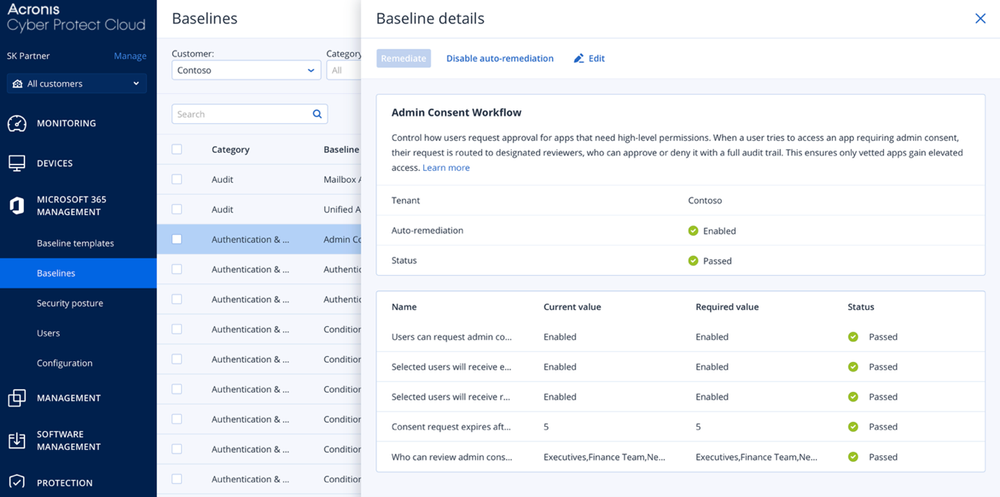
Acronis Security Posture Management for Microsoft 365 helps technicians manage the posture controls that reduce this exposure. It can help enforce policies that restrict access to approved client applications only, reduce exposure to unauthorized or risky OAuth applications through Admin Consent Workflow, and ensure secure authentication and consent-related flows are applied consistently.
Example 2: Entra ID elevation of privilege
What happened
CVE-2026-24305 is listed as an Entra ID elevation-of-privilege vulnerability. Entra ID is central to identity and access control for Microsoft 365 environments, so authorization flaws in this layer matter because they can affect how users, applications or services access resources.
Why it matters for Microsoft 365 tenants
Identity is the control plane for Microsoft 365. If an attacker can abuse an authorization flaw or privilege path, the risk is not limited to one mailbox or one file. It can affect access control, admin privileges and tenant security.
How Acronis helps
So far in 2026, most Microsoft 365 vulnerabilities impact identity and access. Acronis Security Posture Management for Microsoft 365 doesn’t patch the vulnerability, but it prevents attackers from escalating privileges, persisting, and exfiltrating data after exploitation. Acronis minimizes the impact of Microsoft 365 vulnerabilities, where breaches happen.
The wider issue: Posture gaps create multiple attack paths
Attackers look for whatever setting makes the next step easier. See more examples of how Acronis can help here.
A one-time manual review may catch some of these risks, but tenant settings change constantly. New users are added, admins change roles, apps request permissions, sharing settings are adjusted and exceptions are made to keep work moving. That is how configuration drift happens.
Why manual checks do not scale
Checking one tenant properly already takes time. As MSPs scale, the process becomes harder for technicians because every client has different users, licenses, applications, exceptions and security requirements. Technicians may need to move between Microsoft Entra, Defender, Exchange, SharePoint and other admin areas to verify the full posture.
This approach is slow and inconsistent. It also depends heavily on experienced technicians knowing exactly where to look and how each setting affects risk. MSPs need a repeatable workflow: define the expected posture, compare each tenant against that standard, detect drift and remediate risky deviations before they become incidents.
Where Microsoft 365 Security Posture Management fits
Acronis Security Posture Management for Microsoft 365 helps MSP technicians manage this process across customer tenants from a single console. Instead of checking each tenant manually, technicians can assess Microsoft 365 environments against best-practice baselines, identify deviations and remediate risky settings through a standardized workflow.
With Acronis Security Posture Management, technicians can:
- Scan tenants against predefined security baselines.
- Detect configuration drift and baseline deviations.
- Prioritize risky settings across multiple customers.
- Apply manual or automatic remediation.
- Generate posture reports that show status and improvement.
- Manage security consistently through reusable baseline templates.
Baseline templates and auto-remediation make it repeatable
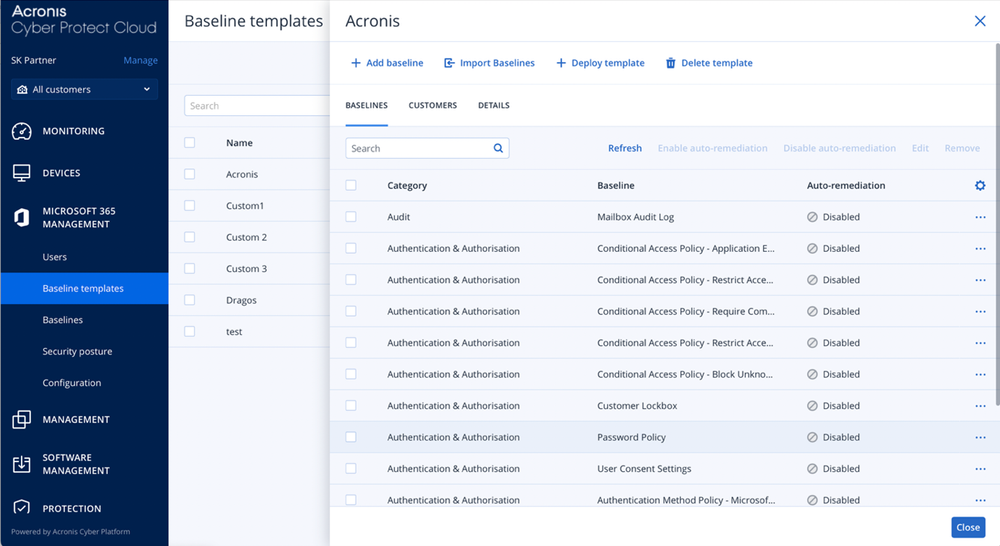
Baseline templates matter because not every customer needs the same configuration. Acronis baseline templates let MSPs create reusable security standards, configure individual baseline settings and deploy or revoke templates for customer tenants. Acronis’ template library includes more than 40 baselines aligned with Microsoft best practices and industry standards, with multitenant management so partners can define standards once and apply them across related customers.
With auto-remediation enabled, a technician does not only discover that a tenant has drifted away from the baseline. The selected remediation policy can help close the gap automatically or guide the technician through the correction.
Why this should be enabled now
Enabling Microsoft 365 Security Posture Management now means you can find those weak paths before attackers do. Apply baseline templates, monitor drift, remediate risky deviations and show customers what improved.
Check out the demo here, where we show how you can manage multiple tenants from a multitenant view, use ready-to-use baselines, detect drift and remediate issues through guided or automated workflows.
Start your Acronis Microsoft 365 Security Posture Management trial
Attackers are already looking for gaps like missing MFA, legacy authentication, risky app consent, excessive admin rights, weak sharing and audit blind spots.
Start a trial to scan customer tenants, find deviations, apply the right baselines, remediate risks and prove improvement with posture reports.
See risky tenants before attackers do. Enable Acronis Security Posture Management for Microsoft 365.
About Acronis
A Swiss company founded in Singapore in 2003, Acronis has 15 offices worldwide and employees in 60+ countries. Acronis Cyber Platform is available in 26 languages in 150 countries and is used by over 21,000 service providers to protect over 750,000 businesses.