






Author: Alexander Ivanyuk
Executive summary
About 9.4% of the Windows computers with Acronis EDR enabled are running some kind of AI agent tool, based on activity observed from June to September 2026. These are coding helpers, command-line assistants and standalone AI desktop apps that can act on their own rather than just answer questions. A year ago, the figure was close to zero. To be clear about what is counted: only separately installed applications, never anything happening inside a web browser. A browser chat assistant would not appear here at all, no matter how heavily it is used.
Two findings stand out: The first is that agentic AI at work is not a terminal story. Roughly seven in ten of these machines are running a graphical application, not a command-line tool, which means this technology has already moved past the developers who adopted it first and into the hands of people who would never open a terminal. The second is how narrow the field already is: Two vendors account for 80% of everything we see, and the entire long tail of specialist tools together makes up under 7%.
The other half of the story is what these tools are permitted to reach. Some can be connected to outside systems, a database, a company service, another website or through a shared standard. Almost everyone has that capability available; only 4.9% have switched it on.
Adoption is led by smaller businesses, not by the largest accounts — and where a business uses an outside IT partner, that partner is usually a confirmed managed service provider. MSP make up 78.2% of adopting customers and adopt at nearly double the rate (7.9%) of direct, non-MSP partners (4.7%). That fits how developer tools have always spread — one person deciding to try something, rather than a company-wide rollout. The thing worth watching is not whether this is happening. It is whether anyone can currently name which outside connections exist on the computers they are responsible for. On the evidence here, mostly not.
What "agentic AI" means, and why the distinction matters
Most people know one kind of AI: You open a chat window, type a question and read an answer. This type of AI only generates a response but leaves subsequent action to the user.
Agentic AI does more than answer questions — it can also act. It can open a file, run a command, query a database, or send data to another program, on its own, based on what you asked for. A coding assistant is agentic if it can read a project, fix a bug, and save the revised file without requiring the user to do it manually. A chatbot in a browser tab is not, no matter how good its answers are.
That difference is the entire reason this report exists. An AI tool that produces only text carries roughly the risk of a badly worded email. A tool that can reach into systems and change things carries the risk of whatever those systems hold. The security question is not how clever the model is. It is which systems and data the model is authorized to access.
Independent research has been tracking the same shift from a different angle, and the numbers line up with what we measured. Gartner expects that by the end of 2026, 40% of enterprise applications will include task-specific AI agents, up from under 5% in 2025.
Stanford's annual AI Index found that 88% of organizations reported using AI in at least one business function in 2025, up from 78% the year before. A 10-point increase in 12 months is still faster than the curve most enterprise technology follows.
The security side is less comfortable. IBM’s Cost of a Data Breach research found that 20% of breached organizations were compromised through shadow AI (unsanctioned AI tools staff adopted without security sign-off), and those breaches cost roughly $670,000 more than average. It also found 63% of breached organizations had no AI governance policy at all, and that among those suffering AI-related breaches, 97% lacked proper access controls. That is the precise gap this report measures from the endpoint side.
It is worth noting one more Gartner finding alongside the enthusiasm: It predicts more than 40% of agentic AI projects will be cancelled by the end of 2027, citing escalating costs, unclear business value and inadequate risk controls rather than technical failure. The pattern in our own data, broad, informal, individually driven adoption running ahead of any management plan, is exactly the soil those cancellations grow in.
Which tools people actually use
We analyzed activity on protected business computers over about 12 weeks. Out of every computer running an AI agent tool, here is the share running each specific one.
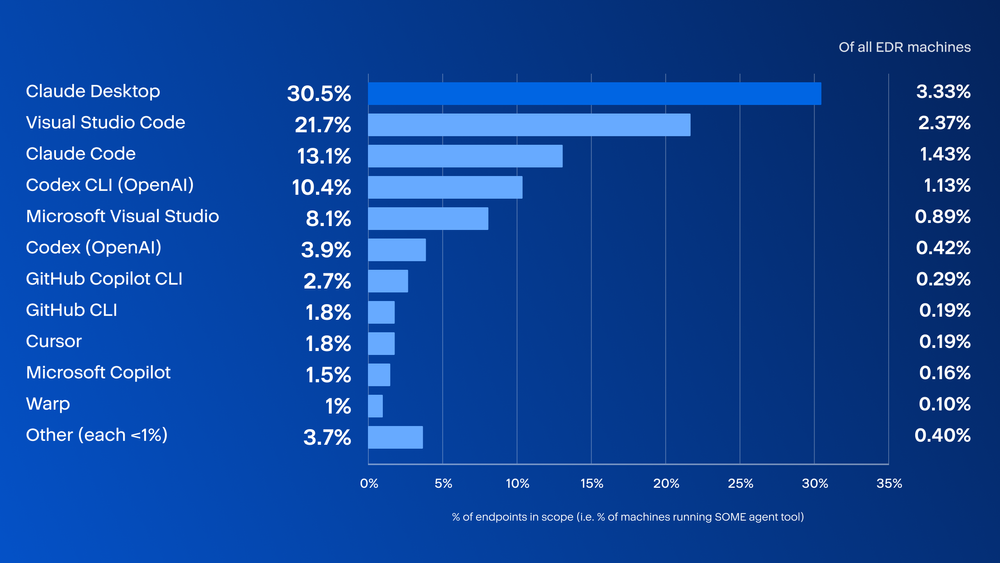
One tool leads by a wide margin: Claude Desktop (26.6%), a general-purpose AI desktop app. Visual Studio Code, a popular free code editor, is in second place (18.3%). In third place at 13.5% is Claude Code, a command-line coding assistant. OpenAI products Codex CLI, a fast command-line assistant, and its IDE/desktop counterpart Codex, tied at 8.0%. Microsoft Visual Studio, is in sixth place at 6.8%, just ahead of ChatGPT itself (5.7%). The remaining named specialist tools each accounted for less than 3% of observed usage. Everything individually below 1% is grouped into a single “Other” slice so the tail does not clutter the picture.
The presence of a general-purpose desktop app at the very top is the detail worth pausing on. Most of these tools were built for programmers, which is why coding tools fill so much of the list. But a desktop assistant sitting at number one means agentic AI has already stopped being purely a developer phenomenon. Plenty of non-coding staff now keep an AI assistant open the way they keep an email client open, and some of those apps can act rather than just talk. We would expect this list to widen further as the technology reaches writing, support and analysis work.
If you assumed this technology currently lives in developer terminals, the data says otherwise, and the picture has shifted since the last look. Across the top 20 countries, which together account for about 84% of all observed activity, we counted more than 100,000 tool instances, where a machine running two different tools is counted once for each. Of those, 27.3% are command-line tools and 72.7% are graphical applications. About seven in 10 are running something with a window and buttons, up from two in three at the last look, largely because this refresh recognizes several newly added desktop and IDE tools (Google Antigravity, JetBrains IDE, Microsoft Copilot and others) that the previous count could not yet see.
This matters for anyone thinking about controls. Guidance written for developers — terminal policies, shell restrictions, repository controls — now addresses roughly one-third of the exposure. The other two-thirds still sits inside ordinary desktop applications used by people who do not consider themselves technical and would not think of their AI assistant as something requiring a security conversation.
The field is already remarkably narrow
Grouping tool by vendor produces a sharper picture than the tool-by-tool view. Of those tool instances, Anthropic accounts for 44.8% and Microsoft for 35.4%. Between them, two companies cover 80.2% of everything we see. OpenAI holds 13.7%, all independent and specialist tools together make up 5.2% and Google, despite considerable investment in this space, registers only 0.9%.
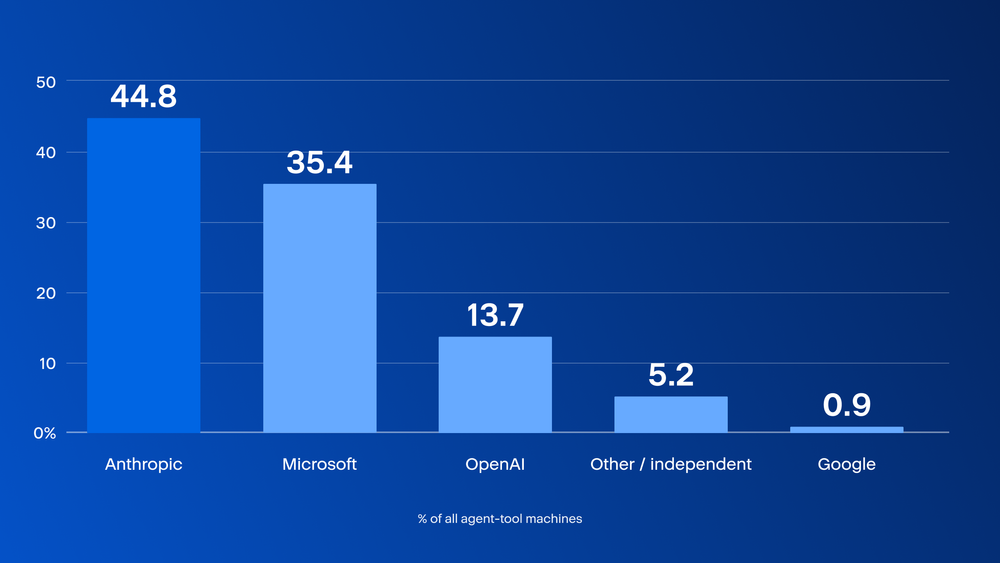
There is a plausible mechanism behind this; the data does not measure product quality. Distribution explains most of it. Microsoft’s share comes overwhelmingly from Visual Studio Code and Visual Studio, software already installed on these machines for reasons that have nothing to do with AI, which then acquired agentic capability through an update. In some cases, agentic functionality may have been added through updates to software that organizations had already deployed.
Anthropic’s lead is different, and more deliberate: Most of it is a desktop app someone chose to download, plus a fast-growing command-line tool developers are actively choosing to install, both genuine adoption decisions, not silent updates to something already there.
Personal AI agents on business endpoints
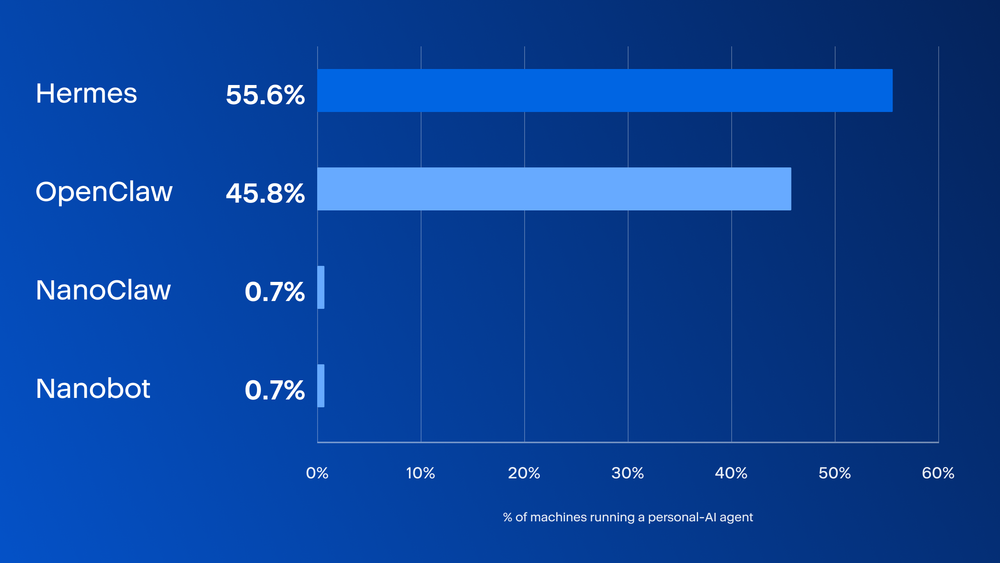
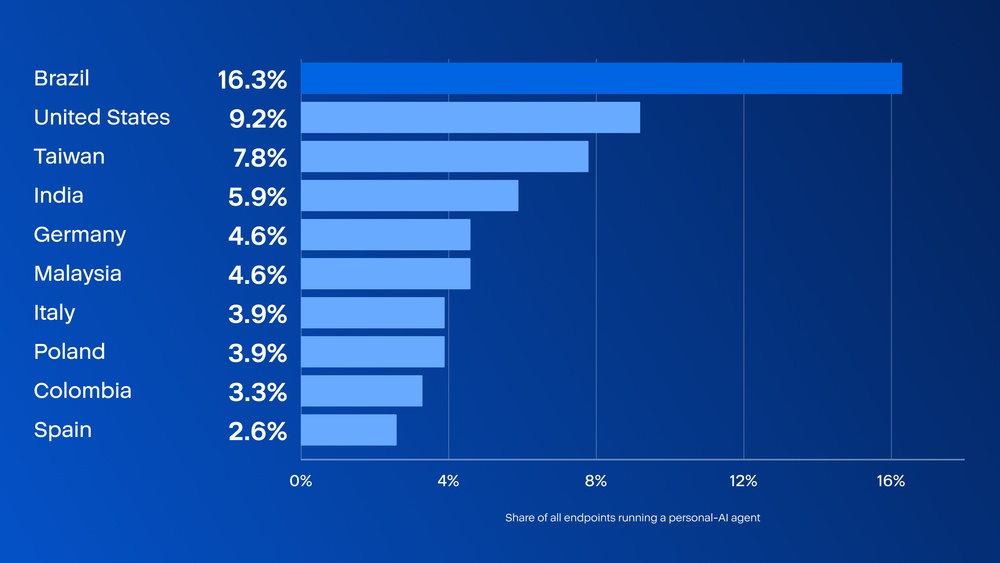
A separate class of tool goes further than the coding assistants above: autonomous personal AI agents that can act on a user’s behalf with no handshake protocol at all. On Acronis-protected business endpoints, about 0.018% are running one: roughly 1 in 5,600 machines. Two agents, Hermes and OpenClaw, account for nearly all the activity found; four of the eight tools tracked have never been seen at all. These figures are minimum observed levels: An endpoint was counted only if its agent was active during the period observed and coverage still has gaps.
Hermes runs on just over half of these machines, and OpenClaw on nearly half, between them, effectively the whole picture (a small number of machines run both at once). Two much rarer tools, Nanobot and NanoClaw, each turned up on a single machine. The other four tracked agents have not been seen at all.
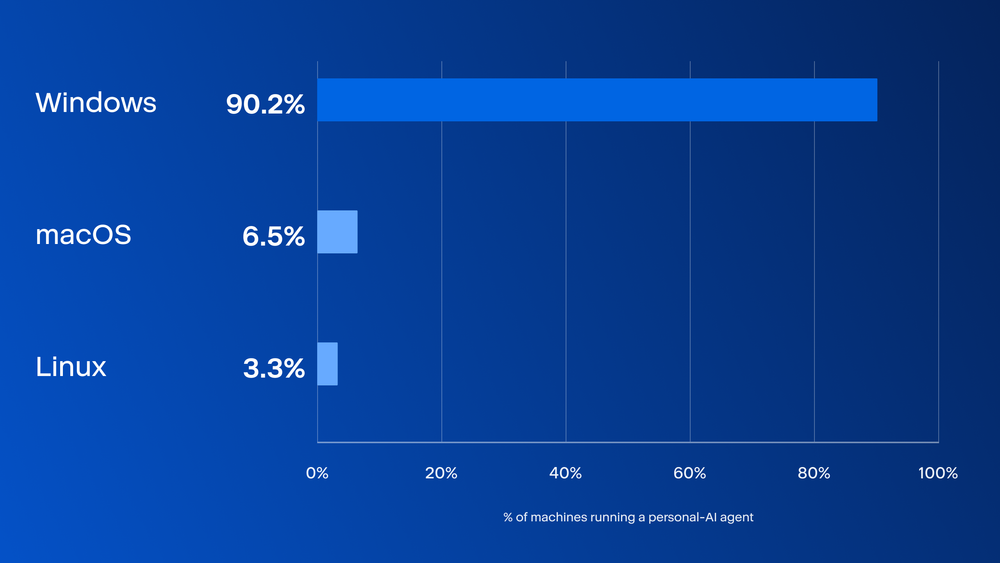
Almost all the machines are Windows. macOS and Linux together make up a small share of the total.
Activity spans 46 countries with no single region dominating. Brazil, the United States and Taiwan lead, but each is still a modest slice of the total, a pattern that looks like scattered, independent adoption rather than one deployment spreading through a single large organization.
MCP connections: when these tools reach outside themselves
Some AI agent tools can be connected to something else entirely, a database, a company system, another website, using a shared standard called MCP, short for Model Context Protocol. Think of it as a universal plug. Instead of every AI tool needing its own custom wiring to reach a database or a calendar, they all use the same kind of connector. That is why it spread across so many different tools so quickly: It is genuinely useful and easy for any developer to add.
One real limit on what we can see, stated plainly because it shapes how much weight these findings carry: Uur detection tells us that a connection was made and what kind of technical channel it used, whether it runs locally or reaches a remote server, and what it was built with. It does not tell us the name or identity of the service on the other end. We see the method of the connection, not its destination.
Most of the time, the extra power sits unused
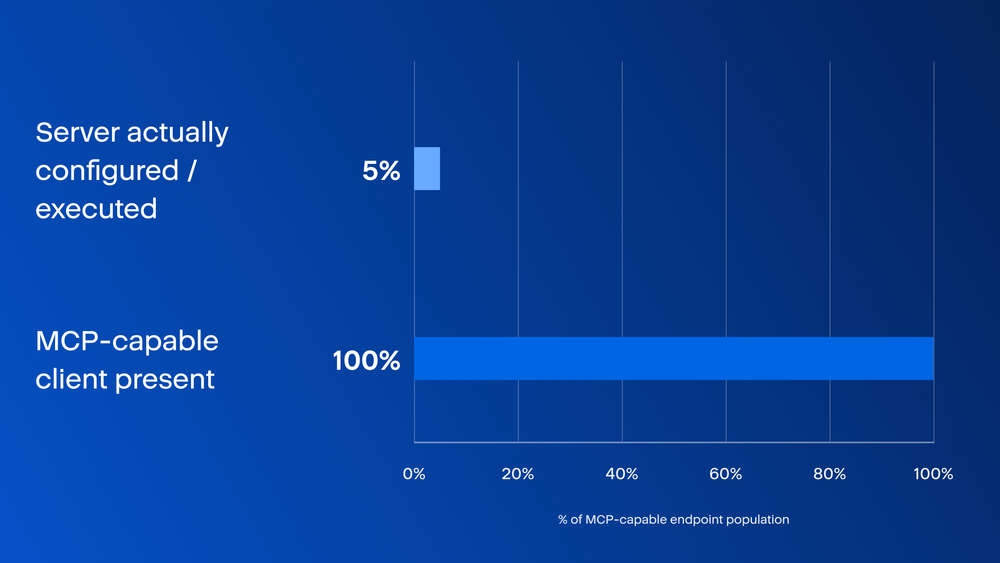
This compares two groups: Every computer with an AI tool capable of using MCP and the far smaller group where a connection was actually turned on and used. Having the capability is near-universal. Using it sits at 4.9%. The overwhelming majority are using their AI tool the ordinary way, without connecting it to anything.
That is mostly good news, and it is worth understanding why the gap exists rather than assuming it reflects caution. Configuring an MCP connection means editing a settings file, a small, unfamiliar, slightly technical act that most users of a desktop AI app will never perform. The barrier is not policy or awareness. It is friction, and friction is a fragile control. It requires no installation, no admin rights and no approval from anyone; it takes about 30 seconds for someone who has seen it done once. A one-time inventory of who has these tools installed tells you nothing about who has switched the extra capability on because the two populations can diverge in an afternoon.
Who is trying this first, and why
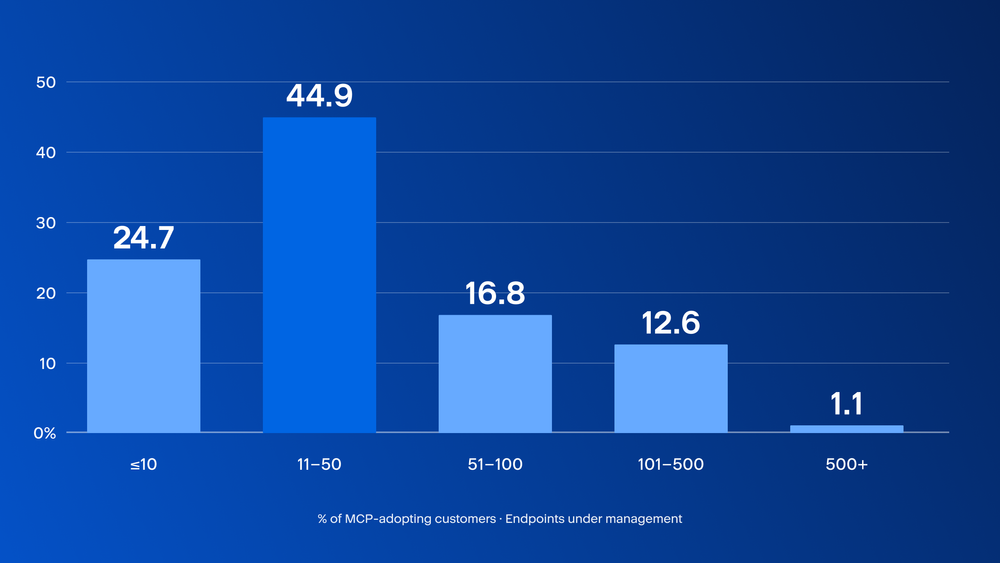
If large, process-heavy organizations were leading this shift, the biggest accounts would show the heaviest use. They do not.
The chart below shows the size distribution among the adopters themselves — each set of bars represents 100% of the confirmed adopters, not the adoption rate within each size band. Acronis’s customer base already skews heavily toward smaller businesses, so a large bar partly reflects there being more customers of that kind overall.
Company size alone does not say who actually manages that computer. To answer that, every adopting customer was tested for real evidence that the company managing it runs remote monitoring and management (RMM) software on its machines, any vendor, 10 or more machines, or 10 or more Acronis RMM units, rather than simply counting how many customers a partner happens to hold. Only companies that pass this test are called a confirmed MSP; the rest are reported as a direct partner relationship with no confirmed MSP tooling or as a self-managed business with no partner at all.
Table 1. MSPs represent most adopting customers and have the highest adoption rate among partner-managed channels.
Confirmed MSPs make up 78.2% of adopting customers, well above their 68.6% share of the whole active customer base and adopt agentic AI at nearly double the rate of a direct partner with no confirmed MSP tooling (7.9% versus 4.7%). The most likely explanation is not risk appetite; it is that MSPs already employ technical staff who evaluate new tools for many clients at once, so one team member trying Claude Code or a similar assistant puts it in front of every account that team touches. Self-managed businesses adopt at 6.5%, almost as high as MSPs, which fits the same one-person-decides mechanism described above: There is simply nobody in the loop to slow it down on either side of the relationship.
None of this suggests MSPs or small businesses are careless. It suggests both groups move fast, which can also make them competitive. The trade-off is that moving fast could mean that no one knows a new connection exists until someone thinks to ask. For an MSP, that question multiplies across every client the same technician touches.
Where in the world this is happening
Observed agent tool activity spans across every continent, in large and small countries alike. The list below covers the top 20 by share of observed activity.
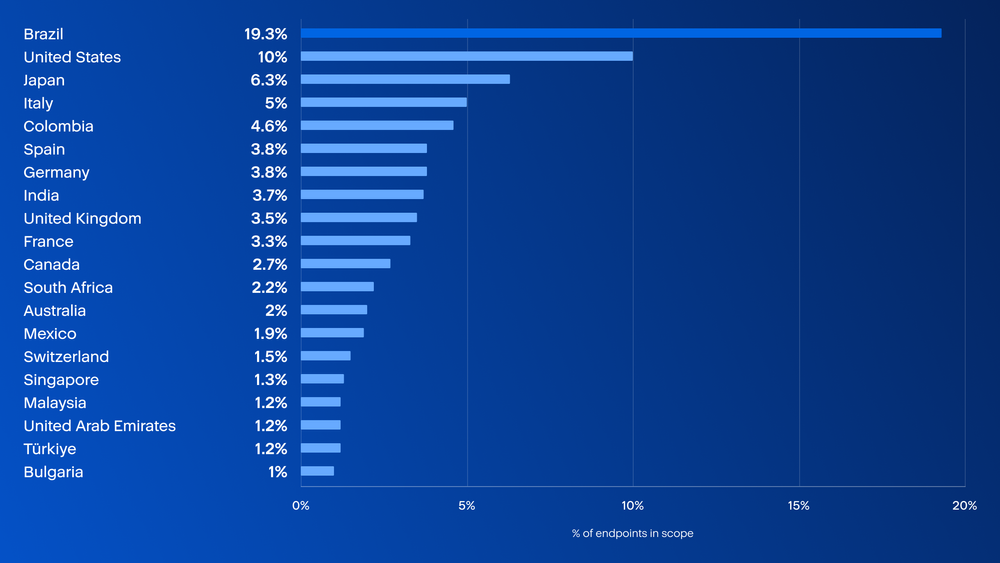
In 19 of 20 countries, the top two tools are the same pair — the general AI desktop app and the free code editor — sometimes in one order, sometimes the other. The one exception is Australia, where Claude Code has displaced it there entirely, though the top spot is unchanged. That near-universal pattern is not surprising: Both leading tools are free or already installed for ordinary office and programming work, so any AI capability added to either reaches an enormous number of people at once, everywhere, without anyone deciding to adopt it.
On the percentages above: Each country’s share is mutually exclusive and the full list equals 100%, which is why these top 20 sum to roughly 86% — the remaining 14% is spread across many more countries, none individually large enough to appear.
Previous analyses showed greater variation in the third-ranked tool by country.
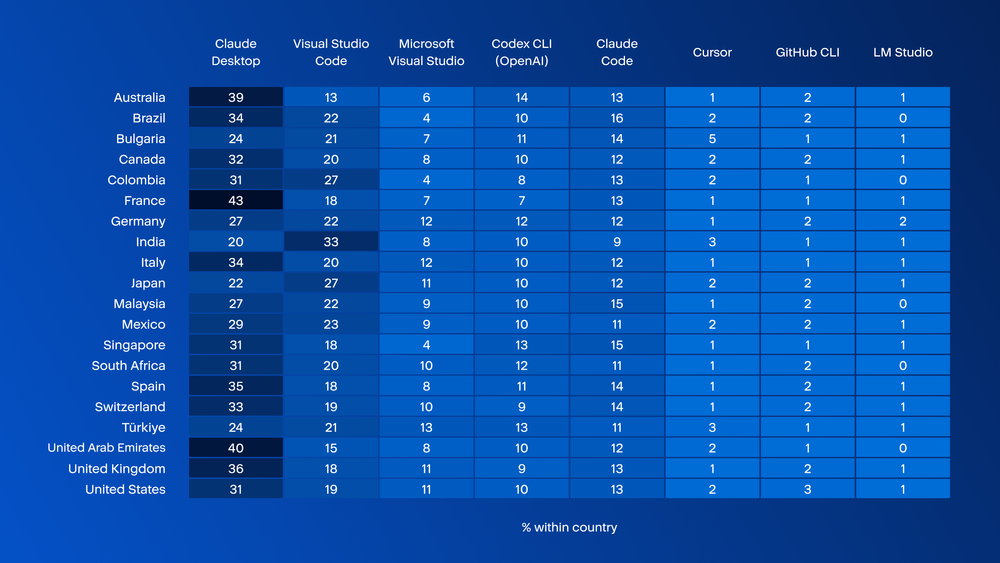
Third place belongs to a single command-line coding assistant — Claude Code — in all 20 of these countries. A single command-line tool becoming the universal third choice, across countries with very different developer populations, points to one product’s fast, broad-based growth rather than to any lasting structural difference between markets.
Table 2. Command line share and top two tool concentration, by country.
Command-line share stays in a narrow band everywhere: 23.3% in France and up to 31.9% in Singapore, a modest nine-point spread. Concentration on just the top two tools varies far more, from 38.2% in Türkiye to 51.8% in France. The two measures are not consistently correlated: France has the lowest command-line share of any country here, yet the most concentrated market because so much of its activity funnels through Claude Desktop and Visual Studio Code specifically.
Concentration is not automatically a problem, but it does shape risk. A market where half or more of its machines run the same two tools is one where a single vulnerability, license change or product decision propagates almost everywhere at once. A more fragmented market absorbs that kind of shock better while being harder to support and advise consistently. Providers operating across several countries are, in effect, managing several different risk profiles under one policy.
Conclusions
Agentic AI is already present on business endpoints, and its use is expanding beyond the developer community. The single most common tool in this data is a general-purpose desktop assistant, not a coding editor, and roughly seven in 10 of the machines running any kind of agent are running a graphical application rather than a terminal. Anyone still picturing this as a developer-terminal problem is already governing a shrinking share of the real exposure. Most of the people carrying this capability around would not describe themselves as technical and would be surprised to be asked about it.
What makes this hard to govern is the same thing that makes it spread so fast: Almost none of it involved a decision anyone can point to. A code editor installed years ago for ordinary work quietly gained the ability to act, not just answer, through a routine update. Turning on the extra step, letting a tool reach outside itself to a database or another system, takes about 30 seconds, needs no admin rights and no approval from anyone. A one-time inventory of what is installed tells you nothing about who has since switched that on, because the two facts can drift apart in an afternoon.
Closing this visibility gap requires continuous monitoring in addition to policy. This is the problem Acronis GenAI Protection in Acronis Cyber Platform, is built to address: It gives MSPs and IT teams visibility into which endpoints are using generative AI tools, including unapproved shadow AI, and controls to stop sensitive data from being typed into a public model or a malicious prompt from doing damage. Instead of a point-in-time survey like this one, it watches continuously, which is exactly what a capability that can be switched on in 30 seconds requires.
None of this argues for shutting agentic AI down. People are adopting it fast because it is genuinely useful, one person at a time, the way developer tools always spread, and that is not going to change. The immediate challenge is visibility: Organizations need to know which connections exist and when those connections change.