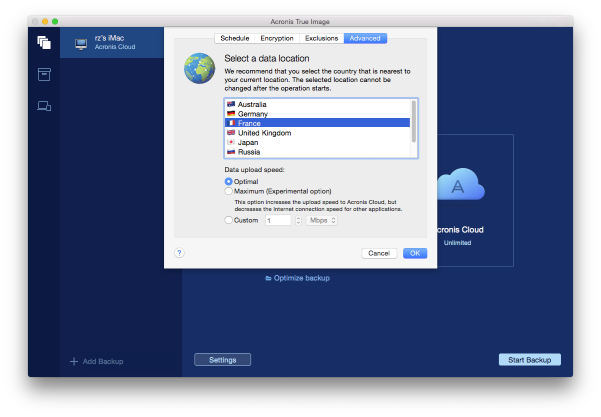
When you create a backup to Acronis Cloud, your data is uploaded to one of the Acronis data centers located in different countries. Initially, the data center is defined as the one closest to your location when you create your Acronis account. Afterwards, your online backups and synced files are stored in the same data center, by default.
We recommend that you set the data center for a backup manually, when you are in a different country and your default data center is not the closest to your current location. This will significantly increase the data upload rate.
Note: You cannot change the data center for an already existing backup.
To select a data center:
Data upload speed
When you back up data to Acronis Cloud, network drives, or FTP, you can change the connection speed used by Acronis True Image 2016. Set the connection speed that will allow you to use Internet and network resources without annoying slowdowns.
To set up the connection speed, select one of the following options:
The data transfer rate is not changed by Acronis True Image 2016.
This option significantly speeds up the upload process, but at the same time the Internet connection speed decreases for other applications. The optimization mechanism splits the data into small portions, and then uploads these portions via multiple network connections. In the target Acronis data center, the split data is assembled back to the initial state, and then stored in the cloud storage.
You can specify a maximum value for data upload speed.