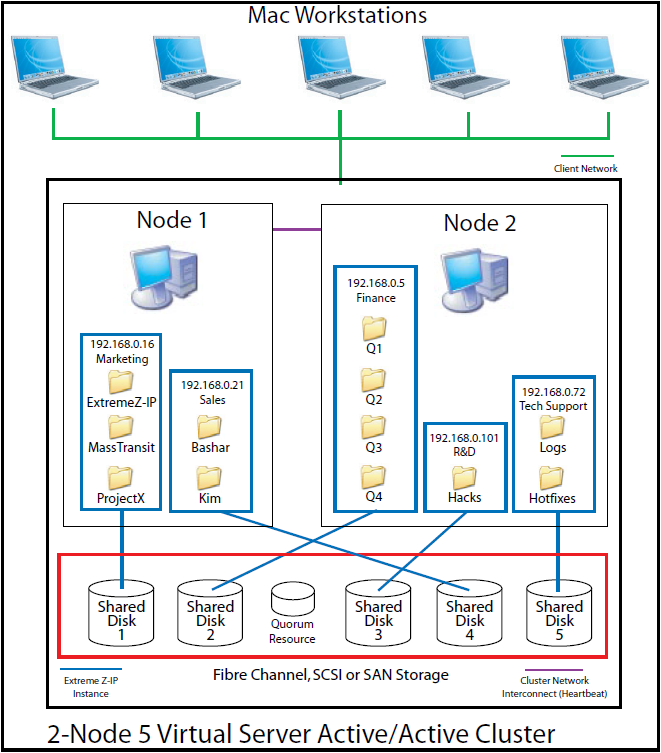
This diagram shows an example of a cluster setup.
Clustering provides fast failover and quick restart of the services provided by a failed server node. You set up an Access Connect cluster using Microsoft Cluster Servers (MSCS)—specially linked servers running the Microsoft Cluster Service. If one server fails or is taken offline, the other server or servers in the cluster immediately take over the failed server’s operations. Applications running on the cluster are always available. Resources running on multiple servers appear to connected clients as a single system, referred to as an Access Connect virtual server. When a successful failover occurs because of a problem, the connected user sometimes cannot tell that service was interrupted. Access Connect is a cluster-aware application that you can use on active/active clustered configurations. Multiple instances of Access Connect can run on a single server node. Each instance has its own IP address and can be assigned its own shared volume. The configuration of multiple virtual servers provides server consolidation and load management benefits. Running multiple instances of Access Connect on a server node provides high reliability because each instance runs in isolation from the others. For help in configuring a cluster, see the following Cluster Worksheet. Access Connect supports the following services in clustered configurations:
When you are running Access Connect in a clustered environment, the Access Connect Administrator window shows the following in
the title bar:
MSCS uses the following terms to describe the component parts of a cluster configuration. Do not confuse these terms as you proceed with installing Access Connect.
This diagram shows an example of a cluster setup.
Note: Each server has its own IP address. You can configure multiple shares for each virtual server.